
MSBA-205 · Lesson 5 of 12 · 20 min
Agent identities, permissions and connectors
▶ Video coming soon A video version of this lesson is on the way.
When Ama Owusu-Pratt demonstrated the Help Desk Triage agent at the Thursday review, it read a user's description of a problem, suggested a fix from the knowledge base and, if the user agreed, created a ticket in the help desk system. Ines asked one question: 'When it creates that ticket, who is it?' The answer turned out to be the most important design decision in the agent, and it is the subject of this lesson.
AB-650 covers agent identity in two skills: 'manage the lifecycle workflows for agent identities by using Microsoft Entra Agent ID' and 'secure agent access, including access packages and conditional access'. Connectors and their credentials belong here too, because a connector is how an agent reaches data and systems, and the identity it uses decides what it can reach.
Three ways an agent can act
An agent that only reads and answers usually acts as the user who is talking to it. An agent that does things, such as creating tickets or updating records, needs a clear answer to Ines's question. There are three common patterns:
| Pattern | How it works | Risk | Fits |
|---|---|---|---|
| User delegated | The agent calls services with the signed-in user's permissions | Lowest; the agent can do only what the user can | Most knowledge and assistant agents |
| Maker or author credentials | A connection created by the agent's maker is shared with all users | High; every user borrows the maker's access | Rarely appropriate; avoid for anything sensitive |
| Agent identity | The agent has its own identity in Microsoft Entra with assigned permissions | Controlled, if permissions are scoped and governed | Agents that act on their own or across users |
The second pattern is the classic mistake. In Copilot Studio, a connection can be configured to use the maker's credentials for everyone, which is convenient during testing and dangerous afterwards: a user who could not normally see help desk tickets for the finance team could ask the agent and receive them, because the agent asks as Ama. Corvallin's strict data policy, set in the MSBA-103 course, does not by itself prevent this, so the review checklist in lesson 4 asks directly whose identity each action uses.
For Help Desk Triage, Ama changed the ticket connection to end-user authentication, so each ticket is created as the person asking. The agent cannot see or create anything the user could not. The only exception is the knowledge base lookup, which uses the organization-wide connector from lesson 3, because those articles are open to everyone in the agency anyway.
Microsoft Entra Agent ID
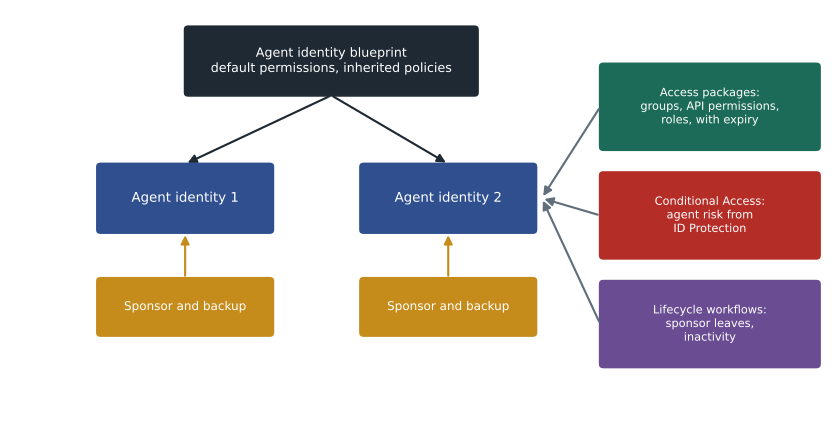
Agents that act on their own, run on a schedule or work across many users need an identity of their own. Microsoft Entra Agent ID, generally available in 2026, gives agents first-class identities in Microsoft Entra ID, so that they can be governed with the same tools as people: sign-in logs, Conditional Access, risk detection, access packages and lifecycle workflows.
Microsoft's model has a few parts worth knowing:
- An agent identity is the identity a specific agent uses to authenticate. It appears in Entra ID alongside users and applications.
- An agent identity blueprint is a template from which agent identities are created. It defines default properties and permissions, and policies such as Conditional Access can be applied at the blueprint level so that every agent created from it inherits them.
- Some agents also have an agent user, an account that lets the agent work in places designed for people, such as having a mailbox or being added to a team.
- Sponsors are the people accountable for an agent identity's lifecycle and access decisions. Owners can manage the identity technically. Both can manage the agent in the My Account portal and request access for it in the My Access portal.
Access packages for agents
New agent identities start with limited permissions, such as the delegated scopes inherited from their blueprint. Additional access should come through entitlement management access packages, the same mechanism used for people in the MSBA-202 course. An access package can grant security group memberships, application permissions and Entra roles, with approval and an expiry date.
Microsoft documents three ways an agent identity can get an access package:
- The agent itself requests it programmatically through Microsoft Graph.
- The sponsor or owner requests it on the agent's behalf, which adds human oversight.
- An administrator assigns it directly.
To allow agents in a package, the assignment policy's 'Who can get access' setting must include agent identities in the directory. When an assignment with an end date approaches expiry, the sponsor is notified and can request an extension, which can trigger a new approval. If the sponsor does nothing, the assignment expires and the agent loses access. That default is exactly what an administrator wants: access that nobody renews goes away.
Conditional Access and risk for agents
Entitlement management decides *which* resources an agent can be granted. Conditional Access decides *under what conditions* it can use them. Conditional Access policies can target agent identities, evaluate agent risk reported by Microsoft Entra ID Protection, and block or limit access when an agent behaves unusually. Applying policies at the blueprint level means a new agent is covered from its first sign-in.
Teodor drafted two policies for the future, to be created once Corvallin has an agent that uses its own identity:
- Block high-risk agents. Any agent identity with high agent risk from ID Protection is blocked from all resources, and an alert goes to the IT team.
- Restrict agent sign-ins to approved resources. Agent identities from Corvallin's blueprint may access only the help desk system's API and the SharePoint procedures library, and nothing else.
Both policies start in report-only mode, as every Conditional Access policy did in the MSBA-202 course, so that the team can see their effect before enforcing them.
Lifecycle workflows for agents
People leave organizations, and so do the people who sponsor agents. Microsoft Entra ID Governance lifecycle workflows handle this for agent identities. When a sponsor leaves, sponsorship can be transferred automatically to the sponsor's manager, so that a human remains accountable, and workflow tasks can notify co-sponsors and managers about the change.
Entra also applies a default inactivity policy to agent identities in every tenant: it identifies agent identities that have not been active, notifies the relevant people and disables the identity if no new activity follows. This closes the gap that service accounts have always had, where an unused credential sits in a directory for years.
Licensing matters here. Microsoft documents that governing agent identities needs either Microsoft 365 E7 (which includes Agent 365 and the Microsoft Entra Suite) or an Agent 365 licence together with at least Microsoft Entra ID P1 or Microsoft 365 E3. Corvallin's E3 covers the second half; the Agent 365 decision in the 2027 budget covers the first.
# Read-only review of agent identities and their sponsors (Microsoft Graph PowerShell).
# Cmdlet and property names for agent identities are new; check Get-Help in your module version.
Connect-MgGraph -Scopes 'Application.Read.All','Directory.Read.All'

# Service principals created for agents can be filtered by tag or type in current modules.
Get-MgServicePrincipal -All |
    Where-Object { $_.Tags -contains 'AgentIdentity' } |
    Select-Object DisplayName, AppId, AccountEnabled, CreatedDateTime
Connectors and data policies
Most agents reach outside systems through connectors. In Copilot Studio and Power Platform, connectors are classified by data policies (formerly data loss prevention policies for Power Platform) into business, non-business and blocked groups, and a policy prevents an agent from combining connectors across the business and non-business groups. Corvallin's strict data policy, set up in the MSBA-103 course, allows only Microsoft 365 connectors and the help desk connector in the Corvallin Agents environments.
Connector governance has four questions, which the runbook asks for every connector an agent uses:
- What can it reach? A connector to the help desk system can read and write tickets; a connector to SharePoint can read whatever its identity can open.
- Whose credentials does it use? End-user authentication is the default; shared credentials need a written reason.
- Can it send data outside the organization? Connectors to external services, including generic HTTP connectors, are blocked unless approved.
- Is it in the right data policy group? A connector in the wrong group can let an agent move data from a business system to a personal one.
Tools added through the Model Context Protocol raise the same questions. The Agent 365 tools registry from lesson 3 lists them and lets administrators allow or block each one; until Corvallin licenses Agent 365, the strict Power Platform data policy keeps MCP connectors out of the Corvallin Agents environments.
Least privilege for agents
The principle that runs through this lesson is the same one the MSBA-101 course applied to administrators: give each identity the smallest access that does the job, for the shortest time, with a person accountable for it. For agents it has three practical forms:
- Read before write. An agent that only needs to look things up should have no write actions. Ama's Help Desk Triage creates tickets, but it cannot close or reassign them.
- Narrow knowledge. Point agents at specific libraries or folders, not whole sites, and use restricted content discovery where a site holds sensitive material.
- Expiring access. Use access packages with end dates for agent identities, and let unused access lapse.
Worked problem
Choosing the identity for a reminder agent
The quality team proposes an agent that checks the training records list every Monday and sends each branch manager a reminder about staff whose mandatory training is overdue. It will run on a schedule with nobody signed in. Which identity pattern fits, and what controls should Teodor require?
Show solution
- No user is present when it runs, so user-delegated access is not possible.
- Using the maker's credentials would give the agent the maker's full access to everything she can open, which is far more than it needs.
- An agent identity fits: create it from Corvallin's blueprint, with a sponsor from the quality team and a backup sponsor.
- Grant it read access to the training records list and permission to send mail through an access package with a six-month end date, and apply the high-risk-agent Conditional Access policy.
Answer: Use an agent identity with a sponsor, scoped permissions through an access package that expires, and Conditional Access. Review it at expiry rather than renewing automatically.
Agent identities at Corvallin today
In November 2026 none of Corvallin's agents used its own Entra identity. Intake Questions, New Hire Guide and Procedures Helper all act with the signed-in user's access, and Help Desk Triage uses end-user authentication for tickets. That is deliberate: every agent the agency has so far runs only when a person asks it something, so user-delegated access is the simplest and safest model.
The runbook's chapter is still worth having before the first agent identity exists, for three reasons. First, Microsoft is adding agent identities to more products, including agents that Microsoft and partners provide, so identities may appear in the directory without Corvallin creating them; the monthly inventory from lesson 4 compares the registry with Entra for exactly this reason. Second, the quality team's training reminder idea from the worked example is likely to become the first scheduled agent in 2027. Third, writing the policies in advance means the first agent identity is governed from its first day, rather than retrofitted after something goes wrong.
Reviewing access for agents
Access reviews in Microsoft Entra ID Governance, used for people and groups in the MSBA-202 course, also apply to the groups and access packages that agents receive. The runbook's design is simple: every access package that can be assigned to an agent identity has an end date of no more than six months, and its sponsor receives the expiry notice. If the sponsor wants the access to continue, they request an extension, which goes to Teodor and the system owner for approval. Access nobody asks to keep expires.
For connectors that use end-user authentication, there is nothing to review on the agent side, because the agent has no access of its own; the review happens where it always has, on the users' own permissions. That is another reason Corvallin prefers end-user authentication wherever an agent works for a present user.
Common mistakes
MistakeSharing the maker's connection with every user of an agent.
InsteadUse end-user authentication, or an agent identity with scoped permissions.
MistakeCreating agent identities without sponsors.
InsteadAssign a sponsor and a backup, and let lifecycle workflows transfer sponsorship when someone leaves.
MistakeGranting agent access permanently.
InsteadUse access packages with end dates so unused access expires.
MistakeEnforcing a new Conditional Access policy for agents on day one.
InsteadStart in report-only mode and review its effect.
Summary and key terms
- Agents can act with user-delegated access, maker credentials or their own identity; maker credentials are rarely appropriate.
- Microsoft Entra Agent ID gives agents identities created from blueprints, with sponsors and owners.
- Access packages grant agents groups, API permissions and roles with approval and expiry.
- Conditional Access for agents can evaluate agent risk from ID Protection and can be applied at blueprint level.
- Lifecycle workflows transfer sponsorship when a sponsor leaves, and a default inactivity policy disables unused agent identities.
- Connectors and MCP tools are governed by data policies and the tools registry, with end-user authentication by default.
- Agent identity
- An identity in Microsoft Entra ID that a specific agent uses to authenticate.
- Agent identity blueprint
- A template for creating agent identities, carrying default permissions and inherited policies.
- Sponsor
- The person accountable for an agent identity's lifecycle and access decisions.
- End-user authentication
- A connector setting where each user's own credentials are used.
- Access package
- An entitlement management bundle of access granted with approval and expiry.
- Agent risk
- ID Protection's assessment of how likely an agent identity is compromised or misbehaving.
- Data policy
- A Power Platform policy that groups connectors and blocks risky combinations.
Practice problems
Work each problem on paper first, then reveal the answer to check.
Why is sharing a maker's connection with all users of an agent risky?
Show answer
Every user borrows the maker's access, so they may see or change data they could not reach themselves.
What happens to an agent's access package assignment if the sponsor ignores the expiry notice?
Show answer
It expires on its end date and the agent loses that access.
What is the advantage of applying Conditional Access at the blueprint level?
Show answer
Every agent identity created from the blueprint inherits the policy from its first sign-in.
Which licences does Microsoft document for governing agent identities?
Show answer
Microsoft 365 E7, or an Agent 365 licence with at least Entra ID P1 or Microsoft 365 E3.
Lesson quiz · 5 questions
Score 60% or more to complete this lesson.
Create a free account to save your progress, take quizzes and earn a certificate.