
MSBA-205 · Lesson 6 of 12 · 19 min
Protecting Copilot interactions with Purview
▶ Video coming soon A video version of this lesson is on the way.
The MSBA-102 course built Corvallin's data protection foundation: a label taxonomy, data loss prevention policies, retention for Copilot interactions and the first data security posture management assessment. The MSBA-204 course covers Microsoft Purview administration in depth. This lesson does not repeat either. It answers the narrower question that AB-650 asks in its AI domain: once Copilot and agents are running, how does Purview protect what people type, what Copilot reads and what it writes back?
Teodor organized the sixth chapter of his runbook around the life of a single interaction. A pilot user types a prompt; Copilot reads files and email to ground it; it produces a response; the interaction is stored. Purview has a control at each step.
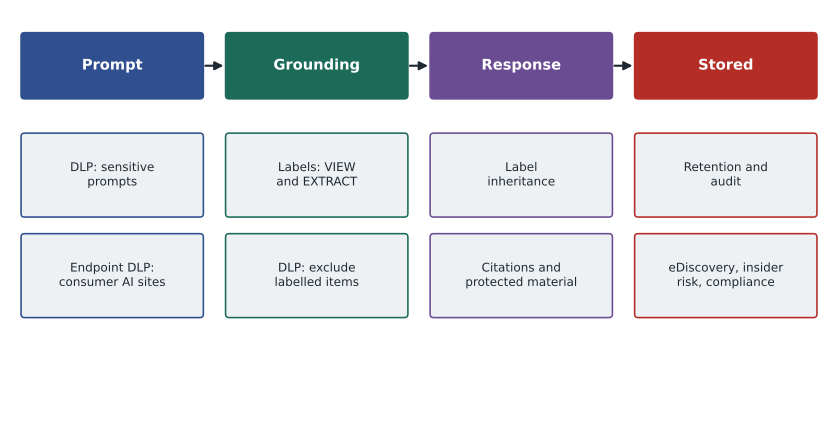
Before the prompt reaches Copilot
The first control is on the way in. Data loss prevention (DLP) for the Microsoft 365 Copilot location can inspect prompts for sensitive information types and stop Copilot from responding when a prompt contains them. In November 2026 Microsoft listed this capability as preview, and the same location can also block web searches that would include sensitive information. Corvallin's Copilot-location policy has a sensitive-prompt rule for health card numbers and client identifiers, built in the MSBA-102 course and still running in simulation mode.
Endpoint DLP covers a different path: staff pasting sensitive content into consumer AI websites in a browser. The MSBA-102 course's first data security posture management assessment found 37 head-office staff using consumer AI sites and 11 prompts containing health card numbers. Endpoint DLP on onboarded devices can warn or block when users paste or upload sensitive content to those sites. It needs devices onboarded to Purview, which at Corvallin happens through the Defender for Endpoint onboarding from the MSBA-203 course.
While Copilot grounds the response
Sensitivity labels are the main control on what Copilot can read and quote. Copilot respects the usage rights that an encrypting label grants. A user must have the VIEW right for Copilot to use an item at all, and the EXTRACT right for Copilot to quote or summarize its content. Corvallin's Confidential / Clinical label, for example, grants clinical staff full Co-Author rights but gives the billing team VIEW without EXTRACT, so Copilot can tell a billing clerk that a relevant clinical document exists without reproducing its contents.
The DLP policy for the Copilot location has a second kind of rule: it can exclude items with specific sensitivity labels from Copilot's processing entirely, so that Copilot does not summarize them even for people who can open them. Microsoft documents some limits that matter for planning: a single rule cannot combine sensitive information types with labels, files uploaded directly into a chat are not scanned by this rule, email is covered for messages sent from January 1, 2025, labels are checked when a file is opened, and policy changes can take up to four hours to apply. Corvallin's label rule excludes Highly Confidential content from Copilot for everyone.
| Control | What it stops | Licensing note |
|---|---|---|
| DLP for the Copilot location, prompt rule | Copilot responding to prompts with sensitive information | Preview in November 2026; needs a Copilot-capable Purview licence |
| DLP for the Copilot location, label rule | Copilot processing items with chosen labels | Generally available |
| Endpoint DLP | Pasting sensitive content into consumer AI sites | Needs onboarded devices and E5-level compliance licensing |
| Sensitivity labels (VIEW, EXTRACT) | Copilot quoting content the user may only view | Encryption labels need Azure Information Protection rights |
| Restricted content discovery | Copilot and search finding a whole site's content | SharePoint Advanced Management |
In the response
When Copilot creates new content from labelled sources, label inheritance applies: the new document or message receives the highest-priority label among its sources. A summary of a Confidential / Clinical care plan becomes Confidential / Clinical, with the same encryption. This is why Corvallin's label priority order, set in the MSBA-102 course, puts Highly Confidential at the top and Public at the bottom.
Copilot's responses also carry citations to the items they used, and Microsoft applies protected material detection to reduce the chance of reproducing copyrighted text or code. Neither is an administrator control, but both appear in the audit trail and help investigators reconstruct what happened.
After the interaction
Copilot and agent interactions are stored, and Purview manages them like any other content.
- Retention. Microsoft Purview has a retention location called Microsoft Copilot experiences. Corvallin keeps Copilot interactions for two years and then deletes them, a decision recorded in the MSBA-102 course. Agents built on Copilot are covered by the same location; agents from other platforms may need separate locations as Microsoft adds them.
- Audit. Every Copilot interaction writes an audit record. The CopilotInteraction records show who asked, when, in which app or agent, and which files, sites and web queries were referenced, and they include a JailbreakDetected flag that lesson 10 uses. Microsoft's documentation and secondary summaries differ on whether the prompt and response text itself appears in the audit record; the safe approach, which Teodor's runbook takes, is to use audit for metadata and eDiscovery for the content.
- eDiscovery. Copilot interactions can be found in eDiscovery cases with the Copilot activity condition, held, reviewed and exported. This is how the privacy officer would answer a complaint like the November 12 care-plan letter from the MSBA-102 course.
- Communication compliance can review Copilot prompts and responses for policy violations, such as attempts to generate inappropriate content.
- Insider risk management has a Risky AI usage policy template that looks for patterns such as repeated attempts to extract sensitive information through Copilot. Corvallin scoped it to licensed users, with the privacy officer and Ines as the only investigators.
Data security posture management for AI
Microsoft introduced Data Security Posture Management for AI (DSPM for AI) in 2024 as a single place to see AI risk. In 2026 Microsoft began calling it 'classic' and moving its functions into a broader Data Security Posture Management experience that covers AI and other data risks together. The capabilities that matter for Copilot are the same in both: reports on AI use and sensitive data in prompts, one-click policies, oversharing assessments of SharePoint sites (lesson 7), and Activity explorer, which shows prompts, responses, referenced items and web queries for investigation.
AB-650 also asks administrators to 'protect sensitive data by using Agent 365' and 'evaluate compliance gaps by using Agent 365'. Agent 365 surfaces Purview signals for each agent in the registry, including whether agents are covered by DLP and audit, and at Ignite 2026 Microsoft announced Purview DLP for Microsoft and local agents in preview. For compliance gaps, Compliance Manager provides assessment templates for AI regulations and standards, and Agent 365 links agent posture to them. Teodor's runbook treats these as an extension of the Purview work rather than a separate project, because the same labels, DLP and retention apply.
The Copilot security dashboard
The Microsoft 365 admin center has a Copilot security view (under Copilot, Overview, Security in Microsoft's documentation) that pulls together DLP status, oversharing management and compliance insights for Copilot. Viewing it needs Global Reader; changing anything needs the AI Administrator role. Microsoft also previewed a Microsoft Security Dashboard for AI that combines Defender, Entra and Purview signals about AI risk. Ines uses the Copilot security view at each Thursday review, because her Global Reader role lets her see it without being able to change it.
Licensing reality
Not every Purview control comes with Microsoft 365 E3. Endpoint DLP, insider risk management, communication compliance and several DSPM features need E5 Compliance or equivalent licensing for the people they protect. Corvallin's answer, set in the MSBA-102 course, is an E5 Compliance add-on for 12 people: privacy, HR, records and IT. For the 40 pilot users, that means:
- Sensitivity labels, label inheritance, retention, audit and eDiscovery work for everyone, because they are included in E3 at the level Corvallin uses them.
- The Copilot-location DLP policy is planned for all pilot users; Teodor confirmed with Corvallin's licensing partner which licences cover it before moving it out of simulation.
- Insider risk's Risky AI usage policy and endpoint DLP apply only where licensing allows. The runbook records this as a known gap for the April 2027 go/no-go decision.
Worked problem
Tracing a summary that should not have happened
A branch manager reports that Copilot summarized a Highly Confidential investigation file for her, even though she believed Copilot was not allowed to use that label. How should Teodor investigate?
Show solution
- Search the Purview audit log for her CopilotInteraction records at the reported time and note the referenced items.
- Check whether the referenced file actually carries the Highly Confidential label, or a lower label applied by mistake.
- Check the DLP policy for the Copilot location: is the label rule in enforcement or still in simulation, and when was it last changed (changes can take up to four hours)?
- If the label was wrong, correct it and ask the records manager to review labels in that library; if the policy was in simulation, record the finding for the go/no-go decision.
Answer: Use audit to find what Copilot referenced, then check the label on the item and the state of the DLP policy. Most such reports turn out to be a mislabelled file or a policy still in simulation.
Planning the move from simulation to enforcement
Most of Corvallin's Copilot-related Purview policies were created in simulation mode, which records what a policy would have done without blocking anything. Simulation is the right start, because a DLP policy that blocks legitimate work on the first day of a pilot will be turned off by the second. But a policy left in simulation forever protects nothing. The runbook sets out the steps for each policy:
- Collect at least four weeks of simulation results, so that the review covers month-end and other cycles.
- Review every match with the records manager or privacy officer and sort them into true positives (the policy was right), false positives (the policy matched something harmless) and gaps (something sensitive that did not match).
- Tune the sensitive information types, thresholds and exclusions until false positives are rare.
- Enforce with policy tips first, so users see a warning and can override with a reason, then move to blocking for the highest-risk rules.
- Record the date and the evidence, so the April 2027 go/no-go meeting can see that each policy was tested.
The Copilot-location policy is scheduled for this treatment in February and March 2027, alongside the health card policy for email and files, with enforcement before pilot licences are assigned in May.
Agents and Purview coverage
Not every agent is covered equally. Agents built on Copilot, such as Agent Builder and SharePoint agents, are covered by the Copilot-location DLP policy and the Microsoft Copilot experiences retention location. Copilot Studio agents published to Microsoft 365 are increasingly covered the same way, and Microsoft has been adding coverage for other agents through Agent 365. The runbook's agent review checklist (lesson 4) therefore asks one more question for each agent: which Purview policies cover its interactions? An agent whose answer is 'none' is not published to anyone who handles client information.
Questions the clinical director asked
Dr. Ostrander-Bey read this chapter twice and asked three questions, which Teodor added to the runbook with their answers. Can Copilot read a client's chart? Only if the user can open the documents that make up the chart, and only to the extent the label on them allows; Copilot does not have its own access to anything. Can we find out later what Copilot told someone? Yes: eDiscovery can find the prompt and response, and audit shows what it referenced, for as long as the retention policy keeps them. Can we stop Copilot using the most sensitive files at all, even for people who can open them? Yes: the DLP label rule excludes Highly Confidential content from Copilot processing for everyone.
Common mistakes
MistakeExpecting Copilot to ignore files the user can open but should not.
InsteadUse labels without EXTRACT, DLP label exclusions or restricted content discovery to limit what Copilot uses.
MistakeRelying on audit records to read prompt content.
InsteadUse audit for metadata and eDiscovery for prompt and response content.
MistakeMoving a Copilot DLP policy from simulation to enforcement minutes before a demonstration.
InsteadAllow up to four hours for policy changes to apply, and test first.
MistakeAssuming every Purview feature is in E3.
InsteadMap each control to the licences of the people it protects and record gaps.
Summary and key terms
- Purview controls apply at each stage of an interaction: prompt, grounding, response and storage.
- DLP for the Copilot location can block sensitive prompts (preview) and exclude labelled items from processing.
- Copilot needs VIEW to use an item and EXTRACT to quote it; new content inherits the highest-priority source label.
- Copilot interactions are retained in the Microsoft Copilot experiences location, audited, discoverable in eDiscovery and reviewable by compliance tools.
- Data security posture management, Agent 365 and Compliance Manager extend these controls to agents and AI regulations.
- Several Purview controls need E5-level compliance licensing for the people they protect.
- DLP for the Copilot location
- A data loss prevention location that controls what Copilot can process and respond to.
- EXTRACT usage right
- The label permission that allows Copilot to quote or summarize an item's content.
- Label inheritance
- Copilot-created content receiving the highest-priority label of its sources.
- Microsoft Copilot experiences
- The Purview retention location for Copilot and agent interactions.
- CopilotInteraction
- The audit record type written for each Copilot interaction.
- Risky AI usage
- An insider risk management policy template for risky behaviour with AI tools.
- Activity explorer
- A Purview view of AI activity including prompts, responses and referenced items.
Practice problems
Work each problem on paper first, then reveal the answer to check.
What label right must a user have for Copilot to summarize an encrypted document for them?
Show answer
EXTRACT, as well as VIEW.
Which Purview retention location covers Copilot interactions?
Show answer
Microsoft Copilot experiences.
Why might a DLP change for the Copilot location seem not to work immediately?
Show answer
Changes can take up to four hours to apply.
Which insider risk template targets risky behaviour with AI?
Show answer
Risky AI usage.
Lesson quiz · 5 questions
Score 60% or more to complete this lesson.
Create a free account to save your progress, take quizzes and earn a certificate.