
MSBA-202 · Lesson 9 of 12 · 19 min
Application registrations and enterprise apps
▶ Video coming soon A video version of this lesson is on the way.
Corvallin's staff used about forty applications beyond Microsoft 365: the scheduling system, a payroll service, an electronic visit verification app, a learning platform for mandatory training, a charting tool, and a long tail of smaller services, many signed up for by a manager with a credit card. Some already used "Sign in with Microsoft". Others had their own usernames and passwords, which meant forty more passwords to forget, and forty places where a departed employee might still have access. Bringing those apps under Entra ID is one of the highest-value things an identity administrator can do: one sign-in, one place to grant and remove access, and Conditional Access in front of every app.
To do that, an administrator has to understand how Entra ID represents applications. The terms are confusing at first, because one application usually appears as two different objects.
Application objects and service principals
An application object is the global definition of an app. It is created when a developer registers the app in a tenant, under App registrations, and it lives in that home tenant. It describes what the app is: its name, its redirect URIs, which permissions it needs, what app roles it defines, and its credentials (certificates or client secrets) if it signs in as itself.
A service principal is the local instance of an app in a particular tenant. It is what the tenant actually grants access to, assigns users to, and applies policy to. In the Microsoft Entra admin center, service principals appear under Enterprise applications. When a developer registers an app in their own tenant, Entra ID creates both an application object and a service principal there. When a user in another tenant consents to a multi-tenant app, such as a software-as-a-service product, Entra ID creates only a service principal in that tenant, pointing back to the application object in the vendor's tenant.
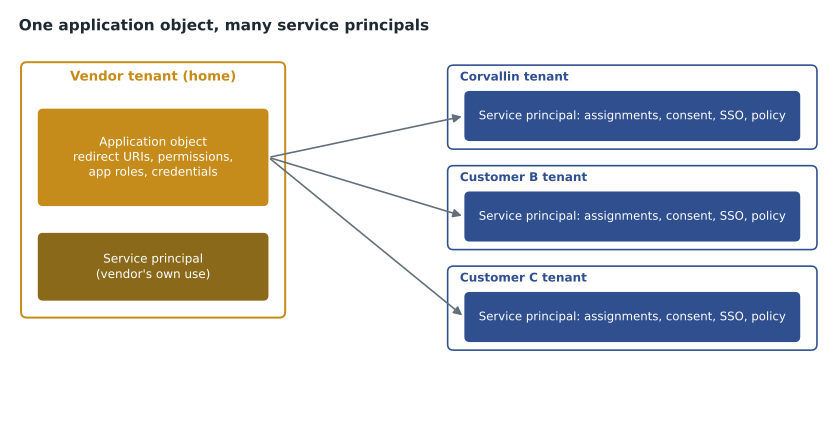
| Application object (App registrations) | Service principal (Enterprise applications) | |
|---|---|---|
| Scope | Global definition, in the home tenant only | Local instance, one per tenant that uses the app |
| Holds | Redirect URIs, requested permissions, app roles, credentials | User and group assignments, granted permissions and consent, SSO settings, provisioning |
| Who manages it | The app's developers and owners | The tenant's administrators |
| Example | Corvallin's own expense-claim app registered by its developer | The scheduling vendor's app as it exists in Corvallin's tenant |
Permissions and consent
Apps that call Microsoft Graph or other APIs need permissions, and Entra ID distinguishes two kinds:
- Delegated permissions let the app act on behalf of a signed-in user, and the app can never do more than that user could. "Read the signed-in user's calendar" is delegated.
- Application permissions let the app act as itself, with no user present, across the whole tenant. "Read all users' mail" is an application permission, and it is exactly as powerful as it sounds.
Consent is the act of granting those permissions. A user can consent to some delegated permissions for themselves, if the tenant allows it; an administrator must consent to application permissions and to delegated permissions that Microsoft marks as requiring admin consent. Attackers exploit consent in illicit consent grant attacks: a convincing app asks a user for broad delegated access to mail and files, and once the user clicks Accept, the attacker reads their data without ever needing a password or MFA. For that reason the user consent settings under Enterprise applications > Consent and permissions matter a great deal.
| User consent option | Effect | Fit |
|---|---|---|
| Do not allow user consent | Every app needs administrator consent | Highly regulated tenants, with an admin consent workflow to keep requests moving |
| Allow user consent for apps from verified publishers, for selected permissions | Users can consent only to low-risk permissions for apps whose publisher Microsoft has verified | Most organizations; Microsoft's recommended balance |
| Let Microsoft manage your consent settings | Microsoft applies and updates its recommended policy | Organizations that want the current recommendation without tuning it |
The admin consent workflow lets a user who is blocked from consenting submit a request, with a justification, to designated reviewers, who approve or deny it in the admin center. Corvallin turned off user consent except for verified publishers and low-risk permissions, enabled the workflow with Teodor and a security analyst as reviewers, and then reviewed every existing consent grant in the tenant. Three apps nobody recognized had permission to read mail; two were abandoned productivity tools and one was a phishing app that had harvested consent from a branch manager the previous spring. Teodor revoked all three and the manager's sessions.
Single sign-on and assignment
For an app to use Entra ID for sign-in, the app and Entra ID must speak a federation protocol. Modern apps use OpenID Connect (built on OAuth 2.0); many business apps use SAML 2.0; a few older ones support only password-based single sign-on, in which Entra ID stores and replays a password through the My Apps browser extension, or header-based authentication through Application Proxy for on-premises web apps. The Microsoft Entra app gallery lists thousands of preintegrated apps with tutorials that set up SAML or OIDC in a few steps, and gallery entries often support automatic provisioning with SCIM, which creates, updates and disables accounts in the app as users are assigned and unassigned in Entra ID.
Each enterprise application has an Assignment required setting. When it is on, only users and groups assigned to the app (directly, through groups or through access packages) can sign in; everyone else is refused even if the app itself would accept them. Corvallin turned it on for every app that held client data and assigned access through groups. Combined with provisioning, assignment means that removing a nurse from the "Scheduling users" group both blocks her sign-in and disables her account inside the scheduling system.
Worked problem
Onboarding a SaaS app
The training team signs up for a new learning platform that supports SAML and SCIM and is in the app gallery. Every staff member needs access; only the training team should be administrators in the platform. How should Teodor set it up?
Show solution
- Add the app from the gallery in Enterprise applications, which creates its service principal in Corvallin's tenant.
- Configure SAML single sign-on using the gallery tutorial and test it with a pilot account.
- Turn on Assignment required and assign the All staff group to the app's User role and the Training team group to its Admin role.
- Configure SCIM provisioning so accounts are created and disabled automatically, and add the app to Conditional Access policies such as CA002.
Answer: Gallery app with SAML, assignment required, groups mapped to app roles, and SCIM provisioning. Access is then granted and removed in one place, and Conditional Access protects the sign-in.
Credentials and app hygiene
An app that signs in as itself, for example a nightly integration that reads the HR system and updates Entra ID, needs a credential. Entra ID supports three kinds, in increasing order of preference:
| Credential | Risk | Guidance |
|---|---|---|
| Client secret | A string that can be copied, pasted into code or a repository, and used by anyone who finds it | Avoid where possible; if used, keep lifetimes short, store in a vault and rotate |
| Certificate | A private key that can be protected in a key vault or hardware module | Preferred over secrets for apps outside Azure |
| Managed identity or workload identity federation | No secret for the app owner to manage at all | Preferred whenever the workload runs in Azure or a federated platform such as GitHub Actions (lesson 10) |
Good app hygiene is a regular task, not a one-time project. An administrator should know every app with application permissions, every credential and when it expires, and every app's owners. Apps should have at least two owners so that one person leaving does not orphan them. App instance property lock prevents changes to sensitive properties of a multi-tenant app's service principal in customer tenants. And the Workload ID Premium features covered next lesson add Conditional Access and risk detection for service principals.
# Service principals with application permissions to Microsoft Graph (Microsoft Graph PowerShell)
Connect-MgGraph -Scopes "Application.Read.All"
$graph = Get-MgServicePrincipal -Filter "appId eq '00000003-0000-0000-c000-000000000000'"
Get-MgServicePrincipalAppRoleAssignedTo -ServicePrincipalId $graph.Id -All |
    ForEach-Object {
        $role = $graph.AppRoles | Where-Object Id -eq $_.AppRoleId
        [pscustomobject]@{ App = $_.PrincipalDisplayName; Permission = $role.Value }
} | Sort-Object AppApp Permission --- ---------- Corvallin HR Sync User.ReadWrite.All Scheduling Connector Calendars.ReadWrite Visit Verification Export Sites.Selected
The output pleased Teodor. Every app on the list was known, each permission was the narrowest that worked (Sites.Selected, for example, grants access only to specific SharePoint sites an administrator names, instead of all sites), and each had two named owners. That is what a healthy list looks like.
App roles and group claims
Many applications need to know not just who a user is but what they may do inside the app: view schedules, edit schedules, or administer the system. Entra ID supports this with app roles, which a developer defines on the application object (for example Scheduler, Viewer and Admin). Administrators then assign users or groups to those roles on the enterprise application, and the roles appear in the token the app receives, so the app can enforce them. App roles are usually better than sending group membership in the token, because group claims can become very large in organizations with many groups and are tied to the tenant's group structure, while app roles express exactly what the app needs.
For SAML apps, the same idea appears as claims configured on the enterprise application's single sign-on page: which attribute becomes the user identifier (often the UPN or email), which other attributes are sent, and whether roles or groups are included. A wrong claim is a common reason a SAML app shows "user not found" after a successful Entra sign-in; the SAML tracing tools and the sign-in logs together show what was sent.
Application Proxy and on-premises apps
Some of Corvallin's applications still ran on servers at head office. Microsoft Entra application proxy publishes such web apps to the internet without opening inbound firewall ports: a connector installed on premises makes an outbound connection to the cloud service, which accepts users' requests, applies Entra pre-authentication and Conditional Access, and forwards them through the connector. Combined with Kerberos constrained delegation or header-based authentication, it can provide single sign-on to apps that know nothing about modern protocols. Application proxy is part of Microsoft's private access offerings, and Microsoft Entra Private Access extends the idea to non-web applications.
Reviewing the app estate
An administrator should be able to answer four questions about apps at any time: which apps exist, who can use each one, what each can do on its own, and who is responsible for each. Entra ID provides the raw data through the enterprise applications list, sign-in logs (which apps are actually used), the permissions and consent pages, and app owners. Microsoft Defender for Cloud Apps adds discovery of shadow IT, the apps staff use without IT's knowledge, from network and endpoint signals, and app governance features that flag risky OAuth apps. At Corvallin, discovery found 27 cloud services in use that IT had never approved, and the eleven that handled client data were brought into Entra single sign-on with assignment required within a quarter.
Who may register apps
By default, any member user can register an application in the tenant, which creates an application object and a service principal that the user owns. That is convenient for developers and risky elsewhere, because registered apps can request permissions and hold credentials. Many organizations, Corvallin included, turn off Users can register applications in the user settings and give the Application Developer role to the few people who need it, while Application Administrator and Cloud Application Administrator manage all apps (the latter without access to application proxy settings). The same least-privilege thinking from lesson 6 applies: granting tenant-wide admin consent to application permissions is one of the most powerful actions in Entra ID, and it should sit with a small, monitored group of people.
Common mistakes
MistakeTreating App registrations and Enterprise applications as the same thing.
InsteadApp registrations hold the global definition; enterprise applications are the service principals your tenant controls.
MistakeAllowing users to consent to any app.
InsteadLimit user consent to verified publishers and low-risk permissions, and use the admin consent workflow.
MistakeLeaving Assignment required off for apps with sensitive data.
InsteadTurn it on and assign access through groups or access packages.
MistakeUsing long-lived client secrets.
InsteadPrefer managed identities, federation or certificates; rotate any secrets.
MistakeGranting broad application permissions such as Sites.Read.All when one site is needed.
InsteadUse the narrowest permission, such as Sites.Selected.
Summary and key terms
- An application object is an app's global definition in its home tenant; a service principal is its local instance in each tenant.
- Delegated permissions act for a signed-in user; application permissions act as the app across the tenant and need admin consent.
- Restrict user consent and use the admin consent workflow to defeat illicit consent grants.
- Use gallery apps, SAML or OpenID Connect, Assignment required and SCIM provisioning to manage app access in one place.
- Prefer managed identities, federation and certificates over client secrets, and keep at least two owners per app.
- Application object
- The global definition of an app, created in App registrations in its home tenant.
- Service principal
- The local instance of an app in a tenant, managed in Enterprise applications.
- Delegated permission
- Permission for an app to act on behalf of a signed-in user.
- Application permission
- Permission for an app to act as itself with no user present.
- Admin consent workflow
- A request and approval process for apps users cannot consent to themselves.
- SCIM provisioning
- Automatic creation, update and removal of user accounts in an app.
Practice problems
Work each problem on paper first, then reveal the answer to check.
A vendor's multi-tenant app is used by Corvallin. Where is its application object, and where is its service principal?
Show answer
The application object is in the vendor's tenant; Corvallin has a service principal.
What makes an illicit consent grant dangerous even with MFA?
Show answer
Once consent is granted, the app accesses data with its own tokens and never needs the user's password or MFA again.
What does Assignment required do?
Show answer
It allows only assigned users and groups to sign in to the app.
Lesson quiz · 5 questions
Score 60% or more to complete this lesson.
Create a free account to save your progress, take quizzes and earn a certificate.