
MSBA-202 · Lesson 5 of 12 · 19 min
Microsoft Entra ID Protection and risk policies
▶ Video coming soon A video version of this lesson is on the way.
Conditional Access acts on what it is told. A rule such as "block sign-ins from outside Canada and the United States" catches an attacker in another country but not one who rents a server in Toronto or Boston. Attackers know about location rules and route around them. What a defender wants is a signal that says "this sign-in looks like an attack" or "this account looks compromised", based on patterns no single administrator could watch for. Microsoft Entra ID Protection provides those signals. It analyses sign-ins and account activity using Microsoft's threat intelligence, which draws on trillions of daily signals across Microsoft's services, and assigns risk that Conditional Access can act on.
ID Protection's full capabilities, including risk-based Conditional Access and the detailed reports, require Microsoft Entra ID P2 (included in Microsoft 365 E5 and the Entra Suite). P1 and free tenants see a limited version of the reports. At Corvallin only the IT team had P2 at first, and Teodor's first recommendation to Ines was to extend P2 to everyone who could open clinical records, because those were the accounts worth stealing.
Sign-in risk and user risk
ID Protection calculates two different kinds of risk, and confusing them is the most common mistake in this topic.
| Sign-in risk | User risk | |
|---|---|---|
| Question it answers | Is this particular authentication request coming from someone other than the account owner? | Has this account probably been compromised? |
| Examples of detections | Anonymous IP address (such as Tor), atypical travel, unfamiliar sign-in properties, malicious IP address, password spray, attacker-in-the-middle patterns | Leaked credentials found by Microsoft, threat intelligence that the account is targeted or compromised, anomalous user activity, an administrator confirming compromise |
| Calculated | In real time during sign-in, or offline shortly after | Over time, from detections across sign-ins and activity |
| Typical response | Require MFA or reauthentication for this sign-in | Require risk remediation (a secure password change or session revocation), or block |
Each kind of risk has a level: low, medium or high, plus "none". The level reflects Microsoft's confidence that something is wrong, not how much damage it would cause. A high sign-in risk means the signals strongly suggest the person signing in is not the owner; a low one means something was unusual but probably benign, such as a sign-in from a new city after a real trip.
Detections are either real-time, calculated while the sign-in happens so a policy can act immediately, or offline, calculated afterwards from patterns that take time to see. Leaked credentials is a good example of an offline user-risk detection: Microsoft finds a username and password pair in a dump on a criminal forum, matches it to a hash it holds through password hash synchronization (lesson 1), and raises the user's risk. A tenant that does not synchronize password hashes cannot get this detection for its hybrid users.
Risk policies now live in Conditional Access
ID Protection originally had its own two policy pages, a user risk policy and a sign-in risk policy, with simple on and off settings. Microsoft has replaced them with risk conditions inside Conditional Access, which can combine risk with other signals and target groups precisely. The legacy risk policies configured in ID Protection retire on October 1, 2026, and Microsoft directs administrators to recreate them as Conditional Access policies. A tenant still showing those legacy pages after that date has policies that no longer protect anyone.
A risk-based Conditional Access policy uses the User risk or Sign-in risk condition together with grant controls:
| Risk type | Grant controls available | Notes |
|---|---|---|
| Sign-in risk | Block, Allow, Require multifactor authentication (or an authentication strength), Require reauthentication through sign-in frequency | Users need a registered MFA method before a sign-in risk policy triggers, or they cannot satisfy it. |
| User risk | Require risk remediation, Require password change, Block | "Require risk remediation" automatically adds an authentication strength and sign-in frequency of every time, so users reauthenticate after their sessions are revoked. |
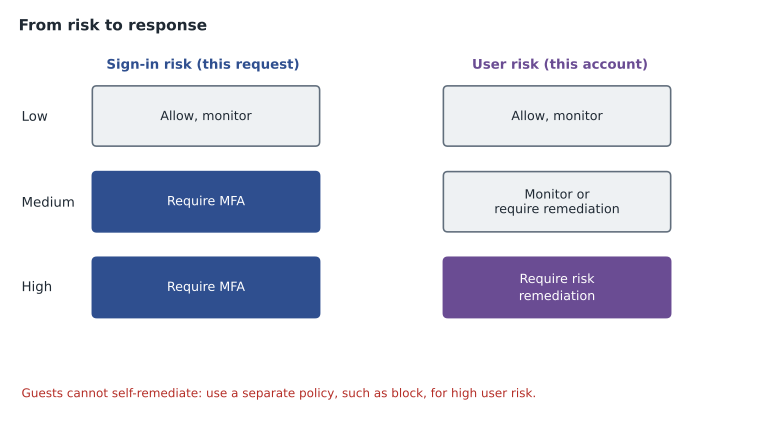
Microsoft's documented guidance includes a few rules worth memorizing. Require risk remediation overrides require password change, and block overrides both; to avoid conflicts, each user should be in only one user-risk policy. Require risk remediation is not supported for guests and external users, because Entra ID cannot revoke their sessions in the home tenant, so a separate policy is needed for them. A common starting configuration is to require MFA when sign-in risk is medium or high, and to require risk remediation when user risk is high.
Self-remediation
The point of risk policies is that most risk can be cleared by the real user, quickly, without the help desk. ID Protection calls this self-remediation:
- When sign-in risk triggers a policy and the user completes MFA with a method the attacker does not have, the risky sign-in is treated as remediated.
- When user risk triggers "require risk remediation" for a user who signs in with a password, the user is guided through a secure password change and existing sessions are revoked.
- For a user who signs in without a password, sessions are revoked and the user must sign in again with their strong method; there is no password to change.
- If an attacker had added a device to the account, the device object can be disabled so it can no longer get tokens.
Self-remediation depends on registration. A user with no registered MFA method cannot complete the challenge, so the policy blocks them instead, and they call the help desk. This is the link back to lesson 2: risk policies are only as good as the registration coverage behind them.
Investigating risk
ID Protection provides three main reports in the Microsoft Entra admin center, under ID Protection, and the same signals flow into Microsoft Defender XDR, where identity alerts are correlated with email, endpoint and cloud app alerts into incidents (MSBA-203).
| Report | Shows | Actions an administrator can take |
|---|---|---|
| Risky users | Users with current risk, risk level, state and history | Reset password, confirm user compromised, confirm user safe, dismiss user risk, block user, investigate in Defender |
| Risky sign-ins | Sign-ins flagged as risky with detection details, location and device | Confirm sign-in compromised, confirm sign-in safe |
| Risk detections | Each individual detection, its type, timing and whether real time or offline | Review and link to the user and sign-in |
These actions are not just tidying up; they feed Microsoft's models. Confirm compromised sets the user's risk to high, which triggers any user-risk policy, and tells the system its detection was right. Confirm safe and dismiss lower risk and tell the system its detection was wrong for this case. Dismissing risk without investigating is the worst habit an administrator can form: it clears the warning and leaves the attacker inside.
Worked problem
Reading a risky user
At 2:10 a.m., ID Protection flags Dana, a branch scheduler, with high user risk from a "Leaked credentials" detection. Her sign-in log shows no unusual sign-ins. Corvallin has a Conditional Access policy that requires risk remediation for high user risk. What happens, and what should the administrator do in the morning?
Show solution
- Leaked credentials is an offline user-risk detection: Microsoft found her password in breach data, not a suspicious sign-in.
- The next time Dana signs in, the policy requires risk remediation, so she completes MFA and changes her password securely, and her sessions are revoked.
- When she completes the change, her user risk is remediated automatically.
- In the morning the administrator should check whether she reused that password elsewhere, confirm no suspicious sign-ins or mailbox rules appeared, and remind staff not to reuse work passwords.
Answer: Dana fixes the risk herself at her next sign-in. The administrator confirms nothing else happened rather than dismissing the risk.
Risk beyond people
People are not the only identities that can be compromised. ID Protection also scores workload identities, such as service principals, for signals like leaked credentials in a public code repository or suspicious sign-ins from unusual locations; acting on that risk with Conditional Access requires the Microsoft Entra Workload ID Premium licence. With Microsoft Entra Agent ID (lesson 10), Microsoft has extended risk and Conditional Access to agent identities as well, including templates for blocking high-risk agent identities. The principle is the same as for people: detect, raise risk, and let policy respond automatically.
# List users currently at high risk (Microsoft Graph PowerShell)
Connect-MgGraph -Scopes "IdentityRiskyUser.Read.All"
Get-MgRiskyUser -Filter "riskLevel eq 'high' and riskState eq 'atRisk'" |
    Select-Object UserPrincipalName, RiskLevel, RiskState, RiskLastUpdatedDateTime
Corvallin's rollout
Teodor created two Conditional Access policies in report-only mode: CA010 requiring MFA for medium and high sign-in risk, and CA011 requiring risk remediation for high user risk, both for all members with P2 licences and excluding emergency accounts. A third, CA012, blocked guests at high user risk, because guests cannot self-remediate. After two weeks the report showed a dozen sign-ins that would have been challenged, most of them nurses who had connected through a hotel network during a training conference, and one genuine password spray against branch accounts that MFA had already stopped. He enabled the policies and retired the old ID Protection policy pages well before the October 2026 retirement.
"So the system notices, the user fixes it, and we only get involved when they can't," Ines summarized. That is the design. The administrator's job shifts from resetting passwords to watching for the cases that self-remediation cannot handle, and to keeping registration coverage high enough that it usually can.
Risk policies and Conditional Access together
Risk conditions combine with everything else Conditional Access knows, which is why Microsoft moved them there. A policy can require MFA at medium sign-in risk for most apps but block access at the same level for the payroll application, or apply risk policies only to users who have P2 licences while a broader policy covers everyone else. It can also exclude emergency access accounts and include workload identities and agents in their own risk policies. Because all applicable policies apply together, a sign-in at high risk to the payroll app on an unmanaged device must satisfy the risk policy, the device policy and the app policy at once.
Two settings outside the risk policies themselves affect how well they work. Trusted named locations reduce false positives: a sign-in from a trusted office range is less likely to be marked unfamiliar. And the MFA registration requirement determines whether users can self-remediate at all. ID Protection used to offer its own MFA registration policy; with risk policies now in Conditional Access, the modern approach is a Conditional Access policy on the user action "Register security information" (lesson 4) together with registration campaigns (lesson 2).
Finally, ID Protection is one signal among several. Microsoft Defender XDR correlates identity alerts with signals from Defender for Office 365, Defender for Endpoint and Defender for Cloud Apps into incidents, and an analyst can confirm a user compromised there as part of an investigation, which flows back into ID Protection. Insider risk from Microsoft Purview can also be used as a Conditional Access condition through adaptive protection, applying stricter controls to users whose behaviour suggests data theft. The administrator's job is to make sure each of these signals reaches a policy that acts on it.
| Signal source | Where it appears | How Conditional Access uses it |
|---|---|---|
| ID Protection sign-in risk | Risky sign-ins report, sign-in logs | Sign-in risk condition |
| ID Protection user risk | Risky users report | User risk condition |
| Defender XDR incidents | Defender portal | Analyst actions such as confirm compromised raise user risk |
| Purview insider risk (adaptive protection) | Purview portal | Insider risk condition |
| Intune device compliance | Intune admin center | Require compliant device grant control |
A note on false positives
Risk detections are probabilistic, and some will be wrong. A nurse who flies to a conference and signs in from a hotel may trigger atypical travel or unfamiliar sign-in properties; a user on a consumer VPN may appear at an anonymous IP address. The design goal is not to eliminate these but to make them cheap: with a medium-and-high sign-in risk policy that requires MFA, a false positive costs the nurse one extra prompt that she passes in seconds, and the event is remediated automatically. The expensive failure is the opposite case, a real attack that no policy acts on. That asymmetry is why Microsoft recommends self-remediating policies over blocking for most users, and why blocking is reserved for those who cannot self-remediate.
Common mistakes
MistakeUsing a sign-in risk policy to respond to leaked credentials.
InsteadLeaked credentials is user risk; respond with a user-risk policy that requires risk remediation.
MistakeKeeping the legacy ID Protection risk policies.
InsteadThey retire on October 1, 2026; recreate them in Conditional Access.
MistakeApplying "require risk remediation" to guests.
InsteadIt is not supported for guests; use a separate policy, such as block, for them.
MistakeDismissing risk to clear the report.
InsteadInvestigate first; confirm compromised or safe so the right action and model feedback follow.
MistakeTurning on risk policies before users have registered MFA.
InsteadUsers must be able to self-remediate, or the policy simply blocks them.
Summary and key terms
- ID Protection scores sign-in risk (this request) and user risk (this account) as low, medium or high; full features need Entra ID P2.
- Leaked credentials is an offline user-risk detection that depends on password hash synchronization for hybrid users.
- Risk policies belong in Conditional Access; legacy ID Protection risk policies retire on October 1, 2026.
- Require MFA for risky sign-ins and risk remediation for risky users so that users self-remediate; guests need a separate policy.
- Investigate with the risky users, risky sign-ins and risk detections reports, and in Defender XDR.
- Sign-in risk
- The probability that a given authentication request was not made by the account owner.
- User risk
- The probability that an account has been compromised.
- Risk detection
- A single suspicious event or signal identified by ID Protection.
- Self-remediation
- The user clearing risk by completing MFA or a secure password change.
- Require risk remediation
- A user-risk grant control that revokes sessions and requires the user to reauthenticate and, with a password, change it securely.
- Confirm compromised
- An administrator action that sets user risk to high and trains the detection models.
Practice problems
Work each problem on paper first, then reveal the answer to check.
Which kind of risk does an "atypical travel" detection raise?
Show answer
Sign-in risk.
What happens to the legacy ID Protection risk policies on October 1, 2026?
Show answer
They retire; risk policies must be in Conditional Access.
Why does a sign-in risk policy need users to have registered MFA?
Show answer
They can only self-remediate by completing MFA; without a method they are blocked.
Lesson quiz · 5 questions
Score 60% or more to complete this lesson.
Create a free account to save your progress, take quizzes and earn a certificate.