
MSBA-202 · Lesson 6 of 12 · 19 min
Privileged Identity Management in practice
▶ Video coming soon A video version of this lesson is on the way.
When Teodor listed who could change what in Corvallin's tenant at the start of the autumn 2026 review, the result alarmed everyone in the room. Seven accounts held the Global Administrator role. One belonged to the former IT manager; the account was disabled but still assigned. Others belonged to managers who had been given the role years earlier "so they could add a user if IT was busy". Help desk staff held broad roles because someone had once needed to fix a shared mailbox. None of these assignments had an end date, and nobody had checked them since they were made.
Every one of those standing assignments is a target. An attacker who phishes any of those accounts owns the tenant: they can read every mailbox, create new administrators, change Conditional Access and delete audit evidence. The goal of privileged access management is to shrink that target in two ways: give each person the least privilege that lets them do their job, and make privilege just in time, present only while it is being used. Microsoft Entra Privileged Identity Management (PIM) is the Entra ID feature for the second part, and good role design is the first.
Least privilege first
Entra ID has dozens of built-in administrator roles, and most tasks need one of the narrow ones. Before buying or configuring anything, an administrator should map tasks to the smallest role that covers them.
| Task | Least privileged built-in role | Not needed |
|---|---|---|
| Reset passwords for non-administrators, manage service requests | Helpdesk Administrator | Global Administrator |
| Create and manage users and groups, assign licences | User Administrator (licences can also use License Administrator) | Global Administrator |
| Reset or require re-registration of MFA methods for non-admins | Authentication Administrator | Privileged Authentication Administrator |
| Manage Conditional Access policies | Conditional Access Administrator | Security Administrator or Global Administrator |
| Manage Exchange Online settings and mailboxes | Exchange Administrator | Global Administrator |
| Read everything for audits and reports | Global Reader (or Security Reader for security data) | Any write role |
| Assign roles and configure PIM | Privileged Role Administrator | Global Administrator for day-to-day work |
Microsoft recommends having fewer than five Global Administrators, and at least two, plus the emergency access accounts described in lesson 4. Roles can also be scoped. An administrative unit is a container of users, groups or devices to which a role can be assigned, so a Helpdesk Administrator for one branch can reset passwords only for that branch's users. Corvallin created one administrative unit per branch. Restricted management administrative units go further and protect sensitive objects, such as executive accounts, from changes by tenant-wide administrators who are not specifically assigned to them.
# Who holds Global Administrator right now? (Microsoft Graph PowerShell)
Connect-MgGraph -Scopes "RoleManagement.Read.Directory","User.Read.All"
$role = Get-MgDirectoryRole -Filter "displayName eq 'Global Administrator'"
Get-MgDirectoryRoleMember -DirectoryRoleId $role.Id |
    ForEach-Object { Get-MgUser -UserId $_.Id -Property displayName,userPrincipalName,accountEnabled } |
    Select-Object DisplayName, UserPrincipalName, AccountEnabled
Eligible and active assignments
PIM changes the nature of a role assignment. Instead of being permanently active, an assignment can be eligible: the person can use the role, but only after activating it for a limited time. Assignments of either type can be permanent or time-bound, with a start and end date, which suits contractors and projects.
| Assignment type | What the user has | When to use |
|---|---|---|
| Eligible | The right to activate the role, subject to the role's activation settings | Most administrators, most of the time |
| Active | The role's permissions now, without activation | Emergency access accounts, and service scenarios that cannot activate |
| Time-bound (either type) | An assignment that starts and expires on set dates | Contractors, projects, temporary cover |
Activation is where control happens. For each role, the role settings in PIM define what activation requires:
- A maximum activation duration, from one to 24 hours (eight by default). After it ends the role disappears automatically.
- Multifactor authentication on activation, or better, a Conditional Access authentication context, which lets a Conditional Access policy demand a phishing-resistant method or a compliant device specifically for activation.
- A justification, and optionally a ticket number, recorded in the audit history.
- Approval by named approvers before the role becomes active, for the most sensitive roles.
- Notifications to administrators and approvers when the role is assigned or activated.
PIM covers three kinds of privilege. Microsoft Entra roles are the directory roles discussed above. Azure resource roles (such as Owner or Contributor on a subscription) can be managed the same way, which matters for any organization with Azure workloads. PIM for Groups makes membership or ownership of a group eligible and time-limited, which is useful because groups grant access to so many things: a role-assignable group that holds a directory role, a group that grants access to an Azure subscription, or a group that controls a sensitive SharePoint site. Groups that can hold Entra roles must be created as role-assignable groups, and only Privileged Role Administrators (or Global Administrators) can manage their membership, so that a group owner cannot quietly make someone an administrator.
Licensing
PIM requires Microsoft Entra ID P2 or Microsoft Entra ID Governance for the users who benefit from it: those with eligible or time-bound assignments, approvers, and reviewers. Corvallin already had P2 for its IT team, which covered everyone who would hold privileged roles. Some advanced features, such as reviews of PIM for Groups and inactive users, need Entra ID Governance.
Worked problem
Designing role settings
Corvallin wants these rules: help desk agents use Helpdesk Administrator for their whole shift; Conditional Access changes need a second person to approve; Global Administrator should be activated rarely, briefly and only with a security key. Propose PIM role settings for Helpdesk Administrator, Conditional Access Administrator and Global Administrator.
Show solution
- Helpdesk Administrator is used all day, so make agents eligible with a maximum duration of 8 hours, MFA on activation and a justification, without approval.
- Conditional Access Administrator changes can lock out the tenant, so require approval by Ines or Teodor, justification and a ticket, with a 4-hour maximum.
- Global Administrator is the highest risk, so require approval, an authentication context that demands a phishing-resistant method, justification and ticket, and a 2-hour maximum.
- Keep only the emergency access accounts as permanent active Global Administrators.
Answer: Helpdesk: eligible, 8 hours, MFA, justification. Conditional Access Administrator: eligible, 4 hours, approval, ticket. Global Administrator: eligible, 2 hours, approval, phishing-resistant authentication context. Emergency accounts stay active.
Alerts, reviews and audit
PIM watches for drift. Its alerts flag conditions such as roles assigned outside PIM, too many Global Administrators, administrators who are not using their roles, and assignments that never expire. Its access reviews of roles (lesson 7 covers access reviews in general) ask an owner or the users themselves, on a schedule, whether each assignment is still needed, and can remove assignments automatically when a reviewer says no or does not answer. Its audit history records every assignment, activation, approval and denial, which is exactly the evidence Corvallin's board had asked for.
PIM does not stop a person from misusing a role during an activation window. It reduces how long privilege exists, makes every use visible and attributable, and adds friction at the right point. Combined with phishing-resistant authentication for activation, it means a phished password alone is no longer enough to become an administrator.
Corvallin's clean-up
Teodor worked through the role assignments over two weeks in the autumn, announced in advance so nobody was surprised:
| Before | After |
|---|---|
| Seven permanent Global Administrators, one of them a departed manager's disabled account | Two emergency access accounts (active); Ines eligible, and Teodor eligible with Ines's approval |
| Managers with Global Administrator | Managers removed from all admin roles; they request user changes through the help desk |
| Help desk staff with broad standing roles | Ama eligible for Helpdesk Administrator and Intune Administrator for 8 hours; agents eligible for Helpdesk Administrator scoped to their branch's administrative unit |
| Felix as permanent Teams Administrator | Felix eligible for Teams Administrator for 4 hours |
| Teodor with standing workload admin roles | Teodor eligible for Exchange, SharePoint, Teams and User Administrator for 4 hours; Ines permanently Global Reader for oversight |
| No reviews, no audit trail of who used what | Quarterly PIM access reviews; activation history reported to the board each quarter |
The first month produced complaints, chiefly from help desk agents who forgot to activate their role at the start of a shift. Ama solved that with a checklist on the help desk wall and an 8-hour activation window that covered a full shift. By the second month activation was routine, and the alerts page showed no roles assigned outside PIM.
Activating a role, step by step
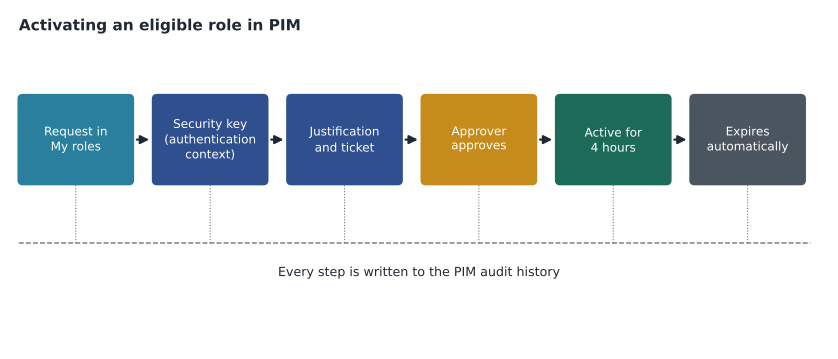
From the administrator's side, activation happens in the My roles page of PIM in the Microsoft Entra admin center. Under Eligible assignments, the administrator chooses Activate next to the role, sets a duration up to the role's maximum, enters the justification and ticket number if required, and submits. If the role requires an authentication context, Entra ID prompts for the method the linked Conditional Access policy demands, such as a security key. If approval is required, the request waits in the approvers' Approve requests page and they receive an email; the administrator sees the request as pending. Once active, the role's permissions apply to new tokens. Signing out and back in, or opening a new browser session to the admin portal, makes sure the portal picks them up.
An administrator who finishes early can deactivate the role instead of waiting for it to expire, and good practice is to do so. An activation can also be extended or renewed if the role settings allow it; a time-bound eligible assignment that is about to expire can be extended by a Privileged Role Administrator, and users get notifications before expiry.
Groups, Azure roles and the bigger picture
PIM for Groups deserves a closer look because it extends just-in-time access beyond directory roles. Consider a security group that is an Owner of Corvallin's Azure subscription, where the backup vault and the Automation account live. Making membership of that group eligible means Felix can become an Owner for two hours to change the vault, then lose the access automatically, without anyone editing Azure role assignments. The same pattern works for a group that controls a sensitive SharePoint site or a Teams team: members are eligible, activate when they need the content and drop back out afterwards.
Azure resource roles managed in PIM follow the same eligible, active and time-bound model at the scope of a management group, subscription, resource group or single resource. The principle is identical throughout: decide who needs a privilege, make it eligible rather than standing, require proof and justification to use it, and record every use.
| PIM feature | Where configured | Typical setting at Corvallin |
|---|---|---|
| Role settings | PIM > Microsoft Entra roles > Settings | Per role: duration, authentication context, approval, justification |
| Eligible assignments | PIM > Assignments | Time-bound for contractors; permanent eligible for staff |
| Alerts | PIM > Alerts | Reviewed weekly by Teodor |
| Access reviews of roles | PIM > Access reviews | Quarterly, reviewed by Ines |
| Audit history | PIM > Resource audit and My audit | Exported monthly for the board report |
Finally, PIM is only as strong as the authentication behind activation. If an attacker phishes a password and an Authenticator code, and the role requires only MFA, the attacker can activate the role just as the real administrator could. Tying activation to an authentication context that demands a phishing-resistant method closes that gap, which is why lesson 12 returns to it.
Reporting privileged access
Corvallin's board wanted to see privileged access once a quarter without reading audit logs. Teodor built a short report from PIM data: how many people were eligible for each role, how many activations each role had, the longest activation, any activation outside business hours with its justification, any approvals that were denied, and any PIM alerts and how they were resolved. Two quarters of that report did something no policy could: it showed the board that privileged access was rare, visible and justified, and it turned a vague worry into a number that went down.
The report also exposed one surprise. A senior help desk agent had activated Exchange Recipient Administrator 41 times in a month, far more than anyone else. The reason was innocent: she handled all shared mailbox requests for the branches. The fix was a better role design rather than a warning, so Teodor moved shared mailbox requests to an access package that granted branch managers control of their own shared mailboxes, and the activations dropped to a handful.
Common mistakes
MistakeUsing Global Administrator for daily tasks.
InsteadMap each task to the narrowest built-in role and scope it with administrative units where possible.
MistakeMaking administrators permanently active "for convenience".
InsteadMake them eligible with short activation windows; keep only emergency accounts active.
MistakeRequiring only a basic MFA prompt for activating the most powerful roles.
InsteadUse an authentication context that demands a phishing-resistant method.
MistakeGranting roles through ordinary security groups.
InsteadUse role-assignable groups, whose membership only privileged role administrators can change.
MistakeSetting up PIM and never checking it.
InsteadAct on PIM alerts and run regular access reviews of role assignments.
Summary and key terms
- Least privilege means the narrowest built-in role, scoped with administrative units where possible; keep fewer than five Global Administrators.
- PIM makes assignments eligible and time-bound, so privilege exists only while it is being used.
- Role settings control activation: duration, MFA or authentication context, justification, approval and notifications.
- PIM covers Entra roles, Azure resource roles and PIM for Groups; it needs Entra ID P2 or ID Governance.
- Alerts, access reviews and audit history keep assignments clean and provide evidence.
- Least privilege
- Giving each identity only the permissions it needs for its work.
- Eligible assignment
- A role assignment that must be activated before its permissions apply.
- Activation
- Turning on an eligible role for a limited time after meeting its requirements.
- Authentication context
- A label PIM or apps can require, which Conditional Access maps to specific controls.
- Administrative unit
- A container that limits the scope of a role assignment to certain users, groups or devices.
- Role-assignable group
- A group that can hold Entra roles and whose membership only privileged role administrators manage.
Practice problems
Work each problem on paper first, then reveal the answer to check.
What is the difference between an eligible and an active assignment?
Show answer
An eligible assignment must be activated before it grants permissions; an active one grants them now.
Which role should a help desk agent have to reset non-admin passwords?
Show answer
Helpdesk Administrator, ideally scoped to an administrative unit.
Why must groups that hold Entra roles be role-assignable?
Show answer
So only privileged role administrators can change their membership, preventing a group owner from creating administrators.
Lesson quiz · 5 questions
Score 60% or more to complete this lesson.
Create a free account to save your progress, take quizzes and earn a certificate.