
MSBA-202 · Lesson 12 of 12 · 18 min
Case study: rolling out phishing-resistant MFA
▶ Video coming soon A video version of this lesson is on the way.
This course has taken each identity control in turn: identity models and synchronization, the authentication methods policy, SSPR, Password Protection and smart lockout, persona-based Conditional Access, risk policies, PIM, access reviews and packages, guest settings, app governance, workload and agent identities, and troubleshooting. This final lesson looks back at the project that first put many of them to work together at Corvallin: the phishing-resistant MFA rollout of autumn 2026, phase 1 of the agency's Zero Trust roadmap. Its goal came straight from Ines's first sentence: make the sign-ins themselves resistant to phishing, so that a stolen password or a relayed approval would no longer be enough to get in.
The reason was not abstract. In early September 2026 a Corvallin branch coordinator received a convincing invoice-approval email, entered her password on a fake sign-in page and approved the Authenticator push that followed. The attacker relayed both to Microsoft in real time, took the session, and set a hidden inbox rule to intercept a supplier's replies while attempting invoice fraud. The fraud was caught and no money was lost, but the lesson was clear. Number matching helps against push fatigue attacks, not against a real-time relay; only phishing-resistant methods, which are bound to the real sign-in domain, defeat it. This lesson follows Corvallin's rollout from plan to measurement, drawing on every earlier lesson.
Step 1: Set the target and the constraints
Teodor wrote the target first: every member account signs in with a phishing-resistant method, enforced by Conditional Access, by the end of November 2026, with no increase in help desk calls after the first month. Then he listed the constraints the rollout had to respect:
| Constraint | Effect on the design |
|---|---|
| Field staff work alone in clients' homes, often early, with weak mobile signal | Methods must work offline on the device where possible, and recovery must not require a trip to the office |
| Most home-care staff carry managed work phones; office staff use Entra-joined Windows laptops | Passkeys in Microsoft Authenticator for phones; Windows Hello for Business on laptops |
| About 60 home-care staff have no work phone | FIDO2 security keys on lanyards, issued in person |
| Two branch offices share kiosk PCs for timesheets | Security keys at kiosks; no Windows Hello for Business on shared devices |
| Relief nurses are guests from an agency | Out of scope for member enforcement; covered by the agency's MFA under cross-tenant trust (lesson 8) |
| Some older apps still use their own sign-in | List them; they are not protected by Entra methods until migrated (lesson 9) |
Step 2: Prepare the methods
Using the authentication methods policy (lesson 2), Teodor configured a passkey profile for all members that allowed device-bound passkeys in Microsoft Authenticator and on FIDO2 security keys, with attestation enforced. He chose device-bound over synced passkeys for this population because field phones were company-owned and managed, and he wanted credentials that stayed on a device Intune controlled. Windows Hello for Business was already deployed on head office laptops through Intune, and it counts as phishing resistant. Temporary Access Pass was enabled for all members, one-time use, with a lifetime of eight hours for onboarding and one hour for recovery.
He also checked that everything downstream would accept the new methods: that the visit app's sign-in used the system browser (so passkeys in Authenticator could be offered), that the kiosk PCs had USB ports free for keys, and that the Conditional Access policy for registering security information (CA004 in lesson 4) allowed a Temporary Access Pass to satisfy it.
Step 3: Pilot with the highest-risk accounts
Administrators went first, for two reasons: their accounts were the most valuable to an attacker, and they were the people best able to report problems clearly. Each administrator received two security keys, one carried and one kept in the office safe, and registered Windows Hello for Business. Teodor then switched on CA003, which required the phishing-resistant MFA authentication strength for all admin roles, after running it in report-only mode for a week and confirming in the Conditional Access insights workbook that every admin sign-in already satisfied it. He also tied PIM activation for Global Administrator to an authentication context that required the same strength (lesson 6).
"The emergency accounts?" Ines asked. They already used security keys kept in separate safes, were excluded from CA003 as Microsoft recommends for break-glass accounts, and triggered an alert on any sign-in. Teodor tested both during the pilot and recorded the test in the runbook.
Step 4: Register everyone else
Registration ran branch by branch over six weeks. For each branch, the help desk scheduled a thirty-minute session at the start of a shift. Staff arrived with their company phones; Ama's team issued each person a one-time Temporary Access Pass after checking their staff ID; and each person registered a passkey in Authenticator at mysignins.microsoft.com and signed in once with it. Staff without smartphones and kiosk users received security keys. People who missed the session were caught by a registration campaign that prompted them at sign-in, and Teodor tracked progress with the Authentication methods activity report and the registration details query from lesson 2.
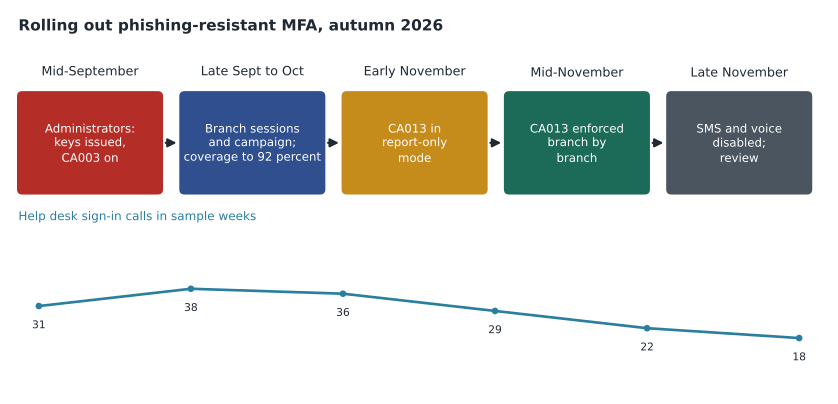
| Week | Members with a phishing-resistant method | Help desk sign-in calls that week |
|---|---|---|
| Start | 24 (admins and a few early adopters) | 31 |
| Week 2 | 96 | 38 |
| Week 4 | 211 | 36 |
| Week 6 | 348 | 29 |
| Week 8 | 417 of 453 | 22 |
Worked problem
Is the organization ready to enforce?
In week 8, 417 of 453 members have a phishing-resistant method. Of the 36 without one, 21 are on leave, 9 work at a branch whose session is next week, and 6 have repeatedly snoozed the registration campaign. Teodor wants to enforce CA013 (phishing-resistant MFA for all members). Should he, and how?
Show solution
- 417 of 453 is about 92 percent coverage, which is high but not complete.
- Enforcing for everyone today would block the 36 people without a method, including staff returning from leave.
- Conditional Access can be enforced group by group: include the branches whose registration is complete, and exclude a temporary "Registration pending" group.
- Members of the pending group get a Temporary Access Pass when they return or attend their session, register, and are removed from the group; the 6 who snoozed get a call from their manager.
Answer: Yes, but in stages. Enforce CA013 branch by branch with a small, time-limited exclusion group that the identity team empties as people register. The exclusion group itself is reviewed weekly so it cannot become a permanent loophole.
Step 5: Enforce, then remove weak methods
CA013 ran in report-only mode for two weeks, during which the insights workbook showed which sign-ins would have failed. Most failures came from two sources: the old visit verification app, which embedded its own browser and could not offer passkeys, and kiosk PCs where staff had used a password out of habit. The vendor shipped an update that used the system browser; the kiosks got a sign on the wall and a security key on a lanyard. Teodor then enforced CA013 branch by branch over two weeks, watching the sign-in logs for AADSTS53003 failures (lesson 11) after each step.
Only when enforcement was complete did he disable SMS and voice in the authentication methods policy, with no exception group left: staff without work phones already had security keys. Removing weak methods last matters: while they remain registered, an attacker who can trick a user into a weaker flow may still find a way in, but removing them before people have something better simply locks people out.
Step 6: Measure and hand over
In late November 2026, Teodor presented the results to the board with Ines and Dr. Marguerite Ostrander-Bey.
| Measure | September 2026 | Late November 2026 |
|---|---|---|
| Members signing in with phishing-resistant methods | About 5 percent (admins only) | All members except a short registration-pending list, emptied weekly |
| Members with SMS as their only method | 31 percent | None |
| Permanent Global Administrators | 7 | 2 emergency access accounts; 2 named administrators eligible through PIM |
| Password-related help desk calls per month | 120 | 18 |
| Average handling time for sign-in calls | 11 minutes | 5 minutes |
| Guest accounts with no owner or expiry | Unknown | None; all guests come through access packages |
| Pilot agents with a named sponsor | 0 of 2 | 2 of 2 |
"What happens next year?" the board chair asked. Teodor's answer described the operating rhythm that keeps an identity program healthy, and it is a good summary of this course: watch the registration and risk reports weekly; act on PIM alerts; run access reviews quarterly; check the Message center for changes such as retiring sync versions, policy migrations and new Microsoft-managed policies; re-test emergency access accounts; and treat every new app and every new agent as an identity to be registered, scoped and sponsored from day one.
Dr. Ostrander-Bey had the last word, and it was the reason the project had succeeded. "The nurses don't think about any of this. They tap their phone and the schedule opens. That's exactly how it should be." Strong identity security that people barely notice is the goal; the work in this course is how an administrator gets there.
Mapping the case to the exam
The AB-650 objectives behind each step are worth reviewing before MSBA-209:
| Step | Skills from the AB-650 study guide |
|---|---|
| Methods and registration | Configure and manage authentication methods; configure SSPR; implement Password Protection |
| Conditional Access and risk | Implement and manage Conditional Access policies, including ID Protection and MFA |
| Privileged roles | Manage roles for Microsoft 365, including PIM; create and manage administrative units |
| Guests and groups | Manage guest users and external access settings; create and manage groups |
| Troubleshooting | Investigate and resolve authentication issues; bulk management with Microsoft Graph PowerShell |
| Agents | Manage the lifecycle of agent identities with Entra Agent ID; secure agent access with access packages and Conditional Access; manage agent owners |
Communication and support
Technical steps were only half of the rollout. Ama's help desk team wrote three short guides: registering a passkey in Authenticator, signing in with a security key at a kiosk, and what to do if a phone is lost or replaced. Each fitted on one page with screenshots taken on Corvallin's own phones, and each was printed and posted at every branch as well as published on the intranet. Managers received a briefing a week before their branch session, so that they could answer questions and release staff for thirty minutes. The clinical director recorded a two-minute video explaining why the change mattered for clients' privacy, which did more for adoption than any technical explanation.
The lost-phone process deserved special care, because a passkey on a lost phone is gone with it. The process was: the user calls the help desk from any phone; the agent verifies identity with a video call against the staff photo; the agent issues a one-hour, one-time Temporary Access Pass; the user signs in on the replacement phone, registers a new passkey and removes the old device from My Sign-Ins; and Intune wipes the lost phone. The whole process took about fifteen minutes, and it removed any reason for the help desk to fall back on a password reset over the phone.
What could go wrong
Teodor kept a short risk register for the rollout and reviewed it weekly with Ines. The main risks and their mitigations were: users locked out after enforcement (staged enforcement, a temporary exclusion group and the lost-phone process); apps that could not use passkeys (inventory and vendor updates before enforcement); emergency accounts failing when needed (tested monthly); help desk overload during registration weeks (sessions scheduled branch by branch); and the exclusion group becoming permanent (reviewed weekly and owned by Teodor). None of the risks materialized beyond a busy fortnight for the help desk, which the call numbers in the registration table show.
The project also left a lasting artifact: a runbook. It described every policy and its purpose, the registration and recovery processes, the emergency access procedure and test schedule, the monthly inventory of apps, workload identities and agents, and the quarterly review calendar. When Teodor took a week off after the rollout, Ama and Felix ran the operating rhythm from the runbook without calling him once, which Ines considered the real test of whether the work was finished.
Common mistakes
MistakeBelieving number matching makes push notifications phishing resistant.
InsteadIt stops fatigue attacks but not real-time relays; only domain-bound methods resist phishing.
MistakeEnforcing phishing-resistant MFA before people have registered.
InsteadRegister first, enforce in report-only and then in stages, and remove weak methods last.
MistakeLeaving an exclusion group open-ended.
InsteadMake it temporary, owned and reviewed weekly until it is empty.
MistakeForgetting apps with embedded browsers or their own sign-in.
InsteadInventory them; they may need vendor updates or migration to Entra single sign-on.
MistakeTreating the rollout as finished at enforcement.
InsteadKeep an operating rhythm of reports, reviews, alerts and Message center checks.
Summary and key terms
- Real-time phishing relays defeat passwords, codes and push; phishing-resistant methods bound to the sign-in domain defeat them.
- Plan around real constraints: devices, shared kiosks, people without smartphones, guests and older apps.
- Pilot with administrators, register everyone with Temporary Access Pass sessions and campaigns, then enforce with an authentication strength in stages.
- Remove SMS and voice only after enforcement is complete, keeping a small reviewed exception group if needed.
- Measure coverage, help desk load and privileged access, and keep a regular operating rhythm afterwards.
- Attacker-in-the-middle phishing
- A fake page that relays a user's credentials and MFA response to the real service in real time.
- Device-bound passkey
- A passkey whose private key stays on one device, such as a security key or Authenticator.
- Registration coverage
- The share of users who have registered the methods a policy will require.
- Staged enforcement
- Turning on a policy for groups in sequence while watching the logs.
- Exception group
- A small, reviewed group excluded from a policy for a documented reason.
- Operating rhythm
- The recurring checks that keep identity controls effective over time.
Practice problems
Work each problem on paper first, then reveal the answer to check.
Why did Corvallin choose device-bound passkeys rather than synced passkeys for field staff?
Show answer
Their phones were company-owned and managed, and device-bound keys stay on a device Intune controls.
What should happen before disabling SMS in the authentication methods policy?
Show answer
Users must have registered stronger methods and enforcement must be complete.
Name three recurring tasks in an identity operating rhythm.
Show answer
Any three of: weekly registration and risk reports, PIM alerts, quarterly access reviews, Message center checks, emergency account tests.
Lesson quiz · 5 questions
Score 60% or more to complete this lesson.
Create a free account to save your progress, take quizzes and earn a certificate.