
MSBA-111 · Lesson 9 of 12 · 22 min
Notebooks and Pages
▶ Video coming soon A video version of this lesson is on the way.
Chats are good for asking and answering, but they are not a good place to keep work. Celestine's research report from lesson 6 lived in one conversation, Solveig's renewal agenda in another, and Tomasz's analysis in a third. None of them could be edited together, shared easily or picked up next month. At the ninth clinic Hamish introduced two places in the Microsoft 365 Copilot app designed for work that lasts longer than a conversation: Copilot Pages and Copilot Notebooks. Exam AB-730 refers to using Pages to share content and store knowledge, and both features changed often during 2026, so this lesson focuses on what each is for.
Copilot Pages: from a response to a shared document
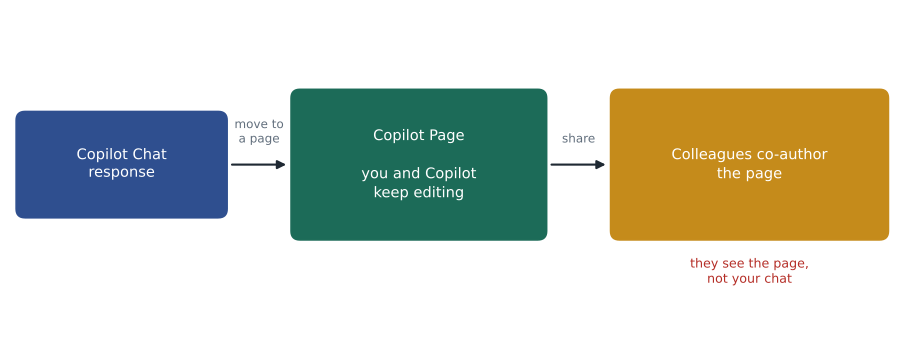
A Copilot Page is an editable, shareable canvas created from Copilot content. According to Microsoft's guidance, updated in November 2026, you can move a response from Copilot Chat to a new page, which opens side by side with the chat. You can then keep asking Copilot to update or add to the page, and you can edit it yourself at any time. When the page is ready, you can share it so that colleagues can see and work on the content without seeing your chat session. Pages support real-time co-authoring, so several people can edit at once, with one caveat Microsoft notes: Copilot's responses may not reflect a colleague's simultaneous edits until the page is refreshed or Copilot is engaged again.
Pages are built on the same collaborative technology as Microsoft Loop. Microsoft's guidance says Pages work mainly with Microsoft 365 content stored in SharePoint, OneDrive and Loop, and support the page and Loop file types. Pages can only use content the user has permission to view. Microsoft also states that Pages are available to work or school accounts with SharePoint or OneDrive storage, including accounts that do not have a Microsoft 365 Copilot licence, and to some personal Microsoft 365 subscriptions. That makes Pages useful for collaboration between licensed and unlicensed colleagues: the licensed person can generate content with Copilot, and everyone can edit the result.
Solveig tried it with her renewal agenda. She moved the agenda from her chat to a page, asked Copilot to add a section summarizing the client's open claims from the claims export, edited two items herself, and shared the page with Gus and the underwriter. All three worked on it before the meeting. "It's the first time the AI output and the team's edits have been in one place," Gus said. Afterward, Solveig added the meeting decisions to the same page, which became the record of the renewal discussion.
Worked problem
Deciding whether to share a chat or a page
Hamish produced a summary of three policy options in a Copilot Chat conversation that also contains his earlier drafts and a question he asked about a different client. He wants Celestine to review the summary. What should he share?
Show solution
- The chat contains unrelated material and drafts Celestine does not need.
- Moving the summary to a page creates a clean, editable document.
- Sharing the page lets Celestine review and comment without seeing the chat.
Answer: Move the summary to a Copilot Page, tidy it, and share the page. Colleagues see the page content, not the conversation that produced it.
Copilot Notebooks: a workspace for a project
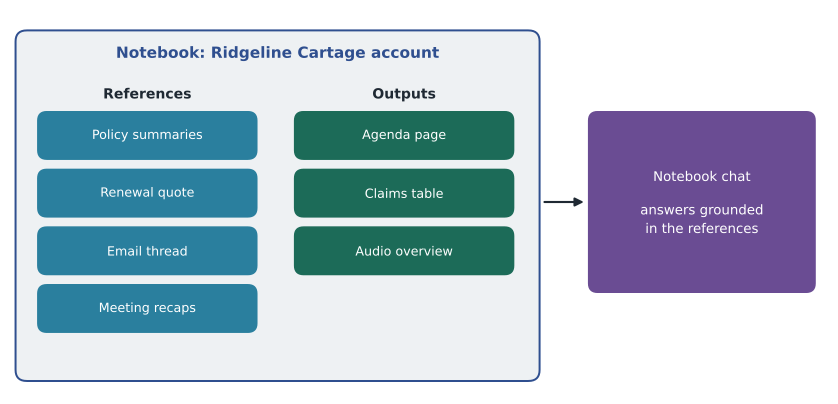
A Copilot Notebook is described by Microsoft as an AI-powered workspace for a project or topic. Where a page is a single document, a notebook gathers the materials for a piece of work in one place so that Copilot can use them together over time. You add references to a notebook, such as documents, emails, meeting recaps and pages, and then chat with Copilot inside the notebook. Its answers draw on the notebook's references, so you do not have to attach the same files to every new conversation. Notes, pages and files created during the work can be kept in the notebook alongside the sources.
Microsoft's update posts in 2026 show how quickly notebooks were developing. An October 2026 post on what was new in Notebooks described support for more file types as references, including Markdown, plain-text and rich-text files; Copilot creating or editing single Word, Excel or PowerPoint files from a notebook chat; interactive reports with export to PDF; recurring tasks set up as scheduled automations; and audio overviews that turn a notebook's sources into a spoken summary, in formats that include a critique-and-debate style, saved to OneDrive with the sensitivity labels of their sources. Several of those features were first released to Microsoft's Frontier early-access program, so what a given user sees depends on their organization's settings and rollout stage.
| Copilot Chat | Copilot Page | Copilot Notebook | |
|---|---|---|---|
| What it is | A conversation | An editable, shareable document | A workspace for a project or topic |
| Best for | Asking, drafting and refining | Turning output into something people edit together | Keeping sources, notes and outputs for ongoing work |
| Sources | Whatever you reference or Copilot finds | Content you add or ask Copilot to add | References you add to the notebook |
| Sharing | Not designed for co-editing | Share for real-time co-authoring | Share with care; check what access it grants |
| Lifespan | Short | As long as the document is useful | The length of the project |
Hamish set up a notebook for his own AB-730 preparation and another for the Ridgeline account. The Ridgeline notebook held the policy summaries, the renewal quote, the email thread with the client's office manager, the meeting recaps and Solveig's agenda page. Asking "What has changed since last year, and what did the client say about it?" inside the notebook produced an answer grounded in exactly those materials, without the cross-client confusion of lesson 3. Solveig adopted the pattern for her five largest accounts.
Choosing between a page and a notebook
The simplest rule is that a page is a document and a notebook is a folder with an assistant in it. If you need one thing that people will read and edit, such as an agenda, a briefing or a plan, use a page. If you need a place to gather materials and ask questions about them over weeks, use a notebook, and keep pages inside it for the documents you produce. Many teams use both: a notebook per client or project, with the pages they share living inside it.
Sharing and permissions
Pages and notebooks are Microsoft 365 content, so permissions and labels matter. A page can only include content the author can see, and sharing a page shares its content, not access to the underlying files it was built from. Labels on sources can carry over to outputs: Microsoft notes, for example, that audio overviews inherit the sensitivity labels of their sources. Check sharing options carefully before sharing a notebook, because a notebook collects many sources in one place and sharing it may give colleagues more access than you intend. Some users reported in Microsoft's community forums in 2026 that notebook sharing could only grant full edit access, which is one more reason to check the current options before sharing a notebook with someone who only needs to read one page.
Wendell added a records point. At Quillfield, decisions about a client's coverage had to be recorded in the client management system, not only in a Copilot page. Pages were excellent working documents, but the official record went where the firm's retention and regulatory rules applied. Every organization will have its own version of that rule, and it is worth knowing it before a page becomes the only place a decision is written down.
Worked problem
Planning a project notebook
Celestine wants a notebook for the small-trucking practice decision from lesson 6. List five references and two outputs it should contain.
Show solution
- References: the Researcher report, the trucking client list, the claims summaries for trucking clients, the leadership meeting recap, and the advisor emails about trucking.
- Outputs: a decision briefing page for the leadership team and a page listing next steps and owners.
- Check sharing: give leadership access to the briefing page; keep the notebook itself to the small project team.
Answer: Five references and two pages, with the briefing page shared more widely than the notebook. The notebook keeps the project's materials together; the pages are what other people read.
Prompting inside a page
Once content is on a page, you can keep working on it with Copilot. Prompts on a page tend to be editing instructions: "Add a section on next steps", "Shorten the background to three sentences", "Turn the list of changes into a table", "Add a short summary at the top for readers who will not read the rest". Because the page is the shared document, it is worth being careful about what you ask Copilot to add. Content that came from a source a colleague cannot open is now visible to them on the page, so check that anything you add is appropriate for everyone the page is shared with.
Pages also work well as the bridge between chat and the Office apps. A briefing that starts as a Copilot response can be shaped on a page with colleagues and then copied into a Word document or a PowerPoint deck for formal use. Solveig used her agenda page as the source for the one slide she showed at the client meeting, which kept the meeting materials consistent with the team's notes.
Prompting inside a notebook
Prompts inside a notebook can be shorter than in general chat, because the notebook's references supply the source. "What are the open questions?" in the Ridgeline notebook meant open questions about Ridgeline, drawn from Ridgeline's materials. That convenience has a flip side: if a reference in the notebook is out of date, every answer may use it. When a new version of a document arrives, replace the old reference rather than adding the new one beside it, or tell Copilot which one is current. Solveig made a habit of checking her notebooks' references at the start of each renewal cycle.
Worked problem
Keeping notebook references current
Solveig's Ridgeline notebook has last year's renewal quote as a reference. This year's quote arrives. What should she do so the notebook answers from the right figures?
Show solution
- Add this year's quote as a reference.
- Remove last year's quote, or rename it clearly as last year's and keep it only for comparison.
- Ask a test question, such as "What is the new deductible?", and check the citation points to this year's quote.
Answer: Replace or clearly label the old reference and test with a question whose answer she knows. A notebook is only as current as its references.
Audio overviews and other outputs
Audio overviews are worth a short note because they are a different kind of output. An audio overview turns a notebook's sources into a spoken summary, which some people find useful for catching up on a project while on the road or between meetings. The same checking rules apply: a spoken summary can contain the same errors as a written one, and it is harder to skim. Use audio overviews to get oriented, and go back to the written sources for details that matter. Because overviews are saved as files with the sensitivity labels of their sources, treat them as you would the source documents.
Pages, notebooks and the exam
AB-730 refers specifically to collaborating with Copilot Pages to share content and store knowledge. Expect scenario questions in which a user wants to share a Copilot response for editing, keep a growing body of project knowledge in one place, or collaborate with colleagues who do not have a Copilot licence. The answers follow the distinctions in this lesson: a page for a shared, editable document; a notebook for a project's sources and outputs; and a reminder that permissions on the underlying content still apply. Because these features change often, the exam tends to test their purpose rather than the exact steps to use them.
Common mistakes
MistakeSharing a whole chat to show someone one result.
InsteadMove the result to a page and share the page.
MistakeRe-attaching the same files to every new conversation about a project.
InsteadPut the project's references in a notebook and chat there.
MistakeSharing a notebook without checking what access it grants.
InsteadShare the specific pages people need and check notebook sharing options first.
MistakeTreating a page as the official record of a regulated decision.
InsteadRecord decisions where your organization's records rules apply.
Summary and key terms
- A Copilot Page turns chat output into an editable, shareable document that supports real-time co-authoring.
- Colleagues see a shared page, not the chat that created it, and Pages work for users without a Copilot licence.
- A Copilot Notebook is a workspace for a project, holding references and outputs so Copilot can answer from them over time.
- Notebook features developed quickly in 2026, including more reference types, file creation, scheduled automations and audio overviews.
- Permissions, sensitivity labels and records rules still apply to pages and notebooks.
- Copilot Page
- An editable, shareable canvas created from Copilot content and edited by people and Copilot together.
- Copilot Notebook
- An AI-powered workspace that gathers references and outputs for a project or topic.
- Reference (notebook)
- A document, email, meeting or page added to a notebook as a source.
- Co-authoring
- Several people editing the same content at the same time.
- Audio overview
- A spoken summary that Copilot creates from a notebook's sources.
- Frontier
- Microsoft's early-access program for new Copilot features.
Practice problems
Work each problem on paper first, then reveal the answer to check.
What do colleagues see when you share a Copilot Page?
Show answer
The page content, not the chat that produced it.
When is a notebook better than a page?
Show answer
When you need a place to gather a project's materials and ask questions about them over time.
Can people without a Microsoft 365 Copilot licence edit a shared page?
Show answer
Yes, Microsoft states that Pages are available to work accounts with SharePoint or OneDrive storage, including unlicensed ones.
Lesson quiz · 5 questions
Score 60% or more to complete this lesson.
Create a free account to save your progress, take quizzes and earn a certificate.