
MSBA-111 · Lesson 2 of 12 · 23 min
Iterating on a prompt
▶ Video coming soon A video version of this lesson is on the way.
The second prompt clinic opened with a confession from Gus Tremblay-Okoro, one of Quillfield's claims advocates. He had used the four-part checklist all week, and still his first answers were rarely right. "I write a good prompt, I get something close, and then I start again from scratch," he said. Hamish told him he was throwing away the most useful thing Copilot gives him: a draft he can react to. This lesson is about iteration, the practice of improving an answer through follow-up prompts in the same conversation instead of starting over.
The first answer is a draft
Even an excellent prompt leaves room for interpretation. Copilot has to choose an order, a level of detail, which facts to emphasize and which words to use. Some of those choices will not match what you had in mind, and you often only discover what you had in mind when you see a version that is wrong. That is normal. Experienced users treat the first response as a first draft from a capable assistant, not as a final answer or a failure. The question to ask is not "Is this right?" but "What would I tell a colleague to change?"
Because a conversation keeps its history, Copilot remembers the earlier request and its own reply when you send a follow-up. That makes small corrections cheap. "Shorter", "move the claims section first", "replace the jargon with plain words" and "add the renewal date from the invitation" are complete, useful follow-ups when they come straight after the draft they refer to. Starting a new chat throws that history away and forces you to restate everything.
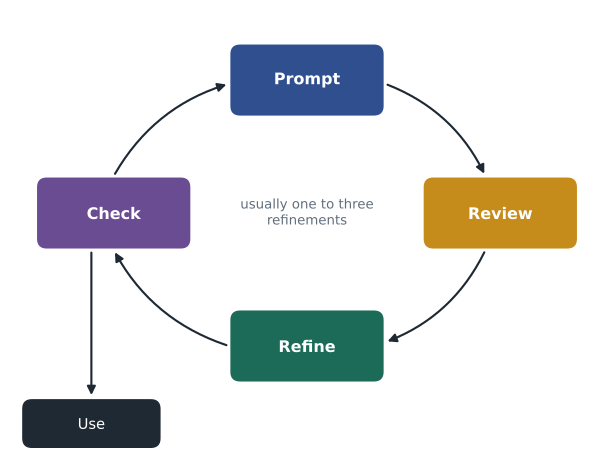
Reviewing a response before refining it
Good follow-ups come from good review. Hamish taught the group to read a response with four questions in mind, each matching a part of the original prompt. Did it do the job I asked for, or something nearby? Did it understand the audience and purpose? Did it use the sources I named, and does it say where each fact came from? Does it have the length, format and tone I need? Whatever fails the review becomes the next prompt.
It also helps to separate problems of content from problems of form. A content problem is a wrong fact, a missing point, or an argument that does not fit the situation. A form problem is length, order, headings or tone. Fix content first, because reshaping a draft that contains the wrong facts wastes a turn. Gus's claims summaries, for example, often left out the date of loss. He learned to ask "add the date of loss and the claim number for each claim from the claims system export" before asking for a tidier table.
Kinds of follow-up prompt
Most refinements fall into a handful of types. Knowing them makes it easier to say exactly what you want.
| Type of follow-up | What it does | Example |
|---|---|---|
| Narrow | Reduces scope or length | Keep only the three most important points. |
| Expand | Adds detail or a missing section | Add a paragraph on the deductible change. |
| Restructure | Changes order or format | Turn this into a table with one row per vehicle. |
| Re-target | Changes audience or tone | Rewrite this for the client, not for our underwriter. |
| Correct | Fixes a fact or source | The renewal date is March 1, not February 1; use the invitation. |
| Explain | Asks for reasoning or sources | Which file did the claim count come from? |
Specific follow-ups work better than general ones. "Make it better" leaves Copilot to guess what was wrong, and it will often change things you liked. "Keep the first paragraph, cut the second, and make the last line a question" changes only what you want changed. When you like most of a response, say which parts to keep. Copilot has no way of knowing which parts you were happy with unless you tell it.
Worked problem
Three refinements to a claims summary
Gus asked Copilot to summarize a client's open claims for a meeting. The response was a 400-word paragraph, used the internal phrase "reserve adequacy", and did not give claim numbers. Write follow-ups that fix it in a sensible order.
Show solution
- Fix content first: "Include the claim number, date of loss and current status for each open claim, taken from the claims export I attached."
- Then form: "Present the claims as a table with those three columns, followed by two sentences of overall summary."
- Then audience: "Replace internal terms such as reserve adequacy with plain words the client would understand."
Answer: Three short, specific follow-ups, content first and then form and audience, turned an unusable paragraph into a table Gus could hand to the client. Each follow-up referred to the draft already in the conversation, so none had to restate the original task.
When to start a new conversation
Iteration has limits. A long conversation that has drifted across several topics can confuse the model, because earlier turns still influence later answers. If you change to an unrelated task, or a conversation has gone off track and keeps repeating a mistake, start a new chat. Lesson 4 looks at conversation management in more detail; the short rule is one conversation per task. If a new chat is needed, carry forward only what matters by writing a fresh, complete prompt that includes the best parts of what you learned.
Another sign that it is time to start over is when you have corrected the same point twice. If Copilot keeps reintroducing a wrong date or a client name you removed, the earlier turns may be pulling it back. A clean prompt that states the correct facts up front usually solves that faster than a third correction.
Asking Copilot to help you prompt
A useful iteration technique is to ask Copilot to improve the prompt itself. You can write a rough request and add "Before answering, suggest a better version of this prompt and ask me any questions you need answered." Copilot will usually point out missing context or ask about the audience. Microsoft also offers a Prompt Coach agent, one of the optional agents built by Microsoft that users can add from the list of all agents, which is designed to teach prompt structure. Hamish used it with the clinic members who found the four-part checklist abstract: they pasted a weak prompt, read the coach's suggestions, and then wrote their own improved version, which kept them learning rather than copying.
Asking for clarifying questions is a related habit. For complex tasks, such as drafting a proposal or planning a project, a prompt that ends with "Ask me up to five questions before you start" often saves several rounds of correction. Copilot asks about the things it would otherwise have to guess, you answer once, and the first draft is much closer to what you need.
Comparing alternatives
Sometimes you do not know what you want until you see options. Asking for alternatives is a form of iteration that works in one turn: "Give me three subject lines for this email, one formal, one friendly and one urgent" or "Suggest two ways to structure this report and explain the trade-off." You can then pick one and continue. In Copilot Chat you can also ask for a response again with the regenerate option, which produces a different version of the same answer, but that is a blunt tool. A specific request for alternatives gives you options that differ in the way you care about.
Keeping track of what worked
Iteration teaches you which instructions your tasks need. When the same follow-ups appear every time ("use our client-friendly tone", "add the claim number"), they belong in the first prompt, and eventually in a saved prompt that you can reuse. Lesson 5 covers saving and sharing prompts. Hamish kept a simple note of follow-ups he typed more than twice. By the fourth clinic most of them had moved into his starting prompts, and his average number of turns per task had fallen from four to two.
Worked problem
Counting turns saved
Gus writes about 15 claims summaries a week. Before the clinic each took about 5 turns; after moving his usual follow-ups into a better first prompt, each takes about 2. If each turn costs him about 1.5 minutes of reading and typing, how much time does he save in a week?
Show solution
- Turns saved per summary: 5 - 2 = 3.
- Turns saved per week: 3 x 15 = 45.
- Minutes saved: 45 x 1.5 = 67.5 minutes.
Answer: A little over an hour a week. The estimate is rough, but it shows why investing in a reusable first prompt pays back quickly for frequent tasks.
Iteration and responsibility
Iterating does not change who is responsible for the result. A response that has been refined five times can still contain an error the first draft introduced, and a confident tone after several turns is not evidence of accuracy. The last step in the loop, checking, stays with the person. Wendell put it plainly at the clinic: "Copilot drafts, you decide." For claims and coverage documents at Quillfield that meant checking every number against the source system before anything went to a client. Lesson 10 covers checking and citing in detail.
There is also a quieter risk in long iteration: anchoring. After several rounds of polishing, people tend to accept the structure of the first draft even when a different approach would be better. If a response is fundamentally wrong for the task, a new prompt that describes the task differently is often more productive than another round of edits.
Iterating on tone
Tone is where iteration earns its keep, because it is hard to describe in advance and easy to recognize once you see it. Quillfield's account executives write to clients who range from first-time small business owners to experienced risk managers at large firms, and a tone that suits one feels patronizing or stiff to the other. Hamish suggested giving tone feedback in terms of the reader's reaction rather than adjectives. "This sounds like a sales pitch; the client just wants the facts" is more useful than "less salesy". "A risk manager would find the second paragraph obvious; cut it" tells Copilot what to change and why.
Comparative feedback also works well. "Make it about as formal as the email I referenced from last March" gives Copilot a concrete target. So does a short sample sentence: "Open more like this: Thanks for sending the updated driver list so quickly." When the group tried both techniques on the same client letter, the sample sentence moved the tone furthest in one step, because Copilot could match a voice it had actually seen.
Iterating on structure
Structure is the other area where a first draft often misses. A summary may be organized by document when the reader needs it organized by topic, or chronologically when the reader needs the most important point first. Ask for the structure you want directly: "Organize this by decision needed, not by meeting date" or "Put the recommendation first, then the reasons, then the background." For longer pieces, asking for an outline first is an efficient form of iteration. You agree the outline in one or two turns, then ask Copilot to write each section, and you avoid rewriting a full draft because the order was wrong.
Worked problem
Outline first, then draft
Celestine needs a two-page note to staff explaining Quillfield's new rules for using Copilot with client information. How can iteration on an outline save time?
Show solution
- Turn 1: "Propose an outline for a two-page staff note on our new rules for using Copilot with client information, based on [the policy document]."
- Turn 2: "Move the section on examples to second place and merge the two sections about email."
- Turn 3: "Now write the note from this outline, in plain language, about 800 words."
Answer: Two quick turns fix the structure before any long text exists, so the third turn produces a draft in the right order. Restructuring a finished 800-word draft would have taken longer and risked losing details.
Knowing when to stop
Iteration can become a habit that wastes time in its own right. If a draft is good enough for its purpose, stop. An internal note to a colleague does not need the polish of a client letter, and the fourth round of edits on a short email rarely improves it much. A useful test is to ask what would happen if you sent the current version. If the answer is "nothing bad, and the reader would understand it", the remaining changes are probably preferences, and you can make them yourself faster than you can describe them. Hamish's rule for the clinic was to edit by hand once the remaining changes were small and specific; prompts are for changes that would take longer to make than to describe.
Common mistakes
MistakeStarting a new chat every time the first answer is not perfect.
InsteadRefine in the same conversation so Copilot keeps the context and its draft.
MistakeSending vague follow-ups such as "make it better".
InsteadSay exactly what to keep, cut, add or change.
MistakePolishing form while a fact is still wrong.
InsteadFix content first, then length, order and tone.
MistakeCorrecting the same error a third time in a drifting conversation.
InsteadStart a new chat with a complete prompt that states the correct facts.
Summary and key terms
- The first response is a draft; most useful results come after a few specific refinements.
- Review a response against the goal, context, source and expectations before refining it.
- Fix content problems before form problems, and say which parts to keep.
- Start a new conversation for a new task or when a chat keeps repeating a mistake.
- Repeated follow-ups belong in the first prompt, and eventually in a saved prompt.
- Iteration
- Improving a response through follow-up prompts in the same conversation.
- Follow-up prompt
- A later turn that refers to an earlier response and asks for a change.
- Clarifying question
- A question Copilot asks before answering so it does not have to guess.
- Regenerate
- An option that asks Copilot for a different version of the same response.
- Prompt Coach
- An optional agent built by Microsoft that helps users improve prompt structure.
- Anchoring
- The tendency to keep the structure of a first draft even when another approach would be better.
Practice problems
Work each problem on paper first, then reveal the answer to check.
What should you fix first in a draft: wrong facts or the wrong format?
Show answer
Wrong facts, because reformatting a draft with errors wastes a turn.
Give one sign that you should start a new conversation instead of refining.
Show answer
The task has changed, or Copilot keeps repeating a mistake you have already corrected.
What can you add to a prompt for a complex task so the first draft is closer?
Show answer
A request for Copilot to ask clarifying questions before it starts.
Lesson quiz · 5 questions
Score 60% or more to complete this lesson.
Create a free account to save your progress, take quizzes and earn a certificate.