
MSBA-111 · Lesson 6 of 12 · 22 min
Using Researcher for deep research
▶ Video coming soon A video version of this lesson is on the way.
Celestine had a question that no single prompt could answer well. Quillfield was considering whether to build a specialist practice in insurance for small trucking firms, and before a leadership meeting in November she wanted a briefing that combined what the firm already knew, from client files, claims trends and advisor emails, with what was happening in the wider market. She asked Hamish whether Copilot could help. His answer was to show the clinic Researcher, one of the agents built by Microsoft into Microsoft 365 Copilot, designed for exactly this kind of multi-step research.
What Researcher is
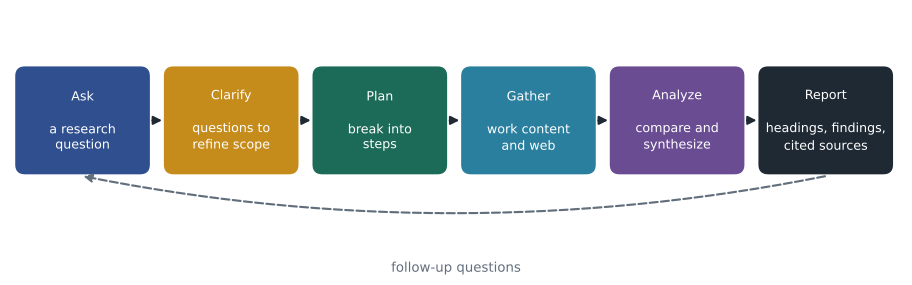
Microsoft describes Researcher as an AI assistant for complex, multi-step research. Instead of answering in one pass, like standard Copilot Chat, it plans an approach, gathers information from several sources, analyzes what it finds and produces a structured report with cited sources. It can combine your work content, meaning the files, emails, meetings and chats you have permission to access, with information from the web, and you can choose whether a task uses work resources, the web or both. Microsoft's FAQ adds that Researcher draws on Microsoft Graph, on connectors that bring other business systems' data into Microsoft 365, and on the Bing index for recent web information.
Researcher is built into the core Copilot experience for licensed users and appears among the agents in the Microsoft 365 Copilot app. Microsoft's FAQ, updated in November 2026, says it stays available in Copilot Chat under Tools even when an administrator has disabled other Copilot agents, and that administrators can block the Researcher and Analyst agents if the organization chooses. The FAQ also states a usage limit of 25 Researcher queries per user per month, which makes it a tool for the questions that deserve it, not for everyday lookups.
When to use Researcher instead of chat
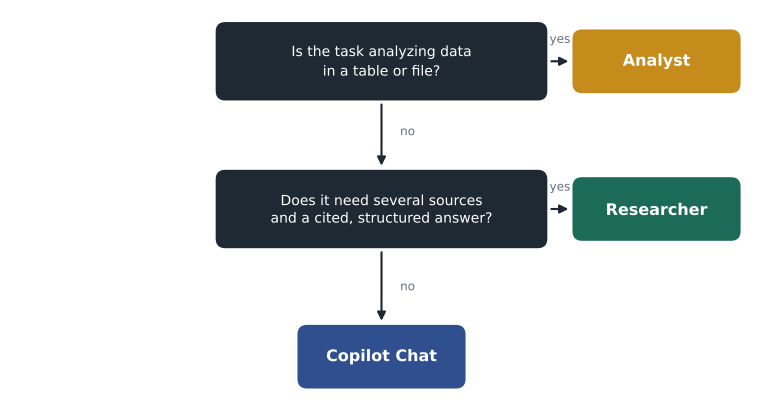
Standard Copilot Chat is fast and suits quick summaries, short drafts and direct questions. Researcher takes longer because it spends more time retrieving and analyzing. Microsoft's FAQ says simple queries typically finish in under five minutes and highly complex ones can take 10 to 45 minutes. That trade-off decides when to use it.
| Task | Better tool | Why |
|---|---|---|
| Summarize one email thread | Copilot Chat | One source, quick answer |
| Draft a reply to a client | Copilot Chat or Outlook | Short task with known sources |
| Brief leadership on a market opportunity using internal and external sources | Researcher | Many sources, synthesis, citations |
| Compare how competitors describe a new product line | Researcher | Web research across many pages |
| Find the renewal date in one policy file | Copilot Chat | A lookup, not research |
| Analyze a claims spreadsheet for trends | Analyst | Data analysis rather than reading |
Writing a research prompt
The four parts from lesson 1 still apply, but research prompts benefit from more scope and structure. State the question clearly, explain what the result is for, say which sources matter (internal files, particular sites, a time period), and describe the report you want. Because Researcher may ask clarifying questions, you can also leave some choices open and answer them when asked, which helps steer the work before it starts.
Worked problem
Celestine's research prompt
Write a Researcher prompt for Celestine's briefing on a possible small-trucking insurance practice.
Show solution
- Question: is there a viable opportunity for Quillfield in insurance for trucking firms with fewer than 25 vehicles in its region?
- Purpose: a briefing for the leadership meeting on November 19.
- Sources: Quillfield's client files and claims summaries for trucking clients, advisor emails mentioning trucking in the last year, and public industry and regulator information.
- Report: an executive summary, market overview, Quillfield's current position, risks, and three options with pros and cons, with every claim cited.
Answer: Research whether Quillfield has a viable opportunity to build a specialist practice in insurance for trucking firms with fewer than 25 vehicles in Saskatchewan and Alberta. This is for a leadership briefing on November 19. Use our trucking client files, claims summaries and advisor emails from the past year, and public industry and regulator sources. Structure the report as an executive summary, market overview, our current position, key risks, and three options with pros and cons. Cite every source and flag anything you could not confirm.
Researcher asked two questions before starting: whether Celestine wanted figures in Canadian or US terms, and whether "our current position" should include premium volumes or only client counts. Answering took a minute and meant the report came back in the shape she needed. When it finished, the report had headings, a table comparing the three options, a chart of claim frequency by vehicle type drawn from the internal summaries, and numbered citations linking to each source.
Reading a research report critically
A long, well-formatted report with citations looks authoritative, which is exactly why it needs careful reading. Hamish asked the clinic to check Celestine's report the way an editor would, and the group found three issues worth discussing. One market figure was cited to a trade association page but came from an article that was two years old. One internal claims statistic combined two years of data when the text implied one. And one recommendation leaned on a single advisor's email, which expressed an opinion rather than a fact. None of these made the report useless; all of them would have mattered in a leadership discussion.
The lesson is that citations make checking possible, not unnecessary. Open the sources behind the claims that matter most, especially numbers, dates and anything that drives a decision. Check the date of web sources. Notice when a conclusion rests on one source. And remember that Researcher, like Copilot Chat, can only use what you have access to: if the most relevant internal document is in a folder you cannot open, the report will not include it, and it will not tell you it is missing unless you ask what it could not find. Lesson 10 covers checking and citing in depth.
Worked problem
Budgeting Researcher queries
Hamish has the monthly limit of 25 Researcher queries described in Microsoft's FAQ. He expects to run 2 research tasks a week for 4 weeks, and each task usually needs one initial query plus one follow-up query. How many queries is that, and how many are left for unplanned work?
Show solution
- Tasks in the month: 2 x 4 = 8.
- Queries per task: 1 + 1 = 2, so 8 x 2 = 16 queries.
- Remaining: 25 - 16 = 9.
Answer: Sixteen planned queries, leaving nine. Using Copilot Chat for quick lookups keeps Researcher available for the questions that need it.
Follow-ups and next steps
A Researcher conversation can continue after the report. You can ask it to go deeper on one section, add a source it missed, compare two options more closely, or rewrite the executive summary for a different audience. Microsoft's description of Researcher includes key findings and suggested next steps in its reports, and those suggestions are often good starting points for follow-ups. Each follow-up that triggers new research counts toward the usage limit, so it is efficient to batch related questions into one follow-up where possible.
You can also carry a report into other tools. A common Quillfield workflow became: run Researcher, check the report, then move the agreed content into a Copilot Page or a Word document for editing and sharing. Pages are covered in lesson 9. The important point for responsible use is that the person who shares the result is responsible for it, whatever tool produced the first draft.
Researcher, privacy and the web
Wendell had one concern about Researcher: web research. When Researcher searches the web, the search queries it generates are based on your prompt, so a prompt full of client details can produce web queries containing them. Microsoft describes protections for web queries from Copilot, and administrators can turn web search on or off for the organization, though Microsoft's FAQ notes there is no per-site allow or block list for Researcher. The practical habit is simple: frame research questions about markets, products and public facts in general terms, and keep client-specific details in the internal part of the task. Celestine's prompt asked about "trucking firms with fewer than 25 vehicles", not about named clients.
Choosing models and modes
Researcher includes a model picker. Microsoft's FAQ describes choosing the model and mode from a picker at the top of the Researcher page, and notes that administrators can make additional models available, including models from Anthropic, under the organization's settings for AI subprocessors. For most business users the default is the right choice. The picker matters when an organization has guidance about which models to use for which kinds of work, or when you are comparing results. If your organization has no guidance, leave the default and focus on the prompt and the sources, which make a larger difference to the result.
Scoping a research task
The most common Researcher problem in the clinic was scope that was too broad. "Research the trucking insurance market" produced a long report that touched everything and helped with nothing. Narrowing by geography, business size, time period and the decision the research supports turned the same request into a useful briefing. A helpful way to scope is to finish the sentence "I need this research so that I can decide..." If you cannot finish it, the task may not be ready for Researcher yet, and a quick chat to clarify your own thinking may help first.
| Scope element | Too broad | Well scoped |
|---|---|---|
| Geography | North America | The two provinces or states where we operate |
| Business size | Trucking companies | Firms with fewer than 25 vehicles |
| Time period | Ever | The last three years |
| Decision supported | (none) | Whether to build a specialist practice next year |
Scope also applies to sources. Telling Researcher which internal sites, folders or document types matter, and which do not, keeps the report grounded in the right material. If a particular trade publication or regulator is the authority on a topic, name it. If certain material should be excluded, such as draft strategy documents that were never approved, say so.
Worked problem
Narrowing a broad request
Tomasz asks Researcher: "Research customer service in insurance." Rewrite it so the report helps him decide whether to add a live chat option to Quillfield's contact centre.
Show solution
- Name the decision: whether to add live chat in the next budget year.
- Narrow the scope: insurance brokers and carriers serving individuals and small businesses, the last three years.
- Add internal sources: the contact centre call analysis from Analyst and the client feedback survey results.
- State the report: adoption levels, effects on call volume and satisfaction, costs and risks, with citations.
Answer: Research whether Quillfield should add a live chat option to its contact centre in the next budget year. Look at insurance brokers and carriers serving individuals and small businesses over the last three years, and at our call analysis and client survey results. Report on adoption, effects on call volume and client satisfaction, typical costs and risks, with citations, and flag where evidence is weak.
What Researcher does not do
Researcher does not make decisions, and it does not know your organization's strategy unless that strategy is written down in content it can reach. It cannot interview people, visit sites or check facts that are not published. Microsoft's FAQ also notes that it does not process images as input. Its reports are a starting point for judgment, not a replacement for it. Celestine took the trucking report to the leadership meeting as background reading, alongside a one-page summary she wrote herself, and the decision was made by the leadership team after discussion, which is how it should be.
Sharing a research report
Researcher reports are often shared, and sharing them well takes a moment of thought. Remove sections the audience does not need, check that internal sources cited in the report are ones the audience is allowed to see, and add a short note on what the report is and is not. Celestine's covering note to the leadership team said that the report was AI-assisted background research, listed the sources she had personally checked, and named the two figures she thought were most uncertain. That note took five minutes and made the discussion better, because everyone knew how much weight each part of the report could bear.
Common mistakes
MistakeUsing Researcher for quick lookups and running out of queries.
InsteadSave Researcher for multi-source questions; use Copilot Chat for quick tasks.
MistakeTreating a cited report as verified.
InsteadOpen the sources behind key numbers and decisions, and check their dates.
MistakePutting client names into a prompt that will search the web.
InsteadFrame web research in general terms and keep client details internal.
MistakeAssuming Researcher found every relevant internal document.
InsteadAsk what it could not find, and remember it only sees what you can access.
Summary and key terms
- Researcher is a built-in agent for complex, multi-step research that produces structured, cited reports.
- It can combine work content, connector data and web information, and may ask clarifying questions first.
- It takes minutes rather than seconds, and Microsoft's FAQ sets a limit of 25 queries per user per month.
- Use Copilot Chat for quick tasks, Researcher for multi-source synthesis and Analyst for data analysis.
- Citations make checking possible; key facts, dates and single-source conclusions still need review.
- Researcher
- A built-in Microsoft 365 Copilot agent that plans and carries out multi-step research and produces cited reports.
- Work content
- Files, emails, meetings and chats a user can access, reached through Microsoft Graph.
- Web grounding
- Using information from the web to inform a response.
- Connector
- A connection that brings data from another business system into Microsoft 365 for search and Copilot.
- Citation
- A numbered reference in a response that links to the source of a statement.
Practice problems
Work each problem on paper first, then reveal the answer to check.
Give one reason to use Researcher instead of standard Copilot Chat.
Show answer
The task needs several sources, synthesis and a structured, cited report.
According to Microsoft's FAQ, what is the monthly Researcher limit per user?
Show answer
25 queries.
Why should research questions that search the web avoid client names?
Show answer
Web search queries are generated from the prompt, so client details could appear in them.
Lesson quiz · 5 questions
Score 60% or more to complete this lesson.
Create a free account to save your progress, take quizzes and earn a certificate.