
MSBA-111 · Lesson 11 of 12 · 22 min
Prompting mistakes to avoid
▶ Video coming soon A video version of this lesson is on the way.
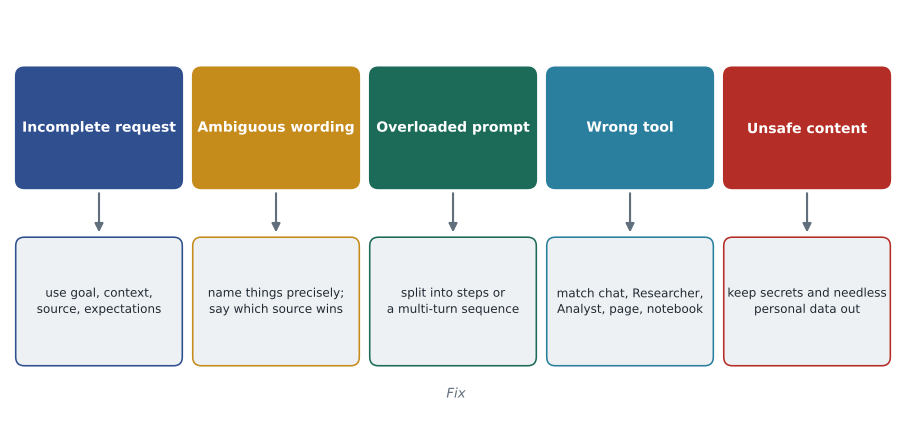
Before the final case study, Hamish used the eleventh clinic to collect the mistakes the group had made over ten weeks. He asked everyone to bring one prompt that had gone badly, and the boardroom whiteboard filled up quickly. Some were the same mistakes in different words; a few were subtle. This lesson organizes them into families, with a fix for each, so that you can recognize them in your own work and in exam scenarios, where the wrong answers often contain exactly these mistakes.
Family 1: The request is incomplete
The most common mistakes leave out one of the four parts from lesson 1. No goal: a topic instead of a task, such as "Ridgeline claims". No context: no audience or purpose, so Copilot writes for an average reader. No source: Copilot searches everything and may use the wrong client's content. No expectations: the answer arrives in a length and format that needs heavy editing. The fix in every case is the checklist. Gus said he had stopped thinking of it as a checklist after a few weeks; it had become the way he thought about any request.
Family 2: The wording is ambiguous
Ambiguity is harder to spot because the prompt seems clear to the person who wrote it. "Summarize the latest quote" is ambiguous if there are three quotes in the folder. "Compare our prices" is ambiguous about whose prices and which products. Pronouns cause trouble in long prompts: in "ask the carrier about the deductible and tell them it is too high", it is not clear whether "them" is the carrier or the client. Relative words cause trouble too: "recent", "large" and "most important" mean different things to different people, and Copilot has to guess.
The fixes are precision and priority. Name the specific item, ideally by referencing it. Replace relative words with definitions: "emails since October 1", "claims over 10,000 dollars". When several sources might disagree, say which one wins, as lesson 3 described. Solveig added a habit of her own: before sending an important prompt, she read it as if she were a new colleague who knew nothing about the account, and fixed anything that colleague would have to ask about.
Family 3: The prompt is overloaded
Some prompts try to do too much at once. "Summarize the account, analyze the claims trend, compare the renewal options, draft the client email and suggest an agenda" asks for five different outputs from one turn. Copilot will try, but each part gets less attention, the response becomes long and uneven, and checking it is harder. Overloaded prompts also make iteration awkward, because a follow-up has to say which of the five parts to change.
The fix is to split the work into steps, usually in one conversation, as lesson 4 showed. Gather and summarize first, then analyze, then draft. Each step produces something you can check before building on it. For work that will continue over days, a notebook holds the materials so each step can draw on them. A useful sign of an overloaded prompt is that it contains the word "and" between several different verbs.
Worked problem
Splitting an overloaded prompt
Split this prompt into a sensible sequence: "Look at the Ridgeline files, work out why the premium went up, compare it with what similar clients pay, write the client an email explaining it and set up a meeting."
Show solution
- Turn 1: summarize the reasons for the premium increase from the renewal letter and the underwriter's email.
- Turn 2: compare the increase with the renewal changes for two named similar clients, using their renewal summaries, as an internal table only.
- Turn 3: draft a short client email explaining the main reasons in plain language, without mentioning other clients.
- Separately: schedule the meeting in Outlook; Copilot can help draft the invitation, but the scheduling is a normal calendar task.
Answer: Three focused turns and a separate calendar task. The comparison with other clients stays internal, which also avoids a confidentiality problem the original prompt would have created.
Family 4: The tool does not fit the task
Many disappointing results come from using the right prompt in the wrong place. Asking Copilot Chat to total a spreadsheet column is a tool mistake; Analyst or Copilot in Excel would compute it. Using Researcher for a quick lookup wastes a limited monthly allowance. Building a long-running project inside one chat, instead of a notebook, leads to drift. Sharing a chat instead of a page exposes drafts and unrelated content. Exam AB-730 scenario questions often test this family: the prompt in the question is fine, and the right answer is a different feature.
| Task | Common mistake | Better choice |
|---|---|---|
| Calculate trends from a data export | Ask Copilot Chat to read the numbers | Analyst, or Copilot in Excel |
| Find one fact in one file | Run Researcher | Copilot Chat with the file referenced |
| A multi-week client project | One long chat | A notebook with the project's references |
| Share a result for editing | Share the chat | Move it to a page and share the page |
| Reuse a good prompt | Retype it from memory | Save it, or share a template |
Family 5: The content is unsafe
The last family is not about result quality but about what goes into prompts. Pasting passwords, account numbers or full personal records into a prompt is a mistake even in a secure, licensed environment, because it spreads sensitive data into conversation history, memories, drafts and pages where it does not need to be. Asking Copilot to compare one client's terms with another's in a client-facing email risks breaching confidentiality. Asking for advice that only a licensed professional should give, such as a final coverage decision, and then passing the answer on as if it were that advice, is a professional mistake as well as a prompting one.
Wendell's rule from lesson 1 covers most of these cases: would you be comfortable if the client saw this prompt? He added two more practical tests. Is every piece of personal data in the prompt necessary for the task? And will the output go anywhere that the people in the data would not expect? If either answer is uncomfortable, remove the data, generalize it, or do that part of the task another way.
Smaller mistakes worth knowing
A few smaller mistakes came up often enough to note. Asking leading questions, such as "Why is this renewal a good deal for the client?", tends to produce one-sided answers; ask "What are the advantages and disadvantages of this renewal for the client?" instead. Ignoring the date: Copilot may not know which documents are current unless you say so, and the web results it finds may be old. Accepting the first format: if a table would be easier to check than paragraphs, ask for a table. Over-politeness: courtesy does no harm, but long apologies and preambles in a prompt add words without adding information. Forgetting to close the loop: when an answer is wrong because a source file is wrong, fix the file, or the next person will get the same answer.
Worked problem
Spot the mistakes
Identify the mistakes in this prompt: "Hi Copilot, sorry to bother you! Can you please explain why the new plan is better for Lakeview Dental's staff and include the employees' salaries from the census file so they can see what they will save?"
Show solution
- Leading question: it assumes the new plan is better.
- Unsafe content: it puts employees' salaries into a document for staff to see.
- No source or expectations: which plan documents, what length, what format?
- Unnecessary preamble: harmless, but it adds nothing.
Answer: A better prompt: "Using [the current plan summary] and [the proposed plan summary], list the main differences for Lakeview Dental's employees, including any advantages and disadvantages, in a one-page plain-language table. Do not include individual salaries or other personal information."
Turning mistakes into practice
Hamish ended the session with a suggestion for exam preparation. AB-730 rewards recognizing what is wrong with a prompt or a choice of feature, so practice by diagnosing. Take your last five disappointing results, name the family of each mistake, and rewrite the prompt. Then do the same with a colleague's. The habit carries over to work: most teams that use Copilot well have a few people who are good at spotting why a prompt failed, and they share what they learn.
Mistakes with conversations and features
A few mistakes involve how people use conversations and features rather than how they write prompts. Never starting fresh leads to drift, as lesson 4 described. Never saving means good prompts are retyped from memory and slowly degrade. Over-trusting agents means relying on a shared agent without knowing its sources or owner. Ignoring citations means checking by feel. And treating a feature preview as permanent causes problems when Microsoft changes or renames it, which happened to several features during 2026. Each of these has a habit that fixes it, and most were covered earlier in the course: one conversation per task, save what works, read an agent before relying on it, open the sources, and check current documentation.
A diagnosis routine
When a result disappoints, a quick diagnosis is faster than random rewording. Hamish's routine had four questions, asked in order. Was the request complete? If not, add the missing part. Was it clear? If not, define the ambiguous term or name the item. Was it one task? If not, split it. Was it the right tool? If not, switch. If all four answers are yes and the result is still poor, the problem is usually the source content itself, such as an out-of-date file, a missing transcript or a document Copilot cannot read well, and the fix lies outside the prompt.
| Ask | If no | If yes |
|---|---|---|
| Was the request complete? | Add the missing goal, context, source or expectations | Next question |
| Was it clear? | Define terms and name specific items | Next question |
| Was it one task? | Split it into steps | Next question |
| Was it the right tool? | Switch to the feature that fits | Check the source content |
Worked problem
Diagnosing a poor result
Gus asked Copilot Chat, with the claims export referenced: "Give me the average claim cost by vehicle type and draft a note to the underwriter about it." The averages look wrong and the note is vague. Diagnose using the routine.
Show solution
- Complete? Mostly, but the note has no audience detail or format.
- Clear? "Vehicle type" may be coded differently in the export; worth defining.
- One task? No: a calculation and a draft in one turn.
- Right tool? No: averages across an export need Analyst or Excel.
Answer: Calculate the averages with Analyst, defining the vehicle type codes; check them; then, in a separate turn, draft the note to the underwriter with the confirmed figures and a clear purpose and length. Two problems in the routine explain both disappointing parts of the result.
Diagnosis practice for the exam
Scenario questions in AB-730 often describe a user, a goal and a disappointing result, then ask what the user should do. The routine maps neatly onto them. If the scenario shows a prompt without a source, the answer usually adds a reference. If it shows a data task in chat, the answer usually involves Analyst or Excel. If it shows a long, drifting conversation, the answer usually starts a new chat. If it shows sensitive data in a prompt, the answer removes or generalizes it. Reading the scenario for which of the five families it belongs to is often the quickest way to the right option.
The mistakes that matter most
Not all mistakes carry the same cost. An incomplete prompt costs a few minutes of rework. An ambiguous one may cost a wrong answer that someone catches. The expensive mistakes are the ones that reach a client or a decision unnoticed: an unsafe prompt that puts personal data where it should not be, a wrong tool that produces a confident but incorrect number, or an unchecked answer passed on as fact. Hamish suggested that if the clinic members remembered only one thing from the session, it should be to slow down in proportion to the consequences. A quick internal note can tolerate a sloppy prompt; a client document cannot.
Common mistakes
MistakeWriting prompts that make sense only to you.
InsteadRead the prompt as a new colleague would and fix anything ambiguous.
MistakeAsking for five outputs in one turn.
InsteadSplit the work into steps in one conversation, or use a notebook.
MistakeAsking leading questions.
InsteadAsk for advantages and disadvantages, or for the evidence on both sides.
MistakePutting personal data into a prompt because the system is secure.
InsteadInclude only the data the task needs, and consider where the output will go.
Summary and key terms
- Incomplete prompts lack a goal, context, source or expectations; the four-part checklist fixes them.
- Ambiguous prompts need precise names, defined terms and a statement of which source wins.
- Overloaded prompts should be split into steps in one conversation or organized in a notebook.
- Many poor results come from using the wrong tool; match the task to chat, Researcher, Analyst, a page or a notebook.
- Unsafe prompts put unnecessary sensitive data into Copilot or produce output that breaches confidentiality.
- Ambiguous prompt
- A prompt that could reasonably be read in more than one way.
- Overloaded prompt
- A prompt that asks for several different outputs in one turn.
- Leading question
- A question that assumes its own answer and invites a one-sided response.
- Relative term
- A word such as recent or large whose meaning depends on the reader.
- Data minimization
- Including only the personal or sensitive data a task actually needs.
Practice problems
Work each problem on paper first, then reveal the answer to check.
Name the five families of prompting mistakes.
Show answer
Incomplete request, ambiguous wording, overloaded prompt, wrong tool, unsafe content.
How would you rewrite "Why is this a good deal?" to avoid a leading question?
Show answer
Ask for the advantages and disadvantages, for example "What are the pros and cons of this renewal for the client?"
What is a quick sign that a prompt is overloaded?
Show answer
It joins several different verbs with "and", asking for several outputs at once.
Lesson quiz · 5 questions
Score 60% or more to complete this lesson.
Create a free account to save your progress, take quizzes and earn a certificate.