
MSBA-111 · Lesson 10 of 12 · 22 min
Checking and citing Copilot answers
▶ Video coming soon A video version of this lesson is on the way.
Wendell Pike-Amari ran the tenth clinic himself. As Quillfield's compliance officer, he had watched the firm's use of Copilot grow since the summer, and he had collected a small file of near misses: an email to a client that quoted last year's deductible, a coverage summary that described an endorsement the client had never bought, and a meeting recap that attributed a promise to the wrong person. None had reached a client, because someone had checked. His session was about making that checking routine, quick and reliable.
Why confident answers can be wrong
Copilot's answers are fluent, well organized and confident, whether or not they are correct. A language model produces text that is likely given its input, and when the input is incomplete or ambiguous it can fill the gap with something plausible. This is often called a hallucination, or more precisely a fabrication or ungrounded statement. Grounding in your work content reduces the problem a great deal but does not remove it. Copilot can still misread a table, combine two documents of different dates, attribute a statement to the wrong speaker in a transcript, or rely on an older version of a file. The tone of the answer gives no signal about which statements are reliable.
There are other failure modes too. An answer can be accurate but incomplete, leaving out the one exception that matters. It can reflect a source accurately when the source itself is wrong. And it can be technically correct but misleading for the audience, for example by using an insurance term a client will misunderstand. Checking is about all of these, not only about invented facts.
Using citations
When Microsoft 365 Copilot uses work content or web results, its responses usually include citations: numbered markers in the text with a list of references that link to the source files, emails, meetings or web pages. Hovering over or selecting a citation shows which source a statement came from, and you can open the source to check it. Citations are the most important checking tool Copilot gives you. They tell you where to look, and their absence tells you something too: a specific figure with no citation deserves extra suspicion.
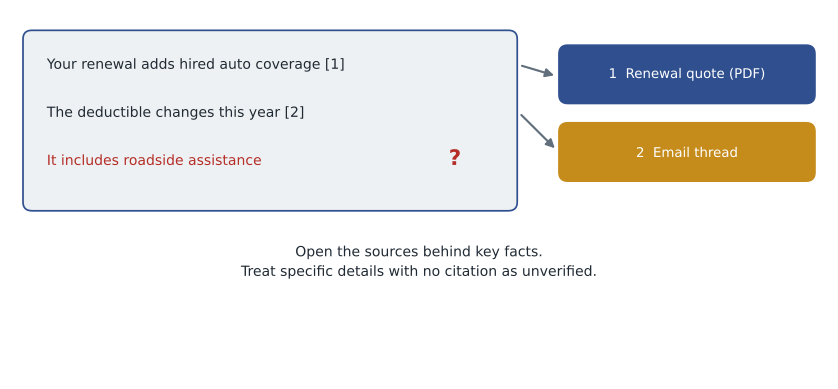
A citation shows that Copilot used a source, not that it used the source correctly. Wendell's deductible example had a citation pointing to the right client's policy file, but it was the previous year's version, sitting in the same folder with a similar name. The statement accurately reflected the cited file; the file was simply the wrong one. Checking means opening the source, confirming it is the right and current document, and confirming that the statement matches what the source actually says.
A checking routine
Wendell proposed a routine with a simple principle: check in proportion to the consequences. An internal note to yourself needs a quick read. A client email that mentions coverage, premiums, dates or obligations needs every such detail checked against the authoritative source. A document that supports a decision needs the key facts checked and the reasoning reviewed by someone who understands the subject.
| Level | Typical output | What to check |
|---|---|---|
| Light | Notes for yourself, brainstorming, a first draft | Read it; correct anything obviously wrong |
| Standard | Internal emails, meeting recaps, summaries for colleagues | Names, dates, decisions and action items against the sources |
| Full | Client communications, coverage descriptions, figures, anything regulated | Every fact against the authoritative source; tone and clarity for the reader; a second reviewer where required |
Some prompts make checking easier. Ask Copilot to quote the passage it relied on for a key statement: "Quote the sentence from the renewal letter that gives the new deductible." Ask it to separate facts from interpretation: "List the facts from the sources, then your suggestions, in separate sections." Ask it to flag uncertainty: "Mark anything you could not confirm in the sources." And ask what it did not find: "Is there anything I asked about that the sources do not cover?" These instructions do not make Copilot infallible, but they turn hidden assumptions into visible ones.
Worked problem
Checking a coverage summary
Copilot drafted a client summary saying: "Your renewal adds hired auto coverage [1], keeps your 2,500 dollar deductible [2], and includes roadside assistance." Source 1 is this year's renewal quote and source 2 is last year's policy summary. What should the checker do?
Show solution
- Statement 1 cites the right document; open the quote and confirm hired auto coverage is listed.
- Statement 2 cites last year's summary; check this year's quote for the current deductible.
- Statement 3 has no citation; search the quote for roadside assistance and remove it if it is not there.
Answer: Confirm the first statement, re-check the deductible against this year's quote, and treat the uncited roadside assistance claim as unverified until it is found in the source. In Wendell's real example, the deductible had changed to 5,000 dollars and roadside assistance was not part of the policy.
Meeting recaps and transcripts
Recaps from meeting transcripts deserve their own check. Transcription can mishear names and numbers, speakers can be misidentified, and a summary can turn a suggestion into a decision. Wendell's third near miss came from a recap that recorded "Quillfield will waive the fee" when the advisor had said "I'll ask whether we can waive the fee". Before sending a recap to clients or using it as a record, read the decisions and action items against your own memory of the meeting, and check the transcript for anything important. If you were not in the meeting, ask someone who was.
Citing Copilot in your own work
The other half of this lesson is how you acknowledge AI assistance. Practices vary by organization and by type of document, and Quillfield wrote its own short policy. Internally, nobody needed to label an email as AI-assisted, because the sender was responsible for it either way. For client-facing documents that summarized policy terms, the policy wording itself remained the authoritative source, and summaries pointed clients to it. For reports to leadership based on Researcher or Analyst, the author listed the main sources, not just "Copilot", so readers could follow the evidence. And nothing regulated was sent on the strength of an AI summary alone.
The common thread is that the person, not the tool, is accountable. Microsoft's own responsible AI principles, which MSBA-110 introduced, include reliability and safety, transparency and accountability. For an everyday user, those principles become habits: check before you rely on an answer, be open about how a document was produced when it matters to the reader, and own what you send.
Worked problem
How long checking takes
Solveig's client summaries contain about 12 checkable facts each. She checks each in about 30 seconds using the citations. She writes 8 summaries a week. How much checking time is that per week, and what does it compare with writing the summaries by hand at 20 minutes each?
Show solution
- Checking per summary: 12 x 30 seconds = 6 minutes.
- Per week: 6 x 8 = 48 minutes.
- Writing by hand: 20 x 8 = 160 minutes.
Answer: About 48 minutes of checking, against 160 minutes of writing by hand. Even with careful checking, Copilot saves time; skipping the check would save a little more time and add real risk.
Giving feedback
Copilot responses include controls for rating a response as helpful or not helpful and for leaving comments. Feedback goes to Microsoft to help improve the product, and organizations may have their own ways of collecting reports about problems, such as a help desk category or a channel where users share examples. Quillfield asked users to report two kinds of problem internally: answers that revealed content the user should not have been able to see, which pointed to an oversharing problem for IT, and repeated wrong answers about the same topic, which often meant a source file needed fixing.
Checking web-grounded answers
Answers that use the web need some checks of their own. Web pages vary widely in quality and age, and a citation to a reputable-looking site is not proof that the information is current or applies to your situation. For Quillfield, the most common problem was jurisdiction: a page explaining rules in one province or state, cited in an answer about another. Check the date of each web source that supports an important point, check that it applies to your location and industry, and prefer primary sources, such as a regulator or the organization that made an announcement, over articles summarizing them.
| Question to ask of a web source | Why |
|---|---|
| When was it published or updated? | Rules, prices and products change |
| Which place does it apply to? | Insurance and employment rules differ by province or state |
| Who published it? | A regulator or the original source is more reliable than a summary |
| Does the page actually say what the answer claims? | Answers can stretch or misread a source |
Checking for what is missing
The hardest errors to catch are omissions. A summary of a policy change can be accurate in every sentence and still leave out the exclusion that matters most to the client. Two techniques help. First, ask Copilot directly: "What important points from [the source] are not in this summary?" A second pass with a different question often surfaces omissions. Second, keep a short list of the things that must always be covered for your common tasks. For renewal summaries at Quillfield, the list was premium, deductible, limits, exclusions that changed and any action needed from the client. Checking against a list takes seconds and catches gaps that reading alone misses.
Worked problem
Using a must-cover list
A renewal summary drafted by Copilot mentions the premium, the deductible and the limits, and says no action is needed. The must-cover list is premium, deductible, limits, changed exclusions and client actions. What should the checker do?
Show solution
- Compare the summary with the list: changed exclusions are not mentioned.
- Ask: "Does the renewal quote change any exclusions compared with last year's policy?"
- Check the answer against both documents and add any change to the summary; confirm that no client action is genuinely needed.
Answer: The list exposed a missing topic. In this case the renewal added an exclusion for vehicles over a certain age, which did require the client to send an updated vehicle schedule, so "no action needed" was wrong too.
Making checking a team habit
Individual habits are easier to keep when the team shares them. Quillfield added three small practices across the commercial lines team. Client-facing drafts carried a short note in the file or email to the reviewer saying which sources had been checked. New users paired with an experienced user for their first few client emails. And near misses, like the ones Wendell collected, were shared without blame in a monthly ten-minute slot at the team meeting, so everyone learned from them. Checking stopped being something people did because compliance asked, and became part of how the team worked.
Responsible AI in everyday checking
Microsoft's responsible AI principles, introduced in MSBA-110, can sound abstract, but checking is where they become concrete for an everyday user. Reliability means confirming important facts before relying on them. Fairness means noticing when a draft describes clients or colleagues in a way that reflects a stereotype, and fixing it. Privacy means making sure a checked draft does not include personal information the reader should not see. Transparency means being honest about how a document was produced when the reader would want to know. And accountability means the person who sends the output owns it. Wendell ended the session by reading those five sentences aloud and asking everyone to add them to the back of the prompt checklist.
Common mistakes
MistakeTrusting an answer because it has citations.
InsteadOpen the cited source and confirm it is current and says what the answer claims.
MistakeOverlooking specific details that have no citation.
InsteadTreat uncited figures, dates and promises as unverified.
MistakeSending a meeting recap to a client without reading it against the meeting.
InsteadCheck decisions and action items, especially names and numbers.
MistakeCrediting "Copilot" as the source in a report.
InsteadCite the underlying sources so readers can follow the evidence.
Summary and key terms
- Copilot's answers are fluent and confident whether or not they are correct; grounding reduces errors but does not remove them.
- Citations show which source a statement came from; open the source to confirm it is current and matches.
- Check in proportion to the consequences, with full checks for client, financial and regulated content.
- Prompts can ask for quotes, separation of facts and suggestions, flags for uncertainty and what was not found.
- The person who sends the output is accountable; cite underlying sources rather than the tool.
- Hallucination
- A plausible but unsupported or false statement produced by an AI model.
- Citation
- A numbered marker in a response linking a statement to its source.
- Authoritative source
- The document or system that is the official record for a fact, such as the policy wording.
- Verification
- Confirming a statement against its source before relying on it.
- Accountability
- The principle that people remain responsible for decisions and output produced with AI.
Practice problems
Work each problem on paper first, then reveal the answer to check.
What does a citation prove, and what does it not prove?
Show answer
It shows which source Copilot used; it does not prove the source is current or that Copilot represented it correctly.
Name two prompt instructions that make checking easier.
Show answer
Any two of: quote the passage relied on, separate facts from suggestions, mark anything unconfirmed, list what the sources do not cover.
Why do meeting recaps need checking?
Show answer
Transcription can mishear names and numbers, misidentify speakers or turn a suggestion into a decision.
Lesson quiz · 5 questions
Score 60% or more to complete this lesson.
Create a free account to save your progress, take quizzes and earn a certificate.