
MSBA-103 · Lesson 7 of 12 · 18 min
Managing agents in the Microsoft 365 admin center
▶ Video coming soon A video version of this lesson is on the way.
By the seventh working session, Corvallin had agents in three tools, two pending requests, a blocked third-party agent and a list of Microsoft-built agents it had decided to allow. Teodor realized he could no longer answer a simple question from Ines without opening four screens: "How many agents do we have, who owns them, and is anyone actually using them?" That session was spent in one place, the Agents area of the Microsoft 365 admin center, which Microsoft describes as the control plane for all agents managed in an organization.
AB-900 asks candidates to monitor agents, including usage, operational insights and the agent lifecycle, by working with the Microsoft 365 admin center and the Power Platform admin center. This lesson covers the Microsoft 365 side: the overview, the registry, agent details, installation and activation, ownership, the settings page and tools. The Power Platform side follows in lesson 8.
The Agents area at a glance
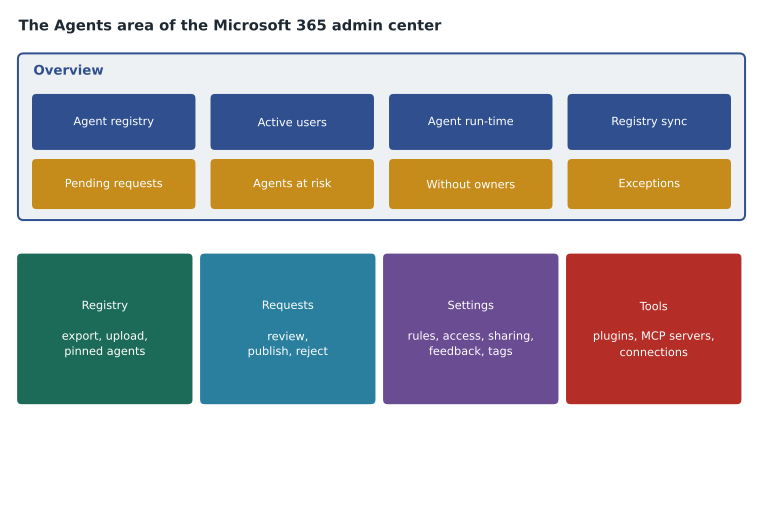
Agents has its own entry in the navigation of the Microsoft 365 admin center. Microsoft's documentation in late 2026 describes an Overview page, the Registry (the inventory of agents), Requests under All agents, Settings and Tools. Pages change often, so the names in this lesson are taken from Microsoft's documentation of October and November 2026; an administrator should expect small differences in their own tenant.
The Overview page
The Overview page is the place to start each week. Microsoft documents four headline metrics: the number of agents in the agent registry, active users over the last 30 days, agent run-time and the status of registry sync. Below them are governance cards that point to work needing attention: pending requests for agents, agents at risk, agents without owners and agents with exceptions. Each card links to the list it summarizes, and the Agents without owners card links straight to the action for assigning an owner.
Microsoft is explicit that only some roles can act on what the Overview shows. Governance actions such as approving requests or assigning ownership can be performed only by the AI Administrator or Global Administrator roles; other roles with access can monitor the gaps but not fix them. That fits a common pattern in which a help desk lead watches the cards and an AI Administrator acts.
The registry
The Registry, also called the agent registry, is the inventory of every agent the organization manages. Microsoft describes it as covering Microsoft-built, partner-built and custom line-of-business agents, which it labels "Built by your organization". Each agent shows who created it (your organization, a third party or Microsoft), its type, its status and its usage. Microsoft's list of agent types in the registry is long: Copilot Studio agents of several kinds, Microsoft Foundry agents, Agent Builder agents, SharePoint agents, Agents Toolkit agents and agent instances built with the Agent 365 SDK.
The registry has list-level actions as well: Export to Excel, for reporting and audits; Upload custom agent, for agents a developer packages outside the usual tools; and Manage pinned agents, for choosing which agents appear prominently for users.
Worked problem
Reading the registry export
Teodor exports the registry at the end of October. It lists 37 agents: 9 built by Microsoft, 2 by third parties and 26 built by the organization. Of the 26, 19 are personal Agent Builder agents with one user each, 4 are SharePoint agents, 2 are Copilot Studio agents and 1 is the blocked VisitWise test. Three of the organization's agents have no owner because their makers left. How many organization-built agents have more than one user or need governance action, and what should he do about the ownerless ones?
Show solution
- Personal agents with one user each: 19, which need no action beyond the normal rules.
- Remaining organization-built agents: 26 minus 19 is 7; these are shared, published or blocked and need active governance.
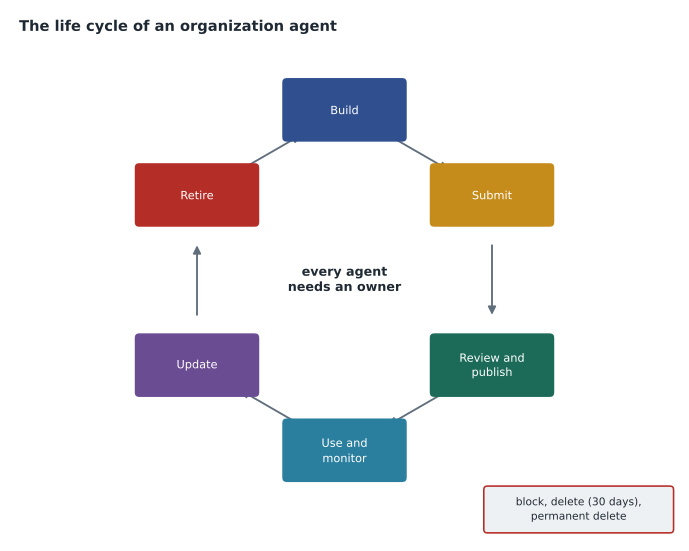
- Ownerless agents: 3. Microsoft recommends that every agent has a designated owner responsible for its lifecycle.
- For each ownerless agent, check its usage. If it is in use, assign a new owner who understands its purpose; if it is not, block it and delete it after a notice period.
Answer: Seven organization-built agents need active governance, and the three ownerless ones need either a new owner or retirement. Teodor reassigned one, used by the quality team, to its manager and scheduled the other two for deletion.
Agent details
Selecting an agent opens its details, which Microsoft describes as covering ownership, usage and security signals, along with the agent's capabilities, data sources and permissions. The details page is where most single-agent actions happen.
| Action | What it does | Notes from Microsoft's documentation |
|---|---|---|
| Install | Installs the agent for all users or for specific users or groups | Users may still need to sign in or set up connections; admin consent may be needed |
| Uninstall | Removes an installed agent for the organization or for chosen users or groups | Appears only if the agent is installed |
| Activate | Lets only selected users or groups create instances of an agent | Requires AI Administrator approval with a governance template applied |
| Block or Unblock | Restricts or restores access across the organization | Effect varies by agent type |
| Assign new owner | Reassigns an ownerless or shared agent | Agent Builder and Copilot Studio agents only; the previous owner loses access |
| Add owner or Remove owner | Adds or removes an additional individual owner | Agent Builder agents only; groups are not supported and the last owner cannot be removed |
| Start or Stop | Starts or stops the underlying Azure infrastructure | Microsoft Foundry agents only |
One limit surprised the group. These actions apply only to the agent selected. They do not extend to the plugin's skills, shared MCP servers or connections that an agent uses, which are managed separately under Agents > Tools. If an agent used a connection that should be revoked, blocking the agent would not revoke the connection for other agents that shared it.
Settings
The Settings page holds the organization-wide rules. Lesson 5 covered sharing and user access, and lesson 6 covered agent and plugin access; Microsoft documents several more settings in the same place.
| Setting | What it controls |
|---|---|
| Agent management rules | Bulk rules, such as installing Microsoft-built agents, reassigning ownerless Agent Builder agents to the owner's manager, blocking ownerless agents without usage, applying a policy template, and rejecting publish requests older than a set number of days |
| Agent and plugin access | Whether Microsoft-built, organization-built and external-publisher agents and plugins appear in the store |
| Policy templates | Predefined security settings applied to agents |
| Sharing | Who can share Agent Builder agents: All users, No users or Specific users |
| User access | Who can access and install agents and plugins; the default is All users |
| Agent feedback sharing | Whether makers receive users' thumbs-up, thumbs-down and comments: No agents, All agents or Selected agents |
| Tags | Up to 50 tags with descriptions for organizing agents; deleting a tag removes it from every agent |
Agent management rules were the most useful discovery of the session. Rather than check the ownerless card every week, Teodor set two rules: reassign ownerless Agent Builder agents to the former owner's manager, and reject publish requests that had been pending for more than 30 days, so makers had to resubmit stale requests with current content. He deliberately did not use the rule that blocks ownerless agents without usage, because Corvallin had so few agents that he wanted to look at each one himself.
He also turned on agent feedback sharing for all agents, so Nadia and Ama would see users' ratings of their agents, and created five tags: Pilot, Clinical-adjacent, Finance, HR and IT. Tags cost nothing and made the registry export much easier to read.
Corvallin agent settings (decision log, Nov 2026)
  Agent and plugin access:   Microsoft-built ON, organization-built ON, external-publisher OFF
  User access:               Specific users or groups -> Copilot-Pilot, IT-Team, Schedulers
  Sharing (Agent Builder):   Specific users -> Agent-Sharers
  Feedback sharing:          All agents
  Management rules:          reassign ownerless Agent Builder agents to manager; reject requests pending > 30 days
  Tags:                      Pilot, Clinical-adjacent, Finance, HR, IT
  Review owner:              Teodor (AI Administrator, eligible in PIM, 4-hour activation)
Limiting user access to three groups was the most cautious line in the record. Other staff kept Copilot Chat with enterprise data protection, but would not see or install agents at all during the pilot, not even web-grounded ones that cost nothing. Ines wanted it that way for 90 days, so that every agent conversation in the organization came from a person the pilot team could ask for feedback, and she put a review of the setting on the agenda for the end of the pilot.
Agent 365 and agent identities
In 2026 Microsoft introduced Microsoft Agent 365 as a way to manage agents across the organization, including agents from other vendors. Microsoft's documentation describes Agent 365 as a licence that is also included in Microsoft 365 E7, and notes that Agent 365 licences are needed for collecting data about third-party agents, not about first-party agents. Agents built with the Agent 365 SDK appear in the registry as agent instances with an identity backed by Microsoft Entra, so that they can be governed with the same identity controls as people and applications, such as Conditional Access and access reviews.
For a fundamentals candidate the important idea is that agents are becoming first-class objects in the directory, with owners, identities, permissions and life cycles, rather than features hidden inside apps. Corvallin, on Microsoft 365 E3, did not have Agent 365 and had no third-party agents in use, so the question did not arise for the pilot. Teodor noted it for the 2027 review of the E3 versus E5 decision.
A weekly routine
By the end of the session the group had turned the Agents area into a fifteen-minute weekly routine that Ama could run and Teodor could act on.
| Step | Where | Look for |
|---|---|---|
| 1 | Overview cards | Pending requests, agents at risk, agents without owners, exceptions |
| 2 | Requests | Anything Pending review or Pending update; requests near the 30-day rule |
| 3 | Registry export | New agents since last week; agents with no usage for 60 days |
| 4 | Feedback | Low ratings or comments on pilot agents |
| 5 | Decision log | Record any action taken and why |
Installing agents for people
Most agents wait in the store for users to find them. Some should simply be there. The Install action puts an agent in front of all users or of specific users or groups without them having to look for it, and the Publish to store wizard offers the same choice through preinstallation. Microsoft notes that users may still need to sign in or set up connections the first time, and that admin consent may be required if the agent requests permissions.
Corvallin preinstalled only two agents for the pilot groups: Procedures Helper, because it would replace the most common repeated questions to coordinators, and Help Desk Triage, because the help desk wanted every pilot user to have one obvious place to report problems with Copilot. Everything else stayed in the store for people to install if they wanted it. Teodor's reasoning was that every preinstalled agent competes for attention in the Copilot app, and an agent nobody asked for teaches users to ignore agents.
When the registry and reality disagree
The Overview shows the status of registry sync, and the details pages draw on several services, so the registry can occasionally lag behind what makers have just done. Microsoft documents, for example, that the Power Platform inventory shows new and changed resources within about 15 minutes. Teodor's rule for the help desk was simple: if an agent a maker has just created or changed does not appear as expected, wait a short while and refresh before raising a ticket, and if the registry still disagrees after an hour, check the Power Platform inventory for Copilot Studio and Agent Builder agents, which is the other view of the same agents.
Common mistakes
MistakeTreating the registry as a one-time inventory.
InsteadAgents appear constantly; review the registry and the Overview cards on a schedule.
MistakeLeaving agents without owners.
InsteadAssign an owner responsible for content and lifecycle, or retire the agent.
MistakeAssuming blocking an agent revokes its connections and tools.
InsteadTools, MCP servers and connections are managed separately under Agents > Tools.
MistakeGiving the help desk the AI Administrator role so it can act on the Overview.
InsteadLet the help desk monitor and have an AI Administrator act, with the role activated in PIM when needed.
Summary and key terms
- The Agents area of the Microsoft 365 admin center is the control plane for agents, with Overview, Registry, Requests, Settings and Tools.
- The Overview shows registry size, active users, run-time and sync, with cards for pending requests, risk, ownerless agents and exceptions.
- The registry lists Microsoft-built, partner-built and organization-built agents and supports export, upload and pinning.
- Per-agent actions include install, uninstall, activate, block, ownership changes and, for Foundry agents, start and stop; tools and connections are managed separately.
- Settings include management rules, access, sharing, user access, feedback sharing and tags; Agent 365 and Entra-backed agent identities extend governance to agents as directory objects.
- Agent registry
- The inventory of agents managed in the organization, in the Microsoft 365 admin center.
- Agent management rules
- Bulk governance rules that act automatically on agents, such as reassigning ownerless agents.
- Activate
- An action that lets selected users or groups create instances of an agent.
- Agent feedback sharing
- A setting that decides whether makers see users' ratings and comments on their agents.
- Microsoft Agent 365
- Microsoft's licence and capabilities for managing agents across the organization, including third-party agents.
- Agent identity
- An identity in Microsoft Entra ID for an agent, so it can be governed like users and applications.
Practice problems
Work each problem on paper first, then reveal the answer to check.
Name the four governance cards on the Agents Overview page.
Show answer
Pending requests for agents, agents at risk, agents without owners, and agents with exceptions.
Which roles can approve requests and assign agent owners?
Show answer
AI Administrator and Global Administrator.
Where are an agent's plugins, MCP servers and connections managed?
Show answer
Under Agents > Tools, separately from the agent itself.
Lesson quiz · 5 questions
Score 60% or more to complete this lesson.
Create a free account to save your progress, take quizzes and earn a certificate.