
MSBA-103 · Lesson 6 of 12 · 21 min
Approving, publishing and blocking agents
▶ Video coming soon A video version of this lesson is on the way.
Nadia's Intake Questions agent worked, and the intake team wanted it. Ama, meanwhile, had built a first version of the Help Desk Triage agent in Copilot Studio, and a software vendor that supplied Corvallin's scheduling system had emailed to say its new "VisitWise Assistant" agent was available in the Microsoft agent store. Three agents, three different routes into the organization. At the sixth working session Ines asked the question that governance is really about: "Who says yes, who says no, and how do we take something away if we were wrong?"
AB-900 asks candidates to understand the approval process for agents and to identify how to configure user access to them. This lesson covers how agents are submitted, where administrators review requests, what publishing involves, how Microsoft-built and third-party agents are allowed or blocked, and the lifecycle actions for retiring an agent.
How an agent reaches the organization
An agent can become available to people in an organization in four main ways, and each has its own gate.
| Route | Example at Corvallin | Gate |
|---|---|---|
| Shared by its maker | Nadia shares Intake Questions with the intake team | Sharing settings and the maker's permissions (lesson 5) |
| Submitted for organization-wide publishing | Ama submits Help Desk Triage from Copilot Studio | Admin review in Agents > All agents > Requests |
| Microsoft-built agent | Researcher, Analyst, coaching agents | Agent and plugin access settings; block or allow per agent |
| Third-party agent from the store | VisitWise Assistant from the scheduling vendor | Agent and plugin access settings; install, block, consent |
Sharing is the lightest route: the agent stays owned by its maker and reaches only the people they share it with, within the limits of the sharing settings. Publishing to the organization is heavier: the agent appears in the organization's agent store for a chosen audience, and Microsoft's documentation says such agents need administrator approval before becoming available tenant-wide.
Submitting and reviewing requests
Makers submit agents for publishing from the tools they build in. Microsoft's documentation names Copilot Studio, Microsoft Foundry and the Microsoft 365 Agents Toolkit as sources of agents submitted for admin approval. When an agent is submitted, the Microsoft 365 admin center receives its full definition, its capabilities, data sources, permissions and custom actions, so that an administrator can review what it does before anyone else can use it.
Requests appear in the Microsoft 365 admin center under Agents > All agents > Requests. The list can be filtered by state and by channel. The states Microsoft documents are Pending review for new submissions, Pending update for new versions of agents already published, and Pending activate for requests from members who want to create instances of an agent. Microsoft's page adds a practical tip: if an expected request is missing, check whether a filter is applied.
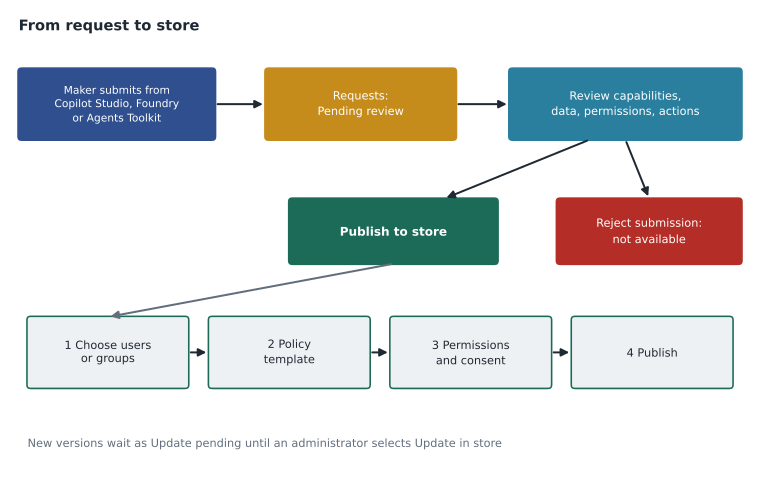
Opening a request shows the agent's details. An administrator reviewing it should ask four questions, which Teodor wrote into Corvallin's review template: What can it do, and does it take actions on anyone's behalf? What data can it reach, and are those sources current, approved and appropriately labelled? What permissions does it request, and is admin consent needed? Who owns it, and who will maintain it when the content changes?
Publishing to the store
Approving an agent is done with Publish to store, which starts a short wizard. Microsoft documents four steps: select the users or groups who can install the agent, and optionally those who get it preinstalled; choose a policy template, which can be an existing, default or custom template that applies predefined security settings to the agent; review the permissions the agent requests and grant admin consent if appropriate; then select Publish. The agent becomes available for installation to the chosen audience.
If the agent should not be available, the administrator selects Reject submission from the request's menu. When a maker publishes an update to an agent that is already in the store, it appears with the status Update pending, and users keep the previous version until an administrator selects Update in store. That last point surprised Ama: fixing a mistake in her agent would not reach users until Teodor approved the update. It was, Ines pointed out, exactly the control she wanted.
Worked problem
Reviewing Help Desk Triage
Ama submits Help Desk Triage from Copilot Studio. Its definition shows: knowledge from the help desk knowledge base site; an action that creates a ticket in the help desk system through a connector; a request for permission to read users' basic profiles; and an intended audience of all staff. What should Teodor check before publishing, and how should he publish it?
Show solution
- Capabilities: the ticket action acts on the user's behalf; confirm it creates tickets only and cannot close or modify them.
- Data: the knowledge base site should contain only current articles; Ama confirms that old articles were archived last month.
- Permissions: reading basic profiles is reasonable for filling in the requester's name; grant consent only for that.
- Audience: publish first to the IT team and pilot users through the Copilot-Pilot group, not all staff, and widen later.
- Policy template: apply Corvallin's default template for internal agents.
Answer: Publish to the pilot audience with the default template after confirming the action's scope and the content's currency. Record the decision, owner and review date in the decision log.
Who can approve
Approvals are deliberately restricted. Microsoft's documentation for the Agents area says that important governance actions, such as approving agent requests or assigning ownership, can be performed only by users in the AI Administrator or Global Administrator roles, while other roles can monitor gaps but cannot act. The requests page adds an important exception: Global Administrators cannot approve third-party agents through this workflow. For Corvallin, that meant Teodor's eligible AI Administrator role in Privileged Identity Management was the one he would activate for review sessions, and approvals would be recorded in the decision log along with the PIM activation.
Microsoft-built and third-party agents
Agents the organization did not build reach users through the agent store, and administrators decide how much of the store users see. Under Agents > Settings, the agent and plugin access settings have three toggles: Microsoft-built agents and plugins, organization-built agents and plugins, and external-publisher agents and plugins. If a type is turned off, it does not appear in the store; Microsoft notes that users can still see Microsoft-built agents when that toggle is off, but cannot install them.
Individual agents can be blocked or unblocked across the organization. The effect of a block depends on the agent's type. Microsoft documents that blocking an Agent Builder or Copilot Studio agent affects Copilot and other host apps such as Outlook and Teams, while blocking a SharePoint or Microsoft Foundry agent affects only Copilot Chat. For first-party agents such as Researcher and Analyst, the panel for choosing users is disabled: the choice is to block for the whole tenant or not.
When a user finds a Microsoft-built agent that is blocked by policy, they can select Request in the store. The request appears under Requests with the state Allow user to install. The administrator opens it, sees who asked, unblocks the agent if appropriate, and approves or rejects the request. Microsoft notes that third-party agents cannot be requested or approved through this particular workflow.
| Agent | Decision at Corvallin | Reason |
|---|---|---|
| Researcher | Allowed | Valuable for leadership and quality work; reports checked before use |
| Analyst | Allowed | Valuable for finance and quality; de-identify data first |
| Visual Creator | Allowed for the pilot | Low risk; images need human review before external use |
| Coaching agents | Allowed | Low risk, useful for training |
| VisitWise Assistant (third party) | Blocked pending review | Reaches client schedules in the vendor's system; needs a data processing review |
| External-publisher agents in general | Toggle off for the pilot | Each must be reviewed individually before use |
The VisitWise decision took a whole session. The vendor's agent could answer schedulers' questions about the day's visits, which was useful, but it read client names and addresses from the vendor's system and the admin center showed that it requested permissions Teodor did not fully understand. Dr. Ostrander-Bey asked for the vendor's privacy documentation and a data processing agreement covering the agent. Until both were reviewed, the agent stayed blocked, and external-publisher agents stayed off for the pilot. Ines summed up the principle: an agent from a trusted vendor is still a new way for data to leave the organization.
Retiring and recovering agents
Agents do not last forever. Content changes, owners leave, better agents replace older ones. Microsoft documents a set of lifecycle actions in the Microsoft 365 admin center.
| Action | Effect |
|---|---|
| Uninstall | Removes an installed agent for the whole organization or for selected users or groups |
| Block | Restricts access across the organization; effect varies by agent type |
| Delete | Soft-deletes the agent: hidden from makers and users, with its properties kept for 30 days |
| Restore | Returns a soft-deleted agent to active state with its previous configuration, within the 30 days |
| Permanently delete | Removes a soft-deleted agent and its resources before the 30 days end; cannot be undone |
| Assign new owner | Reassigns an ownerless or shared Agent Builder or Copilot Studio agent; the previous owner loses access |
The difference between blocking and deleting matters in an incident. Blocking is fast and reversible and keeps the agent intact for investigation. Deleting removes it from view but keeps it recoverable for 30 days. Permanent deletion is final. Corvallin's runbook for "an agent is giving wrong or harmful answers" therefore said: block first, investigate, fix or delete later, and never permanently delete during an investigation.
Worked problem
A wrong answer in production
Suppose that two weeks into the pilot a coordinator reports that Intake Questions told a family that weekend visits can be cancelled without notice, which contradicts the current policy. Nadia is on leave. What should Teodor do, in what order?
Show solution
- Block the agent so no one else receives the wrong answer; blocking is reversible.
- Find the cause: the Family Handbook in the agent's knowledge still has the old cancellation section.
- Ask the records manager to replace the handbook with the current version and archive the old one.
- Have a second trained maker, or Nadia on her return, update and test the agent; the update goes through Update in store.
- Unblock the agent and tell the intake team what changed.
Answer: Block, find the source, fix the content, update through the approval process, then unblock and communicate. Deletion was never needed.
Activation requests and policy templates
One request state needs a little more explanation. Some agents are designed so that users create their own instances of them, each one configured for its user, rather than everyone sharing one copy. Microsoft documents an Activate action and a Pending activate request state for these agents. A member requests activation so they can create instances; the administrator reviews the agent and either approves and activates it, optionally scoping the audience to specific users, groups or everyone, or rejects the request. Microsoft notes that activation requires approval by an AI Administrator with a governance template applied, and that the AI Administrator role cannot configure Conditional Access or Entra access package policies, which need a more highly privileged role.
Policy templates are what make approval consistent. Instead of choosing security settings for each agent by hand, an administrator applies a template, a predefined set of settings, when publishing or activating. Microsoft provides default templates and lets organizations create custom ones. Corvallin made one custom template for internal agents, and the review checklist asked a single question about it: is there any reason this agent should not get the standard template? If the answer was yes, the agent was not ready for the pilot.
Writing down the decision
Every approval, rejection and block at Corvallin produced a short entry in the decision log: the agent, its owner, the request state, what was reviewed, the decision, the audience, the template applied, and a review date. The entries took two minutes each. Their value showed up later, when someone asked why an agent behaved as it did or why a request had been rejected, and the answer was already written down with a date and a name beside it. Ines also asked for one more field, which she said was the most important: who explained the decision to the maker. A maker whose agent is rejected without a reason tends to build the next one somewhere the organization cannot see.
Rejections were written as instructions for a resubmission, not as refusals: what to fix, who could help, and what the reviewer would check next time. When Teodor rejected a first version of New Hire Guide because its knowledge included a folder of draft policies, the entry named the folder, asked the HR lead to point the agent only at published onboarding pages, and offered fifteen minutes to help. The second version was approved a week later.
Common mistakes
MistakePublishing new agents to all users at once.
InsteadPublish to a pilot group first and widen the audience later.
MistakeApproving an agent by looking only at its description.
InsteadReview capabilities, data sources, permissions, actions and ownership.
MistakeExpecting a maker's fix to reach users immediately.
InsteadUpdates wait as Update pending until an administrator selects Update in store.
MistakeDeleting a misbehaving agent during an incident.
InsteadBlock it first; delete only after investigation, and avoid permanent deletion.
Summary and key terms
- Agents reach users by sharing, by organization-wide publishing after approval, or from the store as Microsoft-built or third-party agents.
- Submitted agents appear under Agents > All agents > Requests with states such as Pending review, Pending update and Pending activate.
- Publish to store chooses the audience, applies a policy template, reviews permissions and consent, then publishes; Reject submission keeps an agent out.
- Approving requests and assigning ownership need the AI Administrator or Global Administrator role, and Global Administrators cannot approve third-party agents in this workflow.
- Agent and plugin access settings, per-agent blocks, and lifecycle actions such as delete (30-day soft delete), restore and permanent delete control what stays available.
- Publish to store
- The admin action that makes a requested agent available to chosen users or groups.
- Policy template
- A predefined set of security settings applied to an agent when it is published.
- Pending update
- The state of a new version of a published agent that awaits administrator approval.
- Agent and plugin access
- Settings that decide whether Microsoft-built, organization-built and external-publisher agents appear in the store.
- Block
- An admin action that restricts access to an agent across the organization without deleting it.
- Soft delete
- Deletion that hides an agent but keeps it recoverable for 30 days.
Practice problems
Work each problem on paper first, then reveal the answer to check.
Where do submitted agents wait for approval?
Show answer
Microsoft 365 admin center > Agents > All agents > Requests.
What are the four steps of the Publish to store wizard?
Show answer
Choose users or groups (and optional preinstall), choose a policy template, review permissions and grant consent, then publish.
How long is a deleted agent recoverable?
Show answer
30 days.
Lesson quiz · 5 questions
Score 60% or more to complete this lesson.
Create a free account to save your progress, take quizzes and earn a certificate.