
MSBA-103 · Lesson 1 of 12 · 20 min
What Microsoft 365 Copilot and Copilot Chat can do
▶ Video coming soon A video version of this lesson is on the way.
In the middle of October 2026, a month after the Thursday tenant reviews began, Ines Duvernay-Sato added two more standing meetings a week to Teodor Klimaszewski's calendar, on Tuesday and Friday afternoons, through to the third week of November. The board of Corvallin Home Care had approved a pilot of Microsoft 365 Copilot for about 40 office staff, to start in the spring of 2027, on one condition: that IT could show exactly how Copilot and the agents that come with it would be licensed, switched on, watched and, if necessary, switched off. "The Thursday reviews are about the tenant," Ines said. "Tuesdays and Fridays are about the assistant we are going to put on top of it." She approved four Microsoft 365 Copilot licences for the core IT team alone, for Teodor, herself, Ama Owusu-Pratt on the help desk and Felix Okonkwo-Reyes, so that the people who would support Copilot could learn it before anyone else used it. This course follows those Copilot working sessions.
The course covers the third part of Exam AB-900, Microsoft 365 Copilot and Agent Administration Fundamentals: performing basic administrative tasks for Copilot and agents. In the skills outline Microsoft published as of October 14, 2026, that domain carries 25 to 30 percent of the exam. It asks candidates to compare Copilot's built-in capabilities and agents, compare the monthly licence model with pay-as-you-go, know which features can be turned on and off, identify use cases for Researcher, Analyst and custom agents, assign licences, manage pay-as-you-go billing policies, monitor usage, manage prompts, and configure, approve and monitor agents. The data protection side of Copilot, which carries the largest share of the exam, is the subject of the companion course on governance; this course points to it wherever the two meet.
Two kinds of Copilot at work
Microsoft sells and supports two levels of Copilot for organizations, and the first job of an administrator is to keep them apart. Copilot Chat is the AI chat experience available to people who sign in with a work or school account in Microsoft Entra ID. It is included with eligible Microsoft 365 subscriptions at no extra cost. It answers questions grounded in the public web, works with content a user uploads or opens, and can use agents. Since a set of changes announced in March 2026, Microsoft's own documentation sometimes labels it Copilot Chat (Basic), a level with "standard access" that may slow down or temporarily limit features during busy periods.
Microsoft 365 Copilot is the paid licence. It adds grounding in the user's own work data, reached through Microsoft Graph: their mail, meetings, chats and the files they can open. It brings Copilot into Word, Excel, PowerPoint, Outlook, Teams and the other apps with full capabilities, includes Microsoft-built agents such as Researcher and Analyst, and includes use of agents that reach shared organizational data. The same 2026 documentation calls this level Microsoft 365 Copilot (Premium), with "priority access" that Microsoft describes as faster and more consistent during peak demand.
| Copilot Chat (Basic) | Microsoft 365 Copilot (Premium) | |
|---|---|---|
| Cost | Included with eligible Microsoft 365 plans | Paid licence for each user |
| Grounding | Web, plus files the user uploads or opens | Web plus the user's work data through Microsoft Graph |
| In Word, Excel, PowerPoint and OneNote | Limited; removed in April 2026 for organizations with more than 2,000 seats | Full in-app Copilot |
| Researcher and Analyst | Not included | Included, with usage limits |
| Agents | Web-grounded agents included; agents using shared work data are pay-as-you-go and off by default | Agent use included with the licence |
| Service level | Standard access | Priority access |
The April 2026 change is worth knowing in detail because it trips people up. From April 15, 2026, Microsoft removed the basic, unlicensed Copilot experience from Word, Excel, PowerPoint and OneNote for organizations with more than 2,000 Microsoft 365 seats. Unlicensed users in those organizations kept Copilot Chat in the Microsoft 365 Copilot app and in Outlook. Organizations below 2,000 seats were not affected. Corvallin, with about 460 licensed people, was below the line, so its office staff still saw Copilot Chat inside their Office apps. Teodor noted that a larger partner agency would see something different, and that any comparison of "what staff can see" between organizations had to start with seat counts.
The names themselves kept moving. On October 16, 2026, Microsoft appended "(add-on)" to the names of existing subscriptions that require a qualifying base licence, so the purchased products appear as Microsoft 365 Copilot (add-on) and Microsoft 365 Copilot Business (add-on). From December 1, 2026, Microsoft planned to offer new Copilot and Copilot Business subscriptions that can be bought without a base licence, and the existing add-on subscriptions reach end of sale for new purchases on that date, although renewals and seat changes continue. Microsoft rated the impact as low and advised administrators to make any scripts that look up licences by name use product or SKU identifiers instead. Teodor added that advice to his decision log the same afternoon.
How Copilot answers a prompt
Everything an administrator does with Copilot follows from how it builds an answer, so the working sessions began there. When a licensed user types a prompt in Word or in the Copilot app, Copilot does not send that text straight to a language model. It first gathers context. It looks at the app the user is in and any file they have open, and it searches Microsoft Graph and the semantic index, an index of the organization's content that captures meaning as well as keywords. It finds mail, files, chats and meetings relevant to the request, but only items the user already has permission to see. It may also search the web, if web search is allowed. This step is called grounding.
Copilot then sends the user's prompt together with the grounding data to a large language model running in Microsoft's service. The response comes back through post-processing: responsible AI checks, security and compliance checks, and the addition of citations to the sources used. Only then does it appear to the user, often with links that let them open the documents it drew from.
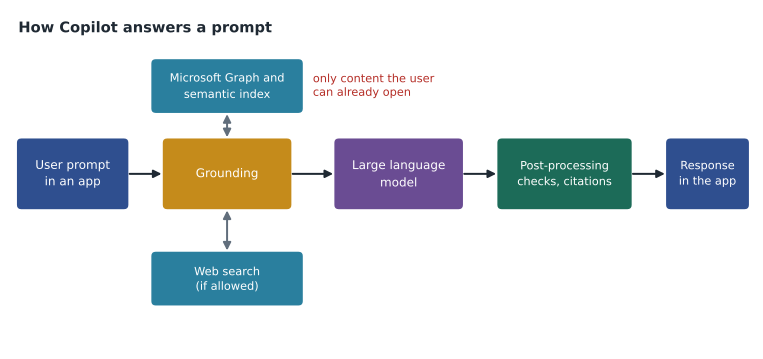
Three consequences matter for administrators. First, Copilot never grants access: if a user can open a file, Copilot can use it, and if they cannot, it will not. That is why oversharing, a file shared far more widely than anyone intended, becomes a much bigger problem once Copilot can find it in seconds. Corvallin's board made the oversharing clean-up a condition of the pilot for exactly that reason. Second, prompts and responses stay inside the Microsoft 365 service boundary and are covered by enterprise data protection when the user signs in with a work account. Microsoft states that prompts, responses and data reached through Graph are not used to train its foundation models. Third, settings such as web search, sensitivity labels and data loss prevention change what Copilot is allowed to ground on or show, which gives administrators real levers rather than an on-off switch alone.
Worked problem
Explaining grounding to a manager
A branch manager asks Teodor whether Copilot will "read everyone's mail" once it is turned on. What should he tell her, and what should he check?
Show solution
- Copilot grounds answers only in content the signed-in user can already open. It does not read other people's mailboxes unless the user has been granted access to them, for example through delegation or a shared mailbox.
- For a manager with Full Access to the branch's shared intake mailbox, Copilot can use that mailbox in her answers, because she can already open it.
- Teodor should review who has delegated and Full Access permissions on mailboxes, and which SharePoint sites are open to everyone, before licences are assigned.
Answer: Copilot works with the manager's own permissions, not wider ones. The risk is not Copilot reading more than she can, but Copilot surfacing quickly what she could already reach and might never have found.
Where Copilot appears
For a licensed user, Copilot appears in many places, and an administrator needs a mental map of them because settings and policies attach to specific surfaces.
| Surface | What Copilot does there | Example at Corvallin |
|---|---|---|
| Microsoft 365 Copilot app (and the web at m365.cloud.microsoft) | Chat with work and web grounding, agents, prompts, pages and notebooks | Asking for a summary of all mail about a client's change of service |
| Outlook | Summarizes threads, drafts replies, coaches tone | Drafting a reply to a family member's complaint |
| Teams | Summarizes chats and meetings, answers questions about what was said | Recapping a case conference for a nurse who missed it |
| Word | Drafts and rewrites documents from prompts or other files | Turning meeting notes into a policy draft |
| Excel | Explains data, suggests formulas, creates charts | Analyzing visit times across branches |
| PowerPoint | Creates presentations from documents or prompts | A board update built from the quarterly report |
| SharePoint and OneDrive | Answers questions about sites and files; agents in SharePoint | Asking the policies site which forms a new hire must sign |
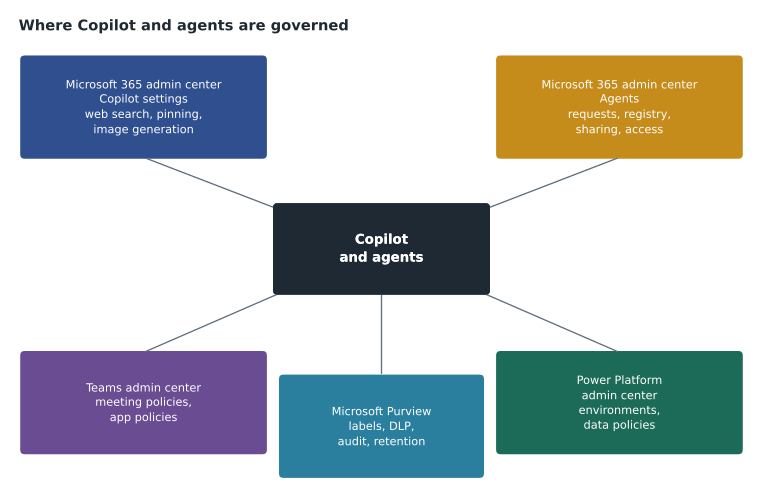
Teams meetings deserve a word because Corvallin had already acted there. In the autumn, at the request of Dr. Marguerite Ostrander-Bey, the clinical director, Teodor had set the Clinical-Meetings meeting policy so that Copilot in clinical meetings worked only during the meeting, without keeping a transcript afterward. The setting lived in the Teams admin center, not on the Copilot page, which was the first example of a lesson Teodor would repeat all autumn: Copilot is governed in many places at once.
Copilot and agents
An agent is an AI assistant built for a particular job. In Microsoft 365 an agent typically has instructions (what it is for and how it should behave), knowledge (the sources it can ground on) and sometimes actions (things it can do, such as creating a record or sending a message). Copilot can be thought of as the general-purpose assistant; agents are specialists that run inside Copilot Chat, Teams and other hosts.
Agents come from three broad places. Microsoft builds some, such as Researcher and Analyst. Organizations build others, from quick agents made by a user in Copilot's Agent Builder to agents in SharePoint and more capable agents made in Copilot Studio or by developers. Third parties, independent software vendors and partners, publish more. The AB-900 outline asks candidates to compare the built-in capabilities of Copilot with those of agents, so the working group made a simple rule of thumb.
| Use plain Copilot when | Use an agent when |
|---|---|
| The task is one-off: summarize this thread, draft this reply | The same kind of task repeats and benefits from fixed instructions |
| The person's own work data is enough | The task needs a curated set of sources, such as one policies site |
| No action is needed beyond producing text | The task needs actions, such as creating a ticket or updating a list |
| Anyone could ask the question | The answers must follow a defined process or tone |
Administratively, agents are where most of the new work lies. A licence decision for Copilot happens once per user. Agents keep arriving: a coordinator builds one on Monday, a vendor publishes one on Tuesday, Microsoft adds a new built-in agent on Wednesday. Lessons 5 to 8 deal with how organizations decide who may build agents, how agents get approved and published, and how they are watched and retired.
What an administrator controls
The AB-900 outline asks which Copilot features can be enabled or disabled. The answer is spread across several consoles, but the centre of gravity is the Copilot section of the Microsoft 365 admin center, which in late 2026 groups its settings into user access (for example pinning Copilot Chat, Copilot in Edge, self-service purchases and pay-as-you-go billing), data access (for example web search, agents and which AI providers may be used), Copilot actions (for example image generation and Copilot in Teams meetings) and a few other settings such as diagnostics logs. The Agents section of the same admin center governs agents. The Power Platform admin center governs agents built in Copilot Studio. Microsoft Purview, covered in the companion course, governs what data Copilot may use and what is recorded.
Roles matter as much as places. Microsoft recommends the AI Administrator role in Microsoft Entra ID for managing Copilot settings, Copilot reports and agents, and reserves Global Administrator for emergencies. Global Reader can view the Copilot settings without changing them. Teodor asked Ines whether he should be made an AI Administrator permanently. She said no: the role would be added to his eligible roles in Privileged Identity Management, activated for four hours at a time like his others.
# Show which Copilot-related service plans are in a user's licensing
Connect-MgGraph -Scopes "User.Read.All"
Get-MgUserLicenseDetail -UserId "teodor.k@corvallincare.example" |
    Select-Object -ExpandProperty ServicePlans |
    Where-Object { $_.ServicePlanName -like "*COPILOT*" } |
    Select-Object ServicePlanName, ProvisioningStatus
The listing is a reminder that a Copilot licence is a bundle of service plans, and some can be turned off for an individual user. That matters in lesson 4, when the group decided whether every pilot user needed every part of Copilot.
Common mistakes
MistakeAssuming Copilot Chat and Microsoft 365 Copilot are the same product with different prices.
InsteadCopilot Chat grounds in the web and in files a user supplies; the paid licence adds grounding in work data through Microsoft Graph, full in-app Copilot and built-in agents.
MistakeBelieving Copilot can see content a user cannot.
InsteadCopilot uses the signed-in user's permissions. Oversharing, not Copilot, is the risk to fix.
MistakeLooking for every Copilot control on one page.
InsteadCopilot settings, agents, Copilot Studio, Teams meetings and Purview each have their own place.
MistakeWriting scripts that find licences by display name.
InsteadNames changed in 2026; use SKU or product identifiers.
Summary and key terms
- Copilot Chat (Basic) is included with eligible plans and grounds in the web and supplied files; Microsoft 365 Copilot (Premium) is a per-user licence that adds work-data grounding, full in-app Copilot and built-in agents.
- From April 15, 2026, basic Copilot left Word, Excel, PowerPoint and OneNote for organizations with more than 2,000 seats.
- Copilot grounds answers in Microsoft Graph and the semantic index using only content the user can open, then post-processes the response with checks and citations.
- Agents are specialist assistants with instructions, knowledge and sometimes actions, built by Microsoft, organizations or third parties.
- Copilot is governed in several places: Copilot settings and Agents in the Microsoft 365 admin center, the Power Platform admin center, Teams policies and Microsoft Purview, ideally by an AI Administrator.
- Copilot Chat
- The AI chat experience included for users signed in with a work account, grounded in the web and in content they supply.
- Microsoft 365 Copilot
- The paid per-user licence that adds grounding in work data through Microsoft Graph, in-app Copilot and built-in agents.
- Grounding
- Gathering relevant context, such as files, mail and web results, to include with a prompt before it reaches the model.
- Semantic index
- An index of organizational content that captures meaning, used by Copilot to find relevant items the user can access.
- Enterprise data protection
- The protections that apply to Copilot prompts and responses when a user signs in with a work or school account.
- Agent
- An AI assistant configured for a particular task with instructions, knowledge and optionally actions.
- AI Administrator
- The Microsoft Entra ID role intended for managing Copilot and agent settings.
Practice problems
Work each problem on paper first, then reveal the answer to check.
What does a Microsoft 365 Copilot licence add to Copilot Chat?
Show answer
Grounding in the user's work data through Microsoft Graph, full Copilot in the Microsoft 365 apps, built-in agents such as Researcher and Analyst, and included agent use.
Why does oversharing matter more after Copilot is deployed?
Show answer
Copilot finds and summarizes anything a user can open, so content shared too widely is surfaced much faster.
Which Entra ID role does Microsoft recommend for managing Copilot settings?
Show answer
AI Administrator.
Lesson quiz · 5 questions
Score 60% or more to complete this lesson.
Create a free account to save your progress, take quizzes and earn a certificate.