
MSBA-103 · Lesson 11 of 12 · 19 min
Responsible AI settings and user guidance
▶ Video coming soon A video version of this lesson is on the way.
Dr. Marguerite Ostrander-Bey had attended every working session, usually saying little until the end. At the eleventh she brought a printed page. It was a letter that a case manager had drafted with Copilot Chat and sent on November 12, summarizing a client's care plan for the family. The summary was fluent, and it presented a medication change as if the agency had decided it, when in fact the client's pharmacist had approved it on the physician's order. The family had complained; nothing harmful had happened. "Nothing in your settings would have stopped that," she said. "The question for this session is which problems settings solve, and which only people can." The session that followed was about responsible AI in practice: the principles, the settings that put them into effect, and the guidance users need.
AB-900 asks candidates to understand responsible AI principles, in the data protection domain, and to identify which Copilot features can be enabled or disabled, in the administration domain. This lesson brings the two together: Microsoft's responsible AI principles, the Copilot settings an administrator controls in late 2026, and the user guidance that makes the rest work.
Microsoft's responsible AI principles
Microsoft organizes its approach to responsible AI around six principles, which appear throughout its documentation, training and the AB-900 outline.
| Principle | What it means | An example in Copilot administration |
|---|---|---|
| Fairness | AI systems should treat all people fairly | Reviewing agent instructions so answers do not differ by who asks |
| Reliability and safety | AI systems should perform reliably and safely | Testing agents against questions they must refuse before publishing |
| Privacy and security | AI systems should be secure and respect privacy | Labels, DLP and permissions limiting what Copilot can use |
| Inclusiveness | AI systems should empower everyone and engage people | Prompts and agents available in the languages staff use |
| Transparency | AI systems should be understandable | Citations in answers; telling users when content is AI-generated |
| Accountability | People should be accountable for AI systems | Every agent has an owner; every AI-drafted letter has a human author |
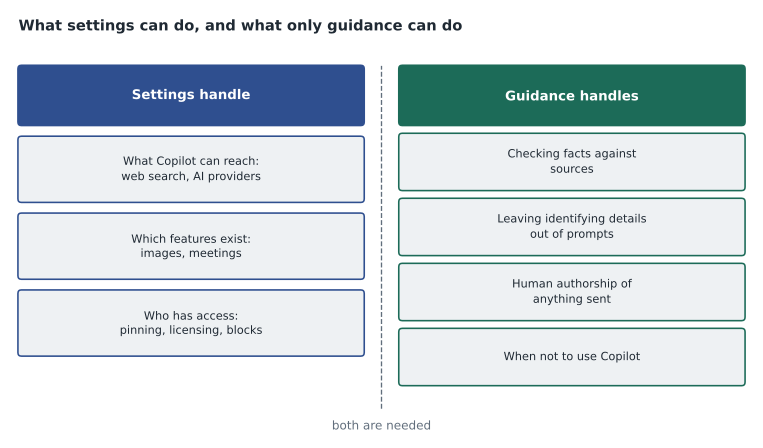
Principles become useful only when they turn into decisions. The care-plan letter was a failure of transparency and accountability, not of security: the data was the case manager's to use, the letter went to the right family, and no setting was misconfigured. What failed was the human step of checking an AI-drafted summary against the source before sending it. That is the class of problem that only guidance, training and habit address.
The Copilot settings page
The Copilot > Settings page in the Microsoft 365 admin center is where most Copilot features are turned on or off for the organization. Microsoft's documentation of October 2026 groups the settings into four categories. The names are worth knowing because the exam asks which features can be enabled or disabled.
| Category | Settings documented in late 2026 |
|---|---|
| User access | Copilot Frontier (early access); Copilot in Bing, Edge and Windows (information); Copilot in Edge (through Edge policies); Copilot pay-as-you-go billing; Microsoft Copilot in admin centers; Microsoft Copilot self-service purchases; pinning the Copilot app to the Windows taskbar; Pin Microsoft Copilot Chat |
| Data access | Agents; AI providers operating as independent processors; AI providers operating as Microsoft subprocessors; Azure DevOps data in Microsoft 365 Copilot; Copilot in Power Platform and Dynamics 365; Data security and compliance; People Skills; Recommendations for Microsoft Copilot licensing; Web search for Microsoft Copilot and Copilot Chat |
| Copilot actions | Copilot image generation; Screen and camera sharing; Copilot in Teams meetings; Advanced package uploads |
| Other settings | Copilot custom dictionary; Copilot diagnostics logs |
Microsoft names the AI Administrator as the appropriate role for managing these settings and Global Reader as able to view but not change them. Some settings open another service's console and need that service's permissions; for example, creating Cloud Policy settings for Microsoft 365 apps needs the Office Apps admin role.
Settings that matter most for responsible use
Corvallin reviewed every setting, but five took most of the discussion.
Web search. The web search setting decides whether Copilot and Copilot Chat may ground answers in web results. With it on, answers can include current public information, with citations to the web pages used; with it off, Copilot relies on work data and the model's training, and Microsoft notes that responses might not reflect the most current information. Researcher follows the same setting, with no list of allowed or blocked sites. Corvallin left web search on: staff often needed public information, such as provincial health guidance, and the alternative was staff using consumer search engines and AI sites outside enterprise data protection. The guidance, not the setting, would say that web-sourced health information must be checked against the official source.
AI providers. Microsoft's Copilot can use models from more than one provider. The settings page distinguishes AI providers operating as Microsoft subprocessors, covered by Microsoft's data protection terms, from providers operating as independent processors, which have their own terms. In 2026 Microsoft offered Anthropic's Claude models as an option in parts of Copilot, including Researcher's model choice when administrators enable it. For a health-care organization the distinction is legal as much as technical, so Ines asked Corvallin's privacy officer to review the terms before any provider was enabled beyond the default.
Copilot in Teams meetings. Meeting settings are partly here and partly in Teams meeting policies. Corvallin had already used the Clinical-Meetings policy to limit Copilot in clinical meetings to "only during the meeting," with no transcript kept afterward. The group confirmed that the organization-wide setting did not override that policy.
Image generation. Copilot can create images. For a home-care agency the risk was not offensive images but plausible ones: a generated photo of a "Corvallin nurse" in a newsletter could be mistaken for a real employee. The group left image generation on for the pilot, with a guidance rule that generated images are labelled as such and never depict clients or staff.
Diagnostics logs. The diagnostics logs setting governs whether administrators can collect and send Copilot diagnostic information to Microsoft when troubleshooting. Teodor noted who could use it and when, because diagnostic data can include the content of interactions.
Controls outside the Copilot page
Several other controls affect responsible use and are easy to forget. Microsoft Purview sensitivity labels and data loss prevention can stop Copilot from using or showing labelled content, and the governance course covers them in depth; Microsoft notes, for example, that Purview DLP can prevent items with specific sensitivity labels from being used in response summarization. Microsoft Edge policies control whether Copilot Chat in the browser can use the content of the open web page or PDF. Integrated Apps can block Copilot for chosen users, and when it does, the page users see can link to a company policy through a custom link setting. Teams app policies control Copilot in Teams. Each is a lever, and each has a different owner in a larger organization.
Worked problem
Which lever for which worry?
Match each concern raised at Corvallin to the right control. (a) Staff pasting client details from a browser page into Copilot Chat. (b) Copilot summarizing documents labelled Confidential / Clinical for non-clinical staff. (c) Copilot answering health questions from out-of-date web pages. (d) A generated image being mistaken for a real nurse.
Show solution
- (a) Edge policies can control use of page content, and Purview DLP can detect sensitive information in prompts; guidance reinforces it.
- (b) Sensitivity labels with encryption and DLP for Copilot, set in Purview, plus correct permissions.
- (c) No setting chooses which web pages are reliable; guidance requires checking against official sources. Turning web search off is possible but pushes staff elsewhere.
- (d) Guidance: label generated images and never depict clients or staff; image generation can be turned off if needed.
Answer: Settings handle (a) and (b) well, partly handle (d), and cannot handle (c) on their own. The rest is guidance and training.
Writing user guidance
Dr. Ostrander-Bey's letter became the opening example of Corvallin's Copilot use guide, a two-page document every pilot user would read and sign before receiving a licence. Its structure is a good model for any organization.
| Section | What Corvallin's guide said |
|---|---|
| You are the author | Anything you send, file or act on is yours, however it was drafted. Read it all before it leaves you. |
| Check facts against sources | Open the cited documents for anything factual. For clinical or medication information, the care plan and the clinical record are the source, never Copilot. |
| Keep identifying details out of reusable prompts | Use placeholders in saved and shared prompts. Do not paste health card numbers into prompts. |
| Use work accounts only | Use Copilot signed in with your Corvallin account. Do not use personal AI tools for work. |
| Know when not to use Copilot | Not for clinical decisions, not for disciplinary letters, not for anything you could not explain without it. |
| Label AI content where it matters | Generated images are labelled and never show clients or staff. |
| Report problems | If Copilot or an agent gives a wrong or worrying answer, tell the help desk the same day. |
Guidance only works if it is short, specific and repeated. Corvallin's plan built it into training (a one-hour session before licences were assigned), into organizational prompts (the pinned "Ask for sources" prompt from lesson 9), into agent instructions (Nadia's agent refers medication questions to the nurse), and into the help desk's scripts. Ama added a line to the ticket form for "AI-related" problems, so that patterns would show up in the monthly report.
Pilot settings review (Copilot > Settings), Nov 2026
  Web search for Copilot and Copilot Chat:      ON   (guidance: verify health information with official sources)
  AI providers as independent processors:       OFF  (pending privacy review)
  Copilot image generation:                     ON   (guidance: label images; no clients or staff)
  Copilot in Teams meetings:                    ON   (Clinical-Meetings policy limits to during meeting)
  Pin Microsoft Copilot Chat:                   ON   (all staff; enterprise data protection applies)
  Microsoft Copilot self-service purchases:     OFF  (purchasing through IT only)
  Copilot diagnostics logs:                     restricted to IT on approval by Ines
  Custom link for blocked Copilot page:         intranet Copilot use guide
When users are blocked
Sometimes an administrator does need to block Copilot Chat for some people, for example contractors whose agreements do not cover AI tools. Microsoft's documentation describes the tenant-wide or scoped block in Integrated Apps, which shows blocked users a page saying Copilot Chat was turned off for the organization, and a Copilot setting for a custom link for the blocked Microsoft Copilot app, so the page can point to the organization's policy. Corvallin set the custom link to its Copilot use guide on the intranet even though it blocked nobody, so that if a block was ever needed, the people affected would see why rather than a bare message.
Keeping the guidance alive
A use guide is out of date as soon as Microsoft changes a feature or a new risk appears. Corvallin's guide named an owner, Ines, and a review date at the end of each pilot phase. It also had a short change log at the bottom, so that pilot users could see what had changed since they signed it. The first change had already been drafted before the pilot began: when scheduled prompts moved to Tasks > Scheduled, the guide's line about scheduled summaries was rewritten to match.
The working group also decided how guidance would be tested. Each monthly survey would include one scenario question, such as "Copilot drafts a letter that mentions a medication change; what do you do before sending it?", and the answers would show whether the guide had been understood, not merely signed. Dr. Ostrander-Bey said that this was the first time she had seen an IT policy that planned to check whether anyone had read it.
Three questions before using Copilot
For people who would never read two pages, Ines asked for something shorter, and the group reduced the whole guide to three questions printed on the training handout and repeated by every champion. Would I be comfortable if the person this is about read my prompt? Have I checked every fact against its source? Am I willing to put my own name on the result? A user who could answer yes to all three, the group agreed, was using Copilot responsibly in almost every situation Corvallin could foresee. A user who hesitated on any of them should stop and ask.
Common mistakes
MistakeExpecting settings to prevent every misuse of Copilot.
InsteadSettings control reach and features; checking, authorship and judgement need guidance and training.
MistakeTurning off web search to stop people using public information.
InsteadThat can push staff to consumer tools outside enterprise data protection; guide them to verify sources instead.
MistakeEnabling every AI provider option without a legal review.
InsteadProviders acting as independent processors have their own terms; review them first.
MistakeWriting a long AI policy nobody reads.
InsteadKeep the guide short and specific, and repeat it in training, prompts, agents and help desk scripts.
Summary and key terms
- Microsoft's six responsible AI principles are fairness, reliability and safety, privacy and security, inclusiveness, transparency and accountability.
- Copilot > Settings groups controls into user access, data access, Copilot actions and other settings; the AI Administrator manages them.
- Key settings include web search, AI providers as subprocessors or independent processors, image generation, Copilot in Teams meetings, pinning and diagnostics logs.
- Purview, Edge policies, Integrated Apps and Teams policies add further controls, each with its own owner.
- Short, specific user guidance, repeated in training, prompts, agent instructions and help desk scripts, handles what settings cannot.
- Responsible AI
- Designing, deploying and using AI in line with principles such as fairness, safety, privacy, inclusiveness, transparency and accountability.
- Web search setting
- The Copilot setting that decides whether Copilot can ground answers in web results.
- Microsoft subprocessor
- A provider that processes data on Microsoft's behalf under Microsoft's data protection terms.
- Independent processor
- A provider that processes data under its own terms rather than as Microsoft's subprocessor.
- Copilot use guide
- An organization's short written guidance for using Copilot safely and well.
- Human in the loop
- The practice of a person reviewing and taking responsibility for AI output before it is used.
Practice problems
Work each problem on paper first, then reveal the answer to check.
List the six Microsoft responsible AI principles.
Show answer
Fairness; reliability and safety; privacy and security; inclusiveness; transparency; accountability.
Which role does Microsoft name for managing Copilot settings, and which can only view them?
Show answer
AI Administrator manages them; Global Reader can view them.
Why did Corvallin keep web search on?
Show answer
Staff needed current public information, and turning it off could push them to consumer tools outside enterprise data protection; guidance requires checking sources.
Lesson quiz · 5 questions
Score 60% or more to complete this lesson.
Create a free account to save your progress, take quizzes and earn a certificate.