
MSBA-103 · Lesson 2 of 12 · 22 min
Built-in agents: Researcher, Analyst and agents in SharePoint
▶ Video coming soon A video version of this lesson is on the way.
At the second working session, Ines brought a question from the leadership team. Corvallin's director of operations wanted to know how other home-care agencies in the region were handling the shortage of personal support workers, and the finance manager wanted to understand why overtime costs at the North Branch had risen for three quarters running. "Is that a job for Copilot," Ines asked, "or for one of these agents everyone talks about?" Teodor had licences for the IT team only, so he ran both questions himself, with permission, against test data. The answers led the group to the three kinds of built-in agent that every Microsoft 365 administrator meets first: Researcher, Analyst and agents in SharePoint.
AB-900 asks candidates to identify use cases for Researcher and for Analyst, and to understand agents in SharePoint well enough to compare their licensing with pay-as-you-go billing. This lesson covers what each one does, who can use it, how administrators control it and where each fits in an organization like Corvallin.
Agents built by Microsoft
Microsoft publishes a set of agents that appear in Copilot without anyone in the organization building them. In late 2026 the Copilot app showed Researcher, Analyst and Visual Creator in its navigation pane, with others, such as Idea Coach, Writing Coach, Prompt Coach and Learning Coach, available through the All agents list. Microsoft's documentation notes that availability varies by subscription and that a missing agent may mean the user lacks a licence or that an administrator has not enabled it. The set changes often, so administrators should treat any list as a snapshot and check the agent store and the Agents pages of the admin center for the current inventory.
Microsoft-built agents are called first-party agents. They cannot be edited, and some administrative actions that apply to organization-built agents, such as changing owners, do not apply to them. What administrators can do is decide whether users may use them, which lesson 6 covers.
Researcher
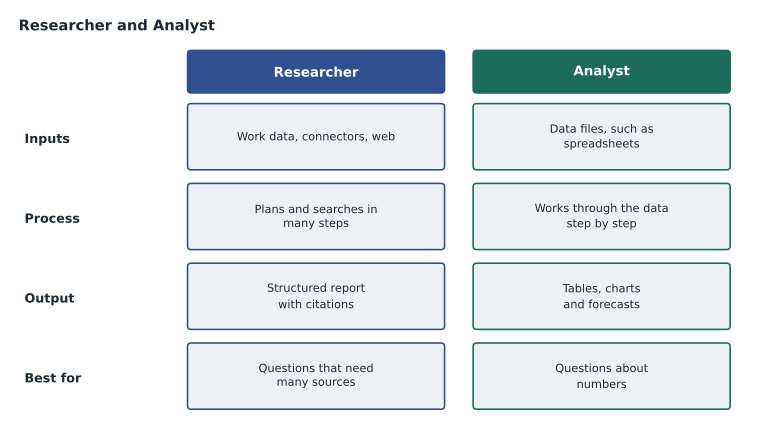
Researcher is an agent for deep, multi-step research. Ordinary Copilot Chat is designed for quick questions and answers; Researcher plans a line of inquiry, searches widely, reasons across what it finds and writes a structured report with citations. It can draw on the user's work data through Microsoft Graph, on content from Microsoft Graph connectors that bring outside systems into Microsoft 365, and on the web through Bing, when web search is allowed. Microsoft's documentation lists more than 30 supported languages and notes that Researcher is also available in the Copilot mobile app.
Researcher is slower than chat by design. Microsoft says simple queries take under five minutes and highly complex ones 10 to 45 minutes. It works within the same data boundary, retention and data loss prevention rules as Copilot, and it does not train on tenant data. It is part of the default experience for users with a Microsoft 365 Copilot licence, and Microsoft set a limit of 25 Researcher queries per user per month.
| Researcher fact | What it means for an administrator |
|---|---|
| Uses work data, connectors and the web | Permissions and oversharing affect its reports just as they affect chat |
| Web access follows the tenant web search setting | There is no list of allowed or blocked sites; turning web search off removes web data entirely |
| Up to 25 queries per user per month | Users who rely on it heavily will hit the limit; guidance should reserve it for real research |
| Cannot be customized or extended in Copilot Studio | Organizations wanting a research agent with custom rules build their own |
| Admins can block it for the tenant | Blocking is all or nothing for first-party agents such as Researcher |
| No dedicated usage dashboard | Adoption is judged from the general Copilot usage reports |
Teodor ran the director's question through Researcher: how comparable agencies were recruiting and retaining personal support workers, combined with Corvallin's own exit-interview summaries and recruitment reports on the HR site. Twenty minutes later he had a six-page report with headed sections, a comparison of retention measures and links to every source. Two of the web sources were older than he liked, and one internal document it cited was a draft that had never been approved. The report was a good start, not a finished briefing, and the session's first rule of guidance was written: Researcher reports must be checked against their sources before anyone forwards them.
Worked problem
Choosing Researcher or chat
Which of these requests should Ama, on the help desk, steer to Researcher, and which to ordinary Copilot Chat? (a) "Summarize this email thread." (b) "Prepare a briefing on how the provincial home-care funding changes this year affect agencies like ours, using our finance reports and public sources." (c) "What time is my next meeting?"
Show solution
- Request (a) is a quick task on a single item: ordinary chat in Outlook or the Copilot app.
- Request (b) needs planning, many sources inside and outside the organization, reasoning and a cited report: Researcher.
- Request (c) is a quick lookup in the user's own calendar: ordinary chat.
Answer: Only (b) is a Researcher task. Steering quick questions to chat preserves each user's monthly Researcher allowance for work that needs it.
Analyst
Analyst is the built-in agent for working with data. Microsoft describes it as turning raw data into insights and forecasts and visualizing them, and its documentation recommends Analyst over Researcher for spreadsheet and Excel tasks. A user gives Analyst one or more data files, such as an Excel workbook or a comma-separated export, and asks questions in plain language: which branch's visit times are trending up, what explains a rise in cancellations, what next quarter might look like. Analyst works through the data step by step, shows its reasoning, and produces tables and charts.
Like Researcher, Analyst is included with the Microsoft 365 Copilot licence, appears as a first-party agent that administrators can block for the whole tenant but not edit. It inherits the protections of Copilot: it can only analyze files the user can already open.
Teodor gave Analyst a de-identified export of 18 months of visit records from the scheduling system, with branch, visit type, scheduled minutes, actual minutes and overtime flags. He asked why North Branch overtime had risen. Analyst found that the increase came almost entirely from visits scheduled after 4 p.m. on Fridays, and that two client addresses accounted for nearly a fifth of the overtime minutes because travel between them had been under-estimated after a road closure. It produced a bar chart by hour of day and a short table of the outlier visits. The finance manager said it would have taken her a week. Ines said the more important point was that Teodor had removed client names and diagnoses before giving Analyst the data, a habit she wanted every pilot user to learn.
Agents in SharePoint
The third family of built-in agents lives in SharePoint. Every SharePoint site has a ready-made agent scoped to that site's content, so a user can open the agent from the site and ask about the site's pages and files. Microsoft's documentation for November 2026 describes Copilot in SharePoint as the upgrade to that ready-made site agent for users with a Copilot licence, with the upgrade rolling out from mid-November 2026.
Beyond the ready-made agent, anyone with edit permission on a site can create a custom agent there. The creator gives it a name and purpose, chooses which sites, pages and files it draws on (including sources beyond their own site), adjusts its branding and writes starter prompts. A custom agent is stored as an .agent file in the site, much like a Word or Excel file, and permissions on that file decide who can open or edit the agent. Creators share custom agents by copying a link from the agent's chat pane; the ready-made site agent cannot be shared that way. Site owners can choose one main agent for their site.
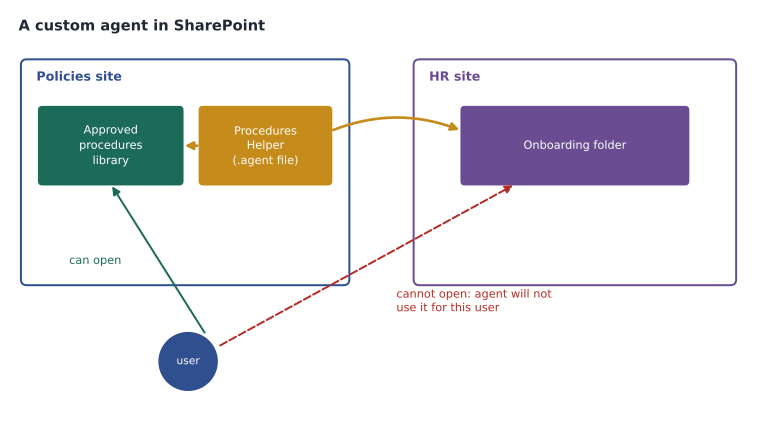
The crucial point for administrators is that an agent does not widen access. A user who opens a SharePoint agent gets answers only from sources they could already open, even if the agent's creator pointed it at a site the user cannot see. If the user has no access to a source, the agent simply cannot use it for them.
| Question | Agents in SharePoint |
|---|---|
| Who can use them? | Users with a Microsoft 365 Copilot licence, or users covered by a pay-as-you-go billing policy for SharePoint agents |
| Who can create custom ones? | Anyone with edit permission on the site where the agent will live |
| Where are they stored? | As .agent files on the SharePoint site |
| How are they shared? | By sharing a link to the custom agent; file permissions apply |
| How is a site kept out of agents? | Restricted content discovery hides the agent icon and keeps the site's content out of agents, Copilot and organization-wide search |
| How is one agent stopped? | Block it in the Agents area of the Microsoft 365 admin center (for SharePoint agents this affects Copilot Chat) |
Licensing for SharePoint agents has two routes, and AB-900 asks candidates to compare them. A user with a Microsoft 365 Copilot licence can use SharePoint agents with no further setup. A user without one can use them only if the organization has set up pay-as-you-go billing for SharePoint agents: an Azure subscription, a billing policy and a security group of users the policy covers. Only members of that group can then use the agents, and usage is charged to the Azure subscription. Lesson 3 covers how that billing works. An administrator who wants to turn off agents in SharePoint for an individual licensed user can switch off the "Microsoft Copilot for SharePoint" service plan in that user's licence details, which also turns off Copilot in OneDrive and SharePoint page authoring for them.
Corvallin had an obvious first candidate. Its policies and procedures site held about 400 documents: clinical procedures, HR policies, forms and the staff handbook. Coordinators answered the same questions from new staff every week. A SharePoint agent scoped only to the approved procedures library, with starter prompts such as "Which forms does a new personal support worker sign?" and "What is the procedure after a client fall?", could answer those questions with links to the controlling document. Teodor built a test version in ten minutes and immediately found a problem: the library still contained superseded versions of three procedures, and the agent cited one of them. The records manager, Ansel Marrowby, was asked to archive superseded documents before any agent was pointed at the library.
Worked problem
Who can use the procedures agent?
Teodor creates a custom agent on the policies site, pointed at the approved procedures library and at the HR site's onboarding folder. Nadia Prevost, an intake coordinator, has read access to the policies site but not to the HR site. She has no Copilot licence, and Corvallin has not set up pay-as-you-go for SharePoint agents. Can she use the agent, and if so what can it draw on?
Show solution
- Without a Copilot licence, Nadia can use SharePoint agents only through a pay-as-you-go billing policy that covers her. There is none, so she cannot use the agent at all.
- If Corvallin later sets up pay-as-you-go with a group that includes Nadia, she could use the agent.
- Even then, it would ground only on the procedures library, which she can read, and not on the HR folder, which she cannot.
Answer: Not today. With pay-as-you-go in place she could use it, but only with content she can already open.
Comparing the three
By the end of the session the whiteboard held a comparison that Teodor later turned into a one-page guide for the help desk.
| Researcher | Analyst | Agents in SharePoint | |
|---|---|---|---|
| Best for | Multi-source research with a cited report | Questions about data in files | Questions about one site or a curated set of content |
| Sources | Work data, connectors, web | Files the user provides | Chosen sites, pages and files |
| Who builds it | Microsoft | Microsoft | Ready-made per site, or users with edit rights |
| Licence | Microsoft 365 Copilot | Microsoft 365 Copilot | Copilot licence or pay-as-you-go |
| Admin controls | Block tenant-wide; web search setting | Block tenant-wide | Block per agent, restricted content discovery, service plan per user |
| Typical risk | Citing stale or unapproved sources | Users uploading identifiable data | Agents pointed at libraries with old versions |
The comparison also showed why administrators cannot stop at licensing. Each agent had a different typical failure, and each failure was about content and habits, not about technology: stale sources, identifiable data and libraries full of old versions. Those are the issues that the readiness checks in lesson 4 and the user guidance in lesson 11 address.
Common mistakes
MistakeSending every complicated question to Researcher.
InsteadResearcher has a monthly limit and takes minutes; reserve it for questions that need many sources and a cited report.
MistakeExpecting to edit or extend Researcher in Copilot Studio.
InsteadFirst-party agents cannot be customized; build a custom agent if special rules are needed.
MistakeThinking a SharePoint agent lets users see content they otherwise could not.
InsteadAgents answer only from sources the user can already open.
MistakePointing an agent at a library without cleaning it first.
InsteadArchive superseded and draft documents so the agent cites current, approved content.
Summary and key terms
- Microsoft-built (first-party) agents such as Researcher, Analyst and Visual Creator appear without anyone building them; administrators can block them but not edit them.
- Researcher performs multi-step research across work data, connectors and the web and returns a cited report; it takes minutes, has a limit of 25 queries per user per month, and follows the tenant web search setting.
- Analyst works step by step through data files to produce insights, charts and forecasts; it only uses files the user can access.
- Every SharePoint site has a ready-made agent; users with edit permission can create custom agents stored as .agent files and share them by link.
- SharePoint agents are used either with a Copilot licence or through a pay-as-you-go billing policy, and never widen a user's access.
- First-party agent
- An agent built and published by Microsoft, such as Researcher or Analyst.
- Researcher
- A Microsoft-built agent for multi-step research that produces cited reports from work data, connectors and the web.
- Analyst
- A Microsoft-built agent that analyzes data in files and produces insights, charts and forecasts.
- Agent in SharePoint
- An agent scoped to SharePoint content, either the ready-made site agent or a custom agent created by a site editor.
- .agent file
- The file in a SharePoint site that stores a custom SharePoint agent; its permissions control who can open or edit the agent.
- Restricted content discovery
- A site setting that keeps a site's content out of Copilot, agents and organization-wide search without changing site access.
Practice problems
Work each problem on paper first, then reveal the answer to check.
Name two differences between Researcher and ordinary Copilot Chat.
Show answer
Any two: Researcher plans multi-step research; it searches more widely; it takes minutes rather than seconds; it produces a structured report with citations; it has a monthly query limit.
Who can create a custom agent in a SharePoint site?
Show answer
Anyone with edit permission on that site.
How can a user without a Copilot licence use SharePoint agents?
Show answer
Only if the organization has set up pay-as-you-go billing for SharePoint agents with a billing policy that covers the user.
Lesson quiz · 5 questions
Score 60% or more to complete this lesson.
Create a free account to save your progress, take quizzes and earn a certificate.