
MSBA-103 · Lesson 5 of 12 · 21 min
Custom agents and who can create them
▶ Video coming soon A video version of this lesson is on the way.
Nadia Prevost had been an intake coordinator at Corvallin for six years, and she answered the same questions from families every week: what a first visit involves, what documents to have ready, how to change a visit time, what the agency does if a worker is running late. When Teodor showed the working group the procedures agent from lesson 2, Ines asked Nadia to come to the next session. "If anyone here is going to build a useful agent," Ines said, "it is the person who already knows the answers." The session that followed was about what kinds of custom agents exist, which tool fits which job, and the decision every organization has to make early: who is allowed to build them.
AB-900 asks candidates to identify use cases for custom agents, create an agent, and identify how to configure user access to agents. This lesson covers the building blocks of an agent, the tools Microsoft provides from simplest to most powerful, how an agent is created in Copilot's Agent Builder, and the settings that decide who can build, share and use agents.
What a custom agent is made of
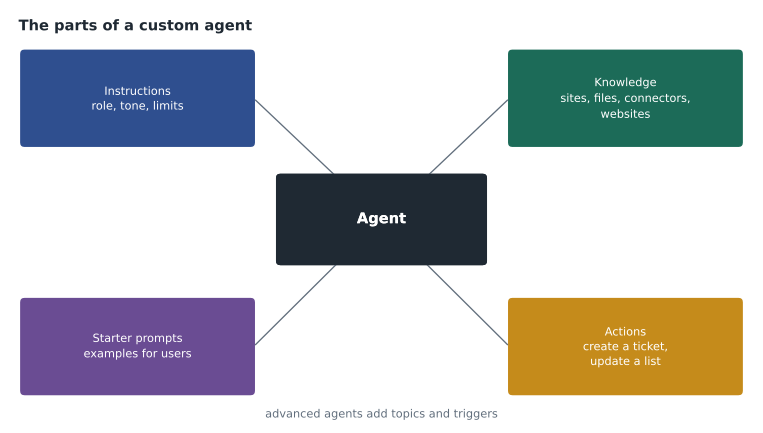
Every custom agent, however it is built, combines a few parts. The instructions say what the agent is for and how it should behave: its role, tone, the questions it should and should not answer, and what to say when it does not know. The knowledge is where it looks for answers: SharePoint sites and files, uploaded documents, Microsoft Graph connectors, public websites or, for more advanced agents, business systems. Actions or tools let the agent do things rather than only answer: create a ticket, add a row to a list, send a message or call an external service. Starter prompts show users what to ask. More advanced agents add topics, which are scripted conversation paths, and triggers, which start the agent when something happens rather than when someone asks.
Microsoft's documentation distinguishes two broad kinds of agent for Microsoft 365. A declarative agent runs on Copilot's own orchestrator and model, and is defined by instructions, knowledge and actions; Agent Builder and SharePoint agents produce agents of this kind, and Copilot Studio can too. A custom engine agent brings its own orchestration or model, built in Copilot Studio or by developers with tools such as Microsoft Foundry and the Microsoft 365 Agents Toolkit. The distinction matters to administrators mainly because it changes where an agent is managed and what it can reach.
The tools, from simplest to most powerful
Microsoft gives organizations a ladder of tools for building agents. Each step up adds capability and adds governance work.
| Tool | Who typically uses it | What it can do | Where it is governed |
|---|---|---|---|
| Agent Builder in Microsoft 365 Copilot | Any user | Quick declarative agents from the chat, grounded in instructions, files, sites and websites | Agents in the Microsoft 365 admin center |
| Agents in SharePoint | Anyone with edit rights on a site | Agents scoped to sites, pages and files | Agents in the Microsoft 365 admin center; SharePoint settings |
| Microsoft Copilot Studio | Trained makers and IT | Topics, actions, connectors, triggers, publishing to many channels | Power Platform admin center and the Microsoft 365 admin center |
| Microsoft Foundry and the Microsoft 365 Agents Toolkit | Professional developers | Custom engine agents, custom models, complex integrations | Azure, plus the Microsoft 365 admin center when published to Microsoft 365 |
Licensing follows the ladder too. Microsoft's documentation for Copilot Chat in November 2026 said that agents grounded only in instructions and public websites are available to Copilot Chat users at no extra cost; agents that use shared tenant data, such as SharePoint content or Graph connector content, are metered through pay-as-you-go for users without a Microsoft 365 Copilot licence and are off by default; and Copilot Studio agents need a Copilot Studio subscription or metered capacity. For users with a Microsoft 365 Copilot licence, agent use is included. Corvallin's 40 pilot users would therefore be able to use organization-built agents grounded in internal content without any metering; the schedulers on pay-as-you-go would pay per use; everyone else would be limited to web-grounded agents.
Creating an agent with Agent Builder
The AB-900 outline includes "Create an agent", and Agent Builder is the tool a fundamentals candidate is expected to know. Nadia built her first agent during the session on Teodor's screen, with his licensed account, following the same steps any user would.
| Step | What Nadia did |
|---|---|
| 1. Start | Opened the Microsoft 365 Copilot app and chose to create an agent, which opens Agent Builder |
| 2. Describe | Typed a plain description: an agent that answers families' common questions about starting home care with Corvallin, using the family handbook and the intake FAQ, in a warm, plain style |
| 3. Configure | Checked the generated name, description and instructions, and edited the instructions to say the agent must not give clinical advice or discuss a specific client |
| 4. Add knowledge | Added the Family Handbook and Intake FAQ documents from the intake team's SharePoint library, and nothing else |
| 5. Add starter prompts | "What happens on the first visit?", "How do I change a visit time?", "What should I have ready?" |
| 6. Test | Asked questions in the test pane, including two it should refuse: a medication question and a question about a named client |
| 7. Save and share | Saved the agent; sharing was left for the approval process in lesson 6 |
Two things happened in testing that taught the group more than the build. The agent answered "Can the worker give my mother her pills?" with a confident paragraph drawn from a handbook section about medication reminders, which was not what Nadia wanted families told by a chatbot. She tightened the instructions: questions about medication or care plans should always be referred to the client's nurse, with the intake phone number. The second surprise was better. Asked a question the handbook did not cover, the agent said it did not have that information and suggested calling intake, exactly as instructed. Ines remarked that a well-written refusal is as much a feature as a good answer. Because the agent had been built in Teodor's licensed account, it stayed there for testing. The plan was that when Nadia's pilot licence was assigned in the spring, Teodor would add her as an owner, which Agent Builder agents support, so that she, not IT, would maintain its content.
Worked problem
Choosing the right tool
Three requests reach Teodor. (a) The quality lead wants an agent that answers staff questions from the approved procedures library. (b) The finance team wants an agent that takes a supplier's invoice question, looks up the invoice in the accounts system and logs a ticket for the accounts clerk. (c) A branch manager wants a personal agent that drafts her weekly staff newsletter in her own style from a few notes. Which tool fits each?
Show solution
- (a) is a question-answering agent over one SharePoint library: an agent in SharePoint, or Agent Builder pointed at that library.
- (b) needs a connector to a business system and an action that creates a ticket: Copilot Studio, built by a trained maker with IT.
- (c) is personal and uses no shared data: Agent Builder, kept private to the manager.
Answer: SharePoint agent or Agent Builder for (a), Copilot Studio for (b), Agent Builder for (c). The more an agent reaches into systems or acts on behalf of people, the higher up the ladder it belongs, and the more governance it needs.
Deciding who can build agents
The most consequential early decision is who may create agents, and for whom. Microsoft does not give a single switch for "who can create agents"; the decision is made with several controls in different places.
| Control | Where | What it decides |
|---|---|---|
| Sharing (Agent Builder agents) | Microsoft 365 admin center, Agents > Settings > Sharing | Who can share Agent Builder agents: All users, No users (direct sharing with named people still works) or Specific users or groups |
| User access | Agents > Settings > User access | Who can access and install agents at all: All users (the default), No users, or specific users or groups |
| Agent and plugin access | Agents > Settings | Whether Microsoft-built, organization-built and external-publisher agents appear in the agent store |
| Edit permission on sites | SharePoint | Who can create agents in a given site |
| Copilot Studio maker access | Licences, environment security groups and security roles in the Power Platform admin center | Who can author Copilot Studio agents, and in which environments |
| Self-service trials | Tenant settings for Copilot Studio | Whether users can start their own Copilot Studio trials |
Microsoft's Copilot Studio guidance describes a zoned governance approach that Corvallin adopted almost word for word. Zone 1 is citizen development: anyone can build personal or team agents with Agent Builder or SharePoint agents, grounded in content they can already reach, read-only and not shared widely. Zone 2 is partnered development: approved, trained makers build team or department agents in Copilot Studio, in environments IT provisions, with connector policies, sharing limits and IT approval before publishing. Zone 3 is professional development: IT and developers build mission-critical agents with the strongest controls and full application lifecycle management.
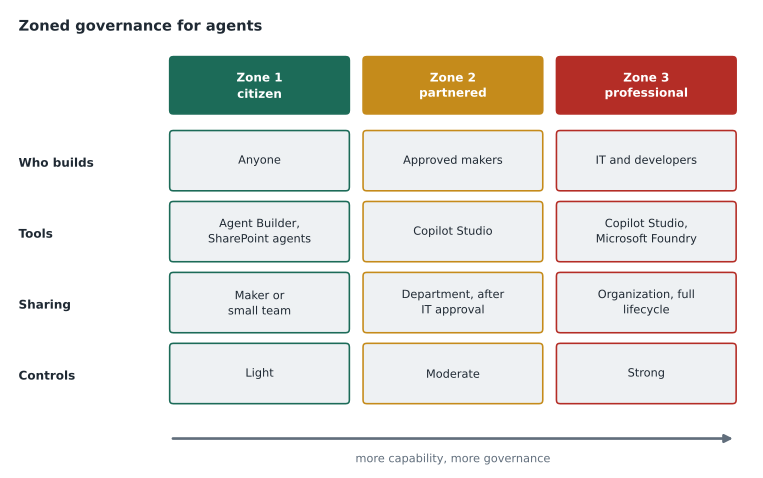
For the pilot, Corvallin set the zones like this. Any pilot user could build Agent Builder agents for themselves. Sharing Agent Builder agents was restricted to a group called Agent-Sharers, which at first contained only Nadia, Ansel Marrowby the records manager and the four IT staff, so a useful personal agent could become a team agent only through someone who had been trained. Copilot Studio authoring was limited to Teodor and Ama in a single managed environment, with nobody else licensed to author. Self-service Copilot Studio trials were blocked. Dr. Ostrander-Bey asked one question: could anyone build an agent that read the clinical site? Teodor's answer was that anyone could build one, but it would answer only from what the person using it could already open, and clinical documents were labelled and restricted under the governance plan. She asked him to show her, and he did.
Worked problem
Reading the sharing setting
Sharing for Agent Builder agents is set to Specific users, with the group Agent-Sharers. Ama, a member, builds an agent and shares it with the help desk team. Felix, not a member, builds an agent and tries to share it with all branch managers. A third user, also not a member, wants to share her agent with one named colleague. What happens in each case?
Show solution
- Ama is in the allowed group, so she can share her agent with the help desk team.
- Felix is not in the group, so he cannot share his agent with the branch managers through normal sharing.
- Microsoft's documentation says that even with the setting at No users, direct sharing with specific individuals still works, so sharing with one named colleague is expected to work; Teodor confirmed it in a test before writing the guidance.
Answer: The setting controls broad sharing of Agent Builder agents; it does not stop people building agents for themselves, and it applies only to Agent Builder agents, not to Copilot Studio or SharePoint agents, which have their own controls.
Use cases worth building
By the end of the session the group had a shortlist of candidate agents, each with an owner, a zone and a reason. The list was more useful than any principle, because it forced specific questions about data, audience and risk.
| Agent | Owner | Zone | Audience | Knowledge |
|---|---|---|---|---|
| Intake Questions | Nadia Prevost | 1, then 2 after approval | Intake coordinators answering families | Family Handbook, Intake FAQ |
| Procedures Helper | Ansel Marrowby | 1 (SharePoint agent) | Schedulers and office staff | Approved procedures library only |
| New Hire Guide | HR and training lead | 1 | New office staff | Onboarding pages and forms |
| Help Desk Triage | Ama Owusu-Pratt | 2 (Copilot Studio) | All staff | Help desk knowledge base, with an action to open a ticket |
Testing an agent before anyone else uses it
Whatever the tool, an agent should be tested against three kinds of question before it is shared: questions it should answer well, questions it should refuse, and questions its knowledge does not cover. Nadia wrote ten of each for Intake Questions and kept them in a short test sheet, so that every later change to the instructions or the knowledge could be checked against the same thirty questions in a few minutes. That sheet became a requirement for the approval review in lesson 6.
Common mistakes
MistakeLetting every user share agents with the whole organization from day one.
InsteadRestrict broad sharing to trained people, and grow the group as skills and governance mature.
MistakeWriting instructions that only describe what the agent should do.
InsteadAlso say what it must not do and what to say when it does not know.
MistakeBuilding system-connected agents with Agent Builder.
InsteadAgents that call business systems or take actions belong in Copilot Studio or professional tools with stronger governance.
MistakeAssuming the Agent Builder sharing setting controls all agents.
InsteadIt applies to Agent Builder agents; SharePoint and Copilot Studio agents have their own controls.
Summary and key terms
- A custom agent combines instructions, knowledge, actions and starter prompts; advanced agents add topics and triggers.
- Declarative agents use Copilot's orchestrator and model; custom engine agents bring their own.
- The tools climb from Agent Builder and SharePoint agents to Copilot Studio and developer tools, with governance increasing at each step.
- Web-grounded agents are included with Copilot Chat; agents using shared data need a Copilot licence or pay-as-you-go; Copilot Studio needs its own licensing.
- Who can build and share is decided by several controls: Agent Builder sharing and user access settings, site permissions, Copilot Studio maker access and trial settings, often organized into zones.
- Instructions
- The text that defines an agent's purpose, behaviour and limits.
- Knowledge source
- Content an agent grounds its answers in, such as a SharePoint library, files or websites.
- Action
- Something an agent can do beyond answering, such as creating a record or calling a service.
- Declarative agent
- An agent defined by instructions, knowledge and actions that runs on Copilot's orchestrator and model.
- Custom engine agent
- An agent that uses its own orchestration or model, built in Copilot Studio or developer tools.
- Agent Builder
- The tool in Microsoft 365 Copilot for creating simple agents from the chat experience.
- Zoned governance
- Grouping agent development into zones by risk and capability, each with its own controls.
Practice problems
Work each problem on paper first, then reveal the answer to check.
Name the four basic parts of a custom agent.
Show answer
Instructions, knowledge, actions (tools) and starter prompts.
Which tool fits an agent that must look up records in a business system and open a ticket?
Show answer
Copilot Studio (or professional developer tools), because it needs connectors and actions.
What are the three options for the Agent Builder sharing setting?
Show answer
All users, No users, and Specific users or groups.
Lesson quiz · 5 questions
Score 60% or more to complete this lesson.
Create a free account to save your progress, take quizzes and earn a certificate.