
MSBA-102 · Lesson 5 of 12 · 21 min
Retention policies and records
▶ Video coming soon A video version of this lesson is on the way.
Corvallin's records manager, a quiet former health-records clerk named Ansel Marrowby, came to Teodor's governance meeting with a printed list of retention rules. Client care records had to be kept for a set number of years after the last service; payroll records for a different period; job applications for a shorter one. Then he asked the question that made everyone stop: "When Copilot writes a summary of a client's care for a nurse, is that a record? And if it is, how long do we keep it?"
Retention in Microsoft 365 is about two duties that pull in opposite directions. Organizations must keep some content for a minimum period because of laws, contracts or professional rules. They should delete content they no longer need, because data kept forever is data that can leak, be subpoenaed or be found by Copilot long after it stopped being useful. Microsoft Purview Data Lifecycle Management and Microsoft Purview Records Management handle both duties.
Retention settings: keep, delete, or both
Every retention setting answers two questions. How long must content be kept, if at all? And what happens at the end of that period? The combinations are:
| Setting | Effect | Example |
|---|---|---|
| Retain only | Content cannot be permanently deleted during the period; nothing happens at the end | Keep all email for 2 years in case of complaints |
| Retain, then delete | Content is kept for the period and then deleted automatically | Keep Teams chats for 3 years, then delete |
| Delete only | Content older than the period is deleted; users can delete earlier | Delete chat messages after 1 year |
| Retain, then disposition review | At the end, a reviewer decides whether to delete (retention labels only) | Client records reviewed before deletion |
Retaining content does not stop people from working normally. If a user deletes an email that must be retained, it disappears from their view but a copy is preserved in the mailbox's Recoverable Items folder. For SharePoint and OneDrive, the original is kept in a hidden Preservation Hold library. The user experience stays the same; the organization keeps what it must.
Retention policies and retention labels
Purview offers two tools that use the same retention settings in different ways.
A retention policy applies to whole locations. An administrator might create one policy that keeps all Exchange mailboxes for seven years and another that deletes Teams chats after three. Policies can target every user or site in a location, or a scope of specific users, groups or sites. Scopes can be static, listing users or sites directly, or adaptive, built from attributes such as department or site properties so that membership updates automatically. Users do not see retention policies; they just work.
A retention label applies to individual items: a document, an email or a folder of items through a default label. Labels are published to locations with label policies, so users can choose them, or applied automatically when content matches conditions such as a sensitive information type, a keyword query or a trainable classifier. Labels can do things policies cannot: they can mark an item as a record, start retention from an event, and send items to disposition review at the end of the period.
| Need | Use |
|---|---|
| Keep all email for everyone for a fixed period | Retention policy on Exchange mailboxes |
| Delete Teams chats after a period to reduce clutter | Retention policy on Teams chats |
| Keep client care records until seven years after discharge | Retention label with event-based retention |
| Stop anyone editing a signed consent form | Retention label that declares the item a record |
| Have a person approve deletion of HR files | Retention label with disposition review |
| Keep Copilot prompts and responses for investigations | Retention policy on the Microsoft Copilot experiences location |
Records and regulatory records
A retention label can declare content a record. Records are locked against some changes. Depending on the settings, users can no longer edit the content or its properties, delete it, or change the label, though versions of some records can still be created by unlocking them in SharePoint. A regulatory record is stricter still: once applied, the label cannot be removed and the retention period cannot be shortened, even by administrators. Microsoft warns that regulatory records are meant for organizations with strict legal requirements, because the restriction is effectively irreversible. Ansel decided that signed consent forms would be records, and that Corvallin did not need regulatory records at all.
Event-based retention
Many retention rules do not start when a file is created. A care record must be kept for a period after the client is discharged, not after the nurse saved the visit note. Event-based retention handles this. A retention label is configured to start its period from an event type, such as "Client discharged", and items carry a property, such as the client number, that links them to that event. When the event is created in Purview, manually or through an API, every matching item's clock starts.
Worked problem
Working out a retention end date
A client file is labelled Client record, which keeps items for seven years after the Client discharged event and then triggers disposition review. The nurse created the first visit note in June 2023. The client was discharged on March 18, 2026, and the event was recorded that day. When does disposition review start?
Show solution
- Event-based retention ignores the creation date of June 2023.
- The period starts on the event date, March 18, 2026.
- Seven years after March 18, 2026 is March 18, 2033.
- At that date, the items go to disposition review rather than being deleted automatically.
Answer: Disposition review begins around March 18, 2033, seven years after the discharge event, not seven years after the first note.
When rules collide: the principles of retention
A single document can fall under a mailbox-wide policy, a site policy and a label at the same time. Purview settles conflicts with the principles of retention, applied in order.
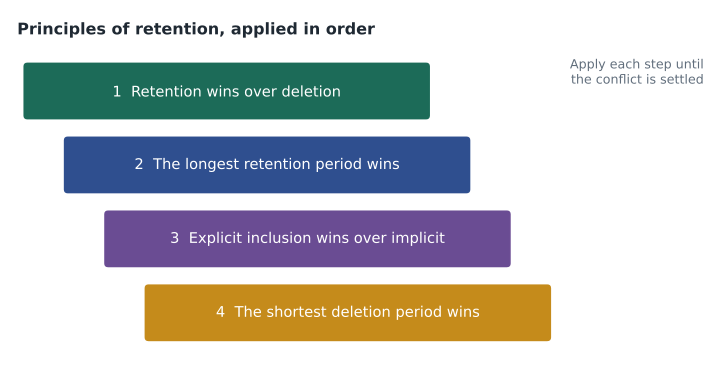
First, retention wins over deletion: if one setting says keep and another says delete, the item is kept until the retention ends. Second, the longest retention period wins. Third, explicit inclusion wins over implicit: a retention label on the item, or a policy scoped to that specific user or site, beats a policy that covers the whole location. Fourth, the shortest deletion period wins among what is left. Ansel liked a simple way to remember the first two: when in doubt, keep it longer.
Worked problem
Applying the principles
A Teams chat message is covered by a policy that deletes chats after 1 year and another that retains all communications for 3 years. When can it be permanently deleted?
Show solution
- Retention wins over deletion, so the 3-year retention applies.
- The message cannot be permanently deleted before 3 years.
- The user may delete it from view earlier, but a preserved copy remains.
- After 3 years, the 1-year delete setting has already passed, so the message is deleted.
Answer: It is kept for 3 years and then deleted.
Retention for Copilot interactions
Ansel's question about Copilot has a precise answer in Purview. Copilot prompts and responses are stored in the user's Exchange mailbox in a hidden location, and retention policies include a location called Microsoft Copilot experiences to retain or delete them. Corvallin could, for example, keep Copilot interactions for two years so that complaints could be investigated, and then delete them. Microsoft also documents that a retention label auto-applied with the option for cloud attachments and links shared in Exchange, Teams, Viva Engage and Copilot can keep a copy of a file as it was when Copilot referenced it, which helps prove what information an answer relied on.
Whether a Copilot summary is a business record is a policy decision, not a technical one. Ansel's view was practical: if a nurse saved the summary to a client's file, the saved document was part of the record and took the client record label. The chat itself was a working conversation and fell under the two-year Copilot policy. That distinction kept retention aligned with how staff actually worked.
# Retention plan - Corvallin Home Care (draft for privacy committee)
Exchange mailboxes          retain 7 years, then delete      (policy)
Teams chats                 retain 3 years, then delete      (policy)
Microsoft Copilot experiences  retain 2 years, then delete   (policy)
Client record               7 years after Client discharged,
                            then disposition review          (label)
Signed consent form         7 years after discharge, record  (label)
Job applications            2 years, then delete             (label)
Deleting on purpose
Retention is not only about keeping. Teodor pointed out that the old funding-application export from lesson 1, full of client addresses and diagnoses, had no business purpose left. Under the principle of keeping personal information only as long as needed, the right action was to delete it, after confirming no hold or retention rule applied. Deletion settings in retention policies, and disposition reviews on labels, give organizations an auditable way to remove data that is past its useful life. Less stale data also means fewer surprises in Copilot answers.
Disposition review and proof of disposal
When a retention label is set to start a disposition review, the items appear on the Disposition page of Records Management at the end of their retention period. Reviewers, who must have the right Purview role, can approve permanent deletion, extend the retention period, relabel the item or add it to a further review stage. Each decision is recorded, and the list of disposed items serves as proof of disposal, which is what auditors and regulators usually ask for. Ansel assigned himself as the first reviewer for client records, with Marguerite as a second stage for files involving incidents or complaints.
Scopes in more detail
A retention policy can apply to every mailbox, site or chat in a location, or to a scope. Static scopes list specific users, groups or sites. They are simple, but someone has to update them as people join and leave. Adaptive scopes use queries on attributes, such as a user's department in Microsoft Entra ID or a site's custom property, and update automatically. Corvallin used an adaptive scope for "all clinical staff" based on the department attribute, so a new nurse's Teams chats fell under the clinical retention rules from the first day, without anyone remembering to add her.
How long policies take to apply
Retention policies and label policies are not instant. After a policy is created or changed, Microsoft distributes it to the locations it covers, and that distribution can take several days before it reaches every mailbox and site. Teodor learned to create retention policies well before the date they mattered, and to check the policy's distribution status in the Purview portal rather than assuming it had applied.
Preservation Lock
Some organizations must prove that nobody, not even an administrator, can turn off retention. Preservation Lock places a restriction on a retention policy so that it cannot be turned off or deleted, and its retention cannot be shortened, though locations and periods can still be extended. Like regulatory records, it is effectively irreversible. Corvallin did not need it, but Ansel noted it as an option if a regulator ever required that level of assurance.
Teams and meeting content
Teams content is handled in a few places. Chat and channel messages have their own retention locations. Files shared in Teams live in SharePoint and OneDrive, so they follow those locations' policies. Meeting recordings and transcripts are stored in OneDrive or SharePoint too. When planning retention for Copilot, Teodor checked all of these, because Copilot meeting summaries draw on transcripts: deleting transcripts on a short schedule also limits what Copilot can summarize later.
Retention and deletion requests
Privacy laws give people rights over their personal information, and organizations sometimes receive requests to correct or delete it. Retention rules and holds can limit what can be deleted and when, because legal obligations to keep records may override a request. Corvallin's privacy officer handled such requests with the records manager, using eDiscovery searches to find the information and the retention plan to decide what could lawfully be removed.
A final check before publishing the plan was to compare it with the sensitivity labels from lesson 3. Labels and retention are separate tools, but staff see both in the same menus, so Teodor made sure the names did not confuse: sensitivity labels described how secret something was, and retention labels described what kind of record it was.
Common mistakes
MistakeUsing a retention policy when items need to be declared records.
InsteadOnly retention labels can declare records, start from events or trigger disposition review.
MistakeAssuming the shortest setting wins when policies conflict.
InsteadRetention wins over deletion, and the longest retention period wins.
MistakeApplying regulatory records casually.
InsteadRegulatory records cannot be unlocked or shortened, so use them only for strict legal requirements.
MistakeForgetting that Copilot interactions need their own retention decision.
InsteadUse the Microsoft Copilot experiences location in a retention policy.
Summary and key terms
- Retention settings keep content for a minimum period, delete it after a period, or both.
- Retention policies apply to locations; retention labels apply to items and can declare records, use events and require disposition review.
- The principles of retention settle conflicts: retention over deletion, longest retention, explicit over implicit, shortest deletion.
- Event-based retention starts the period from a business event such as discharge.
- Copilot prompts and responses can be retained or deleted with the Microsoft Copilot experiences location.
- Retention policy
- A Purview policy that applies retention settings to whole locations or scopes.
- Retention label
- An item-level tag with retention settings that can declare records and trigger disposition review.
- Record
- Content locked by a retention label against editing or deletion according to its settings.
- Regulatory record
- The strictest record type, which cannot be removed or shortened even by administrators.
- Event-based retention
- Retention that starts its period when a specified event occurs.
- Disposition review
- A review where people approve deletion of items at the end of their retention period.
- Adaptive scope
- A retention or policy scope defined by attributes so its membership updates automatically.
Practice problems
Work each problem on paper first, then reveal the answer to check.
Which tool can mark a signed consent form so that it cannot be edited: a retention policy or a retention label?
Show answer
A retention label that declares the item a record.
Two settings apply to an item: delete after 2 years, and retain for 5 years. What happens?
Show answer
Retention wins over deletion, so it is kept for 5 years.
Which retention policy location covers Copilot prompts and responses?
Show answer
Microsoft Copilot experiences.
Lesson quiz · 5 questions
Score 60% or more to complete this lesson.
Create a free account to save your progress, take quizzes and earn a certificate.