
MSBA-102 · Lesson 12 of 12 · 22 min
Case study: preparing a tenant for a Copilot rollout
▶ Video coming soon A video version of this lesson is on the way.
This lesson brings the course together in one problem. Read the scenario, try each task before reading the worked answer, and compare your plan with Teodor's. The point is not to memorize Corvallin's choices; it is to practise the sequence and the reasoning that any organization preparing for Copilot needs.
The scenario
Corvallin Home Care has 450 staff in a head office and four branches. Its tenant has 210 SharePoint sites, most connected to Teams, and about 1.6 million files. Licences: Microsoft 365 E3 for 120 office staff and managers, Microsoft 365 F3 for 340 home-care staff, E5 security features for administrators, and an E5 Compliance add-on for 12 people in privacy, HR, records and IT. Leadership has approved 40 Microsoft 365 Copilot licences for a pilot in spring 2027, on the condition that oversharing is cleaned up first. Copilot Chat is already available to all staff with work accounts.
The starting position, discovered in lessons 1 to 9, is summarized below.
| Area | Finding |
|---|---|
| Sharing settings | Organization defaults unchanged; Anyone links allowed; default link type People in your organization |
| Broad access | EEEU on 23 sites; 41 sites with no active owner; 31 sites untouched for a year |
| Sensitive data | 340 files with health card numbers outside clinical sites; an old export with every client's address and diagnosis |
| Labels | None published |
| DLP | A legacy Exchange rule for credit card numbers only |
| Retention | One policy keeping all email for 7 years; nothing for Teams or Copilot |
| AI use | 37 head office staff using consumer AI sites, 11 prompts containing health card numbers |
| Audit | Audit (Standard) on by default; no one assigned to search it |
Task 1: Prioritize the risks
Rank the three findings that most need attention before any Copilot licence is assigned, and explain why.
Worked problem
Worked answer to task 1
Which three findings come first?
Show solution
- Broad access to sensitive client data comes first: EEEU and organization-wide links on sites holding health card numbers mean Copilot users could surface client information immediately.
- The stale client export comes second: it is the single largest concentration of client data with no business purpose, and deleting it removes risk permanently.
- Sensitive data in consumer AI prompts comes third: it is already happening, it is outside Microsoft 365 protections, and the pilot is partly the cure.
- Labels, DLP for Copilot and retention matter too, but they protect data once access is right; they do not fix the access itself.
Answer: Fix broad access to sensitive sites, delete the stale export, and address consumer AI use; then build labels, DLP and retention on that foundation.
Task 2: Contain before cleanup
Leadership wants the worst exposure contained now, months before the pilot, but the finance and Branch 3 sites cannot be cleaned up quickly. What containment would you use, and for which sites?
Worked problem
Worked answer to task 2
Which containment tools fit which sites?
Show solution
- Finance Payroll: restricted access control with the five-person Finance Payroll group, because the audience is small and known.
- Branch 3 Operations and the other sites with sensitive data and broad links: restricted content discovery, because permissions cannot be fixed quickly without breaking work.
- Sites untouched for a year, including the funding export site: archive with Microsoft 365 Archive after the records manager confirms no retention applies, or delete the export under the retention plan.
- Record each containment in the tracker with an owner and an end date, so RCD is lifted once cleanup is done.
Answer: RAC for payroll, RCD for busy sensitive sites, archive or delete stale sites, all tracked with owners and end dates.
Task 3: Fix the defaults
Which organization-level settings would you change, and what would you tell staff?
Teodor's answer: turn off Anyone links; change the default link type to Specific people with View permission; keep guest sharing for families through New and existing guests; and set clinical sites to share only with people in the organization or existing guests through their container label. He would also turn on the inactive sites and site ownership policies in simulation. The staff message was short: "Starting next month, new links share only with the people you name. If you need to share with your whole branch, add them to the branch team instead."
Task 4: Design the protection layer
Using the E3 and E5 Compliance licences available, outline labels, DLP and retention for the pilot.
| Control | Pilot design | Licence note |
|---|---|---|
| Sensitivity labels | Public, General (default), Confidential, Confidential / Clinical (encrypts for clinical staff), Highly Confidential | Manual and default labelling for E3 users; auto-labelling planned where licensed |
| Container labels | Confidential / Clinical on clinical teams: private, no guests, sharing limited | Labels for groups and sites turned on in Entra ID |
| DLP for email, sites and Teams | Two-rule health card policy: tip and override for 1 to 4, block and alert for 5 or more | Simulation for two weeks first |
| DLP for Copilot | Separate policy: block Highly Confidential and Confidential / Clinical content from processing; block prompts with health card or client numbers; block web search for those prompts | Prompt blocking was in preview; verify status before relying on it |
| Retention | Copilot experiences: keep 2 years then delete; Teams chats: 3 years; client records label: 7 years after discharge with disposition review | Labels with events and disposition need suitable licences |
| Endpoint DLP | Warn when health card numbers are pasted into AI websites on onboarded head office devices | Needs device onboarding and suitable licences |
Task 5: Monitoring and investigation
Who watches what after go-live, and how often?
The answer needs both tools and people. DSPM for AI is the hub: its weekly data risk assessment shows whether oversharing is shrinking, its reports show sensitive information in AI interactions, and its activity explorer shows individual events. DLP alerts go to the privacy officer. Insider risk management, using the departing-users and Risky AI usage templates, is limited to the E5 Compliance users at first, with the privacy officer and Ines as the only investigators. Audit and eDiscovery roles go to the privacy officer and records manager, not to IT. A monthly governance review brings the numbers to Ines and Marguerite.
Task 6: Sequence the work
Put the work into a timeline that meets the spring 2027 pilot date.
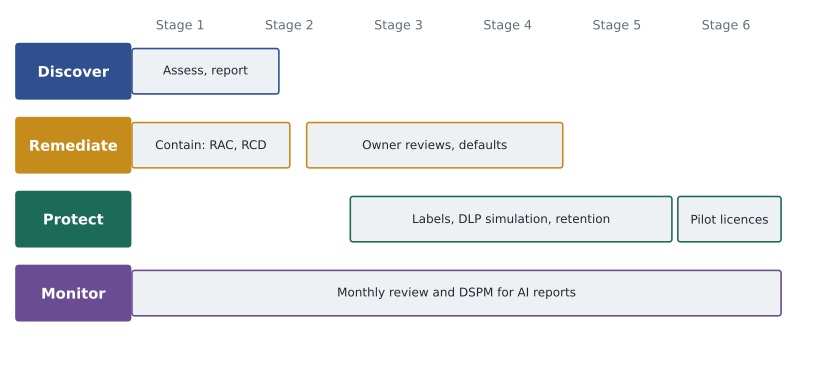
| When | Work | Exit check |
|---|---|---|
| November 2026 | Content management assessment, DAG reports, default data risk assessment, data explorer search | Ranked list of high-risk sites |
| November 2026 | RAC on payroll; RCD on Branch 3 and four other sites; delete the stale export | High-risk sites contained |
| December 2026 to January 2027 | Site access reviews; remove EEEU and broad links; sharing defaults changed | EEEU only on intranet and policies site |
| February 2027 | Labels published to IT and privacy; DLP policies in simulation; Copilot retention policy on | No major false positives |
| March 2027 | Labels to all staff; DLP tips on; DSPM for AI one-click policies reviewed | Staff trained; DLP tuned |
| April 2027 | DLP enforcement; pilot users confirmed; go-live decision | Go or no-go approved by Ines and Marguerite |
| May 2027 | Pilot licences assigned | Monthly review scheduled |
Task 7: The go or no-go decision
Suppose that, a week before go-live, the weekly assessment still shows one branch site with 40 health card files and broad links, because its owner has been on leave. Do you delay the pilot?
Worked problem
Worked answer to task 7
Delay, proceed, or proceed with a condition?
Show solution
- The risk is known, limited to one site and already reduced if the site has restricted content discovery turned on.
- Confirm RCD is on for the site, or apply RAC with the branch team group if its audience is clear.
- Check whether any of the 40 pilot users are members of that site; if so, their access is legitimate, and the issue is only broad links for others.
- Proceed with the pilot on the condition that the site's cleanup is finished by a set date, with a deputy owner named now.
Answer: Proceed with a documented condition: contain the site, name a deputy owner and set a cleanup date. Governance is about managing known risk, not waiting for zero risk.
What made the plan work
Looking back, Teodor listed four lessons that apply far beyond Corvallin. First, fix access before adding protection; labels and DLP cannot compensate for a payroll site shared with everyone. Second, contain fast and clean up properly; restricted access control and restricted content discovery buy time but do not remove the cause. Third, give decisions to the right owners; clinical, privacy and records staff made the choices, and IT made them happen. Fourth, measure a few things every month; the board followed three numbers, and those numbers kept everyone honest.
Task 8: Training and communication
Controls fail when people do not understand them. Outline what pilot users and all staff need to hear before go-live.
Teodor's plan had three parts. Pilot users received a one-hour session covering what Copilot can and cannot see, how labels work, what a DLP block looks like and what to do, and the acceptable use policy. All staff received a short email and an intranet page explaining the new sharing defaults, the label menu and the rule against putting client information into consumer AI sites. Site owners received a separate briefing on site access reviews and lifecycle notifications, because they would be asked to act. Each message named a person to contact, which made questions far more likely than a generic help-desk address.
Task 9: Measuring success after 90 days
What would show, three months after go-live, that the governance work had succeeded?
| Measure | Source | Target trend |
|---|---|---|
| Sensitive items in broadly shared sites | Weekly data risk assessment | Falling each month |
| Sites with EEEU outside the intranet | Data access governance reports | Zero |
| Prompts blocked for client identifiers | DLP and DSPM for AI reports | Falling as habits change |
| Staff using consumer AI with client data | DSPM for AI discovery reports | Falling toward zero |
| Share of files with labels in clinical sites | Data explorer and label reports | Rising |
| Site access reviews completed on time | SharePoint admin center | Above nine in ten |
If the plan works, the first four measures should all move in the right direction within ninety days of go-live. That evidence, rather than enthusiasm for the technology, is what Corvallin's leadership asked to see before licensing Copilot for the rest of the office staff.
Task 10: Lessons for the next rollout
Before expanding Copilot to all office staff, write down three things Corvallin should do differently next time.
Teodor's list was short. First, start the permissions cleanup months earlier, as routine hygiene rather than a project with a deadline, because the hardest part was waiting for site owners. Second, publish labels and DLP policy tips before the cleanup, not after, so that staff are used to them by the time Copilot arrives. Third, involve the help desk from the first week; they were the people who heard every confused question, and their notes improved the training more than any document. Ines added a fourth: keep the monthly governance review even when nothing seems wrong, because that is exactly when drift goes unnoticed.
Reflection questions
Use these questions to test your own plan against Corvallin's. Which of your organization's sites would appear in a default data risk assessment, and who owns them? Which sensitive information types matter most in your sector, and do built-in types cover them or do you need custom ones? Who in your organization should decide who sees sensitive data, and who should investigate when something goes wrong? Which Copilot and Purview capabilities that you plan to rely on are still in preview? And what three numbers would you report to your leadership each month? If you can answer each question with a tool from this course and the name of a person, you are ready to plan a rollout. If not, the gaps tell you where to start.
The same approach applies well beyond health care. A law firm would focus on client matters and privilege, a school on student records, and a manufacturer on designs and contracts, but the sequence of discovering, containing, cleaning up, protecting and monitoring stays the same.
Common mistakes
MistakeStarting the rollout by building DLP rules.
InsteadDiscover and fix broad access first, then add labels and DLP.
MistakeWaiting for every site to be perfect before any pilot.
InsteadContain known risks, document conditions and proceed with owners and dates.
MistakeLetting IT decide who should see clinical data.
InsteadBusiness owners decide access; IT implements and monitors.
MistakeRelying on preview features without checking their status.
InsteadConfirm whether each capability is generally available before treating it as a control.
Summary and key terms
- Prioritize broad access to sensitive data, stale sensitive content and AI use outside Microsoft 365.
- Contain quickly with restricted access control or restricted content discovery, then clean up with site owners.
- Tighten sharing defaults, then layer labels, DLP for all locations including Copilot, and retention for Copilot interactions.
- Use DSPM for AI, DLP alerts, insider risk management, audit and eDiscovery for monitoring, with clear role separation.
- Sequence the work with exit checks and make the go-live decision on managed, documented risk.
- Readiness assessment
- The discovery work that finds oversharing, sensitive data and gaps before a Copilot rollout.
- Containment
- Short-term controls, such as RAC or RCD, that limit exposure while permanent fixes are made.
- Exit check
- A condition that must be met before a project moves to its next stage.
- Responsibility grid
- A table that records who is responsible, who approves, who is consulted and who is informed for each task.
Practice problems
Work each problem on paper first, then reveal the answer to check.
Why does fixing access come before building DLP rules?
Show answer
Copilot uses whatever users can access, so broad access exposes data that DLP rules may not cover; access is the foundation.
Which containment tool would you choose for a site with a small known audience?
Show answer
Restricted access control with that group.
Name two numbers Ines used to report progress to the board.
Show answer
Sensitive items in broadly shared sites; prompts blocked for containing client identifiers; staff using consumer AI with client data (any two).
Lesson quiz · 5 questions
Score 60% or more to complete this lesson.
Create a free account to save your progress, take quizzes and earn a certificate.