
MSBA-102 · Lesson 1 of 12 · 19 min
Why data governance matters for AI assistants
▶ Video coming soon A video version of this lesson is on the way.
Corvallin Home Care sends nurses, personal support workers and therapists into about 2,000 homes a week from a head office in Halifax and four branch offices. Its 450 staff live in Microsoft 365: visit notes are drafted in Word, schedules are built in Excel, families are emailed from Outlook, and every branch has a Teams team with a SharePoint site behind it. In September 2026 leadership approved a Microsoft 365 Copilot pilot for 40 office staff in spring 2027, on the condition that oversharing was cleaned up first, and Ines Duvernay-Sato, the IT manager, gave the preparation work to Teodor Klimaszewski, the Microsoft 365 administrator. Before a single licence was assigned, she asked him one question: if a scheduler asks Copilot about a client, what exactly can it find?
Teodor started where this course starts. An AI assistant does not create new data and, in Microsoft 365, it does not create new permissions. What it changes is how quickly and how completely a person can use the access they already have. That single idea explains why every Copilot deployment guide, and every exam that tests Copilot administration, begins with data governance.
The amplifier problem
Before Copilot, a scheduler who technically had access to a folder of payroll exports would probably never find it. The folder sat three levels deep in a finance site that had been shared with "Everyone except external users" years ago by someone who left the company. Nobody browsed it, search results buried it, and the risk stayed theoretical. Copilot removes that friction. When the scheduler asks "What did we pay the weekend nurses last quarter?", Copilot searches everything the scheduler can open, pulls the relevant lines and writes a neat summary. The permission was always wrong; Copilot simply made the mistake visible and usable.
Security people call this oversharing: content that is accessible to more people than need it. Oversharing usually comes from ordinary habits. Someone creates a sharing link that works for anyone in the organization because it is the easiest option. A team adds a large group to a site so that new hires get access automatically. A site owner leaves and nobody reviews who can still see the content. None of these actions is malicious, and most of them made sense at the time. Together they produce a tenant where the real permissions are much wider than anyone believes.
Teodor ran a quick experiment on a test account that had the same group memberships as a typical scheduler. Using ordinary Microsoft Search he found three things a scheduler should never see: a spreadsheet of staff sick-leave notes, a folder of incident reports about client falls, and an old export of every client's address and diagnosis created for a funding application. Each was reachable because of a broad sharing link or a site shared with the whole company. He wrote in his notes: "Copilot would find all of this in seconds."
What changes when people use AI with company data
Governance for AI covers more than oversharing. Teodor listed the risks he needed to manage, and each one maps to a set of tools that the rest of this course explains.
| Risk | What it looks like at Corvallin | Main controls |
|---|---|---|
| Oversharing | A scheduler's Copilot answer quotes a payroll file shared too widely | SharePoint permissions, data access governance reports, restricted access control, restricted content discovery |
| Sensitive data leaving in prompts or answers | A worker pastes a client's health card number into a prompt, or forwards a Copilot summary outside the company | Sensitivity labels, data loss prevention, including the Microsoft 365 Copilot location |
| Unprotected new content | Copilot drafts a report from labelled clinical notes, and the draft is saved without protection | Label inheritance, mandatory and default labels, auto-labelling |
| Use of outside AI tools | Staff paste client details into a free consumer chatbot | DSPM for AI discovery, endpoint DLP, browser and network controls |
| Misuse by insiders | A departing employee uses Copilot to gather client lists | Insider risk management, including the Risky AI usage template |
| Inappropriate content | Prompts that harass a colleague or ask for protected material | Communication compliance |
| Keeping and finding records | A regulator or court asks what Copilot told a manager about a complaint | Retention policies, audit, eDiscovery |
| Proving compliance | The board asks whether the rollout meets privacy obligations | Compliance Manager, Microsoft's contractual commitments |
The table is a map, not a checklist. Corvallin does not need every control on day one, and some controls, such as insider risk management, need licences that not every plan includes. But each row is a question someone will eventually ask, and an administrator who can point to the right tool for each question is ready to plan a rollout.
Why "it was already shared" is not a defence
When Teodor showed his findings to Dr. Marguerite Ostrander-Bey, the clinical director, she asked the obvious question: if the files were already shared, why was this a Copilot problem at all? Teodor's answer is worth remembering. Privacy law and professional rules care about who can actually reach personal information, not who was supposed to. Nova Scotia's Personal Health Information Act expects custodians such as Corvallin to protect personal health information with reasonable safeguards and to limit access to people who need it for their work. An overshared folder was a problem before Copilot. Copilot turns a quiet problem into one that could produce a privacy breach on an ordinary Tuesday.
There is also a practical reason to fix permissions rather than block Copilot. If an organization responds to oversharing by turning AI off, the underlying problem stays: the same scheduler can still open the payroll file through search, a link or a synced folder. Fixing access improves security for every tool, not only for Copilot. Microsoft's own deployment guidance follows the same logic: assess oversharing, remediate it, then protect sensitive content with labels and DLP, and keep monitoring.
The shared responsibility model
Microsoft runs the infrastructure that hosts Microsoft 365 and Copilot, and it makes commitments about how prompts and responses are processed, which lesson 11 covers in detail. Microsoft does not decide who in Corvallin should see a client's file. That decision belongs to the customer. This split is called the shared responsibility model. In software as a service such as Microsoft 365, the provider secures the physical data centres, the network, the hosts and the application code. The customer is always responsible for its data, its identities and accounts, its devices, and the access it grants.
| Microsoft is responsible for | Corvallin is responsible for |
|---|---|
| Physical data centres and hardware | Which users and groups exist and what they can access |
| The Microsoft 365 and Copilot services and their patches | Sharing settings, links and site permissions |
| Encryption of data at rest and in transit by default | Classifying data and applying sensitivity labels |
| Contractual privacy and security commitments | Policies for DLP, retention and acceptable use of AI |
| Making governance tools available | Turning those tools on, configuring them and acting on alerts |
Teodor found the last row the most sobering. Most of the protections in this course are switched off, set to simulation or left at broad defaults when a tenant is created. Purview gives administrators the controls; it does not decide on their behalf.
Microsoft Purview at a glance
Microsoft Purview is Microsoft's family of data security, governance and compliance solutions. Administrators work with it in the Microsoft Purview portal, and most of its features cover email, documents, Teams messages and Copilot interactions in one place. For this course it helps to group the solutions by the question each answers.
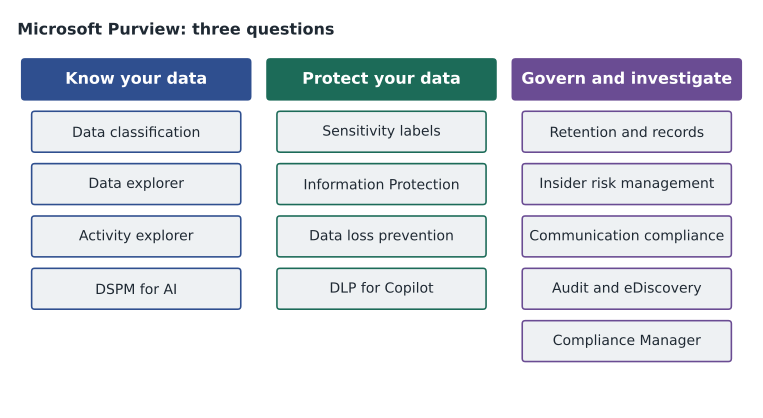
The first group helps you know your data. Data classification recognizes sensitive information such as health card numbers or bank account numbers. Data explorer shows which items contain sensitive information or carry labels, and activity explorer shows what people are doing with them. Data Security Posture Management, including the AI-focused experience that the exam calls DSPM for AI, brings these signals together and points to risks.
The second group helps you protect your data. Microsoft Purview Information Protection applies sensitivity labels that can mark, encrypt and restrict content. Microsoft Purview Data Loss Prevention stops sensitive information from being shared in the wrong place, and it now has a specific policy location for Microsoft 365 Copilot and Copilot Chat.
The third group helps you govern and investigate. Data Lifecycle Management and records management decide what is kept and what is deleted. Insider risk management and communication compliance look for risky behaviour and inappropriate messages. Audit records who did what, eDiscovery finds content for investigations and legal matters, and Compliance Manager tracks progress against regulations and standards.
Worked problem
Mapping a question to a tool
Ines asks Teodor three questions in one email: (a) Which sites contain client health information? (b) Can we stop people from pasting client numbers into Copilot? (c) If a family complains, can we show what Copilot said to the case manager? Which Purview solution answers each question?
Show solution
- Question (a) is a "know your data" question: data classification with sensitive information types, viewed in data explorer, or a DSPM for AI data risk assessment.
- Question (b) is a "protect" question: a data loss prevention policy on the Microsoft 365 Copilot location that blocks prompts containing sensitive information types.
- Question (c) is a "govern and investigate" question: Copilot prompts and responses are captured by audit and can be found with eDiscovery, provided a retention policy has kept them.
Answer: Classification and data explorer (or DSPM for AI) for (a), DLP for the Copilot location for (b), and audit plus eDiscovery with retention for (c).
Licences shape the plan
Not every Purview feature comes with every Microsoft 365 plan. Basic capabilities such as manually applied sensitivity labels, DLP for Exchange, SharePoint and OneDrive, retention policies and Audit (Standard) are included in many business and enterprise plans. Advanced features such as automatic labelling, insider risk management, communication compliance, Audit (Premium) and eDiscovery (Premium) generally need enterprise E5-level licences or add-ons. Licensing names and bundles change often, so Teodor checked Microsoft's current service descriptions rather than relying on a colleague's memory. Corvallin had Microsoft 365 E3 for office staff and managers, Microsoft 365 F3 for home-care staff, E5 security features for administrators only, and was adding an E5 Compliance add-on for a small privacy team, which meant some features could be used for everyone and others only for the people with the add-on.
One licence detail matters for Copilot specifically. Organizations that assign Microsoft 365 Copilot licences get a set of SharePoint Advanced Management features, including restricted access control, restricted content discovery and data access governance reports, without buying SharePoint Advanced Management separately. Lesson 9 covers those features.
A governance plan in four moves
Teodor ended his first week with a simple plan that the rest of this course fills in. Microsoft describes the same loop for AI data security: discover the risks, remediate what is exposed, prevent it from happening again, and keep monitoring.
| Move | Main question | Tools in this course |
|---|---|---|
| Discover | Where is sensitive data and who can reach it? | Data classification, data explorer, DSPM for AI assessments, data access governance reports |
| Remediate | How do we close the gaps we found? | Removing links and broad groups, site access reviews, restricted access control, restricted content discovery |
| Prevent | How do we stop new gaps and protect what matters? | Sensitivity labels, DLP, retention, sharing settings, site lifecycle policies |
| Monitor | How do we know it is working? | Activity explorer, DSPM for AI reports, insider risk, communication compliance, audit |
Ines approved the plan with one change: Marguerite would be named as the business owner for clinical data, so that every decision about who should see client information had a clinical voice, not just an IT one. That is good governance in any tenant. Tools enforce decisions; people still have to make them.
Questions the board asked
When Ines presented the plan, three board members asked questions that come up in almost every organization. The first was whether Corvallin could simply wait until Microsoft "fixed" oversharing. Ines explained that oversharing is not a defect in Microsoft 365; it is the result of thousands of reasonable sharing decisions made over years, and only Corvallin could judge which of them were still right. The second was whether governance would slow the pilot. Her answer was that the first weeks would be spent on discovery and containment, which could run alongside training, and that most of the work improved security whether or not Copilot was used. The third was who would be accountable if something went wrong. Ines named three people: herself for the technical controls, Marguerite for decisions about clinical data, and the privacy officer for incidents. A governance plan that names people is easier to trust than one that names only tools.
Common mistakes
MistakeBelieving Copilot can see data that users cannot.
InsteadCopilot works within the signed-in user's existing permissions; the risk is that those permissions are wider than intended.
MistakeTreating oversharing as a Copilot problem that disappears if Copilot is turned off.
InsteadOvershared content is reachable by search, links and sync too; fixing access helps every tool.
MistakeAssuming Microsoft configures data protection for you.
InsteadUnder the shared responsibility model, the customer decides access, labels and policies.
MistakePlanning features before checking licences.
InsteadCheck which Purview features each user's plan includes before promising a control.
Summary and key terms
- Copilot does not grant new access; it makes existing access faster and more complete to use.
- Oversharing, sensitive data in prompts, unprotected new content, outside AI tools, insider misuse and record keeping are the main AI governance risks.
- Under the shared responsibility model, Microsoft secures the service and the customer controls data, identities and access.
- Microsoft Purview groups its solutions into knowing, protecting and governing data.
- A practical plan moves through discover, remediate, prevent and monitor, with named business owners.
- Oversharing
- Content that is accessible to more people than need it, usually through broad links, groups or inherited permissions.
- Microsoft Purview
- Microsoft's family of data security, governance and compliance solutions, managed in the Microsoft Purview portal.
- Shared responsibility model
- The division of security duties between a cloud provider and its customer.
- Data governance
- The policies, roles and tools an organization uses to decide how data is classified, accessed, kept and deleted.
Practice problems
Work each problem on paper first, then reveal the answer to check.
Why can Copilot make an old oversharing mistake more dangerous?
Show answer
It searches everything the user can access and summarizes it quickly, so content that was hard to find becomes easy to use.
Name the Purview solution group that answers "Where is our sensitive data?"
Show answer
Know your data: data classification, data explorer, activity explorer and DSPM.
Under the shared responsibility model, who decides which users can open a SharePoint site?
Show answer
The customer organization.
Lesson quiz · 5 questions
Score 60% or more to complete this lesson.
Create a free account to save your progress, take quizzes and earn a certificate.