
MSBA-101 · Lesson 9 of 12 · 19 min
The Zero Trust model
▶ Video coming soon A video version of this lesson is on the way.
In October, Corvallin's board asked Ines for a ten-minute briefing on cyber security before approving the Copilot budget. One board member, a retired hospital administrator, remembered the old way: "We had a firewall. Inside was safe, outside was dangerous." Ines asked Teodor to help her explain why that picture no longer fits, using the model the AB-900 exam calls Zero Trust. Their slides became this lesson.
Why the perimeter stopped working
The traditional model of network security is often called castle and moat. Everything inside the corporate network is trusted; a firewall at the edge keeps attackers out. That model assumed that users, devices, applications and data were all inside the walls. None of those assumptions holds at Corvallin. Nurses work from clients' kitchens on phones. Office staff work from home on Tuesdays. Mail, files and VisitWise all live in the cloud. The data is outside the walls, the people are outside the walls, and the attackers, as the phished coordinator showed, can be inside the moment one password is stolen.
Zero Trust is a security strategy that replaces "trust anything inside the network" with "trust nothing by default; check every request". It is not a product that can be bought and installed. It is a set of principles applied across identities, devices, apps, data, infrastructure and networks, using tools such as the ones covered in this course.
The three principles
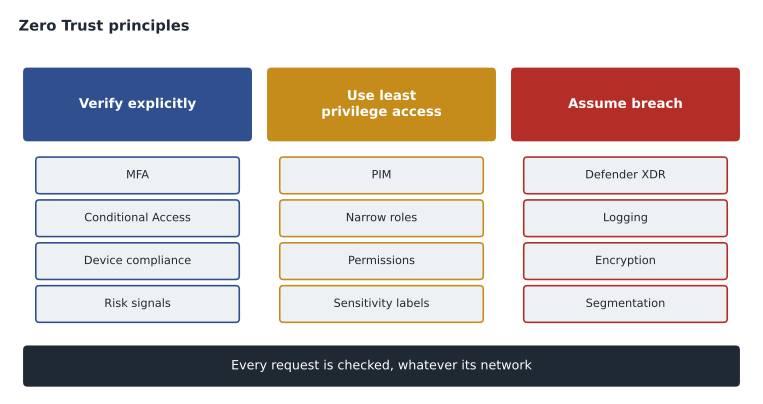
Microsoft describes Zero Trust with three guiding principles, and AB-900 asks you to explain them.
| Principle | What it means | Microsoft 365 examples |
|---|---|---|
| Verify explicitly | Always authenticate and authorize using every available signal: identity, location, device health, the service requested, data sensitivity and anomalies | MFA, Conditional Access, device compliance, sign-in risk |
| Use least privilege access | Limit access with just-in-time and just-enough access, risk-based adaptive policies and data protection | PIM, narrow admin roles, SharePoint permissions, sensitivity labels |
| Assume breach | Minimize the blast radius, segment access, encrypt end to end and use analytics to detect and respond to threats | Defender XDR, audit logs, encryption, short token lifetimes, continuous access evaluation |
Verify explicitly means no request is trusted because of where it comes from. A sign-in from the head office network still needs strong authentication, and a request from a compliant laptop is treated differently from one on a personal tablet in another country. Use least privilege access means nobody gets more than the job needs, and powerful access is granted only when needed, as lesson 8 described. Assume breach is the most important change of mindset: design as if an attacker is already inside, so that one compromised account or device cannot reach everything, and so that the attack is noticed quickly.
The pillars
Microsoft's Zero Trust guidance applies the principles to six technology pillars, held together by visibility, automation and orchestration.
| Pillar | Question it answers | Microsoft tools |
|---|---|---|
| Identities | Is this really the person or service, and should they have access? | Entra ID, MFA, Conditional Access, PIM, ID Protection |
| Endpoints | Is the device known, healthy and compliant? | Intune, Defender for Endpoint, compliance policies |
| Applications | Is the app approved, configured safely and used as intended? | Enterprise applications, consent settings, Defender for Cloud Apps |
| Data | Is the data classified, protected and shared appropriately? | Purview sensitivity labels, DLP, retention, SharePoint permissions |
| Infrastructure | Are servers, containers and cloud resources hardened and monitored? | Defender for Cloud, Azure policies |
| Networks | Is traffic segmented, encrypted and inspected? | Microsoft Entra Internet Access and Private Access, firewalls, encryption in transit |
A useful way to read the table is to follow one request. When a nurse opens a care plan in SharePoint on her phone, the identity pillar checks who she is and how she signed in, the endpoint pillar checks that the phone is enrolled and compliant, the application pillar checks that SharePoint is an approved app she is assigned to, and the data pillar checks the plan's sensitivity label and her permissions. Only if all agree does she see the document, and the whole exchange is logged.
Zero Trust in daily administration
Much of what Teodor had done in the first eight reviews was Zero Trust work, though nobody had called it that. Phishing-resistant MFA and Conditional Access put "verify explicitly" into practice. Removing Global Administrators and introducing PIM put least privilege into practice. Converting shared mailbox passwords into permissions removed shared credentials that made accountability impossible. Restricting app consent stopped malicious apps from quietly gaining access. The remaining reviews would add the "assume breach" tools: Defender XDR, Secure Score and the service health habits that let a small team notice problems early.
Worked problem
Mapping an incident to the principles
Revisit the phished coordinator from lesson 6. Her password and a relayed push approval gave the attacker a session; the attacker created an inbox rule to hide replies and sent invoices with changed bank details. Which Zero Trust controls would have stopped, limited or revealed each stage?
Show solution
- Initial access (verify explicitly): phishing-resistant MFA would have given the fake page nothing to relay. A Conditional Access policy requiring a compliant device would also have blocked the attacker's own computer.
- Persistence (least privilege): the attacker could only use what she could use. Because she was not an administrator, the attacker could not change tenant settings. Restricting user consent stopped any attempt to grant a malicious app access to her mailbox.
- Action (assume breach): Defender for Office 365 flagged the suspicious inbox rule and Defender XDR correlated it with the unusual sign-in as one incident. Automatic attack disruption can disable a compromised account or revoke its sessions.
- Response: revoking sessions, resetting the password and requiring re-registration of methods ended access, and audit logs showed exactly which messages had been sent.
Answer: Phishing-resistant MFA or a device requirement would have stopped it; least privilege limited it; detection and response under assume breach caught and contained it.
Zero Trust and AI
Microsoft applies the same principles to Copilot and agents. Copilot verifies the user explicitly through Entra ID before every request. It works with least privilege, because it can only reach content the user is already permitted to see, which makes cleaning up oversharing essential. And assuming breach means treating AI interactions as data to be logged, protected and monitored, with Purview and Defender watching for risks such as sensitive information in prompts or attempts to manipulate an agent with hidden instructions. An agent is also an identity: in current Microsoft 365, agents can have their own Entra identities, and the same Zero Trust controls apply to them as to people.
Measuring progress
Zero Trust is a journey with no finish line, so organizations measure progress. Microsoft's Secure Score and Identity Secure Score, covered in lesson 10, give numeric measures with recommended actions. Microsoft also publishes a Zero Trust adoption framework and a free, open-source Zero Trust Assessment tool that checks a tenant's configuration against recommended practice and produces a report. Ines used the assessment to give the board a before-and-after picture: the September run flagged legacy authentication, standing Global Administrators and unrestricted app consent; the November run showed all three fixed.
The board member who remembered the firewall asked one last question: "So is the firewall useless now?" Ines's answer was the right one. Network controls still matter; they are one pillar of six. What changed is that the network is no longer the thing that decides whether someone is trusted.
The endpoint and data pillars in more depth
Identity often gets most of the attention because it is where attacks most often begin, but the endpoint and data pillars carry as much weight. For endpoints, Zero Trust means every device that touches company data is known, healthy and managed or at least protected: enrolled in Intune with a compliance policy, running Defender for Endpoint, encrypted, and kept up to date. A device that falls out of compliance, perhaps because updates stopped or antivirus was turned off, automatically loses access through Conditional Access until it is fixed. On personal phones, app protection policies keep work data inside managed apps and allow it to be wiped without touching personal photos.
For data, Zero Trust means protection travels with the information rather than depending on where it is stored. Sensitivity labels classify and, where needed, encrypt documents and email so that only authorized people can open them, even if a file is emailed outside the organization or copied to a USB stick. Data loss prevention policies watch for sensitive information such as health card numbers being shared inappropriately. Retention policies keep what must be kept and delete what should not be kept. The next course in this program covers each of these in depth, because they are also the controls that decide what Copilot may use and show.
A maturity roadmap
Organizations rarely implement Zero Trust in one project. Microsoft's adoption guidance suggests starting with the controls that remove the most risk quickly, then extending. Ines turned that into a three-phase plan that the board could follow.
| Phase | Focus | Corvallin actions |
|---|---|---|
| 1. Foundations (autumn 2026) | Identity and administration | MFA for everyone, phishing-resistant MFA for admins, legacy authentication blocked, PIM, emergency access accounts, app consent restricted |
| 2. Devices and data (winter to spring 2027) | Endpoints and information protection | All laptops compliant in Intune, Defender for Endpoint everywhere, sensitivity labels and DLP for client records, oversharing clean-up before Copilot |
| 3. Detection and automation (2027) | Assume breach | Partner monitoring of incidents, automated response playbooks, regular attack simulations, quarterly access reviews |
The board found the table more useful than any technical slide, because each phase had a clear purpose and visible results. The phase 1 actions were already done by the time of the briefing, which Ines pointed out was the best argument that the plan was realistic.
Zero Trust and the people involved
Every Zero Trust control changes something for someone, and badly communicated controls get worked around. Requiring compliant devices meant a few managers could no longer read email on old personal tablets. Blocking legacy authentication broke an old scanner that emailed documents. Phishing-resistant MFA meant learning to use a security key. Corvallin's rule was that every change came with a short explanation of why, a date, a named person to ask, and a fix ready for the common problems, such as a replacement method for the scanner. The changes stuck because people understood them.
Common misunderstandings
Three misunderstandings came up at the board briefing, and they are common on the exam too. The first is that Zero Trust means not trusting employees. It does not; it means not trusting a request simply because of where it comes from, and it protects employees from having their accounts misused. The second is that Zero Trust makes life harder for users. Done well, it often makes life easier: passwordless sign-in is faster than passwords, single sign-on removes extra logins, and a compliant device usually means fewer prompts, not more. The third is that Zero Trust is finished once the tools are bought. Policies need tuning, exclusions need review, new apps and agents need to be brought under the same controls, and attackers change their methods, so the work is continuous.
| Misunderstanding | Reality |
|---|---|
| Zero Trust means distrusting staff | It means verifying requests, which protects staff accounts from misuse |
| It always adds friction | Passwordless, SSO and compliant devices often reduce prompts |
| It is a one-time project | It is continuous: policies, exclusions and new identities need ongoing attention |
| It replaces network security | Networks remain one pillar among six |
| It only matters for large companies | Small organizations are frequent targets and benefit from the same principles |
Ines closed the briefing with the coordinator's story from lesson 6, told in a minute: one password, one relayed approval, an hour of fraud attempts, and the controls that would have stopped it. The board approved the Copilot budget on the condition that phase 2 of the roadmap, devices and data, was finished before the pilot began.
For Teodor, the briefing changed how he described his own job. He had thought of himself as the person who kept Microsoft 365 running. After nine reviews he saw the work differently: every setting he owned either verified a request, limited what a request could reach, or helped Corvallin notice and recover when something went wrong. That framing made it much easier to decide what to do next, and to explain to anyone at Corvallin why a change was worth the inconvenience it caused.
Common mistakes
MistakeTreating Zero Trust as a product to buy.
InsteadIt is a strategy and set of principles applied with many tools.
MistakeTrusting sign-ins from the office network more because they are inside.
InsteadVerify explicitly everywhere; location is one signal among many.
MistakeThinking "assume breach" means giving up on prevention.
InsteadIt means designing to limit and detect damage as well as prevent it.
MistakeForgetting that agents and apps are identities too.
InsteadApply verification and least privilege to workload and agent identities as well as people.
Summary and key terms
- Zero Trust replaces trust based on network location with checking every request.
- The three principles are verify explicitly, use least privilege access and assume breach.
- The pillars are identities, endpoints, applications, data, infrastructure and networks.
- Microsoft 365 tools such as MFA, Conditional Access, PIM, Intune, Purview and Defender implement the principles.
- The same principles apply to Copilot and agents; Secure Score and the Zero Trust Assessment measure progress.
- Zero Trust
- A security strategy that trusts nothing by default and checks every request.
- Verify explicitly
- Authenticating and authorizing every request using all available signals.
- Assume breach
- Designing as if attackers are already inside, to limit and detect damage.
- Blast radius
- How much an attacker can reach from one compromised account or device.
- Castle and moat
- The older model that trusted everything inside the network perimeter.
- Pillar
- One of the technology areas, such as identities or data, where Zero Trust is applied.
Practice problems
Work each problem on paper first, then reveal the answer to check.
Which Zero Trust principle does PIM mainly support?
Show answer
Use least privilege access.
Give one example of "assume breach" in Microsoft 365.
Show answer
Any of: Defender XDR detection, audit logging, encryption, revoking sessions, short token lifetimes.
Is Zero Trust only about identities?
Show answer
No. It covers identities, endpoints, apps, data, infrastructure and networks.
Lesson quiz · 5 questions
Score 60% or more to complete this lesson.
Create a free account to save your progress, take quizzes and earn a certificate.