
MSBA-101 · Lesson 10 of 12 · 18 min
Microsoft Defender XDR and Secure Score
▶ Video coming soon A video version of this lesson is on the way.
The tenth review took place in the Microsoft Defender portal. Teodor had opened it perhaps a dozen times in two years, usually after Microsoft emailed him an alert he did not fully understand. Ines wanted the opposite: someone who opened it every morning, knew what normal looked like and could explain to the leadership team, with a number, whether Corvallin was getting safer. That meant learning two things: how Microsoft Defender XDR finds and handles attacks, and how Secure Score measures defences.
Threat protection and threat intelligence
AB-900 asks you to understand threat protection and threat intelligence. Threat protection is the set of technologies that prevent, detect and respond to attacks: filtering malicious email, blocking malware on devices, spotting suspicious sign-ins and stopping attackers who get in. Threat intelligence is knowledge about attackers: who they are, how they operate, which infrastructure and tools they use and what they are targeting now. Microsoft sees trillions of signals a day across its cloud services, consumer products and partner feeds, and turns them into intelligence that its protection products use automatically and that security teams can read.
What Microsoft Defender XDR is
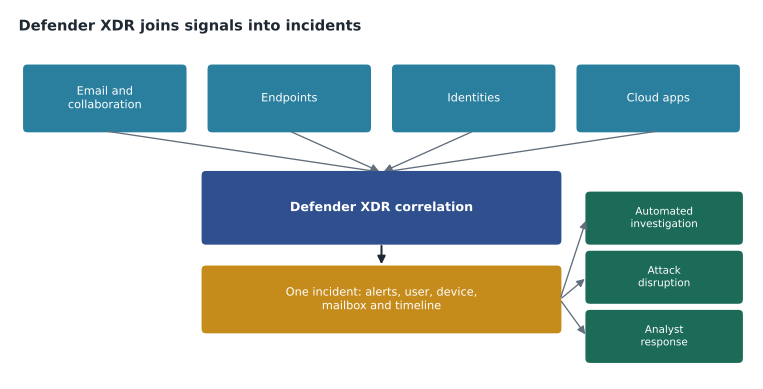
Microsoft Defender XDR (extended detection and response) is a unified suite that coordinates protection across email and collaboration, endpoints, identities and cloud apps. Each area has its own Defender product, and XDR joins their signals so that one attack seen in several places appears as one story rather than many separate alerts. The suite is managed in the Microsoft Defender portal at security.microsoft.com.
| Component | What it protects | Examples of what it does |
|---|---|---|
| Defender for Office 365 | Email and collaboration in Exchange Online, Teams, SharePoint and OneDrive | Anti-phishing, Safe Links, Safe Attachments, attack simulation training |
| Defender for Endpoint | Windows, macOS, Linux, iOS and Android devices | Next-generation antivirus, endpoint detection and response, device isolation |
| Defender for Identity | On-premises Active Directory and hybrid identities | Detects credential theft and lateral movement in Active Directory |
| Defender for Cloud Apps | Cloud apps and how people use them | Discovers shadow IT, controls risky app sessions, detects anomalous behaviour |
| Defender Vulnerability Management | Software and configuration weaknesses | Finds missing patches and risky settings on devices |
Incidents and alerts
An alert is a single detection, such as "suspicious inbox rule created" or "malware blocked on a device". An incident is a collection of related alerts that together describe one attack, along with the users, devices, mailboxes and files involved. In the coordinator's attack from lesson 6, Defender XDR built one incident from a risky sign-in alert in Entra ID, a suspicious inbox rule alert from Defender for Office 365 and an alert about unusual email sending, so Teodor saw one problem with a timeline rather than three unrelated warnings. Working from incidents, not individual alerts, is the main habit Defender XDR is designed to build.
Several features help a small team respond. Automated investigation and response examines alerts, gathers evidence and can take or recommend remediation actions such as removing a malicious email from every mailbox that received it. Automatic attack disruption goes further during high-confidence attacks such as ransomware or business email compromise, automatically disabling a compromised user account or containing a device to stop the attack spreading, and records what it did. Advanced hunting lets analysts query up to 30 days of raw data with Kusto Query Language (KQL). Threat analytics publishes Microsoft's reports on current threats, with a view of which of the organization's devices and users are exposed. Organizations licensed for it can also use Security Copilot, Microsoft's generative AI assistant for security work, inside the portal to summarize incidents and suggest next steps.
// Advanced hunting: inbox rules created in the last 7 days that forward or delete mail
CloudAppEvents
| where Timestamp > ago(7d)
| where ActionType in ("New-InboxRule", "Set-InboxRule")
| where RawEventData has_any ("ForwardTo", "RedirectTo", "DeleteMessage")
| project Timestamp, AccountDisplayName, ActionType, RawEventData
Protecting email and collaboration
Because email is still the most common way attacks begin, Defender for Office 365 deserves a closer look. Exchange Online Protection, included with every Exchange Online mailbox, provides baseline anti-spam and anti-malware filtering. Defender for Office 365 adds anti-phishing policies with impersonation protection for important users and domains, Safe Links, which checks links at the moment they are clicked, including in Teams and Office apps, and Safe Attachments, which opens attachments in a sandbox before delivery. Attack simulation training sends realistic fake phishing messages to staff and assigns short training to those who fall for them. Microsoft provides preset security policies, Standard and Strict, that turn on recommended settings in one step, and Corvallin applied Strict to its executives and finance staff.
Microsoft Secure Score
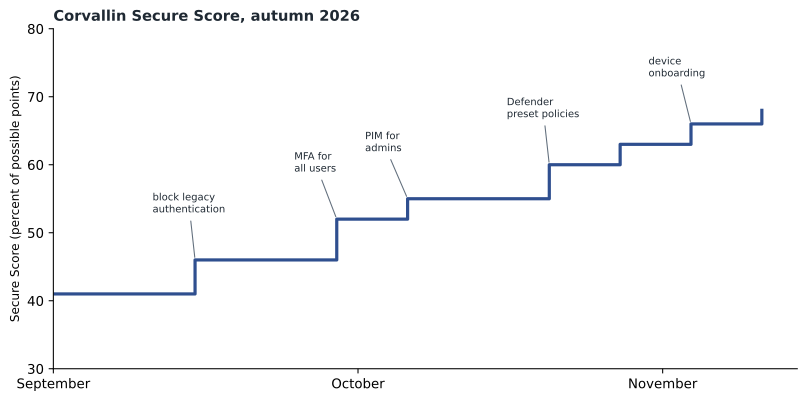
Microsoft Secure Score is a measurement of an organization's security posture, shown in the Defender portal. It awards points for recommended security actions that have been completed, such as requiring MFA for administrators, blocking legacy authentication, turning on Safe Attachments or onboarding devices to Defender for Endpoint, and shows the result as points achieved out of points possible, together with a comparison with similar organizations. Each recommended action explains what it protects against, how much it is worth, what it might affect for users and how to implement it, with a link to the right setting.
Secure Score groups actions into categories (Identity, Data, Device and Apps) and lets administrators set a status for each action: to address, planned, risk accepted, resolved through a third party or resolved through an alternate mitigation. Those statuses matter. A higher score is not always the goal; a recommendation that does not fit the organization can be accepted as a risk with a documented reason, and points can be credited for protections provided by a non-Microsoft product. The score updates as settings change, usually within a day.
Identity Secure Score
The Microsoft Entra admin center has its own Identity Secure Score, which AB-900 asks you to interpret. It focuses only on identity recommendations, such as requiring MFA for administrative roles, using fewer than five Global Administrators, enabling the policy that blocks legacy authentication, protecting all users with user-risk and sign-in-risk policies, turning on self-service password reset and not letting users consent to unmanaged apps. It shows a percentage score, how it compares with organizations of similar size, a history graph and the list of improvement actions with the points each is worth and its current status.
Worked problem
Reading Corvallin's Identity Secure Score
In September, Corvallin's Identity Secure Score showed 38 out of a possible 100 points, below the average for similar organizations. The three highest-value open actions were: require MFA for administrative roles (10 points), block legacy authentication (8 points) and use least privileged administrative roles (5 points). After the work in lessons 4, 7 and 8, what score should Teodor expect, and how should he report it?
Show solution
- Completing the three actions adds 10 + 8 + 5 = 23 points, so the score should rise from 38 to about 61 out of 100.
- Scores update after the service re-checks the configuration, so expect the change within a day or so, not instantly.
- Report the actions completed and the risks they address, not just the number. "We removed standing Global Administrators and blocked old sign-in protocols" means more to a board than "61".
- List the remaining actions with their status: planned, risk accepted with a reason, or to address, so the next steps are visible.
Answer: About 61 out of 100. The story behind the number, and the plan for the remaining actions, is what matters.
The two scores overlap. Identity actions also appear in Microsoft Secure Score's Identity category. Identity Secure Score is simply the identity slice, shown where identity administrators work.
A daily routine for a small team
Ines did not have a security operations centre, so she and Teodor agreed a simple routine. Each morning, open the Defender portal's Incidents queue and triage anything new by severity. Twice a week, review Risky users and Risky sign-ins in Entra ID. Each week, look at Secure Score's new recommendations and the threat analytics reports that show exposure. Each month, review attack simulation results with managers. Corvallin also arranged for its Microsoft partner to monitor high-severity incidents outside working hours, because attacks, as the coordinator's shows, do not wait for Thursday.
Endpoints and cloud apps
Two Defender XDR components deserve a little more explanation because they appear often in Microsoft 365 plans. Microsoft Defender for Endpoint protects devices with next-generation antivirus, attack surface reduction rules that block risky behaviours such as Office apps launching scripts, and endpoint detection and response (EDR), which records what happens on a device so that an analyst can trace an attack and respond, for example by isolating a device from the network while keeping its connection to Defender. Small and medium businesses get a version called Microsoft Defender for Business, included in Microsoft 365 Business Premium.
Microsoft Defender for Cloud Apps is a cloud access security broker. Its cloud discovery analyses network or endpoint traffic to show which cloud apps people actually use, the so-called shadow IT, and rates each app's risk. It can connect to sanctioned apps such as Microsoft 365 and other software as a service products to detect unusual behaviour, such as one account downloading thousands of files, and it provides the session control that Conditional Access can call on. At Corvallin, cloud discovery showed that branch staff had been using three free file-sharing services to send scanned forms, which led to a conversation about giving them an approved alternative rather than simply blocking the sites.
Responding to a compromised account
AB-900 does not expect deep incident response skills, but every Microsoft 365 administrator should know the first steps when an account is compromised. The order matters: stop the attacker, then understand, then recover.
| Step | Action | Where |
|---|---|---|
| 1. Contain | Block sign-in, revoke sessions, reset the password | Microsoft 365 admin center or Entra admin center |
| 2. Remove persistence | Delete malicious inbox rules and forwarding, remove unknown registered MFA methods and app consents | Exchange admin center, Entra admin center |
| 3. Investigate | Review the incident, sign-in logs and audit log for what was accessed or sent | Defender portal, Entra sign-in logs, Purview Audit |
| 4. Recover | Re-register the user's methods with a Temporary Access Pass, unblock, confirm normal use | Entra admin center |
| 5. Learn | Tell affected contacts, fix the control that failed, document the incident | Change log, policies |
Corvallin had followed most of these steps for the coordinator, but in the wrong order: the password was reset before the malicious inbox rule was found, so for two hours replies about the fake invoices continued to vanish into a hidden folder. The written procedure put removing persistence immediately after containment.
Reporting security to leadership
Ines asked for a single page each month for the leadership team. Teodor settled on five items: incidents opened and closed, with the most serious summarized in a sentence; Secure Score and Identity Secure Score with the change since last month; the percentage of staff with phishing-resistant MFA; the percentage of devices compliant; and the attack simulation click rate. Each number had a target and a short note on what would move it. The page took twenty minutes to prepare and, for the first time, gave the leadership team a way to see whether money spent on security was making a difference.
Teodor also learned to read Secure Score critically. A recommendation worth many points is not always the most urgent one for a particular organization, and a low-point action can close a serious gap. He sorted open actions by the risk they addressed at Corvallin, not by points, and used the score as a way to show progress rather than as the goal itself.
By the end of November the routine had become ordinary. The incident queue usually held one or two low-severity items each morning, most of them automatically resolved phishing messages. Twice the partner called after hours, once for a real compromised account at a branch, contained within twenty minutes by revoking sessions and resetting methods. The monthly page showed Secure Score up 27 points since September, and nobody on the leadership team had to take the improvement on trust.
Common mistakes
MistakeHandling every alert one at a time.
InsteadWork from incidents, which group related alerts into one attack story.
MistakeChasing a perfect Secure Score.
InsteadUse the score to prioritize; accept risks deliberately where an action does not fit, and record why.
MistakeAssuming Exchange Online Protection includes everything in Defender for Office 365.
InsteadEOP is the baseline; Safe Links, Safe Attachments, advanced anti-phishing and simulations come with Defender for Office 365.
MistakeReporting only the number to leadership.
InsteadReport the risks reduced and the plan; the number is a summary, not the message.
Summary and key terms
- Threat protection prevents, detects and responds to attacks; threat intelligence describes attackers and their methods.
- Defender XDR joins Defender for Office 365, Endpoint, Identity and Cloud Apps in the Microsoft Defender portal.
- Incidents group related alerts; automated investigation, attack disruption and advanced hunting support response.
- Microsoft Secure Score measures posture with recommended actions and statuses across identity, data, devices and apps.
- Identity Secure Score in Entra ID shows identity recommendations, a percentage score and comparison with similar organizations.
- Defender XDR
- Microsoft's extended detection and response suite across email, endpoints, identities and cloud apps.
- Alert
- A single detection of suspicious or malicious activity.
- Incident
- A group of related alerts describing one attack.
- Automatic attack disruption
- Defender XDR actions that contain an attack in progress, such as disabling a compromised account.
- Secure Score
- A measurement of security posture based on completed recommended actions.
- Advanced hunting
- Querying security data in Defender XDR with KQL.
Practice problems
Work each problem on paper first, then reveal the answer to check.
What is the difference between an alert and an incident?
Show answer
An alert is one detection; an incident groups related alerts into one attack.
Name two statuses an administrator can give a Secure Score recommended action.
Show answer
Any two of: to address, planned, risk accepted, resolved through third party, resolved through alternate mitigation.
Where is Identity Secure Score shown?
Show answer
In the Microsoft Entra admin center.
Lesson quiz · 5 questions
Score 60% or more to complete this lesson.
Create a free account to save your progress, take quizzes and earn a certificate.