
MSBA-101 · Lesson 5 of 12 · 19 min
Microsoft Entra ID: identities, authentication and single sign-on
▶ Video coming soon A video version of this lesson is on the way.
Corvallin's home-care staff used three passwords every morning: one for their phone, one for Microsoft 365 and one for VisitWise, the scheduling app that told them where to go next. VisitWise passwords were reset by the help desk about forty times a month, and twice in the past year a former employee had still been able to sign in to it weeks after leaving. In the fifth review Ines put the VisitWise login page on the projector and asked, "Why is this not just their Microsoft account?" The answer runs through Microsoft Entra ID.
What Microsoft Entra ID is
Microsoft Entra ID, formerly Azure Active Directory, is Microsoft's cloud identity and access management service. Every Microsoft 365 tenant has an Entra ID directory holding its users, groups, devices and applications. Entra ID authenticates people when they sign in, issues the security tokens that Microsoft 365 services and other applications trust, and enforces policies about how and when people may sign in. It is part of a wider family called Microsoft Entra, which also includes products for identity governance, external identities, workload identities and network access.
Entra ID comes in editions. Entra ID Free is included with every Microsoft 365 subscription and covers users, groups, basic single sign-on and security defaults. Entra ID P1, included in Microsoft 365 Business Premium, E3 and E5, adds Conditional Access, dynamic groups, group-based licensing and self-service password reset with writeback. Entra ID P2, included in E5, adds risk-based Conditional Access through Entra ID Protection, Privileged Identity Management and access reviews. Microsoft Entra ID Governance is an add-on that extends lifecycle and access governance features. Knowing which edition unlocks which feature is a regular exam theme.
| Edition | Typical source | Key features added |
|---|---|---|
| Entra ID Free | Every Microsoft 365 subscription | Users and groups, basic SSO, security defaults, sign-in and audit logs |
| Entra ID P1 | Business Premium, E3, E5 or standalone | Conditional Access, dynamic groups, group-based licensing, SSPR with writeback |
| Entra ID P2 | E5 or standalone | Identity Protection risk policies, Privileged Identity Management, access reviews |
| Entra ID Governance | Add-on | Lifecycle workflows, entitlement management and advanced access reviews |
Authentication and authorization
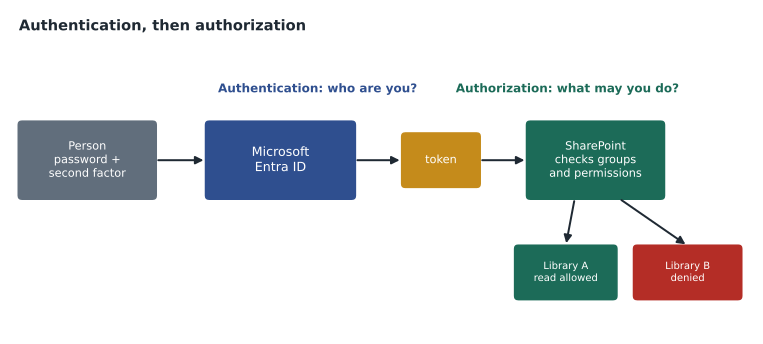
Two words do a lot of work in identity, and AB-900 tests both. Authentication answers "who are you?". It is the process of proving an identity, with a password, an authenticator app, a passkey or another method. Authorization answers "what are you allowed to do?". It is the decision, after authentication, about which resources the person may reach and what they may do with them, based on roles, group memberships, permissions on sites and files, and policies.
A useful way to keep them apart is the hospital badge at Corvallin's head office. Showing the badge at reception proves who you are: authentication. Whether the badge opens the medication room door depends on your role: authorization. A nurse whose badge has been stolen is a failure of authentication; a receptionist whose badge opens the medication room is a failure of authorization.
How sign-in works: tokens
When a person signs in, Entra ID checks the credentials, applies any policies, and if everything passes, issues tokens. An ID token tells the application who the person is. An access token lets the application call a protected resource, such as Microsoft Graph, on the person's behalf, and contains claims about the user and what the token may be used for. A refresh token lets the application get new access tokens without asking the person to sign in again, usually for hours or days, subject to policies. Access tokens are short-lived, typically about an hour, which limits the damage if one is stolen.
These tokens are built on open standards. OAuth 2.0 handles delegated authorization, OpenID Connect adds authentication on top of OAuth, and SAML 2.0 is an older XML-based standard still used by many business applications. An administrator does not need to read a token to pass AB-900, but knowing that the application trusts a token from Entra ID, not a password of its own, is the key to understanding single sign-on.
Single sign-on
Single sign-on (SSO) means a person signs in once, to Entra ID, and is then signed in to every connected application without entering another password. For Microsoft 365 services this is automatic. For other applications, such as VisitWise, an administrator connects the app to Entra ID so it accepts Entra ID tokens instead of its own passwords.
The benefits are practical. People have one strong credential to protect instead of many weak ones. The help desk resets fewer passwords. Security policies such as MFA and Conditional Access apply to every connected app. And, most importantly for Corvallin, when an account is blocked in Entra ID it stops working everywhere at once, so a leaver loses access to VisitWise the moment HR's date arrives instead of whenever someone remembers.
| Without SSO | With SSO through Entra ID |
|---|---|
| A password for each app | One sign-in for all connected apps |
| Each app has its own password rules and no MFA | Entra ID MFA and Conditional Access cover every app |
| Leavers must be removed from every app | Blocking the Entra ID account blocks every app |
| Password resets in every app | Self-service reset in one place |
| No central sign-in record | Sign-in logs for every app in Entra ID |
App registrations and enterprise applications
AB-900 lists "understand App registrations and Enterprise applications" as a separate objective, because the two sound alike and are often confused. Both appear in the Microsoft Entra admin center under Applications.
An app registration is the definition of an application that an organization builds or owns: its name, how it signs users in, the permissions it asks for, its secrets or certificates. Registering an app creates an application object, which lives in the tenant where the app was registered. An enterprise application is the instance of an application in a particular tenant, technically a service principal. It is where an administrator controls how the app is used here: which users and groups may use it, single sign-on settings, consent to its permissions, and its sign-in logs. When Corvallin adds VisitWise from the Entra application gallery, it gets an enterprise application; Corvallin never sees the vendor's app registration, which lives in the vendor's tenant.
| App registration | Enterprise application | |
|---|---|---|
| What it is | The application's definition (application object) | The application's instance in a tenant (service principal) |
| Who creates it | The developer or owner of the app | Created when an app is added from the gallery or first consented to |
| Typical settings | Redirect URIs, API permissions requested, secrets and certificates | Assigned users and groups, SSO configuration, consent, provisioning |
| Corvallin example | A small internal reporting tool Teodor builds | VisitWise added from the gallery |
Applications ask for permissions, such as reading a user's calendar or reading all files in SharePoint. Consent is the act of agreeing. Some permissions can be consented to by an ordinary user for their own data; powerful ones need an administrator. A common attack, consent phishing, tricks people into consenting to a malicious app that then reads their mail. Microsoft recommends restricting user consent to verified publishers and low-risk permissions and routing everything else through an admin consent workflow, where a request goes to an administrator for review. Corvallin's tenant still allowed users to consent to any app; Teodor changed that setting the same afternoon.
Worked problem
Connecting VisitWise with SSO
VisitWise supports SAML single sign-on and is listed in the Entra application gallery. Corvallin wants only home-care staff and the scheduling team to use it, with MFA on every sign-in from an unmanaged device. Outline the steps.
Show solution
- In the Microsoft Entra admin center, open Enterprise applications, choose New application and add VisitWise from the gallery. This creates the enterprise application.
- Open its Single sign-on page, choose SAML and exchange the configuration values with the vendor: Corvallin's identifier and reply address for the app, and Entra ID's signing certificate and sign-in address for the vendor.
- Under Users and groups, assign the Home-care staff and Scheduling security groups. Turn on the setting that requires assignment, so nobody else can sign in.
- Create a Conditional Access policy for the VisitWise app requiring MFA when the device is not compliant (lesson 7).
- Test with one user, check the sign-in log, then switch the vendor side so passwords are no longer accepted.
Answer: Add the gallery app as an enterprise application, configure SAML SSO, assign groups with assignment required, and protect it with Conditional Access.
Hybrid identity in brief
Organizations with an on-premises Active Directory usually synchronize it to Entra ID so people have one identity. Microsoft Entra Connect Sync and the lighter Microsoft Entra Cloud Sync copy users and groups to the cloud. The sign-in method can be password hash synchronization, where a hash of the password hash is synced and Entra ID authenticates in the cloud (the method Microsoft recommends, and a useful fallback for the others), pass-through authentication, where Entra ID asks an on-premises agent to check the password, or federation, where another identity provider such as AD FS does the authentication. Corvallin does not need any of this, but AB-650 and MD-102 candidates will meet it again.
Logs: where to look when sign-in fails
Entra ID keeps several logs, all in the Entra admin center under Monitoring. Sign-in logs record every interactive and non-interactive sign-in, with the user, app, device, location, the authentication methods used, which Conditional Access policies applied and why a sign-in failed. Audit logs record changes to the directory: users created, roles assigned, policies edited. Provisioning logs cover automatic account creation in connected apps. For activity across Microsoft 365 services, such as who opened or shared a file, the unified audit log, searched in the Microsoft Purview portal, is the place to look. AB-900 expects you to pick the right tool for reviewing user and admin activity, and lesson 7 practises reading a failed sign-in.
# Find failed sign-ins for one user in the last day
Connect-MgGraph -Scopes "AuditLog.Read.All"
$since = (Get-Date).AddDays(-1).ToString("yyyy-MM-ddTHH:mm:ssZ")
Get-MgAuditLogSignIn -Filter "userPrincipalName eq 'ama.op@corvallincare.example' and createdDateTime ge $since" |
    Where-Object { $_.Status.ErrorCode -ne 0 } |
    Select-Object CreatedDateTime, AppDisplayName, @{n='Error';e={$_.Status.FailureReason}}
What people see: My Apps and My Account
Single sign-on changes the experience for staff as well as for IT. The My Apps portal, at myapps.microsoft.com, shows each person a tile for every application assigned to them, whether a Microsoft 365 app, a gallery app like VisitWise or a custom one, and opens it with single sign-on. The same apps appear in the Microsoft 365 app launcher. The My Account and My Security Info pages let people see their sign-ins, change their password, manage their registered authentication methods and review the devices signed in to their account. When the help desk receives a "did I sign in from Lisbon?" call, the first step is often to walk the person through their own recent sign-in activity in My Account.
For VisitWise, the change was dramatic. After the switch to SSO, nurses opened VisitWise from the My Apps tile on their phones and were signed in automatically with their Corvallin account. Password reset tickets for VisitWise dropped from about forty a month to zero, because there was no VisitWise password any more.
Identities that are not people
Not every identity in Entra ID belongs to a person. Workload identities are identities for software: service principals for applications, and managed identities, which Azure creates for an Azure resource such as a function or virtual machine and manages without any secret an administrator must store. An integration that copies visit schedules into Microsoft 365 calendars should run as a workload identity with exactly the permissions it needs, not as a user account with a password in a configuration file. Workload identities can have their own Conditional Access policies and sign-in logs, and Microsoft Entra Workload ID adds governance features for them.
In current Microsoft 365 tenants, agents are joining this picture. Agents built in Copilot Studio or with Microsoft's agent frameworks can be given their own Entra identity, so that what an agent does can be authorized, logged and governed like any other identity. The AB-650 course in this program covers agent identities in detail. For AB-900, the point to remember is that every person, app and agent that touches Microsoft 365 data authenticates through Entra ID, and that is what makes consistent policy possible.
| Identity | Who or what it represents | Typical credential |
|---|---|---|
| User | A person in the organization | Password plus MFA, or passwordless |
| Guest | A person from another organization | Their home organization's sign-in |
| Service principal | An application in this tenant | Certificate or secret, ideally a certificate |
| Managed identity | An Azure resource | No stored secret; managed by Azure |
| Agent identity | An AI agent acting in the tenant | Managed by the agent platform through Entra ID |
Common mistakes
MistakeCalling authorization "the second factor".
InsteadMFA strengthens authentication. Authorization is the separate decision about what an authenticated person may do.
MistakeLooking for a vendor's gallery app under App registrations.
InsteadApps added from the gallery appear under Enterprise applications; App registrations holds apps your organization defines.
MistakeLeaving user consent open to any app.
InsteadRestrict user consent and use the admin consent workflow for everything else.
MistakeSearching the Entra audit log for who opened a file.
InsteadFile activity is in the unified audit log in Microsoft Purview; Entra audit logs cover directory changes.
Summary and key terms
- Microsoft Entra ID is the cloud identity service behind every Microsoft 365 tenant, in Free, P1 and P2 editions.
- Authentication proves who someone is; authorization decides what they may do.
- Entra ID issues tokens that services and apps trust, using OAuth 2.0, OpenID Connect and SAML.
- Single sign-on lets people use one identity for every connected app and lets IT block access everywhere at once.
- App registrations define apps an organization owns; enterprise applications are an app's instance and settings in a tenant.
- Authentication
- Proving who a person or service is.
- Authorization
- Deciding what an authenticated identity may access or do.
- Access token
- A short-lived token that lets an app call a protected resource for a user.
- Single sign-on
- Signing in once to use many connected applications.
- Enterprise application
- An application's instance (service principal) in a tenant, where assignments and SSO are configured.
- Admin consent workflow
- A process that routes app permission requests to administrators for approval.
Practice problems
Work each problem on paper first, then reveal the answer to check.
Which Entra ID edition adds Conditional Access?
Show answer
Entra ID P1.
Where would you configure which groups may use a gallery app?
Show answer
In the app's Enterprise application page, under Users and groups.
Give one security benefit of SSO for leavers.
Show answer
Blocking the Entra ID account blocks access to every connected app at once.
Lesson quiz · 5 questions
Score 60% or more to complete this lesson.
Create a free account to save your progress, take quizzes and earn a certificate.