
MSBA-101 · Lesson 1 of 12 · 19 min
Microsoft 365 at a glance: tenants, subscriptions and admin centers
▶ Video coming soon A video version of this lesson is on the way.
Corvallin Home Care sends about 450 nurses, personal support workers, therapists and office staff into clients' homes from a head office in Halifax and four branch offices. On the first Thursday of September 2026, Ines Duvernay-Sato, the IT manager, booked a small meeting room on the second floor and asked Teodor Klimaszewski to bring his laptop. Teodor had been the Microsoft 365 administrator for two years, but most of what he knew he had learned by fixing problems as they arrived: a locked account here, a missing mailbox there. The leadership team had just approved a pilot of Microsoft 365 Copilot for the spring, and Ines did not want an AI assistant let loose on a tenant that nobody fully understood. "Before we turn anything new on," she said, "I want us to know exactly what we have, who can change it and why it is set up the way it is. And I want you certified when we are done." The plan she sketched on the whiteboard became the Thursday tenant reviews, one topic a week, and this course follows them.
The course covers the first part of Exam AB-900, Microsoft 365 Copilot and Agent Administration Fundamentals: the core services and objects of Microsoft 365 and the security principles behind them. The skills outline published by Microsoft, current as of October 14, 2026, gives that area 30 to 35 percent of the exam. The rest of the exam, on data protection and on running Copilot and agents, builds directly on it, which is why every Microsoft 365 role in this program starts here.
What Microsoft 365 is
Microsoft 365 is a family of cloud services sold by subscription. It combines productivity apps (Word, Excel, PowerPoint, Outlook and others), online services that run in Microsoft's datacentres (Exchange Online for email, SharePoint in Microsoft 365 and OneDrive for files, Microsoft Teams for chat and meetings), an identity service (Microsoft Entra ID), and security and compliance services (Microsoft Defender and Microsoft Purview). Most plans also include rights to manage Windows devices through Microsoft Intune. Copilot and agents sit on top of all of these, reading the same mail, files and chats that people can already reach.
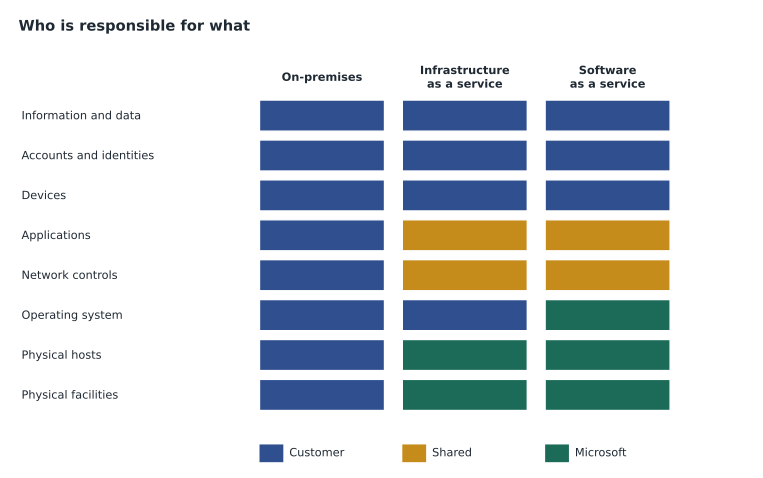
Because the services are delivered as software as a service (SaaS), Microsoft runs the servers, storage, networking and the software itself. The customer does not patch an Exchange server or replace a failed disk in a SharePoint farm. What the customer still owns is everything about how the service is used: who has an account, what each person can do, how data is shared and kept, and which devices may connect. Microsoft calls this the shared responsibility model. At Corvallin, that line explained most of Teodor's job. Microsoft kept the mail service running; Teodor decided who got a mailbox and what happened to it when a nurse left.
The tenant
Every organization that signs up for Microsoft 365 gets a tenant: a dedicated, isolated instance of the services, with its own directory of users and groups, its own settings and its own data. Two companies on Microsoft 365 share Microsoft's hardware, but neither can see into the other's tenant. The tenant is created once, when the first subscription is bought, and it lives in a home geography chosen from the country or region given at sign-up. That choice decides where most customer data is stored at rest, and it cannot be changed later without a migration.
Each tenant has an initial domain ending in onmicrosoft.com, chosen at sign-up. Corvallin's is corvallincare.onmicrosoft.com. That name can never be removed, which is one reason to pick it with care: it appears in some links and system addresses for the life of the tenant. Organizations then add their own custom domains, such as corvallincare.example, and prove they own them by adding a DNS record that Microsoft supplies. Once a domain is verified, users can sign in and receive mail with addresses in it.
A tenant is also an identity boundary. Every user, group, device and application registered in the tenant lives in one Microsoft Entra ID directory. When people say "our Microsoft 365", "our Entra ID" or "our directory", they are usually describing the same tenant from different angles.
| Term | What it means | Corvallin example |
|---|---|---|
| Tenant | The organization's dedicated instance of Microsoft 365 and its directory | The one Corvallin tenant for all five offices |
| Initial domain | The permanent name ending in onmicrosoft.com | corvallincare.onmicrosoft.com |
| Custom domain | An organization's own domain, verified with a DNS record | corvallincare.example |
| Subscription | A purchase of one or more licensed products for a term | An annual subscription for Microsoft 365 E3 seats |
| Licence | The right for one user to use the services in a product | One E3 licence assigned to Teodor |
Subscriptions, plans and licences
A subscription is a purchase of one or more products for a term, usually monthly or annual, through Microsoft directly, through a partner (a Cloud Solution Provider) or through an enterprise agreement. Each subscription contains a number of licences, sometimes called seats. A licence is assigned to a user and turns on the service plans inside the product for that person: an Exchange Online plan for a mailbox, a SharePoint plan, Teams, the desktop apps and so on. A user with no licence still exists in the directory and can be given permissions, but has no mailbox, no OneDrive and no right to the apps.
Microsoft groups its plans into families. The Business plans (Business Basic, Business Standard and Business Premium) are capped at 300 users and suit small and mid-size organizations. The Enterprise plans (such as E3 and E5) have no seat cap and add advanced security, compliance and analytics. Frontline plans (F1 and F3) are cheaper licences for staff who work mostly on shared or mobile devices and need less than a full desktop worker. There are also education and government plans. Since 2024 Microsoft has sold enterprise suites worldwide in versions with and without Teams, with Teams available as a separate licence, so the exact product names on an invoice vary from customer to customer.
Corvallin was a typical mixed estate. Office staff and managers had Microsoft 365 E3. The home-care staff, who mostly used phones and a scheduling app, had Microsoft 365 F3. A handful of security add-ons had been bought over the years, and nobody was sure who used them. Teodor's first homework was to open the Billing area of the Microsoft 365 admin center, list every subscription with its licence count and renewal date, and compare it with the licences actually assigned.
Worked problem
Counting unused licences
Corvallin owns 120 Microsoft 365 E3 licences and 340 Microsoft 365 F3 licences. The admin center shows 104 E3 licences assigned and 333 F3 licences assigned. Twelve of the assigned E3 users have not signed in for more than 90 days. How many E3 licences could be freed for the Copilot pilot without buying more, and what should Teodor check before reclaiming any?
Show solution
- Unassigned E3 licences: 120 minus 104 is 16.
- Inactive assigned users: 12 more could be reclaimed, giving 28 at most.
- Before removing a licence, check why the account is inactive. A user on leave still needs their mailbox; removing a licence starts a grace period, after which the mailbox and OneDrive data can be deleted.
- Copilot itself is an add-on licence that needs an eligible base licence, so the freed E3 seats matter for who can be in the pilot, not as Copilot seats themselves.
Answer: 16 are free now and up to 12 more after checking each inactive account; inactive does not always mean unneeded.
The admin centers
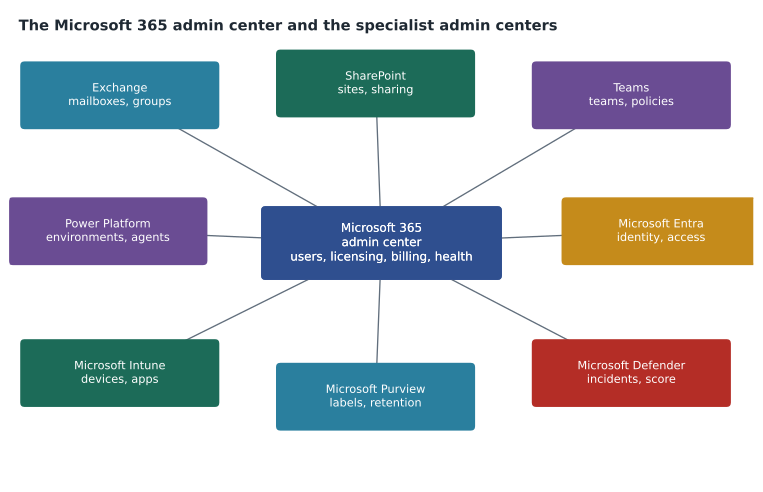
Microsoft 365 is managed through a set of web portals called admin centers. The Microsoft 365 admin center, reached at admin.cloud.microsoft (the older admin.microsoft.com address still redirects), is the front door. It handles users, groups, licences, billing, domains, organization settings, service health and the message center. Each major workload then has its own specialist admin center, linked from the left-hand menu under Admin centers.
| Admin center | What you manage there |
|---|---|
| Microsoft 365 admin center | Users, groups, licences, billing, domains, org settings, service health, message center, reports, Copilot settings |
| Exchange admin center | Mailboxes, distribution groups, mail flow rules, connectors, accepted domains |
| SharePoint admin center | Sites, storage, sharing settings, access control policies |
| Teams admin center | Teams, channels, meeting and messaging policies, apps, calling |
| Microsoft Entra admin center | Identities, authentication methods, Conditional Access, applications, Privileged Identity Management |
| Microsoft Defender portal | Incidents, alerts, threat protection policies, Secure Score |
| Microsoft Purview portal | Sensitivity labels, data loss prevention, retention, audit, eDiscovery |
| Microsoft Intune admin center | Devices, compliance policies, configuration profiles, apps |
| Power Platform admin center | Environments, Power Apps, Power Automate and agent governance |
A good habit, and a favourite exam pattern, is to ask what kind of object a task touches. A mailbox or a distribution group is an Exchange object, so the detailed settings live in the Exchange admin center even though basic mailbox settings also appear on the user's page in the Microsoft 365 admin center. A site, a library or a folder is a SharePoint object. A team, a channel or a meeting policy is a Teams object. A sign-in rule is an Entra object. Some common tasks can be done in more than one place; the specialist centre always has the complete set of options.
Organization settings and the admin center home page
The Settings area of the Microsoft 365 admin center contains Org settings: tenant-wide choices such as whether users can install apps from the Microsoft Store, whether calendars can be shared with outside people, the organization's profile and contact details, the release preference for new features and the security and privacy settings such as password expiry and the privacy statement link. Other settings that affect everyone live under Settings as well, including Domains and, in current tenants, a Copilot page for controlling Copilot and agent features. Changing an org setting changes it for the whole tenant, so Ines asked that every change be written down in the IT change log with the date and the reason.
The release preference is worth knowing early. A tenant can be on standard release, where features arrive when they reach general availability, or targeted release, where they arrive a little earlier, either for everyone or for selected users. Corvallin put Teodor and two help desk staff on targeted release for selected users, so they would see changes a few weeks before the nurses did.
Who can do what: a first look at admin roles
Not everyone in IT should be able to change everything. Microsoft 365 uses role-based access control: administrators are given roles such as Global Administrator, User Administrator, Exchange Administrator or Helpdesk Administrator, each allowing a defined set of tasks. Lesson 4 covers roles in detail and lesson 8 covers how to give admin rights only when they are needed. For now, Ines set one rule: nobody uses a Global Administrator account for daily work. Teodor's everyday account would have no admin role at all, and his admin work would be done from a separate, protected account.
# Connect to Microsoft Graph with read-only directory scopes
Connect-MgGraph -Scopes "Organization.Read.All","Domain.Read.All"

# Show the tenant's display name, ID and verified domains
Get-MgOrganization | Select-Object DisplayName, Id
Get-MgDomain | Select-Object Id, IsVerified, IsDefault
Teodor ran those two commands on the first afternoon and found something useful straight away: a second verified domain, corvallin-careers.example, left over from a recruitment campaign years earlier. Nobody used it, but it could still receive mail. It went on the clean-up list.
How Microsoft 365 changes
A cloud service changes constantly. Features are added, renamed and retired; admin centers are redesigned; licences are reorganized. Microsoft announces most changes in the message center in the Microsoft 365 admin center and publishes plans on the public Microsoft 365 roadmap. Lesson 11 covers both. The practical consequence for anyone studying is that screenshots age quickly. Learn what each setting does and which admin center owns it, and expect the exact menu path to drift.
Common mistakes
MistakeThinking Microsoft is responsible for who can see the organization's files because the files are in Microsoft's cloud.
InsteadUnder the shared responsibility model the customer always owns its data, identities, access and devices.
MistakeTreating a licence and a user account as the same thing.
InsteadAn account exists in the directory; a licence turns on services for it. Accounts without licences are normal, for example for shared mailboxes or service accounts.
MistakeChoosing the onmicrosoft.com name casually.
InsteadThe initial domain is permanent and stays visible in some places, so choose it deliberately.
MistakeDoing everything in the Microsoft 365 admin center.
InsteadIt is the front door; detailed settings for mail, sites, teams, identity, security and compliance live in their own admin centers.
Summary and key terms
- Microsoft 365 combines productivity apps, cloud services, identity, security and compliance, with Copilot on top.
- Under the shared responsibility model, Microsoft runs the service and the customer controls data, identities, access and devices.
- A tenant is an organization's isolated instance with one directory, a permanent onmicrosoft.com domain and optional custom domains.
- Subscriptions contain licences; a licence assigned to a user turns on the service plans in a product.
- The Microsoft 365 admin center is the front door; specialist admin centers manage their own objects.
- Tenant
- An organization's dedicated instance of Microsoft 365, with its own directory, settings and data.
- Shared responsibility model
- The division of security duties between the cloud provider and the customer.
- Subscription
- A purchase of one or more products for a term, containing a number of licences.
- Licence
- The right for one user to use the service plans in a product.
- Admin center
- A web portal for managing part of Microsoft 365.
- Release preference
- The org setting that decides whether a tenant gets new features at general availability or a little earlier.
Practice problems
Work each problem on paper first, then reveal the answer to check.
Which admin center would you use to change the members of a distribution group in full detail?
Show answer
The Exchange admin center.
Name two things that remain the customer's responsibility in Microsoft 365.
Show answer
Any two of: data, user accounts and identities, access decisions, devices.
What is the difference between standard and targeted release?
Show answer
Standard release gets features at general availability; targeted release gets them earlier, for everyone or for selected users.
Lesson quiz · 5 questions
Score 60% or more to complete this lesson.
Create a free account to save your progress, take quizzes and earn a certificate.