
MSAZ-121 · Lesson 2 of 12 · 19 min
NoSQL data models: key-value, document, column-family and graph
▶ Video coming soon A video version of this lesson is on the way.
At the second data clinic, on November 3, 2026, Hana Sato joined Keiko and Nikolai. Hana is the developer rebuilding Finch Rewards, the loyalty app, and she had a problem that every developer of a growing app eventually meets. The old app kept members in a SQL Server database with eleven tables: members, addresses, phone numbers, preferences, points transactions, coupons, stores, and several link tables between them. Showing a member's home screen took nine joins. Every new feature, such as a birthday reward or a favourite store, meant a schema change, a migration script and a weekend deployment. She wanted to know whether a NoSQL database would help, and if so, which kind.
Nikolai began by explaining the term. NoSQL is usually read as "not only SQL". It names a family of databases that store data in models other than the relational table, usually to gain flexibility of structure, horizontal scale or speed for particular access patterns. NoSQL databases are not better or worse than relational ones; they make different trade-offs. Most give up some of the features relational databases provide, such as joins across tables, rigid schemas and multi-row transactions everywhere, in exchange for others.
Why choose a non-relational model?
Four reasons come up again and again. The first is flexible structure: when the shape of the data varies from record to record or changes often, a fixed schema becomes a burden. The second is scale: many NoSQL databases are designed to spread data across many servers, or partitions, so that capacity grows by adding machines rather than buying a bigger one. The third is speed for a known access pattern: if an application always reads a member by member number, a store that keeps everything about the member together can answer in a few milliseconds. The fourth is a natural fit: some data, such as a network of relationships, is simply easier to express in a non-tabular model.
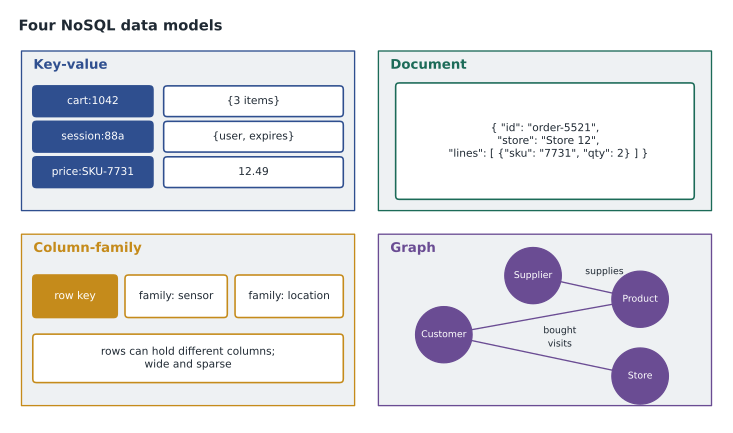
The DP-900 outline groups non-relational data into four common models. Each suits a different kind of question.
Key-value stores
A key-value store is the simplest model. Each item is a key, which must be unique, and a value, which the database usually treats as opaque: a string, a number, a blob of JSON or binary data. You write a value under a key and read it back by the same key. There is usually no way to query inside the value; if you want to find items by something other than the key, you must build that yourself.
Because the database only ever looks things up by key, it can be very fast and very easy to scale. Typical uses are session state for a website, shopping carts, caches of results that are expensive to compute, and configuration settings. Harrow & Finch's website keeps each visitor's shopping cart under a key such as cart:1042 so that the cart survives if the visitor switches from phone to laptop. In Azure, key-value workloads can use Table storage, Azure Cosmos DB, or Azure Managed Redis, a fast in-memory cache.
# A key-value store in miniature: the database only knows the key
store = {}
store["cart:1042"] = {"items": [("SKU-7731", 2), ("SKU-1180", 1)]}
store["session:88a"] = {"user": "member-55210", "expires": "2026-11-03T22:00"}

print(store["cart:1042"])          # fast lookup by key
print("cart:9999" in store) # missing keys are simply absent{'items': [('SKU-7731', 2), ('SKU-1180', 1)]}
FalseWhat this code does
Shows a key-value store in miniature: values such as a shopping cart and a login session are stored and retrieved only by their key. Looking up a known key is fast, and a missing key is simply absent. The database knows nothing about what is inside each value.
Document databases
A document database also stores items by key, but the value is a document that the database understands, usually in JSON. Each document is self-describing: its fields and their values are written inside it, and documents can contain nested objects and arrays. Because the database can see inside documents, it can index fields and run queries that filter, sort and project on them, for example "all members whose home store is Brandon and whose tier is gold".
Documents in the same collection do not need identical structures. One member document might have a favourite store; another might not. Adding a birthday field to new documents requires no schema change and no migration of old ones, as long as the application copes with documents that lack the field. This is what attracted Hana. The member's home screen needs one member, their addresses, their current points and their active coupons, and all of that can live in a single document that the app reads with one request.
import json
member = {
    "id": "member-55210",
    "name": "Ana Ruiz",
    "tier": "gold",
    "homeStore": "Brandon",
    "addresses": [{"type": "home", "city": "Brandon"}],
    "points": 4180,
    "coupons": [{"code": "PATIO15", "expires": "2026-12-31"}],
}
doc = json.dumps(member)
print("Stored as", len(doc), "characters of JSON")
print("Fields:", sorted(member))
print("Active coupons:", [c["code"] for c in member["coupons"]])Stored as 209 characters of JSON Fields: ['addresses', 'coupons', 'homeStore', 'id', 'name', 'points', 'tier'] Active coupons: ['PATIO15']
What this code does
Stores a loyalty member as one JSON document with nested parts, such as a list of addresses and a list of coupons. The code prints the document's fields and filters the coupons to the active ones. Keeping related data together in one document is the main idea of a document database.
The trade-off is that data shared by many documents may be duplicated. If each order document copies the store name, renaming a store means updating many documents. Document design starts from the questions the application asks most often: data that is read together is stored together, and data that changes on its own schedule is kept separate and referenced by an identifier. Lesson 3 shows how Hana applied that rule.
In Azure, the main document database is Azure Cosmos DB, whose native API for NoSQL stores JSON documents. Teams with existing MongoDB applications can use Azure Cosmos DB for MongoDB, or Azure DocumentDB, a separate managed service compatible with MongoDB.
Column-family databases
A column-family database, sometimes called a wide-column store, organizes data in rows and columns but groups the columns into column families. Each row is identified by a row key, and different rows can have different columns within a family. A row might have thousands of columns, and empty columns take no space, which makes the model suit sparse data. Related columns that are read together are stored together.
This model is used for very large volumes of data written at high speed and read by key ranges, such as sensor readings, telemetry from devices, time series and event logs. Apache Cassandra is the best-known column-family database. In Azure, Cassandra workloads can run on Azure Cosmos DB for Apache Cassandra or on Azure Managed Instance for Apache Cassandra. Harrow & Finch does not need this model today, but Nikolai pointed out that if every freezer in every store reported its temperature every ten seconds, the readings would fit it well: a row per freezer per day, with a column per reading.
Graph databases
A graph database stores nodes, which represent entities such as customers, products and stores, and edges, which represent the relationships between them, such as bought, visits or supplies. Both nodes and edges can carry properties. The database is built to traverse relationships quickly: "customers who bought this product also bought", "which suppliers are two steps away from this recalled part?", "who in this organization reports to whom?"
Questions like these are possible in a relational database, but each step in the chain becomes another join, and queries that follow relationships an unknown number of steps are hard to write and slow to run. A graph database answers them naturally. In Azure, Azure Cosmos DB for Apache Gremlin stores graphs and queries them with the Gremlin language. Marcus Feldt, the e-commerce manager, liked the idea of product recommendations built on a graph of purchases, though that is a later project.
# A tiny graph: who bought what, and what else did they buy?
bought = {
    "Ana": {"patio chair", "patio table"},
    "Ben": {"patio chair", "sun umbrella"},
    "Chloe": {"patio table", "grill cover"},
}
product = "patio chair"
buyers = [c for c, items in bought.items() if product in items]
also = set().union(*(bought[c] for c in buyers)) - {product}
print("Bought", product + ":", buyers)
print("Also bought:", sorted(also))Bought patio chair: ['Ana', 'Ben'] Also bought: ['patio table', 'sun umbrella']
What this code does
Represents who bought what as a tiny graph and answers a recommendation question: people who bought a patio chair, what else did they buy? It finds the customers linked to that product and collects their other purchases. Graph databases are built to follow relationships like these quickly.
Comparing the models
| Model | Data looks like | Best at | Azure options |
|---|---|---|---|
| Key-value | Unique key and an opaque value | Very fast lookups by key: sessions, carts, caches | Table storage, Cosmos DB, Azure Managed Redis |
| Document | JSON documents with nested fields | Flexible records read and written whole | Cosmos DB for NoSQL or MongoDB, Azure DocumentDB |
| Column-family | Rows with families of sparse columns | Huge write volumes, time series | Cosmos DB for Apache Cassandra |
| Graph | Nodes and edges with properties | Following relationships | Cosmos DB for Apache Gremlin |
A fifth kind of non-relational data appeared in lesson 1: object storage, where the data is a whole file or blob, such as an image or a video. Blob storage fills that role. And the same data can be modelled in more than one way. A product catalogue could be a set of documents, a graph of related products or rows in a relational table; the right choice depends on how it is read and changed.
What you give up, and what you keep
Nikolai was careful not to oversell. Moving to a NoSQL model usually means accepting some limits. Joins across collections are absent or limited, so data must be shaped for the queries in advance. Some NoSQL databases offer only eventual consistency by default, meaning a read immediately after a write might see the old value briefly; lesson 3 shows that Azure Cosmos DB lets you choose. Transactions are often limited to items that share a partition. Reporting across all the data, such as "total points issued last year by tier", is usually better done in an analytical store, which is the subject of the second half of this course.
Hana's decision was to keep orders and points transactions, which need strong accounting rules, in the relational StockLine database, and to move member profiles, preferences and coupons, which the app reads constantly and changes often, to a document database. Keiko noted that this split would matter to her later: the sales report would need data from both.
Schemas still exist, just in a different place
Keiko asked a sharp question: if a document database has no schema, how does anyone know what a member document contains? Nikolai's answer was that NoSQL databases move the schema rather than remove it. In a relational database, the schema is enforced by the database before any row is written. In a document database, the schema lives in the application code and in agreed conventions: the loyalty app expects a field called homeStore, and every developer who writes to the container must write it the same way. Many teams also validate documents in the application before saving them, or record a schemaVersion field in each document so that code can handle old and new shapes.
This is a trade-off, not a free gift. It makes changes easier, because adding a field does not require a migration, but it also makes mistakes easier, because nothing stops one developer from writing homestore in lower case. Hana planned to write a short data contract for the member document, listing each field, its type and whether it is required, and to check documents against it in automated tests. Keiko liked that idea, because the same contract would tell her which fields she could rely on in reports.
Worked problem
Matching data to a model
Which NoSQL model best fits each need? (a) The website must remember each visitor's cart for 30 days, always looked up by cart identifier. (b) Store managers want to find which suppliers provide parts used in a recalled product, possibly through several layers of subassemblies. (c) The loyalty app stores member profiles whose fields differ from member to member.
Show solution
- The cart is read and written only by its identifier, which is a key-value pattern.
- Finding suppliers through an unknown number of layers means following relationships, a graph pattern.
- Profiles with varying fields that the app reads whole are documents.
Answer: (a) Key-value, (b) graph, (c) document.
Common mistakes
MistakeThinking NoSQL means no query language at all.
InsteadMany NoSQL databases have rich query languages; the name means not only SQL.
MistakeChoosing a document model and then splitting every entity into its own collection.
InsteadStore data that is read together in the same document.
MistakeUsing a key-value store when the application needs to search inside values.
InsteadUse a document database or add an index you maintain.
MistakeAssuming NoSQL is always faster.
InsteadIt is fast for the access patterns it was designed for, and can be slow or awkward for others.
Summary and key terms
- NoSQL, or not only SQL, describes databases that use models other than relational tables to gain flexibility, scale or speed for known access patterns.
- Key-value stores look up opaque values by unique keys and suit sessions, carts and caches.
- Document databases store self-describing JSON documents that can be indexed and queried and suit records that vary in shape.
- Column-family databases hold sparse rows in families of columns and suit high-volume time series.
- Graph databases store nodes and edges and suit relationship questions.
- Each model gives up some relational features, such as joins.
- NoSQL
- A family of databases that use non-relational data models.
- Key-value store
- A database that stores values under unique keys and reads them back by key.
- Document
- A self-describing record, usually JSON, that can contain nested fields and arrays.
- Column family
- A group of related columns stored together in a wide-column database.
- Graph
- Data made of nodes and the edges that connect them.
- Eventual consistency
- A guarantee that replicas will agree eventually, though a read may briefly see older data.
Practice problems
Work each problem on paper first, then reveal the answer to check.
Which model suits a shopping cart looked up only by its identifier?
Show answer
Key-value.
Which NoSQL model stores nodes and edges?
Show answer
Graph.
Name one feature of relational databases that NoSQL databases often limit.
Show answer
Joins, fixed schemas or multi-item transactions.
Lesson quiz · 5 questions
Score 60% or more to complete this lesson.
Create a free account to save your progress, take quizzes and earn a certificate.