
MSAZ-121 · Lesson 1 of 12 · 20 min
Azure Blob, File and Table storage
▶ Video coming soon A video version of this lesson is on the way.
Keiko Tanabe has spent seven years building Harrow & Finch's nightly sales report. Every morning before the stores open, a set of SQL Server queries pulls the previous day's sales from StockLine, and an Excel workbook turns them into the tables that store managers and the finance team read. The report works, but it is slow, it lives on one server in the head office server room, and it cannot answer the questions people now ask: which products sell together, how loyalty members behave, how the weather affects sales of patio furniture. Project Skylight will move that work to Azure, and Keiko has decided to sit the DP-900 Azure Data Fundamentals exam in March 2027 so that she understands the options before the decisions are made.
Her mentor is Nikolai Petrenko, a data engineer who joined Renata Kowal's cloud team in September 2026 after ten years at an insurer. Since October 27 he has run a weekly data clinic for Keiko. An earlier course in this series, MSAZ-120, covered core data concepts and relational databases. This course covers the rest of the DP-900 outline: non-relational data, large-scale analytics, real-time data and visualization in Power BI. Nikolai's first question at every clinic is the same: "Who reads this data, and how fast do they need it?" The answer decides which Azure service fits.
Not all data fits in tables
Relational databases are excellent for data with a fixed structure: orders, invoices, stock levels. A great deal of company data does not look like that. Harrow & Finch has about 60,000 product images, thousands of supplier price lists in PDF and spreadsheet form, CCTV clips from the stores, log files from the website, and the nine terabytes of documents on the store and head office file shares. Storing those in a relational database would be expensive and awkward, because the database would have to treat each file as an opaque blob of bytes anyway.
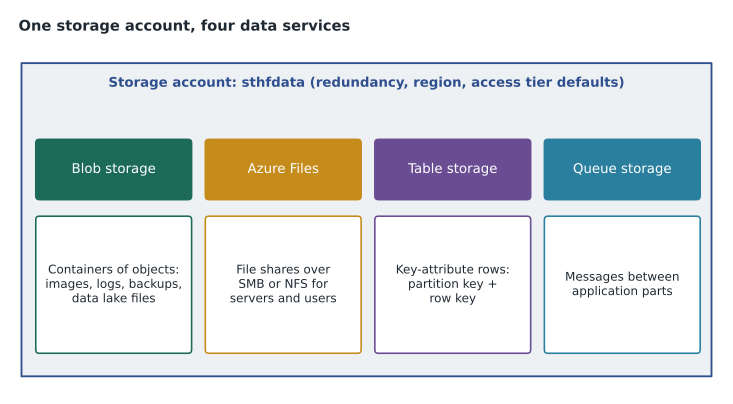
Azure offers several non-relational stores for data like this. The first group lives inside an Azure Storage account: Blob storage, Azure Files, Table storage and Queue storage. The DP-900 outline asks about the first three; queues are mentioned here only so you know what the fourth service in a storage account is. The second group, covered in lessons 2 and 3, is Azure Cosmos DB, a database built for flexible, globally distributed data.
The storage account
A storage account is the Azure resource that holds storage services. It gives them a unique namespace on the internet, such as sthfdata.blob.core.windows.net, and sets shared properties: the region, the performance level (Standard, backed by hard disks, or Premium, backed by solid-state drives) and the redundancy option. Redundancy decides how many copies Azure keeps and where. Locally redundant storage keeps three copies in one datacentre. Zone-redundant storage spreads three copies across availability zones in the region. Geo-redundant options also copy the data to the paired region, which for Harrow & Finch is Canada East.
Most new accounts are general-purpose v2 accounts, which support all four services. Premium accounts are specialized: premium block blob accounts for fast object storage, premium file share accounts for demanding file workloads, and premium page blob accounts for disks. Nikolai created a Standard general-purpose v2 account called sthfdata in Canada Central with zone-redundant storage, so that the loss of one datacentre in the region would not take product images offline.
| Redundancy option | Copies | Protects against |
|---|---|---|
| Locally redundant (LRS) | Three copies in one datacentre | Disk and server failures |
| Zone-redundant (ZRS) | Three copies across availability zones | Loss of a datacentre in the region |
| Geo-redundant (GRS) | LRS in the primary region plus a copy in the paired region | Loss of the whole primary region |
| Geo-zone-redundant (GZRS) | ZRS in the primary region plus a copy in the paired region | Datacentre and regional failures |
Blob storage
Azure Blob storage stores unstructured data as objects called blobs, which simply means binary large objects. A blob can be anything: an image, a video, a PDF, a backup file, a CSV export or a log. Blobs live in containers, which group them the way folders group files, and a storage account can hold any number of containers. Applications reach blobs over HTTPS using REST calls or software development kits, so a web page can display a product image straight from Blob storage.
Blob storage has three blob types. Block blobs are the common case: files uploaded as a series of blocks, suitable for documents, images and data files. Append blobs are optimized for adding data to the end, which suits log files. Page blobs support random reads and writes in fixed-size pages and are used for virtual machine disks. For data work, almost everything is a block blob.
A flat set of containers and blobs is fine for images, but data lakes need folders that can be renamed, secured and listed quickly. Turning on the hierarchical namespace for a storage account turns it into Azure Data Lake Storage Gen2, which keeps Blob storage's low cost and adds a true directory structure with file system permissions. Lesson 6 returns to data lakes; for now, remember that the data lake services in Azure are built on Blob storage.
Access tiers
Not all blobs are read equally often. Today's product images are read thousands of times a day; last year's CCTV clips may never be read again unless there is an insurance claim. Blob storage lets you choose an access tier for each blob to balance the cost of storing data against the cost of reading it.
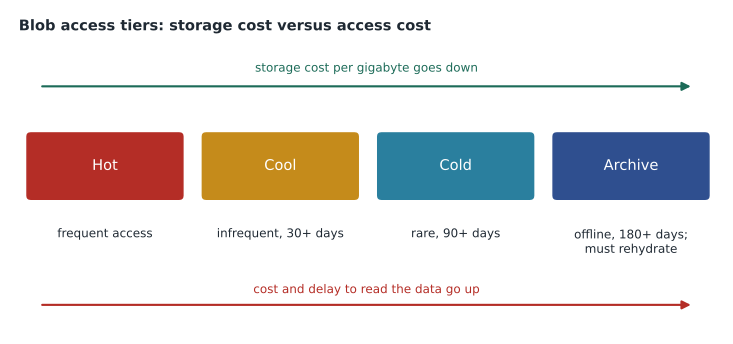
The Hot tier suits data read or changed often; storage costs the most but access costs the least. The Cool tier suits data kept for at least 30 days and read infrequently. The Cold tier suits data kept for at least 90 days and read rarely. The Archive tier suits data kept for at least 180 days that can wait hours to be read; an archived blob is offline and must be rehydrated to an online tier before anyone can open it. Moving data out of a tier before its minimum period ends can bring an early deletion charge. Lifecycle management policies move or delete blobs automatically based on age or last access, so nobody has to remember to archive old clips.
Nikolai set up a lifecycle rule for the CCTV container: move clips to Cool after 30 days, to Archive after 90 days, and delete them after the retention period that store operations director Grace Oduya agreed with the insurer. He also wrote a small script to show Keiko why tiering matters. The prices in it are made up for teaching, not real Azure prices.
# Illustrative monthly prices per gigabyte stored and per gigabyte read (not real Azure prices)
tiers = {"Hot": (0.020, 0.000), "Cool": (0.010, 0.010), "Cold": (0.004, 0.030), "Archive": (0.001, 0.200)}
stored_gb = 4000          # CCTV clips kept
read_gb = 25              # clips read per month for incidents

for name, (store, read) in tiers.items():
    monthly = stored_gb * store + read_gb * read
print(f"{name:8s} {monthly:8.2f} dollars a month")Hot 80.00 dollars a month Cool 40.25 dollars a month Cold 16.75 dollars a month Archive 9.00 dollars a month
What this code does
Compares the monthly cost of storing 4 TB of CCTV clips in each Blob storage tier, using made-up prices, by adding the storage charge to the charge for clips read back each month. Colder tiers cost less to store but more to read. Because only a few clips are read each month, the colder tiers come out cheapest.
With these illustrative numbers, Archive is cheapest for clips that are almost never read, while Hot would be cheapest only if the clips were read constantly. The real decision also weighs the delay: an insurance adjuster can wait a few hours for a clip, but a web page cannot wait for a product image.
Azure Files
Azure Files provides fully managed file shares in the cloud. A file share works like a shared folder on a Windows file server: users and servers connect to it, browse folders and open files. Azure Files supports the Server Message Block (SMB) protocol used by Windows, macOS and Linux, and the Network File System (NFS) protocol used mainly by Linux. Because it behaves like a normal file share, existing applications can use it without being rewritten, which is why it is often called a lift-and-shift service.
Harrow & Finch's MSAZ-101 pilot moved the Brandon store's file share to Azure Files in October 2026. Staff at the store map a drive letter exactly as before, but the files are now stored in Azure with zone redundancy and daily share snapshots. Azure File Sync can keep a cache of frequently used files on a local Windows server, so the store gets fast access while Azure holds the full copy. Shares can also be protected by Azure Backup and secured with Microsoft Entra identities for SMB access.
Azure Files comes in Standard tiers on hard disks, with transaction-optimized, hot and cool options for different usage patterns, and Premium file shares on solid-state drives for low latency. The choice is the same trade-off as blob tiers: how often is the data used, and how quickly must it respond?
Table storage
Azure Table storage is a simple key-attribute store for large amounts of structured but non-relational data. A table holds entities, which are like rows, and each entity has a set of properties, which are name and value pairs like columns. Unlike a relational table, Table storage does not enforce a schema: two entities in the same table can have different properties. There are no foreign keys, joins or stored procedures.
Every entity is identified by two keys. The partition key groups related entities; entities with the same partition key are stored together and can be updated together in a single transaction. The row key identifies the entity uniquely within its partition. Together, partition key and row key form the entity's unique identifier, and lookups that supply both are the fastest kind of query Table storage offers. Queries that filter on other properties have to scan, which is slower.
| PartitionKey | RowKey | Properties (vary by entity) |
|---|---|---|
| store-brandon | 2026-11-09T08:00 | DoorCount = 142 |
| store-brandon | 2026-11-09T09:00 | DoorCount = 211, Note = flyer day |
| store-12 | 2026-11-09T08:00 | DoorCount = 64 |
| store-12 | 2026-11-09T09:00 | DoorCount = 98, SensorFault = true |
Grace Oduya's team used Table storage for a simple log of hourly door counts from each store's door counter: partition key = store, row key = the hour. It costs very little, scales to billions of entities and answers the one question the team asks constantly, "How many people came into this store in this hour?" The script below imitates the idea with a Python dictionary keyed by the pair of keys.
# Imitating a Table storage lookup: the pair (PartitionKey, RowKey) identifies one entity
table = {
    ("store-brandon", "2026-11-09T08:00"): {"DoorCount": 142},
    ("store-brandon", "2026-11-09T09:00"): {"DoorCount": 211, "Note": "flyer day"},
    ("store-12", "2026-11-09T08:00"): {"DoorCount": 64},
    ("store-12", "2026-11-09T09:00"): {"DoorCount": 98, "SensorFault": True},
}
# Point lookup: both keys known, fastest query
print(table[("store-12", "2026-11-09T09:00")])
# Partition query: all hours for one store
total = sum(e["DoorCount"] for (pk, rk), e in table.items() if pk == "store-brandon")
print("Visitors at the Brandon store, 8 and 9 a.m.:", total){'DoorCount': 98, 'SensorFault': True}
Visitors at the Brandon store, 8 and 9 a.m.: 353What this code does
Imitates an Azure Table storage lookup, where each entity is found by its partition key (here the store) and row key (here the hour). It reads two hourly door counts for one store and adds them up, and shows that entities in the same table can have different properties. This is the kind of fast key lookup Table storage is designed for.
Table storage has a close relative in Azure Cosmos DB, the API for Table, which offers the same data model with global distribution, lower latency and automatic indexing of every property, at a higher price. Lesson 3 compares them. For a low-cost log like door counts, plain Table storage was enough.
Securing storage data
Everything stored in Azure Storage is encrypted at rest automatically, and connections use HTTPS. Access can be granted with Microsoft Entra ID and Azure role-based access control, which is the recommended approach, with shared access signatures, which are time-limited signed links, or with account keys, which give full access and should be guarded closely. Network rules and private endpoints can restrict which networks may reach the account at all. Nikolai disabled anonymous public access on sthfdata and gave the website's managed identity read-only access to the product images container, so no keys appear in the website's code.
az storage account create \
  --name sthfdata \
  --resource-group rg-data-prod-cc \
  --location canadacentral \
  --sku Standard_ZRS \
  --kind StorageV2 \
  --allow-blob-public-access false
Worked problem
Choosing a storage service
For each item, which Azure Storage service fits best? (a) 60,000 product images shown on harrowfinch.com; (b) a shared folder of store schedules that staff open in Excel; (c) a log of hourly freezer temperatures per store, looked up by store and hour.
Show solution
- Images are unstructured files read by a web page over HTTPS, so they belong in Blob storage.
- Staff open the schedules through a mapped drive like a normal file share, so Azure Files fits.
- Freezer readings are small, structured records looked up by two keys, so Table storage fits.
Answer: (a) Blob storage, (b) Azure Files, (c) Table storage.
Common mistakes
MistakeThinking Azure Files and Blob storage are the same service.
InsteadBoth live in a storage account, but Files offers SMB or NFS shares and Blob offers objects reached over HTTPS.
MistakeExpecting to open an archived blob straight away.
InsteadArchive blobs are offline and must be rehydrated first, which can take hours.
MistakeDesigning Table storage queries that filter on ordinary properties.
InsteadDesign the partition key and row key around the lookups you need most.
MistakeAssuming Table storage enforces a schema.
InsteadEntities in one table can have different properties.
Summary and key terms
- A storage account holds Blob storage, Azure Files, Table storage and Queue storage, and sets the region, performance level and redundancy.
- Blob storage keeps unstructured objects in containers, with Hot, Cool, Cold and Archive access tiers and lifecycle rules; with a hierarchical namespace it becomes Azure Data Lake Storage Gen2.
- Azure Files offers managed SMB and NFS file shares that existing applications can use unchanged.
- Table storage is a schema-less key-attribute store in which a partition key and row key identify each entity.
- Storage account
- The Azure resource that holds blob, file, table and queue services and sets redundancy.
- Blob
- An object of unstructured data, such as an image or a file, stored in a container.
- Access tier
- A Hot, Cool, Cold or Archive setting that trades storage cost against access cost.
- Rehydration
- Moving an archived blob back to an online tier so it can be read.
- Azure Files
- Managed file shares reached over SMB or NFS.
- Table storage
- A key-attribute store for structured, non-relational entities.
- Partition key
- The key that groups related entities and decides how data is spread out.
- Row key
- The key that identifies an entity uniquely within its partition.
Practice problems
Work each problem on paper first, then reveal the answer to check.
Which Blob tier keeps data offline until it is rehydrated?
Show answer
The Archive tier.
Which protocols does Azure Files support?
Show answer
SMB and NFS.
What two values uniquely identify an entity in Table storage?
Show answer
The partition key and the row key.
Lesson quiz · 5 questions
Score 60% or more to complete this lesson.
Create a free account to save your progress, take quizzes and earn a certificate.