
MSAZ-120 · Lesson 9 of 12 · 19 min
Azure SQL Database, Managed Instance and SQL on VMs
▶ Video coming soon A video version of this lesson is on the way.
Choosing a member of the Azure SQL family is only the first decision. Each option comes with its own settings: how resources are bought, which service tier to use, whether databases share resources, and how backups and failover work. In the seventh data hour, Elena walks the team through the options they will meet when they actually create the resources, using the three databases they placed last week: the Finch Rewards API on Azure SQL Database, StockLine on Managed Instance and the warehouse system on a virtual machine. The exam expects recognition rather than deep configuration knowledge, but the concepts explain why the choices matter.
Azure SQL Database deployment options
Azure SQL Database can be deployed in two ways. A single database has its own dedicated set of resources, sized for that one database. An elastic pool is a shared set of resources that several databases draw on. Databases in a pool can each use more when they are busy, as long as the pool as a whole has capacity. Pools suit groups of databases with varying, unpredictable loads that rarely peak at the same time, such as a software company that gives each customer its own database. Paying for one pool is usually cheaper than sizing every database for its own peak.
Harrow & Finch has only one new database for now, so the Finch Rewards API uses a single database. Ines notes that if the company later builds small databases for each of its supplier portals, a pool would be worth considering.
Purchasing models
Azure SQL Database offers two ways to buy resources, called purchasing models.
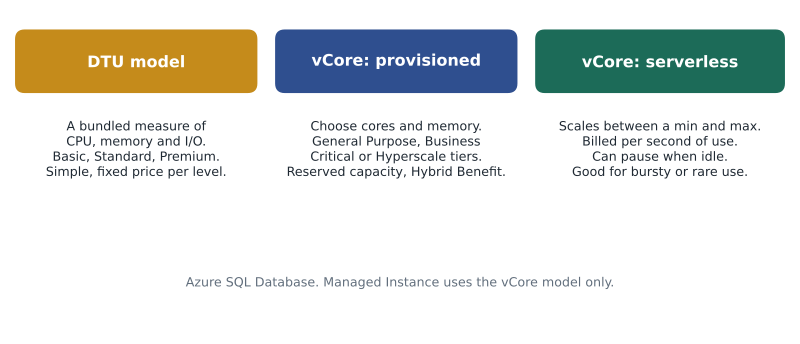
- The DTU model, short for database transaction unit, bundles processing, memory and storage input and output into a single measure. You choose a service level, such as Basic, Standard or Premium, and a size within it. It is simple and predictable, and suits small or steady workloads where you do not want to think about the parts.
- The vCore model, short for virtual core, lets you choose the number of cores and the hardware type separately from storage. It is more flexible, maps more directly to on-premises servers, and is the only model that supports Azure Hybrid Benefit and reserved capacity. Microsoft generally recommends vCore for new deployments.
Within the vCore model, compute can be provisioned or serverless. Provisioned compute is a fixed size that runs and bills all the time, which suits steady, predictable workloads. Serverless compute scales automatically between a minimum and a maximum number of vCores based on demand, bills per second for the compute actually used, and can pause automatically after a period of inactivity, when you pay only for storage. The first request after a pause has to wait while the database resumes, so serverless suits development databases and workloads with long quiet periods better than a shop's checkout.
# Illustrative comparison of provisioned and serverless compute for one month.
# The rate is made up for the example; real prices vary by region, tier and hardware.
RATE = 0.20          # illustrative price per vCore-hour
HOURS = 730          # hours in an average month

provisioned_vcores = 2
provisioned = provisioned_vcores * HOURS * RATE

# A test database: busy 8 hours on 22 weekdays at about 1.5 vCores, paused otherwise.
active_hours = 8 * 22
serverless = 1.5 * active_hours * RATE

print("Provisioned (2 vCores all month):", round(provisioned, 2))
print("Serverless (1.5 vCores while active):", round(serverless, 2))
print("Serverless costs", round(serverless / provisioned, 2), "times as much as provisioned here")Provisioned (2 vCores all month): 292.0 Serverless (1.5 vCores while active): 52.8 Serverless costs 0.18 times as much as provisioned here
What this code does
Compares one month of provisioned compute, billed for every hour, with serverless compute, billed only while the database is active, using a made-up price. For a database idle most of the month, serverless costs a small fraction as much. For one busy around the clock, provisioned would be cheaper.
Try it yourself
Serverless vCore-hours
A serverless database bills for the vCores it uses while active. Write a function vcore_hours(usage) that takes a list of (hours, vcores) pairs, one per period of activity, and returns the total vCore-hours (hours times vCores, added up), rounded to 2 decimal places. Periods when the database is paused are simply not in the list.
def vcore_hours(usage):
    total = 0
    # multiply hours by vcores for each period and add them up
    return total

print(vcore_hours([(8, 1.5), (2, 4), (0.5, 0.5)]))
Service tiers
In the vCore model, the service tier decides the storage design and the level of performance and availability. There are three.
- General Purpose is the default, balanced tier. Compute and storage are separate, with data held on remote storage, and Azure replaces a failed compute node automatically. It suits most business workloads at a moderate price.
- Business Critical keeps data on fast local storage and maintains several replicas of the database in the background, giving the lowest latency and the fastest recovery from failures. One replica can be used for read-only queries at no extra charge, which helps with reporting. It suits workloads where every millisecond and every second of downtime matter, at a higher price.
- Hyperscale uses a distributed storage design that lets a single database grow to very large sizes, with fast backups and restores regardless of size, and the option of extra read replicas. It suits large and fast-growing databases, and Microsoft increasingly positions it as a general choice for new databases too.
Elena's plan for Finch Rewards is a serverless General Purpose database for development and testing, which will sit paused most nights and weekends, and a provisioned General Purpose database for production, reviewed after the first big promotion. Business Critical would be tempting for StockLine's tills, she says, but that is a Managed Instance decision.
| Tier | Storage design | Strengths | Typical use |
|---|---|---|---|
| General Purpose | Remote storage, separate compute | Balanced price and performance | Most business applications |
| Business Critical | Local fast storage, several replicas | Lowest latency, fast failover, free read replica | Busy transactional systems |
| Hyperscale | Distributed storage that scales out | Very large databases, fast backup and restore | Large or fast-growing data |
Changing size later
One of the biggest differences from a physical server is that size is not fixed. An Azure SQL database can be moved to more or fewer vCores, or to a different tier, with a setting change or a command; the service copies or adjusts the database in the background and switches over with only a brief interruption to connections, usually seconds. Storage can be increased the same way. This changes how teams plan. Instead of buying a server large enough for the next five years, they start with a reasonable size, watch the performance metrics and adjust. Finch Rewards will start small, grow for the spring promotion and shrink again afterwards, paying for the larger size only while it is needed.
Built-in backups and availability
Both platform services take backups automatically: full, differential and transaction log backups on a schedule that Microsoft manages. This allows point-in-time restore, which recovers a database to any moment within the retention period, by default seven days and configurable up to 35. Long-term retention can keep weekly, monthly or yearly backups for up to ten years for compliance. Backups can be stored in locally redundant, zone-redundant or geo-redundant storage, the same choices covered in the Azure fundamentals courses, and geo-redundant backups allow a database to be restored in another region after a disaster.
For high availability, the platform keeps the database running through hardware failures and maintenance without any setup. Zone redundancy, where supported, spreads copies across availability zones in the region. For disaster recovery across regions, active geo-replication keeps readable copies of a database in other regions, and failover groups manage a set of databases that fail over to another region together, with connection names that stay the same so applications do not need to change.
Walt reads this section twice. On his own servers, every one of these features is a project: configuring log shipping, testing failover, buying storage for backups. On the platform they are settings. He still intends to test restores every month. "A backup you have never restored," he says, "is a rumour."
Worked problem
Point-in-time restore window
At 10:42 on Thursday a developer runs an UPDATE without a WHERE clause on the Finch Rewards test database, setting every member's points to zero. The database has the default seven-day retention. What can be done?
Show solution
- Point-in-time restore can recover the database to any moment within the last seven days.
- Choose a time just before the mistake, such as 10:41 on Thursday.
- The restore creates a new database at that point in time; it does not overwrite the damaged one.
- The team can copy the correct points from the restored database back into the original, or switch the application to the restored copy.
Answer: Restore to 10:41 as a new database, then recover the data from it. Nothing written after 10:41 is in the restored copy, so any legitimate changes after that time must be reapplied.
Azure SQL Managed Instance in more detail
Managed Instance uses the vCore model only, with General Purpose and Business Critical tiers, and Microsoft has introduced newer hardware and storage options over time. Each managed instance is deployed into a dedicated subnet of an Azure virtual network, which gives it a private address and lets on-premises systems reach it over a VPN or ExpressRoute connection, as if it were in the company's own network. That suits StockLine: the tills and back-office servers will connect over the company's private link to Azure rather than across the internet.
Migrating to Managed Instance can use native SQL Server backups, restored into the instance from Azure Blob Storage, or the Azure Database Migration Service, or a feature called the Managed Instance link, which replicates a database from an on-premises SQL Server to Azure continuously so that the final switch takes minutes. Walt's migration plan, still in draft, uses the link so that the cutover can happen on a quiet Sunday night in 2027 with only a short outage.
SQL Server on Azure VMs in more detail
A SQL Server virtual machine is created from an Azure Marketplace image that includes Windows or Linux and a chosen SQL Server version and edition, or from a plain virtual machine where you install SQL Server yourself. When created from a Marketplace image, the VM registers with an Azure extension that unlocks management features in the portal, such as automated patching windows, automated backups to Azure storage, licence management and storage configuration. These features narrow the gap with the platform services, but the customer still owns the configuration and the outcome.
High availability on VMs uses the same SQL Server features as on-premises, such as Always On availability groups and failover cluster instances, spread across availability zones or availability sets. Disaster recovery can add a replica in another region. Because the options are the familiar ones, an experienced DBA can design them, but they take real work, which is the price of control.
az sql db create --resource-group rg-rewards-prod-cc --server sql-rewards-cc --name rewards --edition GeneralPurpose --compute-model Serverless --family Gen5 --min-capacity 0.5 --capacity 2 --auto-pause-delay 60Elena points out that the command names every important choice from this lesson: the edition, which is the service tier; the compute model; the hardware family; the minimum and maximum vCores; and how long to wait before pausing. The resource group name ends in cc for Canada Central, following the naming standard from Project Skylight.
Common mistakes
MistakeThe DTU model supports Azure Hybrid Benefit.
InsteadAzure Hybrid Benefit and reserved capacity apply to the vCore model.
MistakeA serverless database never has any delay.
InsteadAfter it auto-pauses, the first connection waits while the database resumes.
MistakePoint-in-time restore overwrites the existing database.
InsteadIt creates a new database at the chosen point in time.
Summary and key terms
- Azure SQL Database can be a single database or part of an elastic pool that shares resources among databases.
- The DTU model bundles resources into simple levels; the vCore model chooses cores separately and supports Hybrid Benefit and reserved capacity.
- Serverless compute scales automatically, bills per second and can auto-pause; provisioned compute is fixed and always on.
- Service tiers are General Purpose, Business Critical and Hyperscale; Managed Instance offers General Purpose and Business Critical.
- Platform services take automatic backups with point-in-time restore and offer geo-replication and failover groups.
- Managed Instance runs in a virtual network subnet; SQL Server on VMs uses familiar SQL Server features and optional Azure automation.
- Elastic pool
- A shared set of resources used by several Azure SQL databases.
- DTU
- Database transaction unit: a bundled measure of compute, memory and I/O in the DTU purchasing model.
- vCore
- Virtual core: the unit of compute chosen in the vCore purchasing model.
- Serverless
- A compute option that scales automatically, bills for use and can pause when idle.
- Point-in-time restore
- Restoring a database to a chosen moment within the backup retention period.
- Failover group
- A set of databases that fail over to another region together, keeping the same connection names.
- Hyperscale
- A service tier with distributed storage for very large databases and fast backup and restore.
Practice problems
Work each problem on paper first, then reveal the answer to check.
When is an elastic pool a good choice?
Show answer
When several databases have variable loads that do not peak at the same time.
Which purchasing model supports reserved capacity and Azure Hybrid Benefit?
Show answer
The vCore model.
What happens to a serverless database that has been idle for longer than its auto-pause delay?
Show answer
It pauses, billing only for storage, and resumes on the next connection.
Which service tier keeps several local replicas and offers a free read-only replica?
Show answer
Business Critical.
Lesson quiz · 5 questions
Score 60% or more to complete this lesson.
Create a free account to save your progress, take quizzes and earn a certificate.