
MSAZ-120 · Lesson 12 of 12 · 20 min
Security basics for relational data
▶ Video coming soon A video version of this lesson is on the way.
The last data hour of the year has a guest. Sunil Rao, Harrow & Finch's IT security manager, has read the migration plans and has questions. "When StockLine is in Azure, who can reach it? How do they sign in? What stops an analyst seeing every customer's phone number? And if something goes wrong, how will we know?" Elena says those four questions are the whole of this lesson. Security for relational data, like security for anything in Azure, works in layers, an approach called defence in depth: if one layer fails, the next still protects the data.
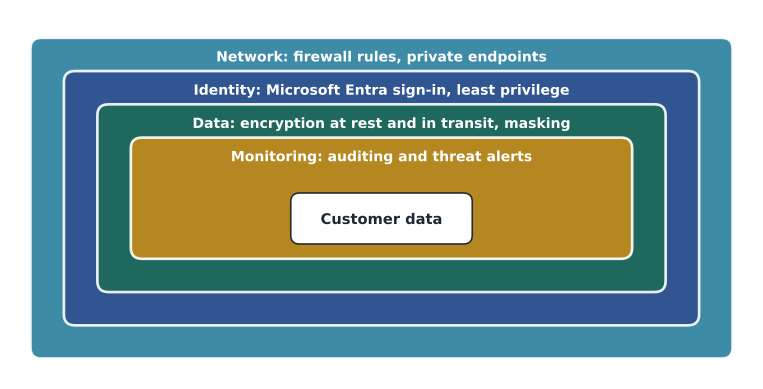
Layer 1: the network
The first question is who can even reach the database. Azure SQL Database and the open-source flexible servers can accept connections over a public endpoint, protected by firewall rules that list the IP addresses allowed to connect. Everything else is refused before it can try to sign in. Server-level rules apply to every database on a logical server; database-level rules apply to one database. A setting that allows all Azure services to connect is convenient but broad, and security teams usually turn it off.
A stronger option is private connectivity. A private endpoint gives the database a private IP address inside the company's Azure virtual network, so applications reach it over the private network and the public endpoint can be disabled entirely. Managed Instance always lives inside a virtual network subnet, as lesson 9 described, and SQL Server on a VM sits behind the network security rules of its virtual network like any other server. For StockLine, Sunil's requirement is simple: no public endpoint at all. The tills, back-office servers and reporting tools will reach the database over the site-to-site connection into the Azure network.
Layer 2: identity and authentication
Authentication proves who is connecting. Azure SQL supports two methods. SQL authentication uses a user name and password stored in the database server, the traditional SQL Server approach. Microsoft Entra authentication uses the company's central identity service, the same accounts people use for email and Teams, which brings multifactor authentication, Conditional Access policies, central account management and immediate removal of access when someone leaves.
Microsoft recommends Microsoft Entra authentication wherever possible, and Azure SQL can be configured to allow only Entra authentication, disabling SQL passwords entirely. Applications can use managed identities, which are identities that Azure creates and manages for a resource such as a web app, so that the application connects to the database without any password stored in its configuration. The Finch Rewards API will connect this way: no password to leak, rotate or forget.
-- Create a database user for a Microsoft Entra group, and give it read access.
CREATE USER [HF-Sales-Analysts] FROM EXTERNAL PROVIDER;
ALTER ROLE db_datareader ADD MEMBER [HF-Sales-Analysts];

-- Create a user for the Finch Rewards app's managed identity.
CREATE USER [app-finch-rewards] FROM EXTERNAL PROVIDER;
GRANT EXECUTE ON SCHEMA::Rewards TO [app-finch-rewards];
Layer 2 continued: authorization and least privilege
Authorization decides what an authenticated user may do. In SQL databases this is controlled with permissions, granted with the DCL statements from lesson 6, and with roles that bundle permissions. Built-in database roles include db_datareader, which can read every table; db_datawriter, which can change data in every table; and db_owner, which can do almost anything in the database. Custom roles can grant exactly the permissions a job needs.
The guiding rule is least privilege: give each person and application only the permissions they need, and no more. Analysts get read access, often only to views in a reporting schema rather than to raw tables. The tills get permission to run the stored procedures that record sales, not to update tables directly, as lesson 7 explained. DBAs use separate administrator accounts for administrative work, and even they do not use the most powerful account for everyday tasks. Granting permissions to groups rather than individuals makes it easy to add and remove people correctly.
Worked problem
Applying least privilege
Three people and one application need access to the reporting database: Keiko, who builds reports from views in the Reporting schema; Ines, whose pipeline loads data into staging tables; Walt, who administers the database; and the store dashboard app, which reads two views. What access should each get?
Show solution
- Keiko: membership of a group with SELECT on the Reporting schema only, not on raw tables.
- Ines's pipeline: its own managed identity with INSERT, UPDATE and DELETE on the staging tables only.
- Walt: an administrator role used through a separate admin account, not his everyday account.
- The dashboard app: a managed identity with SELECT on the two views it uses, and nothing else.
Answer: Each gets the narrowest access that lets them do their job. If any one account is compromised, the damage it can do is limited.
Layer 3: protecting the data itself
Even with strong network and identity controls, the data itself is protected in case something gets through.
- Encryption at rest. Transparent data encryption, TDE, encrypts the database files, backups and logs on disk, so a stolen disk or backup file is unreadable. It is turned on by default for new Azure SQL databases and works without any change to applications. Keys can be managed by Microsoft or by the customer in Azure Key Vault.
- Encryption in transit. Connections are encrypted with TLS, the same protocol that protects websites, so data cannot be read as it crosses the network. Azure SQL can require a minimum TLS version.
- Always Encrypted. For the most sensitive columns, such as government identification numbers, Always Encrypted encrypts data inside the client application, so the database only ever stores and sees encrypted values. Even a DBA cannot read them. The trade-off is that the database can do only limited operations, such as equality comparisons, on those columns.
- Dynamic data masking. Masking hides part of a value in query results for users without permission to see it, for example showing a phone number as XXX-XXX-0142. The stored data is unchanged; masking only affects what is returned. It is a convenience that reduces casual exposure, not a strong security boundary, because a determined user with query access can sometimes infer masked values.
- Row-level security. Row-level security filters which rows a user can see based on who they are, using a policy defined in the database. A store manager could see only their own store's sales in the same table that head office sees in full.
# How dynamic data masking changes what a user sees (the stored value is unchanged).
customers = [("A. Lindqvist", "204-555-0142", "a.lindqvist@example.com"),
             ("P. Novak", "515-555-0177", "pnovak@example.com")]

def mask_phone(p):
    return "XXX-XXX-" + p[-4:]

def mask_email(e):
    name, domain = e.split("@")
    return name[0] + "XXX@XXXX" + domain[domain.rfind("."):]

for unmasked_user in (True, False):
    print("Can see full data:" if unmasked_user else "Masked view:")
    for name, phone, email in customers:
        if unmasked_user:
            print("  ", name, phone, email)
        else:
print(" ", name, mask_phone(phone), mask_email(email))Can see full data: A. Lindqvist 204-555-0142 a.lindqvist@example.com P. Novak 515-555-0177 pnovak@example.com Masked view: A. Lindqvist XXX-XXX-0142 aXXX@XXXX.com P. Novak XXX-XXX-0177 pXXX@XXXX.com
What this code does
Imitates dynamic data masking: it shows customers' full phone numbers and emails to a privileged user, and a masked version to everyone else, with most digits and letters replaced by X. The stored values never change; only what each user sees differs. This mirrors the partial and email masks built into SQL databases.
Try it yourself
Mask a card number
Write a function mask_card(number) that takes a card number as a string of digits and returns it with every digit replaced by X except the last four. For example, mask_card("4111222233334444") returns "XXXXXXXXXXXX4444".
def mask_card(number):
    # keep the last four digits, replace the rest with X
    return number

print(mask_card("4111222233334444"))
Layer 4: monitoring and response
The final layer is knowing what happens. Auditing records database events, such as sign-ins, queries against sensitive tables and changes to permissions, to a storage account or log workspace, where they can be reviewed and kept for compliance. Microsoft Defender for SQL, part of Microsoft Defender for Cloud, adds vulnerability assessment, which scans for weak configurations such as excessive permissions, and threat protection, which alerts on suspicious activity such as unusual sign-in locations, possible SQL injection or a sudden export of large amounts of data. Data discovery and classification helps find and label sensitive columns, such as names, email addresses and payment details, so they can be protected and their use monitored.
Azure SQL also offers ledger tables, which keep a cryptographically verifiable history of changes so that any tampering can be detected afterwards. They suit records where proving integrity matters, such as audit trails and some financial records. And the automatic backups described in lesson 9 are part of security too: if data is damaged by mistake or by ransomware, a point-in-time restore is the way back, which is why backup retention and access to backups deserve the same care as the database.
| Concern | Feature | What it does |
|---|---|---|
| Who can reach the database | Firewall rules, private endpoints, virtual networks | Limit connections to known networks |
| Who is connecting | Microsoft Entra authentication, managed identities | Central sign-in with MFA; no stored app passwords |
| What they may do | Roles, permissions, least privilege | Grant only the access each job needs |
| Data on disk | Transparent data encryption (TDE) | Encrypts files and backups at rest, on by default |
| Data on the network | TLS | Encrypts connections |
| Very sensitive columns | Always Encrypted | Data encrypted in the client; the database never sees it in clear |
| Casual exposure in results | Dynamic data masking | Hides parts of values for users without permission |
| Which rows a user sees | Row-level security | Filters rows by user |
| Knowing what happened | Auditing, Defender for SQL | Records events and alerts on threats |
Privacy law and the shared responsibility
Technical controls serve legal and business obligations. In Canada, PIPEDA requires organizations to protect personal information with safeguards appropriate to its sensitivity, to report breaches that create a real risk of significant harm, and to keep records of every breach; Quebec's Law 25 adds further duties for Quebec residents' information. Carmen Ortiz, the privacy officer, decides what counts as sensitive and who may see it; the database features in this lesson are how that decision is enforced.
Under the shared responsibility model, Microsoft secures the physical data centres, the hardware and, for platform services, the database engine and operating system. The customer always remains responsible for the data, for who has access, for configuring the network and authentication options, and for responding to alerts. Sunil sums it up for the room: "Azure gives us very good locks. We still have to decide who gets keys, and notice when a door is open."
The plan, and the end of the year
The team agrees StockLine's security design on December 16, 2026, as a plan for the 2027 migration: Managed Instance in a private subnet with no public endpoint; Microsoft Entra authentication only, with groups for analysts, administrators and support; tills calling stored procedures through an application identity; TDE with keys in Azure Key Vault; masking on customer phone numbers and emails for support staff; row-level security so store managers see their own store's figures; auditing to a log workspace kept for a year; and Defender for SQL turned on. Sunil signs off with two follow-up actions. Walt adds both to his binder.
Keiko's study plan for DP-900 is now half done: core data concepts and relational data are covered, and the second course, MSAZ-121, turns to non-relational data, data lakes, real-time analytics and Power BI, where her reports will eventually live. Her exam is booked for March 2027. At the end of the hour, Elena asks each person for one sentence on what changed for them this term. Walt says he trusts the cloud a little more. Ines says she finally knows what Walt's binder is for. Keiko says she now knows why her report slowed the tills, and how to stop it.
Common mistakes
MistakeDynamic data masking encrypts the stored data.
InsteadMasking only changes what query results show to some users; the stored data is unchanged. Encryption is a separate feature.
MistakeFirewall rules decide which tables a user can read.
InsteadFirewall rules decide which network addresses can connect; permissions decide what a connected user may do.
MistakeWith a platform database service, Microsoft decides who can access your data.
InsteadAccess control always remains the customer's responsibility.
Summary and key terms
- Database security works in layers: network, identity, data protection and monitoring.
- Firewall rules and private endpoints control who can reach the database; Managed Instance runs inside a virtual network.
- Microsoft Entra authentication, managed identities and least-privilege roles control who connects and what they may do.
- TDE encrypts data at rest by default; TLS encrypts data in transit; Always Encrypted protects the most sensitive columns from everyone except the client.
- Dynamic data masking and row-level security limit what users see in results.
- Auditing, Microsoft Defender for SQL, classification and ledger tables help detect and prove what happened; the customer always owns access decisions.
- Defence in depth
- Protecting data with several independent layers of security.
- Firewall rule
- A rule listing the network addresses allowed to connect to a database server.
- Private endpoint
- A private IP address in a virtual network that connects to an Azure service.
- Least privilege
- Granting only the permissions needed for a task.
- Transparent data encryption (TDE)
- Encryption of database files, logs and backups at rest.
- Always Encrypted
- Encryption of sensitive columns in the client so the database never sees plain values.
- Dynamic data masking
- Hiding parts of values in query results for users without permission to see them.
- Row-level security
- A database policy that filters which rows each user can see.
Practice problems
Work each problem on paper first, then reveal the answer to check.
Which authentication method does Microsoft recommend for Azure SQL?
Show answer
Microsoft Entra authentication, including managed identities for applications.
Is transparent data encryption on by default for new Azure SQL databases?
Show answer
Yes.
What is the difference between Always Encrypted and dynamic data masking?
Show answer
Always Encrypted encrypts data so the database never sees it in plain form; masking only hides parts of values in results while the stored data is unchanged.
Name two features that help detect suspicious activity.
Show answer
For example: auditing and Microsoft Defender for SQL threat protection.
Lesson quiz · 5 questions
Score 60% or more to complete this lesson.
Create a free account to save your progress, take quizzes and earn a certificate.