
MSAZ-120 · Lesson 6 of 12 · 21 min
SQL basics: DDL, DML and queries
▶ Video coming soon A video version of this lesson is on the way.
Keiko has written SQL queries for years, mostly by copying an old report and changing the dates. At the fifth data hour Elena asks her to put that aside and learn the language properly, from the beginning. "The exam will ask you to recognize what a statement does," Elena says. "The job will ask you to write the right one the first time." Walt nods and adds that he has seen more databases damaged by an UPDATE without a WHERE clause than by any hardware failure.
What SQL is
SQL, Structured Query Language, is the standard language for working with relational databases. It is pronounced either as the letters S-Q-L or as "sequel", and both are common. SQL is declarative: you describe the result you want, such as "total sales per store for November", and the database decides how to get it. That is different from most programming languages, where you write the steps yourself. The part of the database that works out the steps is the query optimizer, and lesson 7 shows how indexes help it.
SQL was standardized by ANSI and ISO in the 1980s, and every major relational database supports the core of the standard. Each product also adds its own extensions, called a dialect. Microsoft SQL Server and Azure SQL use Transact-SQL, or T-SQL. PostgreSQL uses its own dialect, usually just called PostgreSQL SQL, and MySQL has its own too. The basic statements in this lesson work almost identically in all of them. The runnable examples use SQLite, a small database built into Python, so they can run in your browser; where T-SQL differs, the lesson says so.
Three groups of statements
SQL statements fall into groups according to what they do. The DP-900 exam expects you to know the three main groups and their key statements.
- Data definition language, DDL, creates and changes the structure of the database: tables, views, indexes and other objects. Its main statements are CREATE, ALTER and DROP.
- Data manipulation language, DML, works with the rows inside tables: SELECT reads rows, INSERT adds them, UPDATE changes them and DELETE removes them. Some sources list SELECT separately as a data query language, DQL, but the exam treats it with DML.
- Data control language, DCL, manages permissions: GRANT gives a user permission, REVOKE removes a permission previously granted, and DENY, in T-SQL, explicitly blocks one.
Data definition: CREATE, ALTER and DROP
CREATE builds a new object. A CREATE TABLE statement names the table and lists its columns, each with a data type and any constraints. ALTER changes an existing object, for example adding a column. DROP removes an object entirely, together with all its data, which is why Walt never runs DROP on a production server without a recent backup and a second person watching.
CREATE TABLE dbo.Stores (
    StoreID   int           NOT NULL PRIMARY KEY,
    StoreName nvarchar(60)  NOT NULL,
    City      nvarchar(60)  NOT NULL,
    OpenedOn  date          NULL
);

ALTER TABLE dbo.Stores ADD Phone varchar(20) NULL;

DROP TABLE dbo.OldPriceImport;
T-SQL groups tables into schemas, which are like folders inside a database; dbo is the default one. A table is often written with its schema name, such as dbo.Stores or Sales.Orders. Schemas help organize large databases and make permissions easier to manage, because a permission can be granted on a whole schema at once.
Reading data with SELECT
SELECT is the statement you will use most. A basic query names the columns to return, the table to read FROM, an optional WHERE clause to filter rows, and an optional ORDER BY clause to sort the results. The examples below run against a small sales table loaded in memory.
import sqlite3
db = sqlite3.connect(":memory:")
db.executescript("""
CREATE TABLE Stores (StoreID INTEGER PRIMARY KEY, City TEXT NOT NULL);
CREATE TABLE Sales (SaleID INTEGER PRIMARY KEY, StoreID INTEGER REFERENCES Stores(StoreID),
                    SaleDate TEXT NOT NULL, SKU TEXT NOT NULL, Qty INTEGER NOT NULL, Amount REAL NOT NULL);
INSERT INTO Stores VALUES (12, 'North'), (15, 'West'), (18, 'South');
INSERT INTO Sales VALUES
 (1, 12, '2026-11-02', 'PNT-114', 2, 69.98), (2, 12, '2026-11-02', 'BRS-030', 1, 16.42),
 (3, 15, '2026-11-02', 'PNT-114', 1, 34.99), (4, 15, '2026-11-03', 'HMR-200', 1, 24.50),
 (5, 12, '2026-11-03', 'PNT-114', 3, 104.97), (6, 18, '2026-11-03', 'BRS-030', 4, 65.68);
""")

query = """
SELECT SaleDate, SKU, Qty, Amount
FROM Sales
WHERE StoreID = 12
ORDER BY SaleDate, Amount DESC
"""
for row in db.execute(query):
print(row)('2026-11-02', 'PNT-114', 2, 69.98)
('2026-11-02', 'BRS-030', 1, 16.42)
('2026-11-03', 'PNT-114', 3, 104.97)What this code does
Builds small store and sales tables in an in-memory database and runs a SELECT query that keeps only store 12's sales and orders them by date and largest amount first. The printed rows are the query's result. It shows the WHERE and ORDER BY clauses in action.
The WHERE clause can combine conditions with AND and OR, compare with operators such as =, <> (not equal), <, >, <= and >=, test ranges with BETWEEN, test lists with IN, and find missing values with IS NULL. Note that a comparison such as Phone = NULL never matches anything, because NULL means unknown; the correct test is Phone IS NULL.
Summarizing with aggregate functions and GROUP BY
Aggregate functions combine many rows into one value: COUNT counts rows, SUM adds, AVG averages, and MIN and MAX find the smallest and largest. On their own, they summarize the whole table. With GROUP BY, they summarize each group separately, which is the heart of most reports. HAVING filters groups after they are formed, in the same way that WHERE filters rows before grouping.
import sqlite3
db = sqlite3.connect(":memory:")
db.executescript("""
CREATE TABLE Stores (StoreID INTEGER PRIMARY KEY, City TEXT NOT NULL);
CREATE TABLE Sales (SaleID INTEGER PRIMARY KEY, StoreID INTEGER REFERENCES Stores(StoreID),
                    SaleDate TEXT NOT NULL, SKU TEXT NOT NULL, Qty INTEGER NOT NULL, Amount REAL NOT NULL);
INSERT INTO Stores VALUES (12, 'North'), (15, 'West'), (18, 'South');
INSERT INTO Sales VALUES
 (1, 12, '2026-11-02', 'PNT-114', 2, 69.98), (2, 12, '2026-11-02', 'BRS-030', 1, 16.42),
 (3, 15, '2026-11-02', 'PNT-114', 1, 34.99), (4, 15, '2026-11-03', 'HMR-200', 1, 24.50),
 (5, 12, '2026-11-03', 'PNT-114', 3, 104.97), (6, 18, '2026-11-03', 'BRS-030', 4, 65.68);
""")

query = """
SELECT StoreID, COUNT(*) AS Sales, SUM(Qty) AS Units, ROUND(SUM(Amount), 2) AS Total
FROM Sales
GROUP BY StoreID
HAVING SUM(Amount) > 50
ORDER BY Total DESC
"""
for row in db.execute(query):
print(row)(12, 3, 6, 191.37) (18, 1, 4, 65.68) (15, 2, 2, 59.49)
What this code does
Uses the same sample tables to total sales per store with GROUP BY, then keeps only stores whose total is above 50 with HAVING. The output lists each qualifying store with its number of sales, units and total amount. This is the standard way to summarise and then filter groups in SQL.
Worked problem
Reading a query in order
Explain what this query returns: SELECT SKU, SUM(Qty) AS Units FROM Sales WHERE SaleDate = '2026-11-03' GROUP BY SKU ORDER BY Units DESC.
Show solution
- FROM Sales: start with every row of the Sales table.
- WHERE SaleDate = '2026-11-03': keep only sales made on November 3.
- GROUP BY SKU: form one group per product code among those rows.
- SELECT SKU, SUM(Qty) AS Units: for each group, return the product code and the total quantity sold, naming that total Units.
- ORDER BY Units DESC: sort the products from most units to fewest.
Answer: The products sold on November 3, with the number of units of each, best seller first. The database processes the clauses roughly in the order FROM, WHERE, GROUP BY, HAVING, SELECT, ORDER BY, even though SELECT is written first.
Combining tables with JOIN
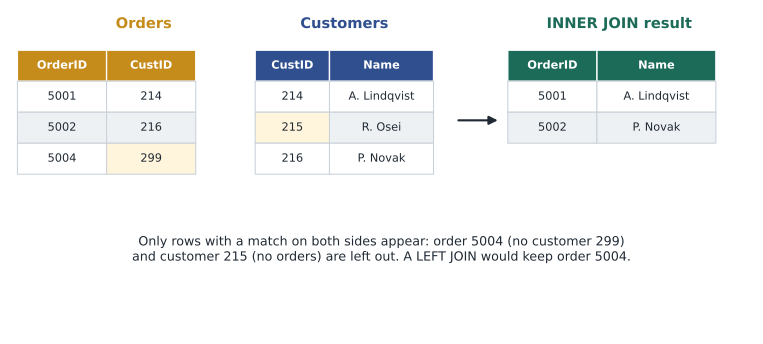
Because a normalized database spreads facts across tables, most real queries join tables back together. A JOIN matches rows from two tables using a condition, usually that a foreign key equals a primary key. An INNER JOIN returns only rows that have a match on both sides. A LEFT JOIN returns every row from the first table, with matching details from the second where they exist and NULL where they do not. RIGHT and FULL joins work similarly from the other side or both sides.
import sqlite3
db = sqlite3.connect(":memory:")
db.executescript("""
CREATE TABLE Stores (StoreID INTEGER PRIMARY KEY, City TEXT NOT NULL);
CREATE TABLE Sales (SaleID INTEGER PRIMARY KEY, StoreID INTEGER REFERENCES Stores(StoreID),
                    SaleDate TEXT NOT NULL, SKU TEXT NOT NULL, Qty INTEGER NOT NULL, Amount REAL NOT NULL);
INSERT INTO Stores VALUES (12, 'North'), (15, 'West'), (18, 'South');
INSERT INTO Sales VALUES
 (1, 12, '2026-11-02', 'PNT-114', 2, 69.98), (2, 12, '2026-11-02', 'BRS-030', 1, 16.42),
 (3, 15, '2026-11-02', 'PNT-114', 1, 34.99), (4, 15, '2026-11-03', 'HMR-200', 1, 24.50),
 (5, 12, '2026-11-03', 'PNT-114', 3, 104.97), (6, 18, '2026-11-03', 'BRS-030', 4, 65.68);
""")

query = """
SELECT st.City, ROUND(SUM(s.Amount), 2) AS Total
FROM Sales AS s
INNER JOIN Stores AS st ON st.StoreID = s.StoreID
GROUP BY st.City
ORDER BY st.City
"""
for row in db.execute(query):
print(row)('North', 191.37)
('South', 65.68)
('West', 59.49)What this code does
Joins the sales table to the stores table on the store ID, so the report shows each store's area name instead of its number, and totals sales by that name. The output lists one total per area. Joins like this combine related tables at query time.
The short names s and st are table aliases, which keep long queries readable. Aliases for columns, such as AS Total, rename a result column. Joins are where most query mistakes happen: joining on the wrong column, or forgetting a condition so that every row of one table matches every row of the other, can multiply rows and inflate totals. Keiko confesses that her store comparison once showed every store selling three times its real figure because of exactly that.
Try it yourself
Units sold per product
The database db already holds a Sales table with columns StoreID, SaleDate, SKU, Qty and Amount. Set the variable query to a SQL statement that returns each SKU and its total quantity as two columns, sorted by SKU. The code then runs it.
query = """
SELECT SKU
FROM Sales
"""
result = db.execute(query).fetchall()
print(result)
Changing data: INSERT, UPDATE and DELETE
INSERT adds rows, listing the columns and the values to put in them. UPDATE changes values in existing rows, and DELETE removes rows. Both UPDATE and DELETE take a WHERE clause that chooses which rows to affect, and both affect every row in the table if the WHERE clause is left out. That is Walt's nightmare: UPDATE Products SET Price = 0 with no WHERE sets every price in the company to zero. His habit, worth copying, is to write the WHERE clause first, run it as a SELECT to see exactly which rows match, and only then change SELECT to UPDATE or DELETE, inside a transaction he can roll back.
INSERT INTO dbo.Stores (StoreID, StoreName, City, OpenedOn)
VALUES (24, 'Riverside', 'Riverside', '2027-04-01');

UPDATE dbo.Products
SET    ListPrice = 36.99
WHERE  SKU = 'PNT-114';

DELETE FROM dbo.PriceImport
WHERE  ImportDate < '2026-01-01';
TRUNCATE TABLE removes every row from a table quickly, without logging each row individually, and resets any automatic numbering. It is classed with DDL in SQL Server because it acts on the table as a whole. MERGE, in T-SQL and other dialects, combines insert, update and delete in one statement, which is handy when loading a batch of changes into a table.
Controlling access with GRANT, REVOKE and DENY
DCL statements give and take away permissions. GRANT SELECT ON dbo.Sales TO ReportReaders lets members of the ReportReaders role read the Sales table. REVOKE removes a permission that was granted or denied earlier. DENY, specific to SQL Server, blocks a permission even if the user would otherwise receive it through a role. Permissions are usually granted to roles rather than individual users, so that adding a new analyst to the right role gives them the right access in one step. Lesson 12 returns to this.
GRANT SELECT ON SCHEMA::Reporting TO ReportReaders;
DENY  DELETE ON dbo.Sales TO ReportReaders;
REVOKE INSERT ON dbo.PriceImport FROM PricingApp;| Group | Purpose | Main statements |
|---|---|---|
| DDL | Create, change and remove database objects | CREATE, ALTER, DROP, TRUNCATE |
| DML | Read and change the rows in tables | SELECT, INSERT, UPDATE, DELETE, MERGE |
| DCL | Manage permissions | GRANT, REVOKE, DENY |
By the end of the hour Keiko has rewritten her store comparison from scratch: one query, joining Sales to Stores, grouped by store and week, with a clear WHERE clause on the dates. It is shorter than the copied version and, she checks carefully, produces the right totals. Walt reviews it and approves, which from Walt is high praise.
Common mistakes
MistakeDROP TABLE removes the rows but keeps the table.
InsteadDROP TABLE removes the table and all its data; TRUNCATE TABLE or DELETE removes rows but keeps the table.
MistakeWHERE Phone = NULL finds rows with no phone number.
InsteadComparisons with NULL never match; use WHERE Phone IS NULL.
MistakeGRANT is a data manipulation statement.
InsteadGRANT is data control language (DCL); it manages permissions, not rows.
Summary and key terms
- SQL is the standard, declarative language for relational databases; T-SQL is Microsoft's dialect.
- DDL (CREATE, ALTER, DROP) defines structure; DML (SELECT, INSERT, UPDATE, DELETE) works with rows; DCL (GRANT, REVOKE, DENY) manages permissions.
- SELECT queries use FROM, WHERE, GROUP BY, HAVING and ORDER BY to filter, summarize and sort data.
- Aggregate functions such as COUNT, SUM, AVG, MIN and MAX summarize rows, usually with GROUP BY.
- JOIN combines tables; INNER JOIN keeps matching rows only and LEFT JOIN keeps every row from the first table.
- UPDATE and DELETE affect every row unless a WHERE clause limits them.
- SQL
- Structured Query Language, the standard language for relational databases.
- T-SQL
- Transact-SQL, the dialect of SQL used by SQL Server and Azure SQL.
- DDL
- Data definition language: statements that create, change and remove database objects.
- DML
- Data manipulation language: statements that read, insert, update and delete rows.
- DCL
- Data control language: statements that grant, revoke and deny permissions.
- Aggregate function
- A function such as SUM or COUNT that combines many rows into one value.
- JOIN
- A query operation that combines rows from two tables using a matching condition.
Practice problems
Work each problem on paper first, then reveal the answer to check.
Which statement group does ALTER TABLE belong to?
Show answer
DDL, data definition language.
What does HAVING do that WHERE cannot?
Show answer
It filters groups after GROUP BY, for example keeping only stores with total sales above a value.
What is the difference between an INNER JOIN and a LEFT JOIN?
Show answer
An inner join returns only matching rows; a left join returns every row from the first table, with NULLs where there is no match.
Why should you run a SELECT with the same WHERE clause before an UPDATE?
Show answer
To see exactly which rows will be changed before changing them.
Lesson quiz · 5 questions
Score 60% or more to complete this lesson.
Create a free account to save your progress, take quizzes and earn a certificate.