
MSAZ-120 · Lesson 3 of 12 · 18 min
Transactional and analytical workloads
▶ Video coming soon A video version of this lesson is on the way.
Every winter weekday at about seven in the morning, cashiers at Harrow & Finch stores notice that the tills are slow. Walt has known the cause for years. At the same moment that stores open and start ringing up sales, Keiko's overnight report is still running its final queries against the StockLine database, scanning months of sales to build the store comparison that managers read first thing. Two very different kinds of work are competing for the same database. Elena uses this problem to introduce the most important distinction in data work: transactional workloads and analytical workloads.
What a workload is
A workload is the pattern of work a system does: what kinds of requests arrive, how many, how big each one is, and what the users expect in response. Two systems can store the same tables but face completely different workloads. The till system asks many small questions very quickly; the reporting system asks a few enormous questions slowly. Designing a data system starts with understanding its workload, because the best design for one pattern is often poor for the other.
Transactional workloads
A transactional workload records the day-to-day events of a business as they happen: a sale, a return, a delivery received, a price changed, a customer's address updated. These systems are often called online transaction processing systems, or OLTP. StockLine is an OLTP system. So are banking systems, airline booking systems and the order system behind harrowfinch.com.
OLTP workloads share a recognizable pattern. There are many users or devices at once: every till in 23 stores, plus the website and the warehouse. Each request touches a small amount of data, usually a few rows: insert one sale, update one stock count, read one product's price. Requests must complete in a fraction of a second, because a customer is waiting. Data changes constantly, with as many writes as reads. And above all, the data must be correct: if the system says there are four tins of paint on the shelf, there should be four tins of paint on the shelf.
Transactions and ACID
The word transaction has a precise meaning in databases. A transaction is a group of operations that the database treats as a single unit of work: either all of them take effect or none of them do. Moving ten tins of paint from the distribution centre to store 12 is one transaction, made of two operations: subtract ten from the warehouse count and add ten to the store count. If the system crashed between the two operations without transactions, ten tins would vanish from the records. With a transaction, the database guarantees that the half-finished change is undone.
Relational databases describe the guarantees they give transactions with the acronym ACID.
- Atomicity: a transaction is all or nothing. If any step fails, the whole transaction is rolled back, as if it never started.
- Consistency: a transaction takes the database from one valid state to another. Rules defined in the database, such as a stock count that may never be negative, hold before and after.
- Isolation: transactions running at the same time do not see each other's half-finished changes. Two cashiers selling the last tin of paint at the same moment cannot both succeed.
- Durability: once a transaction is committed, it stays committed, even if the power fails a second later. Databases achieve this by writing changes to a log on durable storage before reporting success.
The example below uses SQLite, a small relational database built into Python, to show atomicity. The transfer subtracts stock from the warehouse, then tries to add it to a store that does not exist in the table. Because the error happens inside the transaction, the database undoes the first step too.
import sqlite3
db = sqlite3.connect(":memory:")
db.execute("CREATE TABLE stock (location TEXT PRIMARY KEY, sku TEXT, qty INTEGER CHECK (qty >= 0))")
db.executemany("INSERT INTO stock VALUES (?, ?, ?)", [("DC", "PNT-114", 40), ("Store 12", "PNT-114", 3)])
db.commit()

def transfer(src, dst, qty):
    try:
        with db:   # one transaction: commits if no error, rolls back if there is one
            db.execute("UPDATE stock SET qty = qty - ? WHERE location = ?", (qty, src))
            cur = db.execute("UPDATE stock SET qty = qty + ? WHERE location = ?", (qty, dst))
            if cur.rowcount == 0:
                raise ValueError("unknown location " + dst)
        print("transfer done")
    except Exception as e:
        print("rolled back:", e)

transfer("DC", "Store 99", 10)   # store 99 does not exist
transfer("DC", "Store 12", 10)
transfer("DC", "Store 12", 50)   # would make the DC count negative
print(db.execute("SELECT location, qty FROM stock ORDER BY location").fetchall())rolled back: unknown location Store 99
transfer done
rolled back: CHECK constraint failed: qty >= 0
[('DC', 30), ('Store 12', 13)]What this code does
Creates a small in-memory database with a stock table whose quantity may never go below zero. A transfer moves stock between two locations as a single transaction: if any part fails, such as a transfer that would leave negative stock, everything is rolled back. The output shows one transfer succeeding, one refused, and the final balances unchanged by the failed attempt.
The first transfer fails and leaves the warehouse count at 40, because the subtraction is rolled back. The second succeeds. The third breaks the rule that stock can never be negative, a CHECK constraint, so the database rejects it, again leaving both counts untouched. That is atomicity and consistency working together, and it is exactly the behaviour a retailer needs from the system that counts its stock.
Analytical workloads
An analytical workload asks questions about many records at once, usually historical ones, to understand what happened and decide what to do next. Which stores grew fastest this year? How do paint sales vary with the weather? Which products are often bought together? These systems are often called online analytical processing, or OLAP, though the term is used loosely to mean analytical systems in general.
The pattern is the opposite of OLTP. There are fewer users, mostly analysts, managers and reports. Each query reads a large amount of data, often millions of rows, and combines it into a small answer, such as one total per store. Queries can take seconds or minutes, and that is acceptable. Data is mostly read, not changed; new data arrives in batches, such as last night's sales, or as a stream. And the data is usually organized around the questions people ask rather than around the steps of a business process.
| Feature | Transactional (OLTP) | Analytical (OLAP) |
|---|---|---|
| Purpose | Run the business: record events as they happen | Understand the business: analyse what happened |
| Typical request | Insert or update a few rows | Read and summarize millions of rows |
| Users | Many: tills, apps, websites, staff | Fewer: analysts, managers, reports |
| Response time | Milliseconds | Seconds to minutes |
| Data | Current, constantly changing | Historical, loaded in batches or streams |
| Design priority | Correctness and concurrency (ACID) | Fast reading and aggregation |
| Typical store | Relational database, normalized | Data warehouse, data lake, lakehouse |
Why they are usually separated
Keiko's seven o'clock problem shows what happens when the two workloads share one database. Her report reads hundreds of thousands of rows, holding resources and sometimes locks that the tills need for their small, urgent writes. The tills slow down, and so does the report. Walt has tried scheduling the report earlier, but the data is not complete until the last store closes and the online orders for the day are in.
The standard solution is to copy data from the transactional system into a separate analytical store designed for big reads. The copy is reshaped along the way, combining data from several sources, cleaning it and organizing it for analysis. This process is often called ETL, for extract, transform and load. A newer variation, ELT, loads the raw data into the analytical store first and transforms it there, using the store's own processing power.
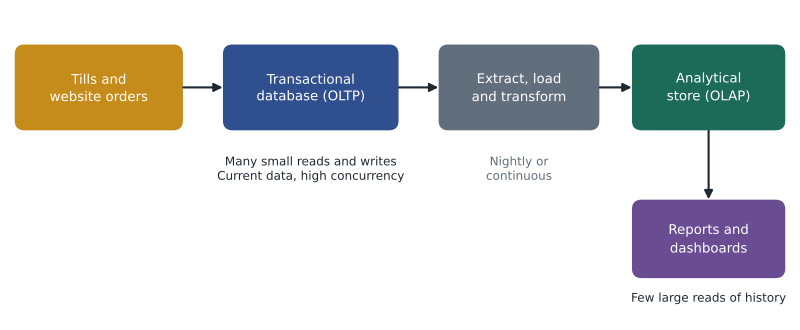
Separating the workloads brings three benefits. The tills are protected from heavy queries. The analytical store can use structures that make big reads fast, such as column-based storage, which lesson 2 described. And data from several systems can be combined: StockLine sales, website orders, the warehouse system and the weather feed Keiko has always wanted, in one place. The cost is that the analytical copy is slightly behind the live system, by a day for a nightly load or by seconds for a continuous one.
# An analytical question: total sales per store from many individual sale rows.
from collections import defaultdict
sales = [  # (store, date, amount) as a transactional system would record them
    ("12", "2026-11-02", 86.40), ("12", "2026-11-02", 19.99), ("15", "2026-11-02", 42.10),
    ("15", "2026-11-03", 120.00), ("12", "2026-11-03", 7.49), ("15", "2026-11-03", 64.25),
]
by_store = defaultdict(float)
for store, date, amount in sales:
    by_store[store] += amount
for store in sorted(by_store):
print("Store", store, "total", round(by_store[store], 2))Store 12 total 113.88 Store 15 total 226.35
What this code does
Takes many individual sale rows, as a transactional system records them, and adds them up into one total per store. That is the typical shape of an analytical query: it reads lots of detailed rows and returns a short summary. Analytical systems are built to make this kind of summary fast.
Try it yourself
Daily totals
Write a function daily_totals(sales) that takes a list of (store, date, amount) tuples and returns a dictionary mapping each date to the total amount for that date, rounded to 2 decimal places.
def daily_totals(sales):
    totals = {}
    # add each amount to totals[date], then round the results
    return totals

sales = [("12", "2026-11-02", 86.40), ("15", "2026-11-02", 42.10), ("12", "2026-11-03", 7.49)]
print(daily_totals(sales))
Other workload patterns
Real systems do not always fall neatly into one camp. Some are hybrid: a modern database might run transactions and also offer a column-based copy of the same tables for analytics, sometimes called hybrid transactional and analytical processing, or HTAP. Some analytical workloads must be nearly real time, such as a dashboard that shows today's sales as they happen; these use streaming data, covered in MSAZ-121. And some workloads are mostly about storing and serving files, such as product images on the website, which are neither transactional nor analytical in the database sense. The DP-900 exam focuses on the basic distinction, and recognizing it in a scenario is the skill to practise.
Recognizing workloads in a scenario
Exam questions often describe a system in a sentence and ask which kind of workload it is. A few clues make the answer clear. Words such as record, update, place an order, book, pay or check stock, together with many concurrent users and instant responses, point to a transactional workload. Words such as trends, history, compare, forecast, aggregate, dashboard and large volumes of past data point to an analytical workload. A question about a nightly copy from one store to another usually points to ETL or ELT.
Keiko practises with Harrow & Finch examples. The till ringing up a sale is transactional. The website reserving the last tin of a paint colour for a customer's cart is transactional, and it needs isolation so that two shoppers cannot reserve the same tin. The monthly report on paint sales by region is analytical. The buyers' model that predicts next spring's demand from five years of history is analytical. Walt's job of copying yesterday's sales into the reporting database is an ETL process that links the two worlds.
The plan for Harrow & Finch
Elena sketches the target design on the whiteboard. StockLine stays an OLTP database, moved to Azure in 2027 as later lessons describe, and no reports will run against it directly. A data platform, built by Ines and covered in MSAZ-121, will receive a copy of each day's sales soon after the stores close, along with website orders and warehouse data. Keiko's reports will be rebuilt to read from that platform. Walt is pleased: the tills will no longer compete with the reports. Keiko is pleased too, because her reports will finally be able to combine store and online sales in one query.
Keiko asks how often the copy should run. Elena turns the question back with her usual habit: "Who will read this data, and how often?" Store managers read the comparison once a morning, so a nightly load is enough for them. The buyers want to see a hot product selling out within an hour, so for a few key numbers a more frequent feed will be added later. The workload decides the design, not the other way round.
Common mistakes
MistakeOLAP systems need ACID transactions more than OLTP systems.
InsteadACID guarantees matter most for transactional systems that record changing business events; analytical stores mostly read historical data.
MistakeRunning reports directly on the transactional database is always the best option because the data is current.
InsteadHeavy reports compete with transactions for resources; copying data to an analytical store usually protects both.
MistakeA transaction is any single SQL statement.
InsteadA transaction is a unit of work that may include many statements, all committed or all rolled back together.
Summary and key terms
- A workload is the pattern of requests a system handles.
- Transactional (OLTP) workloads record business events with many small, fast reads and writes that must be correct.
- A transaction is an all-or-nothing unit of work; relational databases guarantee atomicity, consistency, isolation and durability (ACID).
- Analytical (OLAP) workloads read large amounts of historical data and summarize it.
- Analytical data is usually copied from transactional systems into a separate store through ETL or ELT.
- Separating the workloads protects transactional performance and allows data from many sources to be combined.
- Workload
- The pattern of requests and processing that a system handles.
- OLTP
- Online transaction processing: systems that record business events as they happen.
- OLAP
- Online analytical processing: systems built to analyse and summarize large amounts of data.
- Transaction
- A group of database operations treated as one all-or-nothing unit of work.
- ACID
- Atomicity, consistency, isolation and durability: the guarantees a database gives transactions.
- ETL
- Extract, transform and load: copying data from sources, reshaping it, then loading it into a target.
- ELT
- Extract, load and transform: loading raw data first, then transforming it inside the target store.
Practice problems
Work each problem on paper first, then reveal the answer to check.
What does the A in ACID stand for, and what does it mean?
Show answer
Atomicity: a transaction completes fully or not at all.
Give two differences between OLTP and OLAP workloads.
Show answer
For example: OLTP handles many small writes while OLAP reads large volumes; OLTP needs millisecond responses while OLAP tolerates seconds or minutes.
Why do organizations copy data into a separate analytical store?
Show answer
To protect the transactional system from heavy queries and to organize and combine data for analysis.
What is the difference between ETL and ELT?
Show answer
ETL transforms data before loading it; ELT loads raw data first and transforms it in the target.
Lesson quiz · 5 questions
Score 60% or more to complete this lesson.
Create a free account to save your progress, take quizzes and earn a certificate.