
MSAZ-120 · Lesson 8 of 12 · 19 min
The Azure SQL family
▶ Video coming soon A video version of this lesson is on the way.
With the relational basics in place, the data hour turns to the question everyone has been waiting for: where should StockLine and Harrow & Finch's other databases live in Azure? Walt has read the marketing pages and come away confused. "There's SQL Database, SQL Managed Instance, SQL Server on a VM, elastic pools, Hyperscale, serverless. It's a menu with twenty items and no prices." Elena draws a single arrow on the whiteboard, from "you manage everything" on the left to "Microsoft manages almost everything" on the right, and says that the whole family fits along that arrow.
One engine, several ways to run it
The Azure SQL family is a group of services built on the same database engine as Microsoft SQL Server, the product Walt has run for seventeen years. Because they share the engine, they share T-SQL, the same data types, the same tools such as SQL Server Management Studio, and most of the same features. An application written for SQL Server can usually talk to any member of the family with little or no change, and a DBA's skills carry across.
What differs is how much of the system Microsoft runs for you, which features you can use, and how you pay. The DP-900 skills outline names three members of the family, and the exam expects you to know what distinguishes them.
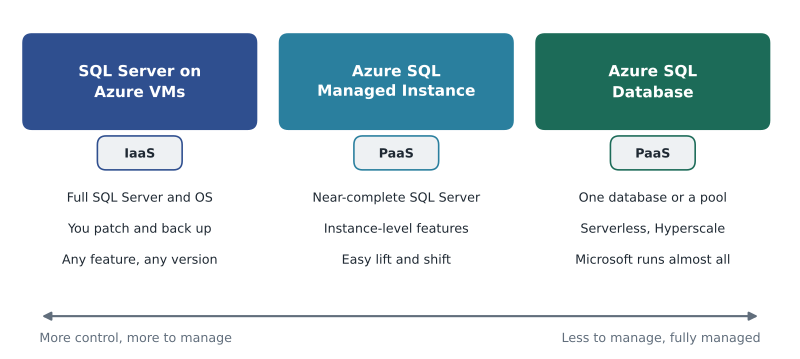
SQL Server on Azure Virtual Machines
The first option is simply SQL Server running on a virtual machine in Azure. This is infrastructure as a service, IaaS: Microsoft provides the hardware, the network and the virtualization, and you get a Windows or Linux virtual machine with SQL Server installed, either from an image that includes a SQL Server licence or with a licence you bring. From there it is your server. You have full administrator access to the operating system and to SQL Server, you can install any version and any feature, and you are responsible for patching, backups and high availability, though Azure offers tools that automate much of that if you turn them on.
This option suits workloads that need something only a full SQL Server provides. Examples include software from a vendor that requires access to the operating system, features that platform services do not support, or a specific older version that an application is certified for. It is also the quickest way to move a database to Azure without change, which is called lift and shift. Harrow & Finch's warehouse management system is a case in point: the vendor installs agents on the database server and supports only that arrangement, so it will run on SQL Server on an Azure VM.
The trade-off is that the DBA's workload barely changes. Walt would still patch, plan backups and design failover, just on a server he cannot touch. For a database that does not need that control, the platform options offer much more.
Azure SQL Managed Instance
Azure SQL Managed Instance is a platform service, PaaS, that provides a near-complete SQL Server instance managed by Microsoft. "Instance" is the key word: in SQL Server, an instance is a running copy of the engine that can hold many databases, along with server-level features such as SQL Server Agent for scheduled jobs, cross-database queries, linked servers and Database Mail. Managed Instance keeps these instance-level features while Microsoft takes over the routine work of patching, automatic backups and built-in high availability.
Managed Instance runs inside your own Azure virtual network, which makes it behave much like a server on the company's network. Its compatibility with on-premises SQL Server is very high, so it is the usual target for moving existing SQL Server applications to a platform service with minimal change. StockLine is a good fit. It relies on SQL Server Agent jobs for nightly stock calculations, and one of its procedures queries a small Pricing database on the same server. Both features work on Managed Instance. Walt will lose the chores of patching and backup scheduling but keep almost everything StockLine depends on.
Azure SQL Database
Azure SQL Database is the most fully managed member of the family. It is a platform service that provides a database rather than a whole instance. Microsoft runs the engine, applies updates, takes backups automatically, keeps redundant copies for high availability and handles much of the tuning. You create databases, design tables and write queries; you never see or manage a server's operating system.
Azure SQL Database is built for modern cloud applications. It can scale up and down quickly, it offers a serverless option that pauses when idle and bills only for use, and its Hyperscale tier can grow to very large sizes. Several databases can share a pool of resources, called an elastic pool, which suits software companies with one database per customer. Lesson 9 covers these options in detail.
Because Azure SQL Database works at the database level, some instance-level features are not available or work differently. SQL Server Agent is replaced by other ways of scheduling jobs, such as elastic jobs or Azure automation services, and queries cannot simply reach into another database by name. For new applications these limits rarely matter. For existing applications they can, which is why Azure SQL Database is often the choice for new builds and Managed Instance for migrations. Harrow & Finch's new Finch Rewards API, being written from scratch, will use Azure SQL Database.
| SQL Server on Azure VMs | Azure SQL Managed Instance | Azure SQL Database | |
|---|---|---|---|
| Service type | IaaS | PaaS | PaaS |
| What you get | A whole server with SQL Server | A managed SQL Server instance | A managed database (or pool) |
| Operating system access | Yes | No | No |
| Patching and backups | Customer, with optional automation | Microsoft | Microsoft |
| Compatibility with on-premises SQL Server | Complete | Very high, including SQL Agent and cross-database queries | High for database features; some instance features unavailable |
| Typical use | Apps needing OS access or unsupported features; quick lift and shift | Migrating existing SQL Server apps with minimal change | New cloud applications; elastic and serverless needs |
Shared responsibility for databases
The shared responsibility model, familiar from the Azure fundamentals courses, applies directly to databases. In every option, Microsoft is responsible for the physical data centres, hardware and network. With SQL Server on a VM, the customer is responsible for the operating system, the SQL Server software, patching, backups and high availability configuration. With Managed Instance and SQL Database, Microsoft takes over the operating system and database engine, patching, backups and built-in availability.
Some responsibilities never move. In every option the customer owns the data, decides who can access it, designs the tables and indexes, writes the queries and protects the accounts used to connect. Elena puts it in her usual way: "Microsoft will patch the engine at three in the morning. Microsoft will not notice that you granted the interns permission to delete the Sales table."
Worked problem
Hours saved by a platform service
Walt estimates his monthly routine work on the StockLine server: 6 hours applying operating system and SQL Server patches, 4 hours managing backup jobs and storage, 3 hours testing restores, 5 hours on query tuning and index work, and 2 hours on user access requests. If StockLine moves to Managed Instance, patching and backup job management are handled by Microsoft. How many hours a month does Walt still spend on these tasks?
Show solution
- Total current routine work: 6 + 4 + 3 + 5 + 2 = 20 hours.
- Microsoft takes over patching (6 hours) and backup job management (4 hours): 10 hours.
- Restore testing stays with Walt, because only the customer can prove their own recovery process works; tuning and access management also stay.
- Remaining: 20 − 10 = 10 hours.
Answer: About 10 hours a month, now spent on restore testing, tuning and access, the work that depends on knowing StockLine.
# Walt's monthly routine hours on StockLine, and who handles each task on each option.
tasks = {
    "patching":        (6, {"vm": "customer", "mi": "microsoft", "sqldb": "microsoft"}),
    "backup jobs":     (4, {"vm": "customer", "mi": "microsoft", "sqldb": "microsoft"}),
    "restore testing": (3, {"vm": "customer", "mi": "customer",  "sqldb": "customer"}),
    "query tuning":    (5, {"vm": "customer", "mi": "customer",  "sqldb": "customer"}),
    "access requests": (2, {"vm": "customer", "mi": "customer",  "sqldb": "customer"}),
}
for option in ("vm", "mi", "sqldb"):
    hours = sum(h for h, who in tasks.values() if who[option] == "customer")
print(option, "customer hours per month:", hours)vm customer hours per month: 20 mi customer hours per month: 10 sqldb customer hours per month: 10
What this code does
Lists the DBA's routine monthly tasks with the hours each takes and who is responsible on three hosting options: SQL Server on a virtual machine, Managed Instance, or Azure SQL Database. Adding up only the tasks the customer keeps shows how many hours of DBA time each option still needs. Managed options take over patching and backups.
Licensing and cost in brief
All three options can be paid for in a pay-as-you-go way that includes the SQL Server licence in the price. Organizations that already own SQL Server licences with Software Assurance can use Azure Hybrid Benefit to apply them in Azure and pay less. Reserved capacity, a commitment to a certain amount of compute for one or three years, reduces the price further. Lesson 9 explains the purchasing models; for now, the point is that the three options are priced differently and that the cheapest-looking option is not always cheapest once the DBA's time is counted.
Questions to ask a vendor
For software bought from a vendor, the vendor's support statement often settles the choice. Before any migration, Elena asks every vendor the same short list: which Azure SQL options do you support; which SQL Server version and compatibility level do you need; does your software need operating system access, SQL Server Agent or other instance-level features; and will you still support us if we move. The warehouse vendor answered that only a full SQL Server on a virtual machine is supported, which made that decision in a single email. A written answer from the vendor is worth keeping with the migration plan, because it explains a choice that might otherwise look odd to someone reviewing costs later.
Other members of the family
A few related services appear in Microsoft's materials. Azure Arc-enabled SQL Server lets an organization manage SQL Servers running on its own premises or in other clouds from the Azure portal, with some Azure features applied to them. SQL database in Microsoft Fabric brings an Azure SQL Database engine into the Fabric analytics platform, which MSAZ-121 introduces. The DP-900 exam concentrates on the three main options in this lesson, so those are the ones to know well.
Placing Harrow & Finch's databases
By the end of the hour the team has a first placement for each SQL Server database, written as a plan to confirm during 2027.
- StockLine: Azure SQL Managed Instance, because it needs SQL Server Agent and a cross-database query, and Walt wants to stop patching.
- Finch Rewards API: Azure SQL Database, because it is new, simple and needs to scale with promotions.
- Warehouse management system: SQL Server on an Azure VM, because the vendor requires operating system access.
- Pricing database: moves to the same Managed Instance as StockLine, so the cross-database query keeps working.
Keiko asks where the website's product catalogue goes. Ines answers that it is not SQL Server at all: the website vendor built it on PostgreSQL. That is lesson 10.
Common mistakes
MistakeAzure SQL Database gives you access to the server's operating system.
InsteadOnly SQL Server on an Azure VM gives operating system access; the two platform services do not.
MistakeManaged Instance and SQL Database are different database engines from SQL Server.
InsteadAll three options use the SQL Server engine; they differ in management, features and pricing.
MistakeWith a platform service, Microsoft is responsible for who can read your data.
InsteadAccess control and data protection always remain the customer's responsibility.
Summary and key terms
- The Azure SQL family runs the SQL Server engine in three main ways, from most control to most managed.
- SQL Server on Azure VMs is IaaS: full control and compatibility, with the customer managing the OS, patching and backups.
- Azure SQL Managed Instance is PaaS with near-complete SQL Server compatibility, including instance-level features such as SQL Server Agent; it suits migrations.
- Azure SQL Database is a fully managed PaaS database with serverless, Hyperscale and elastic pool options; it suits new cloud applications.
- Under shared responsibility, Microsoft runs more of the stack as you move toward PaaS, but data, access and design always stay with the customer.
- Licences can be included in the price or brought with Azure Hybrid Benefit.
- Azure SQL family
- Azure services built on the SQL Server engine: SQL Server on VMs, SQL Managed Instance and SQL Database.
- SQL Server on Azure VMs
- SQL Server installed on an Azure virtual machine, managed by the customer (IaaS).
- Azure SQL Managed Instance
- A managed SQL Server instance with near-complete compatibility (PaaS).
- Azure SQL Database
- A fully managed relational database service (PaaS).
- Instance
- A running copy of the SQL Server engine that can host many databases and server-level features.
- Lift and shift
- Moving an application to the cloud with little or no change.
- Azure Hybrid Benefit
- Using existing SQL Server or Windows Server licences in Azure to reduce cost.
Practice problems
Work each problem on paper first, then reveal the answer to check.
Which Azure SQL option gives full operating system access?
Show answer
SQL Server on Azure Virtual Machines.
Why is Managed Instance a common target for migrating existing SQL Server applications?
Show answer
It has near-complete compatibility, including instance-level features such as SQL Server Agent and cross-database queries, while Microsoft manages patching and backups.
Name one responsibility that stays with the customer in every Azure SQL option.
Show answer
For example: the data itself, access control, table design or protecting accounts.
Which option suits a new application that should scale and pause when idle?
Show answer
Azure SQL Database, using the serverless option.
Lesson quiz · 5 questions
Score 60% or more to complete this lesson.
Create a free account to save your progress, take quizzes and earn a certificate.