
MSAZ-120 · Lesson 11 of 12 · 20 min
Choosing a relational service
▶ Video coming soon A video version of this lesson is on the way.
By the ninth data hour, the team has placed four databases. Elena wants more than four answers, though; she wants a method the company can use for every database that comes after, including the dozens of small ones nobody has listed yet. "Next year someone in purchasing will build a tool on a database and ask us where to put it," she says. "I want Keiko or Ines to be able to answer in ten minutes, with reasons." This lesson pulls together the previous four into a way of choosing, which is also how the DP-900 exam tests the topic: a short scenario, a set of requirements and a question about which service fits.
Start with the engine
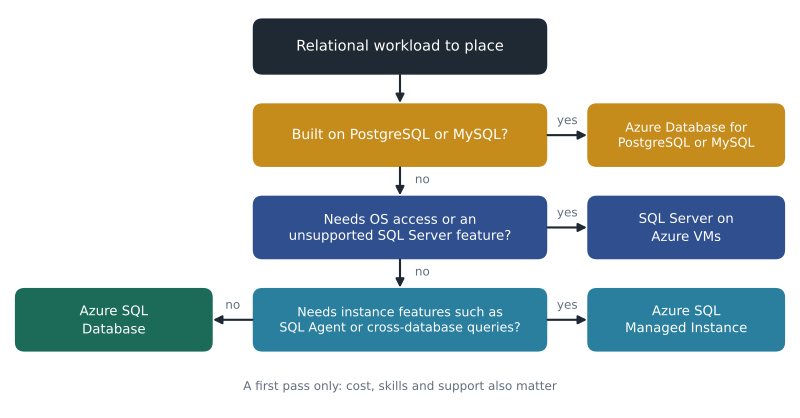
The first question is which database engine the workload uses or needs. If an application is built on PostgreSQL or MySQL, the natural home is Azure Database for PostgreSQL or Azure Database for MySQL. Converting to another engine is possible but expensive, as lesson 10 explained. If the application is built on SQL Server, or if a new application is being designed by a team that knows SQL Server, the Azure SQL family is the natural home. For a brand-new application with no constraints, the choice often follows the team's skills and the frameworks they use, since all the engines can handle typical business workloads well.
Then ask how much control is needed
Within the SQL Server family, the main question is how much of the server the workload needs to control. Lesson 8's arrow applies: SQL Server on Azure VMs gives full control, Managed Instance gives almost complete SQL Server features without the server, and SQL Database gives a managed database with the least to manage.
- If the workload needs access to the operating system, needs a SQL Server feature or version that the platform services do not support, or comes from a vendor who supports only a full server, choose SQL Server on an Azure VM.
- If it needs instance-level features such as SQL Server Agent jobs, cross-database queries, linked servers or Database Mail, and you want Microsoft to handle patching and backups, choose Azure SQL Managed Instance.
- Otherwise, and especially for new cloud applications, choose Azure SQL Database, then pick the deployment option, purchasing model and tier that fit the workload.
Other factors that refine the choice
The decision tree gives a first answer. Several further factors confirm it or change it.
- Scale and growth. How large will the database get, and how fast? Hyperscale suits very large Azure SQL databases, elastic clusters scale PostgreSQL out, and read replicas spread read-heavy loads.
- Load pattern. Is the workload steady, bursty or mostly idle? Provisioned compute suits steady loads, serverless suits intermittent ones, and elastic pools suit many databases whose peaks do not coincide.
- Availability and recovery. How much downtime and data loss can the business accept? These are usually expressed as a recovery time objective, how long the system can be down, and a recovery point objective, how much recent data could be lost. Zone redundancy, Business Critical tiers, geo-replication and failover groups meet tighter targets at higher cost.
- Data residency and compliance. Must the data stay in a particular country or region? For Harrow & Finch's Canadian customers, company policy keeps personal information in Canadian regions. Every option can be placed in a chosen region, but backup and replica locations must follow the same rule.
- Network. Must the database be reachable only from private networks? Managed Instance always lives in a virtual network; the other services can use private endpoints or private access.
- Cost. The total cost includes compute, storage, backups, licences and, often forgotten, staff time. A VM can look cheaper per month than a platform service until patching, backup management and failover design are counted. Licences can be reduced with Azure Hybrid Benefit and compute with reservations.
- Skills and support. Who will run it, and does the software vendor support the chosen option? A vendor's support statement can override everything else.
| Requirement in the scenario | Points toward |
|---|---|
| Application built on PostgreSQL or MySQL | Azure Database for PostgreSQL or Azure Database for MySQL |
| Needs operating system access or a full SQL Server feature set | SQL Server on Azure VMs |
| Existing SQL Server app using SQL Server Agent or cross-database queries | Azure SQL Managed Instance |
| New cloud app, minimal administration | Azure SQL Database |
| Many small databases with unpredictable, non-overlapping peaks | Azure SQL Database elastic pool |
| Database idle most of the time, such as development or testing | Azure SQL Database serverless |
| Very large or fast-growing SQL database | Azure SQL Database Hyperscale |
| Must survive a regional outage with the same connection names | Failover groups |
Try it yourself
A first-pass recommender
Write a function recommend(engine, needs_os, needs_instance_features) that follows the decision tree in this lesson. engine is a string: "postgresql", "mysql" or "sqlserver". The two other arguments are True or False. Return one of these exact strings: "Azure Database for PostgreSQL", "Azure Database for MySQL", "SQL Server on Azure VMs", "Azure SQL Managed Instance" or "Azure SQL Database".
def recommend(engine, needs_os, needs_instance_features):
    # check the engine first, then OS access, then instance features
    return "Azure SQL Database"

print(recommend("sqlserver", False, True))
Recovery objectives in numbers
Business people rarely say "we need a Business Critical tier with a failover group." They say "the stores cannot be without the tills for more than fifteen minutes" or "we can't lose more than a few minutes of sales." Turning those statements into recovery objectives is part of choosing a service.
Worked problem
Translating a business requirement
Grace Oduya, the store operations director, says StockLine may be down for at most 15 minutes in a regional disaster and may lose at most 5 seconds of transactions. Walt's restore from geo-redundant backup takes about two hours and can lose up to an hour of data. Does a geo-restore meet the requirement? What would?
Show solution
- The requirement gives a recovery time objective of 15 minutes and a recovery point objective of 5 seconds.
- A geo-restore takes about 2 hours, far longer than 15 minutes, and could lose up to an hour, far more than 5 seconds.
- So geo-restore alone does not meet it.
- A failover group with a geo-replica in the paired region keeps a copy only seconds behind and can fail over in minutes, which fits both targets, at the cost of running a second instance.
Answer: No. Geo-restore misses both targets; a failover group to the paired region meets them, and the business must decide whether the extra cost is worth it.
# Checking options against recovery objectives (all figures illustrative).
rto_minutes, rpo_seconds = 15, 5
options = {
    "Geo-restore from backup":        (120, 3600),
    "Failover group (geo-replica)":   (5, 5),
    "Zone redundancy only":           (1, 0),   # protects against a zone, not a region
}
for name, (rto, rpo) in options.items():
    ok = rto <= rto_minutes and rpo <= rpo_seconds
    print(f"{name}: recovery about {rto} min, data loss up to {rpo} s -> {'meets' if ok else 'misses'} target")
print("Note: zone redundancy does not protect against losing the whole region.")Geo-restore from backup: recovery about 120 min, data loss up to 3600 s -> misses target Failover group (geo-replica): recovery about 5 min, data loss up to 5 s -> meets target Zone redundancy only: recovery about 1 min, data loss up to 0 s -> meets target Note: zone redundancy does not protect against losing the whole region.
What this code does
Checks three recovery options against a target of recovering within 15 minutes and losing at most 5 seconds of data. Each option's recovery time and possible data loss are compared with those targets to decide whether it meets them. It also notes that zone redundancy, though fast, does not protect against losing a whole region.
Recovery objectives also shape testing. A target written on paper means little until the team proves it, so Walt plans a failover rehearsal twice a year once StockLine is in Azure: switch to the paired region on a quiet Sunday, time how long the tills take to reconnect, check how much data arrived, then switch back. The first rehearsal is pencilled in for the autumn of 2027, after the migration settles.
Moving existing databases
Choosing a target is half of a migration; the other half is moving the data. Microsoft provides several tools. Azure Migrate discovers and assesses on-premises servers and databases and suggests suitable Azure targets and sizes. The Azure Database Migration Service moves databases to Azure SQL, PostgreSQL and MySQL targets, either offline, with a planned outage while data is copied, or online, keeping the source and target in sync until a short final switch. For Managed Instance, the Managed Instance link described in lesson 9 offers near-continuous replication. Native tools also work: SQL Server backups restored into Managed Instance, or PostgreSQL's own dump and restore.
Before moving, an assessment checks for compatibility problems, such as features the target does not support or code that will behave differently. For StockLine, the assessment confirmed what the team already knew: the SQL Server Agent jobs and cross-database query rule out Azure SQL Database without changes, but work on Managed Instance as they are.
Common traps in exam scenarios
Scenario questions on this topic often contain a detail designed to separate similar answers. A few patterns are worth practising.
- A scenario that mentions the operating system, installing agents or software on the server, or a feature only available in a full SQL Server points to a virtual machine, even if the rest of the description sounds like a perfect fit for a platform service.
- A scenario that mentions migrating an existing SQL Server application with minimal changes, or names SQL Server Agent, cross-database queries or linked servers, points to Managed Instance rather than SQL Database.
- A scenario that stresses minimal administration for a new application, unpredictable usage, or many small databases points to Azure SQL Database, often with serverless or an elastic pool.
- A scenario that names PostgreSQL, MySQL, a LAMP stack or WordPress points to the open-source services, regardless of other details.
- A scenario about surviving a regional outage needs a cross-region feature; zone redundancy alone is the tempting wrong answer.
Keiko notices that the wrong answers in practice questions are usually real Azure services, just not the best ones for the situation. Reading the scenario for the one requirement that rules out the others is the skill, and it is the same skill Elena wants for real decisions.
The ten-minute answer
Keiko writes the method on one page for the Skylight wiki: identify the engine; check for operating system or full-feature needs; check for instance-level features; then refine with scale, load pattern, recovery objectives, residency, network, cost, skills and vendor support. Elena tests it on a new request from the purchasing team, a small tool for tracking supplier contracts. The engine is open, the team knows SQL Server, there are no special features, the database will be tiny and used a few hours a week. Keiko answers in under ten minutes: Azure SQL Database, serverless, General Purpose, in the company's primary region, with the default backup retention. Elena approves it with one change: geo-redundant backup storage, because contracts are legal records the company must not lose.
Walt asks a final question: what if the method gives the wrong answer? Elena points out that platform choices are not permanent. Databases can move between tiers, from serverless to provisioned, and even between Azure SQL Database and Managed Instance with migration tools. The goal of the method is a good first answer with written reasons, so that the next person can see why the choice was made and change it when the reasons change.
Common mistakes
MistakeSQL Server on a VM is always the cheapest option because there is no platform fee.
InsteadCount staff time for patching, backups and availability; platform services often cost less overall.
MistakeZone redundancy protects against the loss of a whole region.
InsteadZone redundancy protects within one region; cross-region protection needs geo-replication, failover groups or geo-restore.
MistakeEvery SQL Server application should be converted to Azure SQL Database.
InsteadApplications needing instance features usually suit Managed Instance, and some need a VM.
Summary and key terms
- Choose a relational service by starting with the engine, then the level of control the workload needs.
- OS access or unsupported features point to SQL Server on Azure VMs; instance-level features point to Managed Instance; otherwise Azure SQL Database.
- Refine the choice with scale, load pattern, recovery objectives, data residency, network, cost, skills and vendor support.
- Recovery time objective (RTO) limits downtime; recovery point objective (RPO) limits data loss.
- Azure Migrate assesses workloads; Azure Database Migration Service moves databases offline or online.
- Service choices can be changed later; record the reasons with each decision.
- Recovery time objective (RTO)
- The longest acceptable time a system can be unavailable after a failure.
- Recovery point objective (RPO)
- The largest acceptable amount of recent data that could be lost, measured in time.
- Azure Migrate
- A service that discovers and assesses on-premises workloads and recommends Azure targets.
- Azure Database Migration Service
- A service that migrates databases to Azure, offline or online.
- Online migration
- A migration that keeps source and target in sync so the final switch needs only a short outage.
- Total cost of ownership
- The full cost of running a system, including staff time, not just the monthly bill.
Practice problems
Work each problem on paper first, then reveal the answer to check.
What is the first question to ask when choosing a relational service?
Show answer
Which database engine the workload uses or needs.
Which features point to Managed Instance rather than SQL Database?
Show answer
Instance-level features such as SQL Server Agent jobs, cross-database queries, linked servers and Database Mail.
What is the difference between RTO and RPO?
Show answer
RTO is how long the system can be down; RPO is how much recent data can be lost.
Which tool assesses on-premises databases and suggests Azure targets?
Show answer
Azure Migrate.
Lesson quiz · 5 questions
Score 60% or more to complete this lesson.
Create a free account to save your progress, take quizzes and earn a certificate.