
MSAZ-101 · Lesson 9 of 12 · 21 min
Azure compute services: VMs, containers and functions
▶ Video coming soon A video version of this lesson is on the way.
In the last week of October, the Skylight team builds its first real workloads in the non-production subscription: two test virtual machines for StockLine's application tier, a container running a small inventory lookup service that Liam Ferreira, a junior developer, has been writing, and an Azure Function that resizes product photos for the website. Theo is responsible for the virtual machines. By Friday he has opinions about all three kinds of compute, and Renata asks him to present them at the next cloud lunch. This lesson follows his presentation.
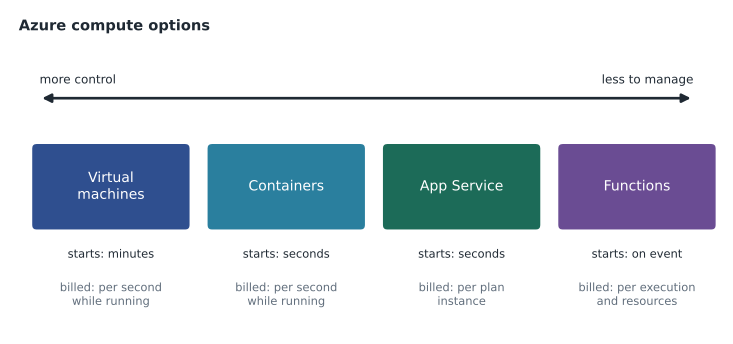
Compute is the processing power that runs applications. Azure offers it in several forms, from virtual machines that look like physical servers to functions that run for a fraction of a second. They differ in how much the customer controls, how much it must manage, how fast they start and how they are billed.
Virtual machines
An Azure virtual machine, or VM, is a software emulation of a physical computer. It runs a full operating system, Windows or Linux, chosen from an image in the Azure Marketplace or from the customer's own image. VMs are IaaS: Azure provides the virtualized hardware, and the customer manages the operating system and everything installed on it. VMs are the most flexible compute option and the natural choice when an application needs full control of the operating system, a particular configuration, or software that cannot run anywhere else.
When Theo creates a VM, he chooses a size, which sets the number of virtual processors, the amount of memory and other limits. Azure offers many size families for different purposes: general purpose, compute optimized, memory optimized, storage optimized, and families with graphics processors for specialized work. Size can be changed later, which usually requires the VM to restart.
Resources a virtual machine needs
A VM is not a single resource. Creating one in the portal creates several resources that work together, and the exam expects you to know them.
| Resource | Purpose |
|---|---|
| Virtual machine | The compute itself: size, image and settings. |
| Managed disks | An operating system disk, and optionally data disks, that store the VM's files persistently. |
| Network interface | Connects the VM to a subnet in a virtual network and gives it a private IP address. |
| Virtual network and subnet | The private network the VM sits in; lesson 10 covers networking. |
| Public IP address (optional) | Lets the VM be reached from the internet; often left out for security. |
| Network security group (optional) | Rules that allow or deny traffic to the VM or its subnet. |
Because these are separate resources, deleting a VM does not necessarily delete its disks or network interface, which keep costing money if forgotten. Theo learns this the expensive way, at a small scale: a week after deleting his first test VM, he finds its 128 gigabyte disk still in the resource group. Putting each test in its own resource group, as lesson 8 suggested, and deleting the whole group afterwards avoids the problem.
az vm create --resource-group rg-stockline-test-cc --name vm-stk-app-01 --image Win2022Datacenter --size Standard_D2s_v5 --zone 1 --admin-username hfadmin --public-ip-address ""
az vm list --resource-group rg-stockline-test-cc --output table
Virtual Machine Scale Sets
A single VM is a single point of failure, and it cannot grow beyond its largest size. Azure Virtual Machine Scale Sets manage a group of identical, load-balanced VMs as one resource. A scale set can add or remove VMs automatically according to rules, such as processor use or a schedule, and can spread its instances across availability zones. Scale sets suit applications that can run on several identical servers at once, such as web front ends or batch processing. Lesson 5 showed a scale set being created with an autoscale setting.
Availability sets
Before availability zones existed, and still in regions without them, Azure offered availability sets to protect a group of VMs from failures within a single data centre. An availability set spreads VMs across fault domains and update domains. A fault domain is a group of hardware that shares a power source and network switch, roughly a server rack; spreading VMs across fault domains means one hardware failure does not take them all down. An update domain is a group of VMs that Azure may restart together during planned maintenance; spreading VMs across update domains means maintenance never restarts them all at once. An availability set can use up to three fault domains and up to twenty update domains.
Availability sets protect against rack-level and maintenance failures within one location. Availability zones protect against the loss of a whole data centre. Where zones are available, they are usually the better choice for new designs; availability sets remain useful for older applications and regions without zones.
Images and extensions
A VM starts from an image, a template containing an operating system and sometimes preinstalled software. Azure Marketplace images include current versions of Windows Server and popular Linux distributions. Organizations can also build their own images with their standard settings and security tools already applied, and share them through a service called Azure Compute Gallery, so that every new server starts from the same known state. After creation, VM extensions add software or run configuration scripts, such as installing a monitoring agent.
Worked problem
Counting update domains
Theo places six StockLine test VMs in an availability set with five update domains. During planned maintenance Azure restarts one update domain at a time. What is the largest number of VMs that can be restarting at the same moment, and what share of capacity stays up?
Show solution
- Six VMs spread across five update domains means one domain holds two VMs and the other four hold one each.
- Azure restarts one update domain at a time, so at most the domain with two VMs restarts at once.
- At that moment 6 − 2 = 4 VMs are running.
- Four of six is two thirds of capacity, about 67 parts in 100.
Answer: At most two VMs restart at once, leaving four of six running. More update domains, up to twenty, would reduce the impact further.
Azure Virtual Desktop
Azure Virtual Desktop is a service for delivering Windows desktops and applications from Azure to users on any device. Users connect to a desktop or app that runs on VMs in Azure, while the customer's data stays in the cloud rather than on the user's device. It supports multi-session Windows, where several users share one VM, which reduces cost. Grace's team is interested in it for the distribution centres, where shared terminals are used by several shifts and lost laptops have been a recurring problem.
Containers
A container packages an application with everything it needs to run, its code, libraries and settings, into a single unit that runs the same way on any host that supports containers. Unlike a VM, a container does not include a full operating system; it shares the host's operating system kernel. That makes containers smaller and much faster to start, often in seconds, and lets many of them run on one host. Docker is the best-known tool for building and running containers.
Azure offers several ways to run containers. Azure Container Instances runs a single container or a small group without any servers to manage, which suits simple tasks and testing. Azure Container Apps runs containerized applications and microservices with automatic scaling, including scaling to zero when idle. Azure Kubernetes Service (AKS) runs Kubernetes, the most widely used system for orchestrating large numbers of containers, with Azure managing the Kubernetes control plane. Liam's inventory lookup service runs on Container Apps in the test environment.
| Virtual machine | Container | |
|---|---|---|
| Includes | Full operating system | App and dependencies; shares host kernel |
| Size | Gigabytes | Megabytes to a few gigabytes |
| Start time | Minutes | Seconds |
| Isolation | Strong, separate OS | Process-level, lighter |
| Good for | Full control, existing servers, any software | Modern apps, microservices, consistent deployment |
Functions
Azure Functions is Azure's main serverless compute service, introduced in lessons 1 and 6. A function is a small piece of code that runs when a trigger fires: an HTTP request, a timer, a new file in storage, a message in a queue. Azure provides the servers, scales the number of running instances with demand and, on consumption-based plans, bills only for executions and the resources they use. Functions can be written in several languages, including C#, JavaScript, Python, Java and PowerShell.
Functions are stateless by default: each execution starts fresh, without memory of the previous one, which makes them easy to scale. When a process needs to remember where it is, such as a multi-step order workflow, an extension called Durable Functions keeps the state. The photo-resizing function the web team built is a typical stateless function: triggered by a new image in a storage container, it makes three smaller copies and stops.
Application hosting options
For a web application or API, Azure offers three main hosting paths, and the exam asks you to know when each fits. Web apps in Azure App Service are the simplest: the team deploys code, and App Service runs it on managed web servers with built-in scaling, deployment slots and security updates. Containers, on Container Apps or AKS, suit teams that already package their apps as containers or need more control over the runtime. Virtual machines suit apps that need full control or cannot be changed. Many organizations use all three for different applications.
| Need | Good fit |
|---|---|
| Run an existing server with minimal change | Virtual machines |
| Many identical servers that grow and shrink | Virtual Machine Scale Sets |
| Protect VMs from rack failures and maintenance in one location | Availability sets |
| Desktops and apps for users on any device | Azure Virtual Desktop |
| Package an app once and run it anywhere, start in seconds | Containers (Container Instances, Container Apps, AKS) |
| Host a web app or API without managing servers | App Service web apps |
| Run small pieces of code on events, pay per execution | Azure Functions |
Whichever option is chosen, compute is usually where most of an Azure bill comes from, so it is also where cost reviews start. Right-sizing, shutting down idle machines and choosing the cheapest suitable option are habits the Skylight team builds from the first week.
Theo's conclusions
Theo's presentation ends with three conclusions. First, VMs are familiar and flexible, which makes them the fastest way to move StockLine, but they bring all the work of running servers with them, and every VM's disks and network pieces need tidying up. Second, containers and App Service remove most of that work for applications that can use them, and Liam's service shows how quickly a containerized app starts and scales. Third, functions are the cheapest way to run small jobs that happen occasionally, and the photo function costs almost nothing in a normal week.
Renata adds one point. The choice of compute is not permanent. StockLine can move to VMs now and to App Service or containers later, as the developers modernize it. The important thing is to know why each choice was made, so it can be revisited when the reasons change.
Common mistakes
MistakeDeleting a VM deletes all its related resources.
InsteadDisks, network interfaces and public IPs are separate resources and may remain, still costing money.
MistakeContainers include a full operating system like VMs.
InsteadContainers share the host's kernel and package only the app and its dependencies.
MistakeAvailability sets protect against the loss of a whole data centre.
InsteadThey protect against rack failures and maintenance in one location; availability zones protect against data centre loss.
Summary and key terms
- Azure VMs are IaaS: the customer chooses a size and image and manages the operating system.
- A VM uses several resources: the VM, managed disks, a network interface, a virtual network and optional public IP and security group.
- Scale sets manage groups of identical VMs that can scale automatically and span zones.
- Availability sets spread VMs across up to three fault domains and twenty update domains.
- Azure Virtual Desktop delivers Windows desktops and apps from Azure to any device.
- Containers package apps with their dependencies; Azure runs them on Container Instances, Container Apps and AKS.
- Azure Functions runs event-triggered code serverlessly; App Service hosts web apps without server management.
- Virtual machine
- A software emulation of a physical computer running its own operating system.
- VM size
- The combination of processors, memory and limits assigned to a VM.
- Scale set
- A group of identical, load-balanced VMs managed as one resource, able to scale automatically.
- Availability set
- A grouping that spreads VMs across fault domains and update domains in one location.
- Fault domain
- A group of hardware sharing power and network, such as a rack.
- Update domain
- A group of VMs that may be restarted together during planned maintenance.
- Container
- A lightweight package of an application and its dependencies that shares the host operating system kernel.
- Azure Kubernetes Service
- A managed service for running Kubernetes to orchestrate containers.
Practice problems
Work each problem on paper first, then reveal the answer to check.
Name four resources involved in an Azure VM.
Show answer
Any four of: the VM, managed disks, network interface, virtual network and subnet, public IP address, network security group.
What does a scale set add to a group of VMs?
Show answer
Management as one resource, load balancing and automatic scaling.
How many fault domains and update domains can an availability set use?
Show answer
Up to three fault domains and twenty update domains.
Why do containers start faster than VMs?
Show answer
They do not boot a full operating system; they share the host's kernel.
Which Azure service orchestrates large numbers of containers with Kubernetes?
Show answer
Azure Kubernetes Service (AKS).
What triggers an Azure Function?
Show answer
An event such as an HTTP request, a timer, a new file or a queue message.
Lesson quiz · 5 questions
Score 60% or more to complete this lesson.
Create a free account to save your progress, take quizzes and earn a certificate.