
MSAZ-101 · Lesson 12 of 12 · 21 min
Identity, access and security in Azure
▶ Video coming soon A video version of this lesson is on the way.
On Monday, November 9, Sunil Rao's security analyst, Ama Boateng, shows the cloud lunch a sign-in log from the weekend. Someone in another country tried 340 times to sign in as a store manager whose password had appeared in a breach at an unrelated website. Every attempt failed, because the account required multifactor authentication and the sign-ins came from an unfamiliar location. "In the old world," Sunil says, "the firewall was the wall. In the cloud, identity is the wall." This final lesson covers how Azure handles identity, access and security, and closes the first half of Theo's AZ-900 preparation.
Microsoft Entra ID
Microsoft Entra ID, formerly called Azure Active Directory, is Microsoft's cloud-based identity and access management service. It stores users, groups and applications for an organization's tenant and handles sign-in to Azure, Microsoft 365 and thousands of other applications. When Theo signs in to the Azure portal, Entra ID checks who he is and issues a token that Azure uses to decide what he can do.
Entra ID is not the same as the on-premises Active Directory Domain Services that Harrow & Finch has run for years. On-premises Active Directory uses protocols such as Kerberos and LDAP and manages computers joined to the domain; Entra ID uses modern web protocols and is built for cloud applications. Most organizations connect the two: as lesson 3 described, Microsoft Entra Connect or Cloud Sync synchronizes users from Active Directory to Entra ID so people have one identity everywhere.
Some older applications need traditional domain features in the cloud: joining servers to a domain, Group Policy, or LDAP and Kerberos authentication. Microsoft Entra Domain Services provides these as a managed service, so a customer can lift and shift such an application to Azure without building and patching its own domain controllers. Harrow & Finch's warehouse system, which authenticates with LDAP, may use it when it moves.
Authentication methods
Authentication proves who someone is; authorization decides what they may do. Azure supports several authentication methods, and the exam expects you to recognize three ideas: single sign-on, multifactor authentication and passwordless authentication.
Single sign-on, or SSO, lets a user sign in once and reach many applications without signing in again. With SSO, a store manager signs in to Entra ID in the morning and then opens Teams, the scheduling app and StockLine without more prompts. SSO improves security as well as convenience: users have one strong credential to protect instead of many weak ones, and when someone leaves the company, disabling one account removes access everywhere.
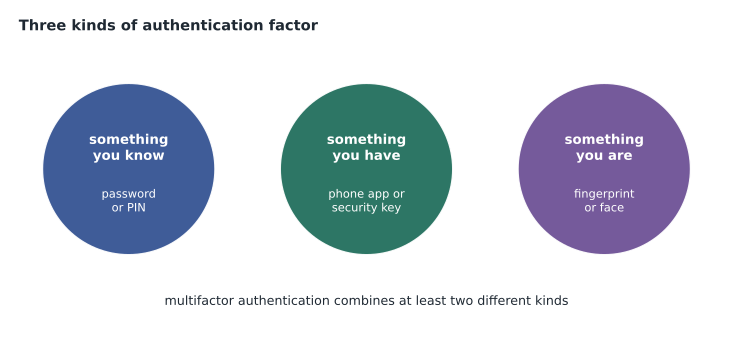
Multifactor authentication, or MFA, requires two or more kinds of evidence: something the user knows, such as a password; something the user has, such as a phone with an authenticator app or a security key; and something the user is, such as a fingerprint or face. A stolen password alone is not enough to sign in. Microsoft's own research has repeatedly found that MFA blocks the overwhelming majority of account compromise attacks, which is why the weekend's 340 attempts failed.
Passwordless authentication removes the password altogether, replacing it with something the user has combined with something they are or know locally. Options include Windows Hello for Business, which uses a PIN or biometric tied to a specific device; the Microsoft Authenticator app; and passkeys or FIDO2 security keys. Passwordless methods are both easier to use and harder to phish, because there is no password to steal. Sunil plans to move administrators to passkeys in 2027.
External identities
Organizations work with people outside them: suppliers, contractors, partners and customers. Microsoft Entra External ID covers these external identities. Business-to-business (B2B) collaboration lets external users sign in with their own organization's account, or a personal account, and be invited as guests to use specific applications and resources. Harrow & Finch's lumber supplier can be given guest access to a shared delivery schedule without the company creating and managing a password for every supplier employee. External ID also supports customer-facing applications, where members of the public create accounts, as the Finch Rewards app may do.
Conditional Access
Conditional Access is the part of Entra ID that decides, at each sign-in, whether to allow access, block it or require more evidence. It works on signals: who the user is and which groups they belong to, where they are signing in from, what device they are using and whether it is managed, which application they want, and how risky the sign-in looks. Policies combine signals with decisions, such as "require MFA for anyone signing in from outside the company network" or "block access to StockLine administration from devices the company does not manage".
Conditional Access is how organizations apply strong controls where they matter without making every sign-in difficult. A store manager at a store computer may sign in with a single prompt, while the same manager at home on a personal laptop is asked for MFA. Conditional Access requires Entra ID P1 or P2 licences, which Harrow & Finch has through its Microsoft 365 plan.
| Signal | Example | Possible decision |
|---|---|---|
| User or group | Member of the Azure administrators group | Require MFA every time |
| Location | Sign-in from an unfamiliar country | Block, or require MFA |
| Device | Personal laptop not managed by the company | Allow web access only, or block |
| Application | StockLine administration pages | Require a compliant device |
| Risk | Sign-in matches patterns of a leaked password | Require MFA and a password change |
Azure role-based access control
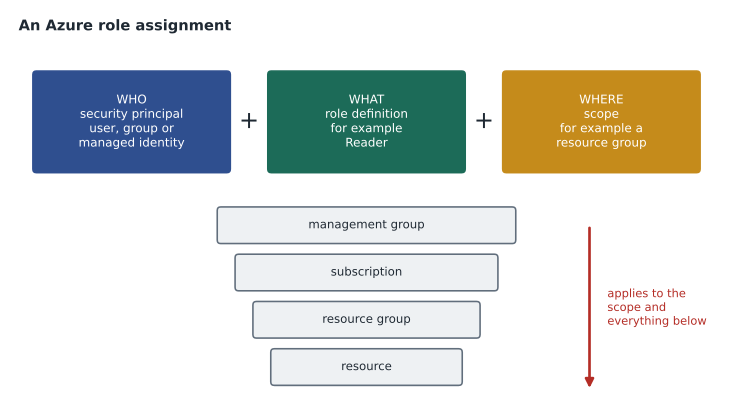
Once someone is signed in, Azure role-based access control, or Azure RBAC, decides what they can do with Azure resources. RBAC works through role assignments, each made of three parts: a security principal (a user, group, service principal or managed identity), a role definition (a collection of permissions, such as Reader or Contributor) and a scope (a management group, subscription, resource group or resource). A role assignment gives that principal those permissions at that scope and everything below it, following the hierarchy from lesson 8.
| Built-in role | What it allows |
|---|---|
| Owner | Full access, including granting access to others |
| Contributor | Create and manage all resources, but not grant access |
| Reader | View resources, but not change them |
| User Access Administrator | Manage who has access, without managing resources |
RBAC follows the principle of least privilege: give each person only the access they need, at the narrowest scope that works. Assigning roles to groups rather than individuals makes this manageable. In Skylight, the StockLine operations group has Contributor on the hf-prod-stockline subscription, the developers have Contributor only on non-production, and Ama's team has Reader across everything through the top management group. Theo, who used to have administrator rights on every server, now has Contributor on non-production and must request elevated access for production, which is logged.
Managed identities
Applications need identities too. A managed identity is an identity in Entra ID that Azure creates and manages for a resource, such as a VM or a web app, so the application can sign in to other services without storing a password or key in its code. The StockLine web tier will use a managed identity to read from the database and from Azure Key Vault, which removes a whole category of leaked-credential risks.
Worked problem
Reading a role assignment
A contractor is assigned the Reader role on the resource group rg-stockline-test, which sits in the hf-nonprod subscription. Can the contractor (a) view a VM in rg-stockline-test, (b) restart that VM, (c) view a storage account in a different resource group in hf-nonprod?
Show solution
- (a) Reader allows viewing, and the VM is inside the scope: yes.
- (b) Restarting is a change, which Reader does not allow: no.
- (c) The other resource group is outside the scope; access flows down from the scope, not sideways: no.
Answer: Yes, no and no. Scope limits where a role applies; the role limits what can be done there.
Zero Trust
Zero Trust is a security model that assumes no user, device or network is trustworthy by default, even inside the company's own network. Instead of trusting anything behind the firewall, it checks every request. Microsoft describes Zero Trust with three principles. Verify explicitly: always authenticate and authorize using all available signals, such as identity, location, device health and the resource being accessed. Use least privilege access: give just enough access, just in time, for just as long as needed. Assume breach: design as if an attacker is already inside, limiting how far they could move, encrypting data and watching for unusual activity.
Conditional Access, MFA, RBAC and private endpoints are all ways of putting Zero Trust into practice. Sunil's summary for the cloud lunch is shorter: "Trust nothing, check everything, and plan for the day you're wrong."
Defence in depth
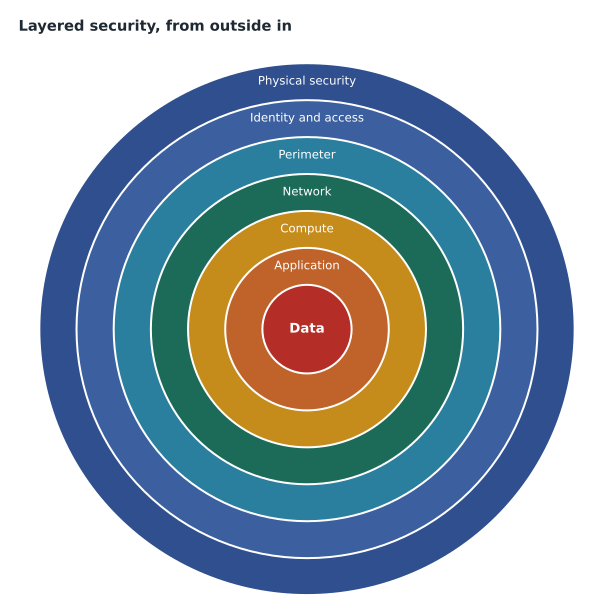
Defence in depth protects information with several layers of security, so that if one layer is breached, the next still stands. Microsoft's usual description has seven layers, from the outside in.
| Layer | Purpose | Azure examples |
|---|---|---|
| Physical security | Protect buildings and hardware | Microsoft's data centre security |
| Identity and access | Control who can sign in and what they can do | Entra ID, MFA, Conditional Access, RBAC |
| Perimeter | Protect against large network attacks | Azure DDoS Protection, Azure Firewall |
| Network | Limit communication between resources | Network security groups, private endpoints, segmentation |
| Compute | Secure virtual machines and other compute | Patching, endpoint protection, closing unused ports |
| Application | Build and run applications securely | Secure coding, secrets kept in Azure Key Vault |
| Data | Protect the information itself | Encryption at rest and in transit, access controls on data |
Microsoft Defender for Cloud
Microsoft Defender for Cloud is a tool that monitors an organization's security posture and protects its workloads in Azure, in other clouds and on premises. It continuously assesses resources against security recommendations and summarizes the result as a secure score, which shows how far the environment is from recommended practice and which fixes would help most. It also detects threats to workloads, such as unusual access to a storage account or a VM communicating with a known malicious address, and raises alerts. Some capabilities are included free; enhanced protection plans for specific workload types are paid.
Ama shows the group Harrow & Finch's secure score for the pilot environment. Two recommendations stand out: a test storage account still allows public network access, and two test VMs have management ports open to the internet. Both are fixed by the end of the day. Defender for Cloud did not prevent the mistakes; it made them visible, which is the customer's side of the shared responsibility model in action.
Halfway to AZ-900
Theo finishes the lesson by booking time, not an exam. His plan is to complete MSAZ-102, which covers cost management, governance and compliance tools, management and deployment tools and monitoring, in November and December, review with MSAZ-190, and sit AZ-900 in January 2027. Renata suggests he also use the free sandbox exercises on Microsoft Learn to practise the portal. "You've learned what the cloud is and how Azure is built," she says. "Next comes the part Dana cares about: keeping it under control."
Common mistakes
MistakeMicrosoft Entra ID is just Active Directory running in the cloud.
InsteadEntra ID is a cloud identity service using modern protocols; Entra Domain Services provides traditional domain features as a managed service.
MistakeA Contributor can grant other people access.
InsteadContributor manages resources but cannot grant access; Owner and User Access Administrator can.
MistakeZero Trust means users are never trusted with access.
InsteadZero Trust grants access, but only after explicit verification, with least privilege and an assumption of breach.
Summary and key terms
- Microsoft Entra ID is Microsoft's cloud identity service; Entra Domain Services provides managed domain features for older apps.
- SSO lets users sign in once; MFA requires two kinds of evidence; passwordless replaces the password entirely.
- Entra External ID lets organizations work with guests and customers using their own identities.
- Conditional Access combines signals such as user, location, device and risk to allow, block or require MFA.
- Azure RBAC assigns a role to a security principal at a scope, inherited down the hierarchy.
- Zero Trust means verify explicitly, use least privilege and assume breach.
- Defence in depth layers security from physical to data; Defender for Cloud assesses posture and detects threats.
- Microsoft Entra ID
- Microsoft's cloud identity and access management service, formerly Azure Active Directory.
- Single sign-on
- Signing in once to reach many applications.
- Multifactor authentication
- Requiring two or more different kinds of evidence to sign in.
- Conditional Access
- Entra ID policies that use sign-in signals to allow, block or require more verification.
- Azure RBAC
- Role-based access control that grants permissions through roles assigned at a scope.
- Zero Trust
- A security model that verifies every request and assumes no implicit trust.
- Defence in depth
- Protecting data with several independent layers of security.
- Secure score
- Defender for Cloud's measure of how closely an environment follows security recommendations.
Practice problems
Work each problem on paper first, then reveal the answer to check.
What was Microsoft Entra ID formerly called?
Show answer
Azure Active Directory.
What three kinds of factor can MFA combine?
Show answer
Something you know, something you have and something you are.
What are the three parts of an Azure role assignment?
Show answer
A security principal, a role definition and a scope.
Which built-in role can manage resources but not grant access?
Show answer
Contributor.
Name the three principles of Zero Trust.
Show answer
Verify explicitly, use least privilege access and assume breach.
Which layer sits at the centre of defence in depth?
Show answer
Data.
Lesson quiz · 5 questions
Score 60% or more to complete this lesson.
Create a free account to save your progress, take quizzes and earn a certificate.