
MSAZ-101 · Lesson 11 of 12 · 21 min
Azure storage services and redundancy options
▶ Video coming soon A video version of this lesson is on the way.
Harrow & Finch keeps about 9 terabytes on its file servers: store schedules, product photos, scanned delivery notes, ten years of finance spreadsheets and a large folder called "OLD - do not delete" that nobody dares to open. In late October, the Skylight team runs a pilot: the Brandon store's share moves to Azure Files, and the head office's archive of scanned delivery notes moves to Blob Storage. Theo leads the pilot. Before he moves a single file, he has to make four decisions: which storage service, which kind of storage account, which access tier and which redundancy option. This lesson explains each.
Storage accounts
Most Azure storage lives in a storage account, a container that provides a unique namespace for data, reachable over HTTP or HTTPS from anywhere in the world. Every storage account has a name that must be unique across all of Azure, between 3 and 24 characters long, using only lowercase letters and numbers. The name becomes part of the address of every object in the account, for example a blob address beginning with the account name followed by .blob.core.windows.net. Theo's pilot account is called sthfdocsprod01.
Storage accounts come in a few types. Standard general-purpose v2 accounts are the default and support all the main services, blobs, files, queues and tables, on standard hard-disk-based storage; Microsoft recommends them for most scenarios. Premium accounts use solid-state storage for low latency and come in specialized types: premium block blobs for high-transaction workloads, premium file shares for demanding file workloads, and premium page blobs for disks. The account type also decides which redundancy options are available.
The core storage services
| Service | What it stores | Typical use |
|---|---|---|
| Azure Blob Storage | Unstructured objects: documents, images, video, backups, logs | Scanned delivery notes, product photos, backups, data for analytics |
| Azure Files | Fully managed file shares reachable over SMB or NFS | Replacing on-premises file servers, shared app settings |
| Azure Queue Storage | Messages waiting to be processed | Passing work between parts of an application |
| Azure Table Storage | Structured, non-relational data as key and attribute rows | Simple, large datasets such as device logs or user settings |
| Azure Disk Storage | Block-level volumes attached to VMs | Operating system and data disks for virtual machines |
Blob stands for binary large object. Blob Storage is optimized for storing massive amounts of unstructured data and serving it over HTTP, which makes it the natural home for documents, media and backups. Blobs are organized into containers within the account. Azure Files, by contrast, provides shares that look like ordinary network drives: Windows, Linux and macOS computers can map them using the SMB protocol, and the share can be used by applications that expect files. Queue Storage holds messages, each up to 64 kilobytes, that one part of an application leaves for another to pick up. Table Storage holds simple structured data cheaply, without the features of a relational database. Disk Storage, introduced in lesson 9, provides the managed disks VMs run on.
Access tiers for blobs
Not all data is used equally. A product photo for this week's promotion is read thousands of times a day; a scanned delivery note from 2019 may never be read again but must be kept for seven years for tax purposes. Blob Storage offers access tiers that trade storage cost against access cost.
| Tier | Intended use | Minimum storage period | Access |
|---|---|---|---|
| Hot | Data read or changed often | None | Immediate; highest storage cost, lowest access cost |
| Cool | Data read infrequently, kept at least 30 days | 30 days | Immediate; lower storage cost, higher access cost |
| Cold | Data rarely read, kept at least 90 days | 90 days | Immediate; lower storage cost again, higher access cost |
| Archive | Data almost never read, kept at least 180 days | 180 days | Offline; must be rehydrated first, which can take hours |
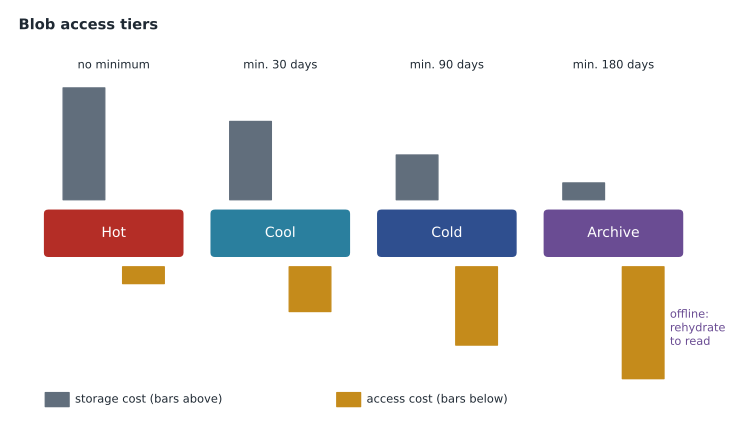
The hot, cool and cold tiers can be set at the account level as a default and changed for individual blobs; archive is set per blob. Data in the archive tier cannot be read directly. It must first be rehydrated by moving it to an online tier or copying it, a process that can take up to several hours depending on the priority chosen. Lifecycle management rules can move blobs between tiers automatically, for example to cool after 30 days without access and to archive after a year. Theo sets up exactly that for the delivery notes.
# Illustrative yearly cost for 2 TB of delivery-note scans in each tier (made-up prices per GB per month)
storage = {"hot": 0.020, "cool": 0.010, "cold": 0.004, "archive": 0.001}
read_per_gb = {"hot": 0.000, "cool": 0.010, "cold": 0.030, "archive": 0.050}
gb = 2000
reads_gb_per_year = 20          # staff retrieve about 20 GB of old scans a year
for tier in storage:
    cost = gb * storage[tier] * 12 + reads_gb_per_year * read_per_gb[tier]
print(f"{tier:8} about {cost:8.2f} a year")hot about 480.00 a year cool about 240.20 a year cold about 96.60 a year archive about 25.00 a year
What this code does
Compares the yearly cost of keeping 2 TB of scanned delivery notes in each Azure storage tier (hot, cool, cold and archive) using made-up prices. Each tier's total adds the monthly storage charge to the charge for reading back the scans staff retrieve each year. Rarely read data is much cheaper in the colder tiers even after the higher retrieval charge.
With invented prices, the archive tier is cheapest for data that is rarely read, and the hot tier is the most expensive way to keep it. If the staff started reading the old scans every day, the balance would shift, which is why the tier should match the real pattern of use.
Redundancy options
Azure Storage always keeps several copies of data to protect against hardware failures. The redundancy option decides how many copies are kept and where. There are two dimensions: how data is copied within the primary region, and whether it is also copied to a secondary region, normally the paired region from lesson 7.
| Option | Copies in primary region | Copy to secondary region | Protects against |
|---|---|---|---|
| LRS: locally redundant storage | 3, in one data centre | No | Disk and server failures |
| ZRS: zone-redundant storage | 3, across three availability zones | No | Loss of a data centre or zone |
| GRS: geo-redundant storage | 3, in one data centre | Yes, 3 more copies using LRS | Loss of the primary region |
| GZRS: geo-zone-redundant storage | 3, across three zones | Yes, 3 more copies using LRS | Zone loss and regional loss |
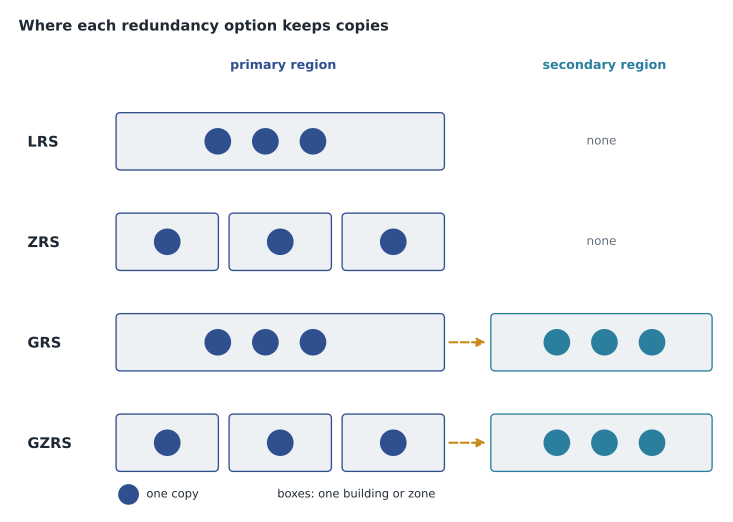
With GRS and GZRS, data is copied to the secondary region asynchronously, so a small amount of the latest data could be lost if the primary region failed suddenly. By default, the secondary copy cannot be read until Microsoft or the customer starts a failover. Read-access versions, RA-GRS and RA-GZRS, let applications read from the secondary region at any time, which is useful for reporting or as a fallback during an outage.
Microsoft describes durability in terms of nines. Its documentation states that LRS provides at least eleven nines of durability for objects over a year, ZRS at least twelve nines, and the geo-redundant options at least sixteen nines. The exam focuses on what each option protects against, but the figures show how unlikely data loss from hardware failure is with any option.
Not every option is available in every region or for every account type. ZRS and GZRS need a region with availability zones, so they are available in Canada Central but not Canada East; premium accounts support fewer options than standard ones. Remember from lesson 2 that redundancy is not backup: every option faithfully copies deletions and changes. Soft delete and versioning, which keep deleted or overwritten blobs for a set period, and Azure Backup protect against those.
Securing storage accounts
Storage accounts hold some of an organization's most sensitive data, so their settings matter. All data written to Azure Storage is encrypted at rest automatically, with keys managed by Microsoft or, if the customer prefers, by the customer. Access can be granted through Microsoft Entra ID roles, through account keys that act like master passwords, or through shared access signatures, which are limited, time-bound links. Network rules can restrict an account to selected networks or to private endpoints. Sunil's standard for Skylight disables account keys where possible, requires Entra ID for access, and blocks public network access for any account holding personal information.
Worked problem
Choosing redundancy for the pilot
Theo must choose redundancy for two storage accounts: (a) the Brandon store's file share, which staff use every day and which must survive the loss of a data centre; (b) the archive of scanned delivery notes, which must survive a regional disaster and, by company policy, stay in Canada.
Show solution
- (a) Surviving a data centre loss within the region needs copies in several zones: ZRS. A regional disaster is covered by the nightly backup, so geo-redundancy is not required for the share.
- (b) Surviving a regional disaster needs a copy in another region: GRS or GZRS.
- The paired region, Canada East, is also in Canada, so geo-replication keeps the data in the country.
- The archive is rarely read, so the cheaper GRS is enough; GZRS would add zone protection for a little more.
Answer: ZRS for the active file share, GRS for the archive. Both choices follow from what each must survive, not from habit.
Redundancy can be changed after an account is created, for example from LRS to GRS, although some conversions take time and some combinations need a migration. Theo records the chosen option and the reason in the design document for each account, so that later reviewers know whether it was a decision or a default.
Moving files to Azure
Several tools help move data into Azure Storage. AzCopy is a command-line utility for copying blobs and files to, from or between storage accounts; it is fast and scriptable, which suits large or repeated transfers. Azure Storage Explorer is a free desktop application with a graphical interface for browsing and managing storage accounts, using AzCopy underneath. Azure File Sync keeps a Windows file server in sync with an Azure file share: the cloud holds the full share, while the local server keeps a cache of frequently used files, a feature called cloud tiering. That suits stores with slow connections, where staff want local speed but the company wants one central copy.
azcopy login
azcopy copy "D:/Scans/2019" "https://sthfdocsprod01.blob.core.windows.net/delivery-notes/2019" --recursive
Migration options
For whole systems rather than folders, Azure Migrate is a central hub for discovering, assessing and migrating on-premises servers, databases, web apps and virtual desktops to Azure. It helps estimate what Azure resources and costs a workload would need, and provides tools to move it. The Skylight team has run Azure Migrate's discovery tool against the server room to build its migration plan.
When data is too large to send over the network in reasonable time, Azure Data Box is a family of physical devices that Microsoft ships to the customer. The customer copies data onto the device locally and ships it back, and Microsoft uploads it to Azure. Data Box devices come in different capacities, from disks to rugged appliances; check Microsoft's current documentation for the options. Data Box can also move data out of Azure. Harrow & Finch's 9 terabytes can travel over the network, but a nearby hospital the network team spoke to used Data Box to move several hundred terabytes of imaging files.
Common mistakes
MistakeArchive tier blobs can be opened immediately like hot blobs.
InsteadArchive data is offline and must be rehydrated first, which can take hours.
MistakeGRS copies data across availability zones.
InsteadGRS keeps three copies in one data centre in the primary region plus copies in the secondary region; GZRS adds zones.
MistakeGeo-redundant storage replaces backups.
InsteadRedundancy copies deletions and changes too; soft delete, versioning and Azure Backup protect against them.
Summary and key terms
- A storage account provides a globally unique namespace for Azure storage; standard general-purpose v2 suits most needs.
- The core services are Blob Storage, Azure Files, Queue Storage, Table Storage and Disk Storage.
- Blob access tiers are hot, cool, cold and archive, with minimum periods of 30, 90 and 180 days for the lower tiers.
- Archive data is offline and must be rehydrated before it can be read.
- Redundancy options are LRS, ZRS, GRS and GZRS, with read-access variants RA-GRS and RA-GZRS.
- Zone-redundant options need a region with availability zones; geo-redundant options use the paired region.
- AzCopy, Storage Explorer and Azure File Sync move files; Azure Migrate and Data Box move systems and large datasets.
- Storage account
- A container that provides a unique namespace for Azure Storage data.
- Blob
- A binary large object: unstructured data such as a document, image or backup file.
- Access tier
- A blob setting (hot, cool, cold or archive) that trades storage cost against access cost.
- Rehydration
- Moving an archived blob back to an online tier so it can be read.
- LRS
- Locally redundant storage: three copies in one data centre.
- ZRS
- Zone-redundant storage: three copies across three availability zones.
- GZRS
- Geo-zone-redundant storage: zone-redundant in the primary region plus copies in a secondary region.
- Azure File Sync
- A service that syncs Windows file servers with Azure file shares and caches popular files locally.
Practice problems
Work each problem on paper first, then reveal the answer to check.
Which storage service provides SMB file shares?
Show answer
Azure Files.
What is the minimum storage period for the cool tier?
Show answer
30 days.
What must happen before an archived blob can be read?
Show answer
It must be rehydrated to an online tier.
How many copies does GRS keep in total?
Show answer
Six: three in the primary region and three in the secondary region.
Which redundancy option protects against both a zone failure and a regional disaster?
Show answer
GZRS (or RA-GZRS).
Which tool keeps a local Windows file server in sync with an Azure file share?
Show answer
Azure File Sync.
Lesson quiz · 5 questions
Score 60% or more to complete this lesson.
Create a free account to save your progress, take quizzes and earn a certificate.