
MSAZ-101 · Lesson 8 of 12 · 21 min
Subscriptions, management groups and resource groups
▶ Video coming soon A video version of this lesson is on the way.
On September 21, before anything was built, Renata spent a day creating something Theo could not see at first: the structure every Skylight resource would live inside. She created a set of management groups, five subscriptions and the first resource groups, and gave each a name that followed a written standard. A month later, with dozens of resources deployed, Theo understands why she started there. Every permission, policy and bill in Azure follows that structure, and changing it later is far harder than getting it right at the start.
This lesson works from the bottom up: resources, resource groups, subscriptions, management groups, and how the four fit together in a hierarchy.
Resources
A resource is a single manageable item in Azure: a virtual machine, a virtual network, a storage account, a database, a public IP address, a web app. Each resource has a type, a name, a location (usually a region) and properties. Every resource is created and managed through Azure Resource Manager, the management layer that receives requests from the portal, the command line and programming interfaces, checks permissions and policies, and passes the request to the right service. Because everything goes through Resource Manager, the same rules apply whichever tool is used.
Resource groups
A resource group is a logical container for resources that share a lifecycle, such as all the resources for one application in one environment. Every resource must be in exactly one resource group. Resource groups have a few rules the exam expects you to know.
- A resource can be in only one resource group at a time, though it can usually be moved to another.
- Resource groups cannot be nested inside other resource groups.
- A resource group has a location, which is where its metadata is stored; the resources inside can be in other regions.
- Deleting a resource group deletes every resource inside it.
- Permissions and policies applied to a resource group are inherited by the resources inside it.
The deletion rule makes resource groups useful for temporary work. Theo creates a resource group for each experiment, and when he is done, he deletes the group and everything in it disappears, leaving nothing running to cost money. The same rule makes resource groups dangerous for production. A resource lock, which MSAZ-102 covers, can prevent a production group from being deleted by accident.
How to group resources is a design choice. The most common approach is by application and environment: everything for the StockLine production system in one group, StockLine test in another. Some organizations also group shared infrastructure, such as networks, separately. The Skylight naming standard spells out the pattern: rg-stockline-prod-cc for StockLine production in Canada Central, and similar names for every other group.
az group create --name rg-theo-lab-01 --location canadacentral --tags owner=theo purpose=az900-lab
az group list --output table
az group delete --name rg-theo-lab-01 --yes
Subscriptions
A subscription is the unit of billing and of management in Azure. Every resource group belongs to exactly one subscription, and every subscription is linked to a Microsoft Entra tenant that holds the identities allowed to use it. A subscription does three jobs at once. It is a billing boundary: Azure produces a separate invoice or cost breakdown for each subscription. It is an access control boundary: permissions can be granted on a whole subscription. And it has limits and quotas, such as the maximum number of virtual machine processors in a region, which can usually be raised by request.
Organizations use several subscriptions to separate things that should be billed, controlled or limited differently. Typical reasons include separating production from development, so that an experiment cannot affect live systems or use up production quotas; separating departments or business units for chargeback; separating workloads with different compliance needs; and separating shared platform services, such as networking and identity, from the applications that use them.
| Subscription | Purpose | Who has access |
|---|---|---|
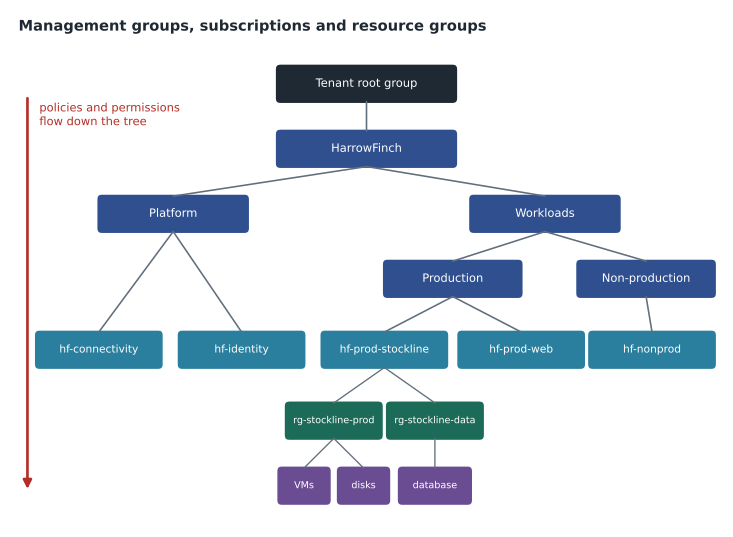
| hf-connectivity | Hub virtual network, VPN gateway, DNS | Network team |
| hf-identity | Domain controllers in Azure, identity services | Identity team |
| hf-prod-stockline | StockLine production | StockLine operations |
| hf-prod-web | harrowfinch.com production | Web team |
| hf-nonprod | Test and development for all workloads, labs | Developers, server team |
Subscriptions are created under a billing account, through an agreement such as a Microsoft Customer Agreement, an Enterprise Agreement, a reseller arrangement or a free or pay-as-you-go offer. The details of agreements are beyond AZ-900; what matters is that the subscription is what resources and costs are attached to.
Management groups
Large organizations can have dozens or hundreds of subscriptions. Management groups organize subscriptions into a hierarchy so that access, policies and compliance can be managed at scale. A management group can contain subscriptions and other management groups. Every tenant has a single root management group at the top, and everything else sits beneath it.
The main purpose of management groups is inheritance. A policy assigned to a management group applies to every subscription beneath it, and every resource group and resource inside those subscriptions. So does a role assignment. If Sunil's security team needs read access to everything, Renata assigns it once at the top management group instead of in each subscription. If the board decides that all resources must stay in approved regions, a single policy at the top enforces it everywhere, including in subscriptions created next year.
Management groups have limits worth knowing. A tenant can hold up to 10,000 management groups, and the tree can be up to six levels deep, not counting the root level or the subscription level. Each management group and each subscription can have only one parent.
The hierarchy
Put together, Azure's management structure has four levels. From the top: management groups contain subscriptions; subscriptions contain resource groups; resource groups contain resources. Access and policy flow down the tree, so a setting applied at any level reaches everything beneath it. This makes the design of the upper levels important. A well-designed hierarchy lets an organization apply broad rules once and grant narrow permissions where needed, while a flat or tangled one forces the same settings to be repeated in many places.
| Level | Contains | Main purposes |
|---|---|---|
| Management group | Subscriptions and other management groups | Apply policy and access to many subscriptions at once |
| Subscription | Resource groups | Billing, access, limits and quotas |
| Resource group | Resources | Group resources that share a lifecycle |
| Resource | Nothing (it is the item itself) | The VM, database, network or other service |
Limits, quotas and why they matter
Each subscription has limits on how many resources of certain kinds it can hold, such as the number of virtual processors that can run in a region, the number of storage accounts or the number of public IP addresses. Some limits are fixed by Azure; others are default quotas that can be raised by submitting a request in the portal. Quotas protect both Microsoft and the customer: they stop a script error from creating thousands of machines overnight.
Limits are one reason organizations use several subscriptions. If developers in the non-production subscription use up its processor quota while load-testing, production is unaffected, because it has its own. In late October, Theo hits a quota for the first time when a test scale set tries to grow beyond the default number of processors for its VM family. The fix takes a short request and a few minutes of waiting; the lesson he takes from it is to check quotas before a big deployment, not during one.
Naming and organizing from day one
Renata's naming standard looks fussy at first, but it pays off quickly. Every resource name follows the pattern type, workload, environment and region, so vm-stk-app-01 in rg-stockline-prod-cc tells anyone what it is and where it lives. Some resource names must be unique within a resource group, some within a subscription, and some, such as storage accounts and web apps, across all of Azure, because they become part of a public address. Many names cannot be changed after creation, so the standard is written before the first resource is created.
The standard also says where each kind of resource belongs. Shared network resources live in the connectivity subscription, identity resources in the identity subscription, and each application's resources in its own resource groups within its environment's subscription. Theo now looks at the portal's list of resource groups the way he used to look at the server room: everything has a place, and anything out of place is either a mistake or someone's forgotten experiment.
Worked problem
Where should the setting go?
Renata gives Theo four requirements and asks at which level each should be applied: (a) every resource in the company must be in an approved region; (b) the web team can manage everything in the website's production subscription; (c) a contractor can read the resources for one StockLine test environment only; (d) all non-production subscriptions get a cost alert.
Show solution
- (a) applies to everything, so it goes on the top HarrowFinch management group, where it is inherited by every subscription.
- (b) covers one subscription, so the role assignment goes on hf-prod-web.
- (c) is narrow, so the contractor's read access goes on the single resource group for that test environment.
- (d) applies to a group of subscriptions; budgets are set per subscription, but the Non-production management group shows which ones need them, and a policy there can require them.
Answer: Apply each setting at the highest level that covers exactly what it should and nothing more.
Structures do change, and Azure allows for it within limits. Many resource types can be moved between resource groups and between subscriptions, and subscriptions can be moved between management groups. A move changes the resource's identifier, so scripts and permissions that refer to the old location may need updating, and some resource types cannot be moved at all. That is another reason to settle the structure early and change it rarely.
Tags
The hierarchy answers many questions about ownership, but not all. Tags add flexible labels to resources, resource groups and subscriptions, as name and value pairs such as owner=theo or costcode=stores. Tags do not change how a resource works; they help organize, report and automate. Cost reports can be filtered by tag, and policies can require certain tags. MSAZ-102 covers tags in the context of cost management. Note that tags are not inherited by default: a tag on a resource group does not automatically appear on the resources inside, although a policy can copy it down.
Why structure comes first
Theo asks why Renata spent a whole day on structure before building anything. Her answer is practical. Moving a resource between resource groups or subscriptions is possible for many resource types, but not all, and it can require downtime. Moving subscriptions between management groups is easy, but rebuilding permissions and policies after a messy start is not. A clear hierarchy also makes costs readable: Dana can see the cost of each subscription without asking anyone. Microsoft's Cloud Adoption Framework, a collection of guidance for organizations moving to Azure, describes a standard starting design called a landing zone, which includes exactly this kind of hierarchy. Renata's design is a simplified version of it.
Common mistakes
MistakeDeleting a resource group leaves its resources running.
InsteadDeleting a resource group deletes everything inside it.
MistakeA resource can belong to several resource groups.
InsteadEach resource is in exactly one resource group, though it can usually be moved.
MistakeA policy on a management group affects only that group.
InsteadPolicies and role assignments are inherited by every subscription, resource group and resource below.
Summary and key terms
- Resources are individual items such as VMs and databases, all managed through Azure Resource Manager.
- Resource groups hold resources that share a lifecycle; each resource is in exactly one group, and deleting a group deletes its contents.
- Subscriptions are boundaries for billing, access and limits; organizations use several to separate environments and teams.
- Management groups organize subscriptions into a hierarchy up to six levels deep below the root.
- Policies and permissions applied at any level are inherited by everything beneath it.
- Apply settings at the highest level that covers exactly what they should.
- Tags add flexible labels for reporting and automation but are not inherited by default.
- Resource
- A single manageable item in Azure, such as a VM, network or database.
- Azure Resource Manager
- The management layer that handles every request to create, change or delete Azure resources.
- Resource group
- A logical container for resources that share a lifecycle.
- Subscription
- A unit of billing, access control and limits that contains resource groups.
- Management group
- A container that organizes subscriptions so policies and access can be applied at scale.
- Root management group
- The single top-level management group in every tenant.
- Tag
- A name and value label attached to a resource, group or subscription.
Practice problems
Work each problem on paper first, then reveal the answer to check.
Can resource groups be nested?
Show answer
No.
What happens to resources when their resource group is deleted?
Show answer
They are deleted too.
Name three jobs a subscription does.
Show answer
Billing boundary, access control boundary, and limits and quotas.
How deep can the management group tree be?
Show answer
Six levels, not counting the root level or the subscription level.
Where should a rule that applies to every resource in the company be assigned?
Show answer
On a top-level management group, so it is inherited everywhere.
Are tags inherited by resources in a resource group?
Show answer
Not by default, though a policy can copy them down.
Lesson quiz · 5 questions
Score 60% or more to complete this lesson.
Create a free account to save your progress, take quizzes and earn a certificate.