
MSAZ-101 · Lesson 1 of 12 · 20 min
What cloud computing is
▶ Video coming soon A video version of this lesson is on the way.
On Tuesday, September 8, 2026, Theo Marchand carries a coffee into the boardroom at Harrow & Finch's head office in Winnipeg for the kickoff of Project Skylight. Theo has spent six years on the server team. He knows every blinking light in the server room down the hall: the 38 servers, the storage array whose support contract ends next June, the tape library that still needs a person to swap cartridges on Fridays. The board has approved a plan to move most of that work to Microsoft Azure by the end of 2027, and the company has hired Renata Kowal, a cloud lead who spent the last decade running infrastructure at a bank, to make it happen.
Renata opens the meeting by drawing two boxes on the whiteboard. One says "our server room". The other says "someone else's data centre". Under both she writes the same three questions: who pays, who patches, who gets paged? "Every cloud decision you'll make in the next year comes back to those three questions," she says. After the meeting she asks Theo to join a weekly cloud lunch and to work towards the Microsoft Azure Fundamentals certification, exam AZ-900, by early next year. This course follows the first half of that journey: what the cloud is, why organizations use it, and how Azure is built.
A working definition
Cloud computing is the delivery of computing services, such as servers, storage, databases, networking, software and analytics, over a network, usually the internet, on demand and paid for according to use. Instead of buying a server, installing it in a rack and waiting weeks for it to arrive, an organization asks a cloud provider for the capacity it needs and gets it in minutes. When the capacity is no longer needed, it is released and the charges stop.
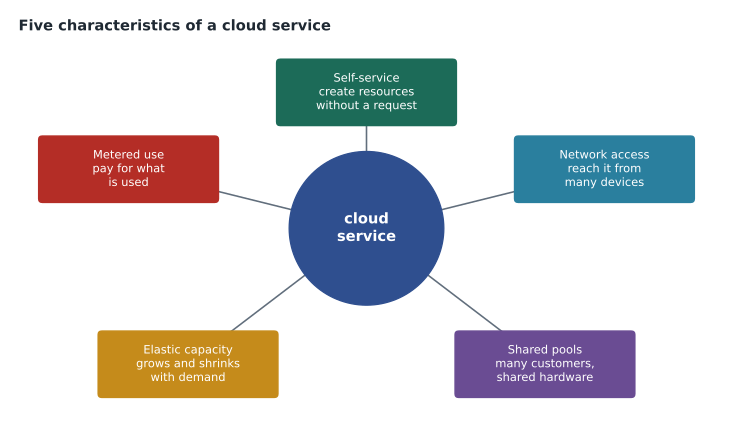
The most widely quoted definition comes from the United States National Institute of Standards and Technology, in a short publication called SP 800-145. It describes five essential characteristics. They are worth knowing because they explain what makes a service a cloud service rather than just a server in someone else's building.
| Characteristic | What it means | Skylight example |
|---|---|---|
| On-demand self-service | Customers provision resources themselves, without a person at the provider approving each request. | Theo creates a test virtual machine from the Azure portal in a few minutes. |
| Broad network access | Services are reached over standard networks from many kinds of devices. | Store managers reach the inventory app from tablets and laptops. |
| Resource pooling | The provider serves many customers from shared hardware, assigning capacity dynamically. | Harrow & Finch shares physical hosts with other Azure customers without seeing them. |
| Rapid elasticity | Capacity can grow or shrink quickly, often automatically. | The website adds servers for the spring garden sale and removes them after. |
| Measured service | Use is metered, so customers pay for what they consume. | The finance team sees a charge for each hour a virtual machine runs. |
What changes when you move to the cloud
For Theo, the biggest change is not technical. In the server room, buying capacity is a project: a quote, a purchase order, a delivery, an afternoon with a screwdriver. Capacity is bought for the busiest day of the next five years, so most of it sits idle most of the time. Theo once measured the head office servers and found that their processors averaged well under a quarter of their capacity across a month. In the cloud, capacity is a setting. It can be matched to today's need and changed tomorrow.
# Theo's server room sample: average processor use over a month, per server group (out of 100)
groups = {"StockLine app": 18, "StockLine database": 41, "File servers": 9,
          "Warehouse system": 22, "Domain controllers": 6, "Print and misc": 4}
servers = {"StockLine app": 4, "StockLine database": 2, "File servers": 3,
           "Warehouse system": 2, "Domain controllers": 2, "Print and misc": 5}
total = sum(servers.values())
weighted = sum(groups[g] * servers[g] for g in groups) / total
print("servers sampled:", total)
print(f"weighted average processor use: {weighted:.1f} out of 100")
print(f"idle share of the capacity paid for: {100 - weighted:.1f} out of 100")servers sampled: 18 weighted average processor use: 14.3 out of 100 idle share of the capacity paid for: 85.7 out of 100
What this code does
Takes the average processor use of each group of servers in the server room and weights it by how many servers are in that group. The result is the average share of processing power actually used across all servers, and the rest is capacity being paid for but sitting idle. A high idle share is a common argument for moving to the cloud, where you pay for what you use.
The numbers are typical of on-premises environments. Servers are sized for peaks and for growth, and they keep drawing power, cooling and support fees whether they are busy or not. The cloud does not make that waste disappear automatically, but it gives an organization the tools to stop paying for capacity it is not using.
Other things change too. Hardware failures become the provider's problem: when a disk dies in an Azure data centre, Microsoft replaces it, and well-designed services keep running on other hardware. New services, such as managed databases or artificial intelligence tools, become available without buying anything. And the skills the team needs shift from racking equipment towards designing, automating, securing and paying attention to cost.
Cloud computing compared with traditional hosting
Theo points out that Harrow & Finch's website has been hosted outside the company for years, by a small web firm with servers in a rented rack. Is that the cloud? Renata's answer is that it depends on how the service behaves, not where it sits. With traditional hosting, the customer usually rents a fixed server or a fixed share of one for a fixed monthly fee, under a contract measured in months or years. Adding capacity means asking the host, who may need days or weeks. Billing does not change with use, and the customer has little control beyond the server itself.
A cloud platform turns those arrangements around. Capacity is requested through a portal or a script and appears in minutes. Charges follow use, often by the second or the hour. The same platform offers dozens of building blocks, such as databases, load balancers, queues and identity services, that work together and are managed the same way. And the provider runs the platform at a scale that lets it offer features, such as copies of data in several buildings, that a small host cannot. The web firm's rack is useful, but it does not have the five characteristics in the table above.
The idea behind the cloud is older than the name. Large companies have shared mainframes between departments since the 1960s, and utility computing, paying for processing like electricity, was proposed decades before anyone could deliver it cheaply. What changed in the 2000s was the combination of fast networks, cheap commodity servers, virtualization that let one physical server act as many, and automation good enough to run millions of servers with few people. Azure itself was announced in 2008 and became generally available in 2010.
What does not change
Renata is careful to tell the team what the cloud does not do. It does not remove the need for good security; a badly configured cloud service can be more exposed than a server locked in a basement. It does not make software well designed; an application that falls over when one server restarts will still fall over in Azure unless it is changed. And it does not run itself. Someone still has to decide what to build, watch the bills, apply updates to the parts the customer manages, and respond when something goes wrong.
"The cloud is a different place to run things, with different rules," she says. "It's not a place where the rules stop." The next lesson looks at exactly which rules belong to whom.
Microsoft Azure in brief
Microsoft Azure is Microsoft's public cloud platform. It offers hundreds of services, from basic virtual machines and storage to databases, analytics, artificial intelligence, internet of things and developer tools. Azure runs in data centres grouped into regions around the world; Microsoft describes its footprint as more than 60 regions. Lesson 7 explains regions in detail. Customers reach Azure through the Azure portal, a web interface; through command-line tools called Azure CLI and Azure PowerShell; and through programming interfaces that tools and scripts can call.
Harrow & Finch already uses Microsoft 365, which is Microsoft's software-as-a-service suite for email, Teams and SharePoint. The company's Microsoft 365 tenant, the organization's account in Microsoft's cloud, is also the home of its identities in Microsoft Entra ID, which Azure uses too. Theo is surprised to learn that the company has been a cloud customer for five years without thinking of itself as one.
az login
az account show --output table
Azure Cloud Shell is a browser-based command line built into the Azure portal, with Azure CLI and Azure PowerShell already installed. Theo uses it for the first time to list the subscription Renata has created for experiments. Later courses use these tools heavily; for AZ-900 it is enough to know what they are and that they all talk to the same management layer, Azure Resource Manager, which lesson 8 introduces.
Why organizations move to the cloud
At the kickoff, each department head says what they hope to gain. Their answers match the reasons most organizations give.
- Dana Whitcombe, the chief financial officer, wants to stop large hardware purchases every five years and pay for computing more like a utility.
- Grace Oduya, the store operations director, wants the inventory system to stay up during storms and power cuts at head office, which have stopped sales twice in three years.
- Marcus Feldt, the e-commerce manager, wants the website to cope with holiday traffic without paying for peak capacity all year.
- Sunil Rao, the IT security manager, wants better security tools than the company can build itself, and a clearer record of who did what.
- Theo's own manager wants the server team to spend less time on hardware and more time helping the business.
These map onto the benefits the AZ-900 exam expects you to describe: cost flexibility, high availability, scalability and elasticity, reliability, predictability, security and governance, and manageability. Lessons 4 and 5 cover them in detail.
Serverless: the furthest step from the server room
One term comes up at the kickoff that Theo has not heard before: serverless. Serverless computing does not mean there are no servers. It means the customer never sees or manages them. The customer supplies code or a workflow, and the provider runs it when an event happens, such as a file arriving or a web request, scaling it automatically and charging only while it runs. Azure Functions, which runs small pieces of code, and Azure Logic Apps, which runs workflows, are Azure's main serverless services. Marcus's team wants to use Functions to resize product photos when they are uploaded. Lessons 6 and 9 return to serverless.
The AZ-900 exam and this course
AZ-900 is a fundamentals exam. It tests understanding, not hands-on configuration. Microsoft publishes a skills outline, a list of everything the exam can cover, grouped into three areas: cloud concepts, Azure architecture and services, and Azure management and governance. When this course was written, the outline was dated July 20, 2026, and it weighted the areas at about 25 to 30, 35 to 40 and 30 to 35 parts in 100 respectively. Microsoft's study guide states that a scaled score of 700 or more out of 1,000 is needed to pass.
This course, MSAZ-101, covers the first two areas: cloud concepts and Azure's architecture and core services. MSAZ-102 covers cost, governance, management tools and monitoring. MSAZ-190 reviews all of the Microsoft fundamentals exams and explains how booking and the exam itself work. Because Microsoft updates its outlines and services regularly, always check the current study guide on Microsoft Learn before you book.
Common mistakes
MistakeThe cloud means there are no servers.
InsteadThere are always servers; the provider owns and manages them, and the customer rents capacity.
MistakeMoving to the cloud automatically saves money.
InsteadIt can save money, but only if capacity is matched to need and unused resources are shut down.
MistakeCloud providers are responsible for all security.
InsteadResponsibility is shared; the customer always keeps responsibility for its data, identities and devices.
Summary and key terms
- Cloud computing delivers computing services over a network, on demand, paid for by use.
- NIST lists five characteristics: on-demand self-service, broad network access, resource pooling, rapid elasticity and measured service.
- On-premises servers are sized for peaks and often sit mostly idle; cloud capacity can follow demand.
- The cloud changes who handles hardware, but not the need for security, good design and management.
- Azure is Microsoft's public cloud, reached through the portal, Azure CLI, Azure PowerShell and APIs.
- Serverless services such as Azure Functions run code on events without the customer managing servers.
- AZ-900 covers cloud concepts, Azure architecture and services, and management and governance.
- Cloud computing
- Delivering computing services over a network on demand, paid for according to use.
- On-premises
- Equipment and software that an organization owns and runs in its own buildings.
- Elasticity
- The ability to add or remove capacity quickly as demand changes.
- Measured service
- Metering of resource use so that customers pay for what they consume.
- Tenant
- An organization's dedicated account and directory in Microsoft's cloud.
- Azure Cloud Shell
- A browser-based command line in the Azure portal with Azure CLI and PowerShell installed.
- Serverless
- A model where the provider runs code on demand and the customer never manages servers.
Practice problems
Work each problem on paper first, then reveal the answer to check.
Name the five essential characteristics of cloud computing.
Show answer
On-demand self-service, broad network access, resource pooling, rapid elasticity and measured service.
Why do on-premises servers often sit mostly idle?
Show answer
They are sized for peak demand and future growth.
Does serverless mean there are no servers?
Show answer
No; the provider manages the servers and the customer never sees them.
What is Azure Cloud Shell?
Show answer
A browser-based command line in the Azure portal with Azure CLI and Azure PowerShell already installed.
Which three areas does the AZ-900 skills outline cover?
Show answer
Cloud concepts, Azure architecture and services, and Azure management and governance.
What score does Microsoft's study guide say is needed to pass AZ-900?
Show answer
A scaled score of 700 or more out of 1,000.
Lesson quiz · 5 questions
Score 60% or more to complete this lesson.
Create a free account to save your progress, take quizzes and earn a certificate.