
MSAZ-101 · Lesson 4 of 12 · 21 min
Consumption-based pricing and cloud economics
▶ Video coming soon A video version of this lesson is on the way.
Dana Whitcombe, the chief financial officer, has been waiting for this cloud lunch. On September 29 she brings the last five years of IT spending: two large hardware purchases, steady support contracts, power and cooling for the server room, and a line marked "emergency" for the year a storage controller failed. "I understand buying servers," she says. "I'm being asked to approve something I can't put on the asset register. Explain to me how the money works." Renata starts with two abbreviations every finance team knows: CapEx and OpEx.
Capital expenditure and operational expenditure
Capital expenditure, or CapEx, is spending on physical assets that last several years, such as servers, storage arrays and network equipment. The money is spent up front, and the asset's value is spread over its useful life through depreciation. On-premises IT is mostly CapEx: Harrow & Finch spent a large sum in 2022 on new servers and will spend another large sum in 2027 when the storage array's support ends.
Operational expenditure, or OpEx, is spending on services and products used in the current period, such as rent, electricity or subscriptions. It is charged as an expense when it is incurred. Cloud services are mostly OpEx: the company pays each month for what it used that month, with no asset to depreciate. This is what Dana means when she says she cannot put Azure on the asset register.
| CapEx (on-premises) | OpEx (cloud) | |
|---|---|---|
| When money is spent | Up front, in large amounts | Each period, as services are used |
| Accounting treatment | Asset, depreciated over years | Expense in the period |
| Capacity | Bought for expected peak and growth | Matched to current use |
| Risk of guessing wrong | Overspend on idle capacity, or run out | Bills rise if use is not controlled |
| Ending the commitment | Hardware is owned until retired | Stop using the service and charges stop |
Neither model is better in every case. Some organizations prefer CapEx because the cost is known in advance and the assets appear on the balance sheet. Others prefer OpEx because it frees cash for the business and avoids paying for idle capacity. For Dana, the strongest argument is flexibility: Harrow & Finch has opened three stores and closed one in five years, and a cost base that follows the business is easier to manage than one fixed for half a decade.
The consumption-based model
Azure uses a consumption-based model: customers pay for the resources they use, for as long as they use them. A virtual machine is billed for the time it runs; storage is billed for the amount of data kept and the operations performed on it; data leaving Azure over the internet is billed by volume. There is no upfront cost for most services, no charge for capacity that has not been requested, and the ability to stop paying by deleting a resource.
Consumption pricing has two important consequences. The first is that cost becomes a design decision. An engineer who leaves a large test virtual machine running over a long weekend has spent real money, and an application that keeps far more data than it needs costs more every month. The second is that savings are possible that were never possible on premises. Development servers can be shut down at night and on weekends; capacity for the spring garden sale can be added for six weeks and removed. The server room's idle capacity from lesson 1 becomes a choice rather than a fact of life.
# Illustrative monthly cost of a test VM at a made-up rate (not a real Azure price)
rate_per_hour = 0.40
hours_month = 730            # average hours in a month
always_on = rate_per_hour * hours_month
# office hours only: 12 hours a day, 22 working days
office = rate_per_hour * 12 * 22
print(f"left running all month: {always_on:.2f}")
print(f"running only in office hours: {office:.2f}")
print(f"saving: {always_on - office:.2f}, which is {100 * (1 - office / always_on):.0f} parts in 100")left running all month: 292.00 running only in office hours: 105.60 saving: 186.40, which is 64 parts in 100
What this code does
Multiplies a made-up hourly rate by the hours in a month to get the cost of a test virtual machine left running all the time. It then works out the cost if the machine runs only in office hours, 12 hours a day on 22 working days, and prints the saving. This shows why switching off test machines out of hours cuts the bill so much.
The rate in the example is invented; real prices vary by region, size and operating system and change over time, so never memorize prices for the exam. The principle is what matters: a machine that only needs to run in office hours costs roughly a third as much as one left on all month.
Comparing cloud pricing models
Pay-as-you-go is only one way to pay. Azure offers several pricing models, and choosing among them is a large part of cloud cost management. The AZ-900 outline asks you to compare them.
| Model | How it works | Best for |
|---|---|---|
| Pay-as-you-go | Pay the standard rate for what you use, with no commitment. | Variable or short-term workloads, testing, new projects. |
| Reservations | Commit to a specific resource type in a region for one or three years in exchange for a lower rate. | Steady workloads that will run all the time, such as a production database. |
| Savings plans | Commit to spend a fixed hourly amount on compute for one or three years, across many services and regions. | Steady overall compute spending where the exact resources may change. |
| Spot pricing | Use spare Azure capacity at a deep discount; Azure can reclaim it at short notice. | Work that can be interrupted, such as batch jobs or testing. |
| Azure Hybrid Benefit | Use existing Windows Server or SQL Server licences with Software Assurance to reduce Azure charges. | Organizations that already own eligible Microsoft licences. |
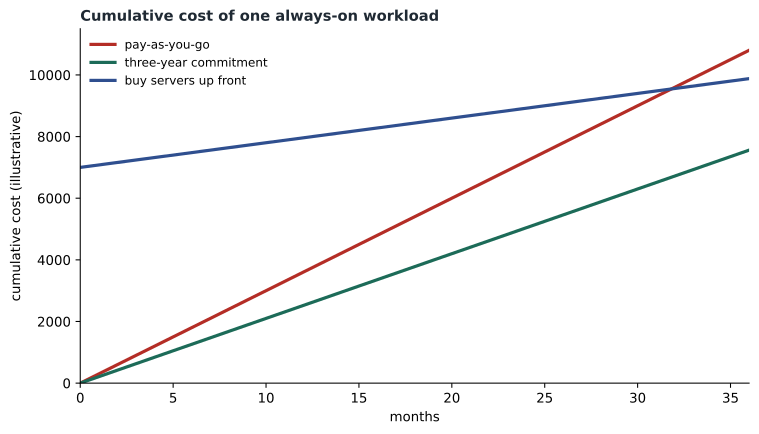
Reservations and savings plans trade flexibility for price. If Harrow & Finch reserves a database server size for three years and then redesigns StockLine to use a smaller one, the commitment still has to be paid. Reservations can sometimes be exchanged or cancelled under Microsoft's current policies, but the safest approach is to reserve only what is clearly steady. Renata's rule is to run a workload on pay-as-you-go for a few months, see what it really uses, and then commit.
Charges that surprise new customers
Most first cloud bills contain a few surprises, and Renata warns Dana about the common ones in advance. Data transfer is the first. Sending data into Azure from the internet is generally free, but data leaving Azure to the internet is charged by volume, and data moving between regions is charged too. A website that serves large images to millions of visitors pays for that outbound traffic, which is one reason content delivery networks and image compression matter.
Storage operations are the second. Storage is billed both for the amount of data kept and for the number of read and write operations, so an application that writes millions of tiny files can cost more than its data volume suggests. The third is resources left behind: disks, public IP addresses and snapshots that outlive the virtual machines they belonged to. Lesson 9 shows how this happens. The fourth is support. Azure's free basic support covers billing and subscription questions; technical support with guaranteed response times comes through paid support plans or a partner agreement.
Trying Azure without spending money
Microsoft offers ways to experiment before committing. The Azure free account gives new customers a credit to spend in the first 30 days, a selection of popular services free for 12 months within set limits, and a list of services that are always free up to a monthly amount. The exact credit and limits vary by country and change over time, so check Microsoft's current offer. Microsoft Learn, the free training site, also provides sandbox environments for many of its exercises, where learners can create resources in a temporary subscription that Microsoft pays for and deletes afterwards.
Theo uses both. His experiments for this course run in the hf-nonprod subscription under a strict monthly budget, while the exercises he practises for the exam run in Microsoft Learn sandboxes at no cost to the company. Spending limits on some free and trial subscriptions stop resources automatically when the credit runs out, which pay-as-you-go subscriptions do not do; there, budgets and alerts are the safeguard.
Worked problem
When does a commitment pay off?
A production VM runs all the time. At illustrative prices, pay-as-you-go costs 300 a month and a one-year reservation costs 2,520 for the year, paid up front. After how many months has the reservation saved money, if the VM would otherwise run the whole year?
Show solution
- The reservation costs 2,520 for 12 months, which is 210 a month on average.
- Pay-as-you-go would cost 300 × 12 = 3,600 for the year.
- The reservation is cheaper only if the VM runs long enough: 2,520 ÷ 300 = 8.4 months of pay-as-you-go use.
- If the VM runs more than about 8.4 months of the year, the reservation saves money; if the project ends sooner, it does not.
Answer: The break-even point is about 8.4 months. For a VM that truly runs all year, the reservation saves 1,080, or 30 parts in 100.
Total cost of ownership
Comparing an Azure bill with the price of a server misses most of the cost of running a server room. Total cost of ownership, or TCO, adds up everything an on-premises system really costs: the hardware, software licences, support contracts, power, cooling, floor space, network connections, backup media, insurance, and the time of the staff who run it. Many of these costs are hidden in other budgets. The server room's electricity, for example, is part of the head office power bill, and nobody at Harrow & Finch has ever separated it out.
Microsoft provides a TCO calculator that estimates on-premises costs and compares them with Azure, and a pricing calculator that estimates the cost of a planned set of Azure resources. MSAZ-102 covers both tools in detail. Both produce estimates, not quotes; their value is in forcing the comparison to include everything.
Economies of scale
Why can a cloud provider charge less than it costs a company to run its own servers? Part of the answer is economies of scale. Microsoft buys hardware, power and network capacity in quantities no single customer could, builds data centres designed for efficiency, and automates operations so that a small number of engineers can run very large numbers of servers. It also keeps its hardware busy, because the idle capacity of one customer is used by another. Some of those savings are passed on in prices that have, for many services, fallen over time.
Economies of scale also explain features that would be impractical for a single company: data copied automatically to buildings hundreds of kilometres apart, security teams watching for attacks around the clock, and hardware refreshed continuously without customers noticing.
Controlling consumption
Dana's worry is that consumption can grow without anyone noticing. She is right to worry. The same self-service that lets Theo create a virtual machine in minutes lets anyone with access create expensive resources. Cloud cost control depends on visibility and limits: budgets with alerts, tags that show which department owns each resource, policies that restrict which sizes can be created, and regular reviews of what is running. MSAZ-102 covers these tools in detail. For now, Renata promises Dana a monthly report by department and an alert whenever spending passes three quarters of the month's budget.
By the end of the lunch Dana is more comfortable. "So the bill is a result of choices," she says. "I want to know who's making them." Renata writes that on the whiteboard too.
Common mistakes
MistakeCloud spending is CapEx because it pays for computers.
InsteadConsumption-based cloud services are usually OpEx: an expense for what is used in the period, with no asset to depreciate.
MistakeReservations are always cheaper.
InsteadThey are cheaper only for resources that run long enough; for short or uncertain workloads pay-as-you-go can cost less.
MistakeComparing a server's price with an Azure bill shows the true saving.
InsteadA fair comparison uses total cost of ownership, including power, cooling, space, support and staff time.
Summary and key terms
- CapEx is up-front spending on assets that are depreciated; OpEx is spending on services as they are used.
- Cloud services follow a consumption-based model: pay for what you use, for as long as you use it.
- Consumption pricing makes cost a design decision and enables savings such as shutting down idle resources.
- Pricing models include pay-as-you-go, reservations, savings plans, spot pricing and Azure Hybrid Benefit.
- Commit only for steady workloads, after measuring real use.
- Total cost of ownership includes hidden on-premises costs such as power, space, support and staff time.
- Economies of scale let providers offer capabilities and prices individual companies cannot match.
- CapEx
- Capital expenditure: up-front spending on long-lived assets, depreciated over time.
- OpEx
- Operational expenditure: spending on services and products used in the current period.
- Consumption-based model
- Paying for cloud resources according to how much is used and for how long.
- Reservation
- A one- or three-year commitment to a specific resource in exchange for a lower rate.
- Savings plan
- A one- or three-year commitment to a fixed hourly compute spend across services.
- Spot pricing
- Discounted use of spare capacity that the provider can reclaim at short notice.
- Total cost of ownership
- The full cost of a system over its life, including hidden operating costs.
Practice problems
Work each problem on paper first, then reveal the answer to check.
Is a monthly Azure bill CapEx or OpEx?
Show answer
OpEx.
What do you pay for under the consumption-based model?
Show answer
The resources you use, for as long as you use them.
Which pricing model suits batch work that can be interrupted?
Show answer
Spot pricing.
What does a reservation trade for its lower rate?
Show answer
Flexibility: a one- or three-year commitment to a specific resource type and region.
What does Azure Hybrid Benefit let customers reuse?
Show answer
Existing eligible Windows Server and SQL Server licences with Software Assurance.
Name three costs often missed when comparing on-premises and cloud.
Show answer
Any three of: power, cooling, floor space, support contracts, staff time, backup media, insurance.
Lesson quiz · 5 questions
Score 60% or more to complete this lesson.
Create a free account to save your progress, take quizzes and earn a certificate.