
MSAZ-101 · Lesson 5 of 12 · 21 min
High availability, scalability and reliability
▶ Video coming soon A video version of this lesson is on the way.
Grace Oduya, the store operations director, has a story she tells at every planning meeting. In February 2024 a snowstorm knocked out power to the head office for nine hours, the generator failed to start, and StockLine went down with it. Twenty-two stores could still take card payments, but none could look up stock or process returns. "I don't care where the servers are," she tells the cloud lunch on October 6. "I care that it never happens again." Renata says Grace has just described the benefits the cloud is best at: high availability, scalability and reliability. The exam groups them with predictability, security and governance, and manageability.
High availability
Availability is the share of time a system is working and usable. High availability means designing a system so that it keeps working even when some of its parts fail. A single server in a single room is only as available as that server, its power, its network and the room. A highly available system removes single points of failure by running duplicate components, ideally in separate locations, so that one can take over when another fails.
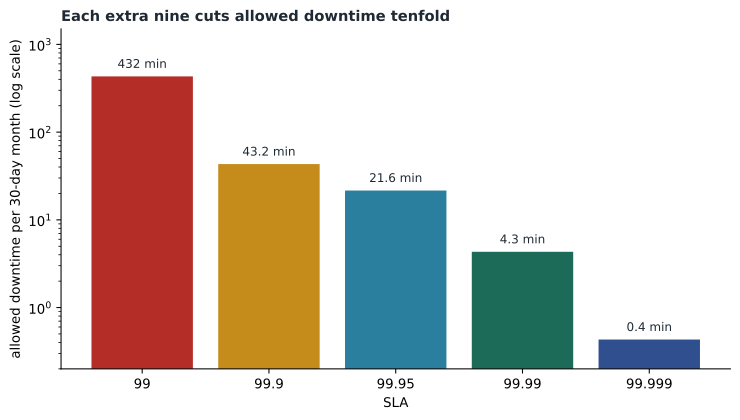
Cloud providers express availability promises through service-level agreements, or SLAs. An SLA is Microsoft's formal commitment to a level of uptime or connectivity for a service, together with the credit customers receive if it falls short. SLA figures are written as a share of 100: an SLA of 99.9 means the service should be available 99.9 minutes out of every 100. Each additional nine cuts the allowed downtime by a factor of ten.
# Allowed downtime per 30-day month and per year for common SLA levels
for sla in (99.0, 99.9, 99.95, 99.99, 99.999):
    down_share = (100 - sla) / 100
    month_min = down_share * 30 * 24 * 60
    year_hours = down_share * 365 * 24
print(f"SLA {sla}: about {month_min:.1f} minutes a month, {year_hours:.2f} hours a year")SLA 99.0: about 432.0 minutes a month, 87.60 hours a year SLA 99.9: about 43.2 minutes a month, 8.76 hours a year SLA 99.95: about 21.6 minutes a month, 4.38 hours a year SLA 99.99: about 4.3 minutes a month, 0.88 hours a year SLA 99.999: about 0.4 minutes a month, 0.09 hours a year
What this code does
Turns common service level agreement figures, such as 99.9 and 99.99 out of 100, into the downtime each allows. For each level it calculates the minutes per 30-day month and hours per year the service may be unavailable. The output shows how each extra nine in the figure shrinks the allowed downtime roughly tenfold.
The SLA depends on how a service is deployed, not just which service it is. Microsoft offers a higher SLA for virtual machines spread across availability zones, which are separate buildings within a region, than for virtual machines in a single location. Lesson 7 explains zones; lesson 9 explains availability sets. The exact figures are published in Microsoft's SLA documents and change over time, so check them rather than memorizing them. What the exam expects is the principle: redundancy raises availability, and SLAs reward designs that spread risk.
Reading an SLA
An SLA is a contract, not a guarantee that nothing will fail, and reading one closely shows its limits. Microsoft's SLAs define how uptime is measured, what counts as downtime, and what service credit the customer receives when the monthly uptime falls below the commitment, typically a share of that month's charge for the affected service, applied to a future bill. The customer usually has to claim the credit within a set period. A credit for one month of a database service is small compared with a day of lost sales, so the real value of an SLA is as a design signal: it tells the customer which configurations Microsoft is confident enough to back.
SLAs also exclude things. Downtime caused by the customer's own mistakes, by preview features, by factors outside Microsoft's control or by the customer's failure to follow the documented configuration is generally not covered. Free services and preview services usually have no SLA at all. When the Skylight team compares options, they read the current SLA for each service, note which configuration it requires, and record the figure in the design document with the date they checked it.
Availability in business terms
Grace does not think in nines. She thinks in questions such as "how long can the stores manage without StockLine?" and "how many sales can we afford to lose?" Two terms translate these questions into design targets. The recovery time objective, or RTO, is the longest acceptable time to restore a service after a failure. The recovery point objective, or RPO, is the largest acceptable amount of data loss, measured as time: an RPO of fifteen minutes means losing at most the last fifteen minutes of changes.
After discussion, Grace and Renata agree targets for StockLine: an RTO of one hour for the loss of a data centre, which zone redundancy meets with almost no interruption, and an RTO of one business day with an RPO of fifteen minutes for the loss of a whole region. Lower numbers are possible, but each step costs more. Setting the targets first, and then choosing the design, keeps the conversation about the business rather than about technology.
Worked problem
A composite SLA
StockLine will run on application servers with an SLA of 99.99 and a database with an SLA of 99.99. The application needs both to be up. What is the combined availability, and roughly how much downtime could it have in a year?
Show solution
- When a system needs several components at once, multiply their availabilities: 0.9999 × 0.9999 = 0.99980001.
- That is a combined availability of about 99.98.
- The downtime share is 1 − 0.9998 = 0.0002; over a year that is 0.0002 × 8,760 hours ≈ 1.75 hours.
- So chaining two components each rated at 99.99 gives a lower combined figure than either alone.
Answer: About 99.98, or roughly 1.75 hours of possible downtime a year. Every component a system depends on lowers its overall availability, which is why redundancy matters.
Scalability and elasticity
Scalability is the ability to handle more work by adding resources. There are two ways to do it. Scaling up, or vertical scaling, means giving a single resource more power: more processors, more memory or faster disks. Scaling out, or horizontal scaling, means adding more instances of a resource, such as more web servers behind a load balancer. Scaling down and scaling in are the reverse.
| Scale up / down (vertical) | Scale out / in (horizontal) | |
|---|---|---|
| What changes | Size of one resource | Number of resources |
| Example | Move the StockLine database to a larger VM size | Add two more web servers for the sale |
| Limits | The largest size available | Application must support several instances |
| Downtime | Often a short restart | Usually none |
Elasticity is scalability that happens automatically as demand changes. An elastic website watches its own load and adds servers when traffic rises, then removes them when it falls. Azure calls this autoscale, and services such as Virtual Machine Scale Sets and App Service support it. Marcus Feldt's team wants exactly this for harrowfinch.com, whose traffic in the two weeks before the spring garden sale is several times its winter average.
On premises, scaling is slow and lumpy: buying a server takes weeks and the capacity stays forever. In the cloud, scaling is fast and reversible, which is why lesson 4's consumption model and this lesson's elasticity work together. Paying only for what you use only saves money if what you use can shrink as well as grow.
Reliability
Reliability is the ability of a system to recover from failures and keep functioning. Availability measures how often a system is up; reliability describes how it behaves when things go wrong. A reliable design expects failure: hardware will break, networks will drop packets, and occasionally a whole data centre will lose power. Reliable systems detect failures and recover from them, ideally automatically, without losing data.
Azure helps through its global scale. Customers can place resources in several availability zones in one region, or in several regions, so that a failure in one place does not stop the whole system. Many Azure services are built to recover by themselves; storage keeps several copies of data, and managed databases fail over to a standby copy. Grace's snowstorm would not have stopped a StockLine design that ran in two zones, because each zone has its own power, cooling and network.
Reliability also depends on practice. A failover that has never been tested is a hope, not a plan. The Skylight team schedules a test every quarter in which one zone's StockLine servers are deliberately shut down during business hours, with the stores warned in advance, to prove that the others take over as designed.
Predictability
Predictability has two sides in the cloud. Performance predictability means a workload performs as expected, because capacity can be added when needed and resources such as load balancers spread work evenly. Cost predictability means an organization can forecast what it will spend. Azure's tools for cost predictability include the pricing calculator, budgets, and cost reports that track spending in real time. Predictability also comes from following proven designs; Microsoft publishes guidance called the Azure Well-Architected Framework, which describes good practice for reliability, security, cost, operations and performance.
Security and governance
The cloud also brings security and governance benefits. Microsoft invests in physical security, threat detection and specialist staff at a scale few organizations can match. Patches for the platform are applied by Microsoft, and for PaaS and SaaS services, for the operating system as well. Tools such as Microsoft Defender for Cloud, covered in lesson 12, assess the customer's own configuration. Governance tools such as Azure Policy, which MSAZ-102 covers, let organizations set rules about what can be deployed and enforce them automatically, for example requiring that every resource sits in an approved region. Built-in policy initiatives mapped to common regulatory standards help organizations meet compliance requirements from the start.
Manageability
Manageability has two meanings in AZ-900. Management of the cloud means managing the resources themselves: deploying them from templates, scaling them automatically, monitoring their health and receiving alerts when something needs attention. Management in the cloud means how you manage: through the Azure portal, the command line, programming interfaces or scripts, from anywhere with a network connection. Theo, who used to drive to head office at night to restart a stuck server, appreciates both.
az vmss create --resource-group rg-web-test --name vmss-web --image Ubuntu2204 --instance-count 2 --admin-username hfadmin --generate-ssh-keys
az monitor autoscale create --resource-group rg-web-test --resource vmss-web --resource-type Microsoft.Compute/virtualMachineScaleSets --name autoscale-web --min-count 2 --max-count 6 --count 2
Putting the benefits together
By the end of the lunch, Renata has summarized the benefits on the whiteboard in Grace's terms. StockLine will run in two availability zones so a building-level failure does not stop the stores (high availability and reliability). The website will grow for the garden sale and shrink afterwards (scalability and elasticity). Budgets and reports will show what each system costs (predictability). Policies will keep resources in approved regions and require encryption (security and governance). And Theo will be able to see and fix everything from a browser (manageability).
Grace asks the obvious question: will this cost more than one server room? Renata answers honestly. Running in two zones costs more than running in one, just as owning two generators would cost more than one. The cloud makes the choice cheap enough to be reasonable for StockLine, and easy to skip for test systems that can afford downtime.
Common mistakes
MistakeAn SLA of 99.99 means the service will never be down for more than 0.01 minutes.
InsteadIt allows about 4.3 minutes of downtime in a 30-day month; SLAs describe a commitment and the credits paid if it is missed.
MistakeScaling up and scaling out are the same.
InsteadScaling up enlarges one resource; scaling out adds more resources.
MistakeA system made of high-SLA parts has the same SLA as its best part.
InsteadComponents that must all work multiply their availabilities, so the combined figure is lower.
Summary and key terms
- Availability is the share of time a system works; high availability removes single points of failure.
- SLAs state Microsoft's uptime commitments; each extra nine cuts allowed downtime tenfold.
- Dependent components multiply their availabilities into a lower composite figure.
- Scaling up changes the size of a resource; scaling out changes the number of resources; elasticity does it automatically.
- Reliability is the ability to recover from failure; zones and regions let workloads survive local failures.
- Predictability covers both performance and cost, supported by tools and the Well-Architected Framework.
- Security, governance and manageability benefits come from Microsoft's scale and Azure's tools.
- High availability
- Designing a system to keep working when some of its components fail.
- SLA
- A service-level agreement stating the uptime a provider commits to and the credits if it falls short.
- Composite SLA
- The combined availability of components that must all work, found by multiplying their figures.
- Scale up
- Increase the size or power of a single resource; also called vertical scaling.
- Scale out
- Add more instances of a resource; also called horizontal scaling.
- Elasticity
- Automatically adjusting resources as demand rises and falls.
- Reliability
- The ability of a system to recover from failures and continue to function.
Practice problems
Work each problem on paper first, then reveal the answer to check.
How much downtime per 30-day month does an SLA of 99.9 allow?
Show answer
About 43 minutes.
What is the difference between scaling up and scaling out?
Show answer
Scaling up makes one resource larger; scaling out adds more resources.
What does Azure call automatic scaling based on demand?
Show answer
Autoscale.
Two components each rated 99.9 must both work. Is the combined figure higher or lower than 99.9?
Show answer
Lower, about 99.8.
Name the two kinds of predictability.
Show answer
Performance predictability and cost predictability.
What does 'management in the cloud' refer to?
Show answer
How resources are managed: through the portal, command line, APIs or scripts from anywhere.
Lesson quiz · 5 questions
Score 60% or more to complete this lesson.
Create a free account to save your progress, take quizzes and earn a certificate.