
JS-220 · Lesson 8 of 12 · 31 min
Routing
▶ Video coming soon A video version of this lesson is on the way.
On Thursday, February 3, the portal has three screens, the shift list, a shift's details and My shifts, but only one address. Switching between them changes state, so the browser's Back button leaves the portal altogether, a refresh always returns to the list, and Lucy cannot email a volunteer a link to a particular shift. "Every screen a person might want to return to, share or bookmark should have its own address," Gareth says. "In a single-page application that is the router's job."
This lesson explains how client-side routing works in a single-page application: how the browser's History API changes the address without loading a page, and how a router chooses which components to show for each address. It then builds the portal's routes with React Router, covering route parameters, nested routes and layouts, links, navigation from code, search parameters for filters, a not-found page and loading data for a route. It ends with what the server must do for client-side routes to work, and how to keep route changes accessible.
Addresses in a single-page application
In a multi-page site, each address is a file or a page the server produces, and following a link loads a new page. In a single-page application there is only one HTML page, so something else must connect addresses to screens. The browser provides the tools in its History API. history.pushState changes the address in the address bar and adds an entry to the session history without loading anything. The popstate event fires when the user moves through that history with Back or Forward. A router is a library that uses these tools: it intercepts clicks on links, calls pushState, and renders the components that belong to the new address, and it listens for popstate to do the same when the user goes back.
The example simulates the session history as a list of entries with a current position, which is how the browser keeps it. It shows the difference between push, which adds an entry, and replace, which swaps the current one, and what Back and Forward do.
const history = { entries: ['/volunteer/shifts'], index: 0 };
const where = () => history.entries[history.index];

function push(url) {
  history.entries = history.entries.slice(0, history.index + 1);   // forward entries are dropped
  history.entries.push(url);
  history.index++;
}
function replace(url) { history.entries[history.index] = url; }
function go(delta) { history.index = Math.min(Math.max(history.index + delta, 0), history.entries.length - 1); }

const step = (label) => console.log(label.padEnd(32), where(), `(${history.index + 1} of ${history.entries.length})`);
step('start');
push('/volunteer/shifts/s-101');                step('open a shift');
go(-1);                                          step('Back');
push('/volunteer/my-shifts');                    step('open My shifts');
go(+1);                                          step('Forward (nothing ahead)');
replace('/volunteer/my-shifts?view=past');       step('switch to past shifts (replace)');
go(-1); step('Back');start /volunteer/shifts (1 of 1) open a shift /volunteer/shifts/s-101 (2 of 2) Back /volunteer/shifts (1 of 2) open My shifts /volunteer/my-shifts (2 of 2) Forward (nothing ahead) /volunteer/my-shifts (2 of 2) switch to past shifts (replace) /volunteer/my-shifts?view=past (2 of 2) Back /volunteer/shifts (1 of 2)
What this code does
history keeps a list of entries and the position of the current one, as the browser does for each tab. push drops anything ahead of the current position before adding the new address, which is why opening My shifts after going back removes the shift page from the forward history. replace changes the current entry without adding one, so Back skips over the past-shifts view, which suits small changes that should not fill the history.
Routers use push for normal navigation and replace for changes that should not create their own history entry, such as correcting an address or updating filters as the volunteer types.
React Router
React Router is the most widely used router for React, maintained by the Remix team. Version 8, released in June 2026, is the current major version; it needs React 19.2.7 or later and is published only as ES modules. It is installed as one package, react-router. The older react-router-dom package was merged into it in version 7 and removed in version 8, so older tutorials that import from react-router-dom need a one-word change.
React Router can be used in three ways, called modes. In declarative mode, routes are written as JSX elements inside a BrowserRouter, and the router only matches addresses to components. In data mode, routes are written as objects passed to createBrowserRouter, and each route can also load its data and handle form submissions. In framework mode, a Vite plugin adds file-based routes, server rendering and code splitting, turning React Router into a full framework. The portal uses data mode: it gets data loading and error handling per route, but stays a set of static files that Theo's server can host.
| Mode | Set up with | Adds | Suits |
|---|---|---|---|
| Declarative | <BrowserRouter> and <Routes> | Matching, links, navigation, parameters | Small apps, or adding routing to an existing app |
| Data | createBrowserRouter and <RouterProvider> | Loaders, actions, pending states, error elements per route | Single-page applications with their own API, like the portal |
| Framework | The React Router Vite plugin | File-based routes, server rendering, code splitting, type safety | Full-stack React applications |
Defining the routes
Each route has a path and an element or component to show. Paths can contain dynamic segments, written with a colon, such as shifts/:shiftId, which match any value in that position and make it available as a route parameter. Routes can be nested: a parent route with a layout component and child routes that fill part of it. A route with index: true is the default child, shown when the address matches the parent exactly, and a route with path "*" matches anything not matched elsewhere, which is how a not-found page is made.
import { createBrowserRouter, RouterProvider } from 'react-router';
import { AppLayout } from './AppLayout.jsx';
import { HomePage } from './pages/HomePage.jsx';
import { ShiftsPage } from './pages/ShiftsPage.jsx';
import { ShiftDetailsPage, shiftLoader } from './pages/ShiftDetailsPage.jsx';
import { MyShiftsPage } from './pages/MyShiftsPage.jsx';
import { NotFoundPage } from './pages/NotFoundPage.jsx';
import { RouteError } from './pages/RouteError.jsx';

const router = createBrowserRouter(
  [
    {
      path: '/',
      element: <AppLayout />,
      errorElement: <RouteError />,
      children: [
        { index: true, element: <HomePage /> },
        { path: 'shifts', element: <ShiftsPage /> },
        { path: 'shifts/:shiftId', element: <ShiftDetailsPage />, loader: shiftLoader },
        { path: 'my-shifts', element: <MyShiftsPage /> },
        { path: '*', element: <NotFoundPage /> },
      ],
    },
  ],
  { basename: '/volunteer' },
);

export function App() {
  return <RouterProvider router={router} />;
}
What this code does
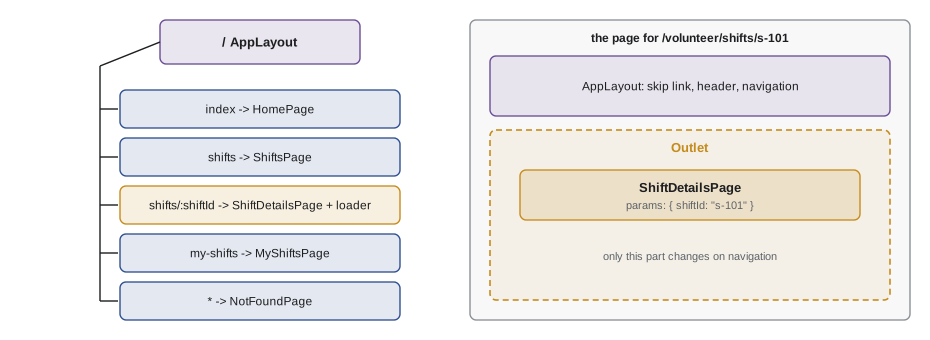
createBrowserRouter takes an array of route objects, here one parent route whose AppLayout appears on every screen and five children for the individual screens. The shift details route has a dynamic segment, :shiftId, and a loader that fetches its data. basename tells the router that the portal lives under /volunteer on Theo's server, so the route shifts matches the address /volunteer/shifts.
How a path is matched
Matching a path against a pattern is simple at heart: split both into segments, compare them one by one, and collect the values of the dynamic segments. Values arrive URL-encoded, so characters such as spaces come in encoded form and must be decoded with decodeURIComponent. The example implements a small matcher.
function matchPath(pattern, pathname) {
  const p = pattern.split('/').filter(Boolean);
  const u = pathname.split('/').filter(Boolean);
  if (p.at(-1) === '*') {
    if (u.length < p.length - 1) return null;
  } else if (p.length !== u.length) {
    return null;
  }
  const params = {};
  for (let i = 0; i < p.length; i++) {
    if (p[i] === '*') { params['*'] = u.slice(i).map(decodeURIComponent).join('/'); break; }
    if (p[i].startsWith(':')) params[p[i].slice(1)] = decodeURIComponent(u[i]);
    else if (p[i] !== u[i]) return null;
  }
  return params;
}

const tests = [
  ['shifts/:shiftId', '/shifts/s-101'],
  ['shifts/:shiftId', '/shifts/s-101/edit'],
  ['shifts/:shiftId', '/shifts/kitchen%20sat'],
  ['my-shifts', '/my-shifts/'],
  ['areas/:area/shifts/:shiftId', '/areas/garden/shifts/s-104'],
  ['*', '/no/such/page'],
];
for (const [pattern, path] of tests) console.log(pattern.padEnd(28), path.padEnd(28), JSON.stringify(matchPath(pattern, path)));shifts/:shiftId /shifts/s-101 {"shiftId":"s-101"}
shifts/:shiftId /shifts/s-101/edit null
shifts/:shiftId /shifts/kitchen%20sat {"shiftId":"kitchen sat"}
my-shifts /my-shifts/ {}
areas/:area/shifts/:shiftId /areas/garden/shifts/s-104 {"area":"garden","shiftId":"s-104"}
* /no/such/page {"*":"no/such/page"}What this code does
matchPath splits the pattern and the path into segments, ignoring empty ones so that a trailing slash does not matter. A segment starting with a colon captures the path's value under that name, a plain segment must match exactly, and a star at the end captures the rest of the path. It returns the parameters on success and null on failure, which is also what React Router's own matchPath function returns.
When several routes could match the same address, React Router does not use the order they were written in. It ranks them: a route with more static segments beats one with dynamic segments, and dynamic segments beat a star. So shifts/new would win over shifts/:shiftId for the address /shifts/new, wherever each is written. The example ranks candidates the same way.
function score(pattern) {
  return pattern.split('/').filter(Boolean)
    .reduce((total, seg) => total + (seg === '*' ? 1 : seg.startsWith(':') ? 3 : 10), 0);
}
function matches(pattern, path) {
  const p = pattern.split('/').filter(Boolean), u = path.split('/').filter(Boolean);
  if (p.at(-1) === '*') return p.slice(0, -1).every((s, i) => s.startsWith(':') || s === u[i]) && u.length >= p.length - 1;
  return p.length === u.length && p.every((s, i) => s.startsWith(':') || s === u[i]);
}
const routes = ['*', 'shifts/:shiftId', 'shifts/new', 'shifts', ':section/:id'];

for (const path of ['/shifts/new', '/shifts/s-101', '/shifts', '/garden/beds', '/a/b/c']) {
  const ranked = routes.filter((r) => matches(r, path)).toSorted((a, b) => score(b) - score(a));
  console.log(path.padEnd(15), '->', ranked[0], `(candidates: ${ranked.join(', ')})`);
}/shifts/new -> shifts/new (candidates: shifts/new, shifts/:shiftId, :section/:id, *) /shifts/s-101 -> shifts/:shiftId (candidates: shifts/:shiftId, :section/:id, *) /shifts -> shifts (candidates: shifts, *) /garden/beds -> :section/:id (candidates: :section/:id, *) /a/b/c -> * (candidates: *)
What this code does
score gives each segment points, ten for a static segment, three for a dynamic one and one for a star, so more specific patterns score higher. For each address, the example keeps the routes that match and sorts them by score, and the winner is the most specific. /shifts/new is matched by four patterns but goes to shifts/new, and an address no specific route matches falls through to the star.
Layouts and the Outlet
A parent route's component is a layout: the parts of the page that stay the same, such as the header and navigation, with a place for the child route. That place is marked with the Outlet component. When the address changes from /volunteer/shifts to /volunteer/my-shifts, React Router keeps AppLayout mounted and only swaps what is in its Outlet, so the header does not flash and its state is kept.
import { NavLink, Outlet } from 'react-router';
import { ConnectionNotice } from './components/ConnectionNotice.jsx';

export function AppLayout() {
  return (
    <>
      <a className="skip-link" href="#main">Skip to content</a>
      <header className="site-header">
        <p className="portal-name">Riverside Community Food Hub volunteer portal</p>
        <nav aria-label="Portal">
          <ul>
            <li><NavLink to="/shifts" end>Open shifts</NavLink></li>
            <li><NavLink to="/my-shifts">My shifts</NavLink></li>
          </ul>
        </nav>
      </header>
      <ConnectionNotice />
      <main id="main" tabIndex={-1}>
        <Outlet />
      </main>
    </>
  );
}
What this code does
AppLayout draws the skip link, the header with the portal's navigation and the connection notice from Lesson 5, then the main element with an Outlet inside it. Whatever child route matches the address is rendered where the Outlet is. NavLink is a link that knows whether it is active; end makes Open shifts active only for /shifts itself, not for a shift's own page.
The nesting can go as deep as the screens need. The example shows how a router builds the chain of components for an address from a tree of routes, outermost layout first.
const routes = [
  { path: '', component: 'AppLayout', children: [
    { index: true, component: 'HomePage' },
    { path: 'shifts', component: 'ShiftsLayout', children: [
      { index: true, component: 'ShiftList' },
      { path: ':shiftId', component: 'ShiftDetails' },
    ] },
    { path: 'my-shifts', component: 'MyShifts' },
    { path: '*', component: 'NotFound' },
  ] },
];

function matchChain(routes, segments) {
  for (const route of routes) {
    if (route.index) { if (segments.length === 0) return [{ component: route.component }]; continue; }
    if (route.path === '*') return [{ component: route.component, params: { '*': segments.join('/') } }];
    const own = route.path.split('/').filter(Boolean);
    if (own.length > segments.length) continue;
    const params = {};
    if (!own.every((s, i) => (s.startsWith(':') ? (params[s.slice(1)] = segments[i], true) : s === segments[i]))) continue;
    const rest = segments.slice(own.length);
    if (!route.children) { if (rest.length === 0) return [{ component: route.component, params }]; continue; }
    const inner = matchChain(route.children, rest);
    if (inner) return [{ component: route.component, params }, ...inner];
  }
  return null;
}

for (const path of ['/', '/shifts', '/shifts/s-101', '/my-shifts', '/shifts/s-101/extra']) {
  const chain = matchChain(routes, path.split('/').filter(Boolean));
  console.log(path.padEnd(20), chain.map((c) => c.component + (c.params && Object.keys(c.params).length ? JSON.stringify(c.params) : '')).join(' > '));
}/ AppLayout > HomePage
/shifts AppLayout > ShiftsLayout > ShiftList
/shifts/s-101 AppLayout > ShiftsLayout > ShiftDetails{"shiftId":"s-101"}
/my-shifts AppLayout > MyShifts
/shifts/s-101/extra AppLayout > NotFound{"*":"shifts/s-101/extra"}What this code does
matchChain walks the route tree: a route whose own segments match the start of the address passes the remaining segments to its children, and an index route matches when nothing is left. The result is the chain of components from the outermost layout to the screen, which is what React Router renders, each one in the Outlet of the one before. The last address does not fit any specific route, so the star route inside AppLayout catches it and the not-found page appears inside the normal layout.
Links and navigation
Links between screens use the Link component, not a plain a element. Link renders a real a element with an href, so it works with the keyboard, can be opened in a new tab and is announced as a link, but when it is clicked normally it navigates with the History API instead of loading the page. NavLink does the same and adds aria-current="page" and an active class when its address is the current one, which the navigation uses to show where the volunteer is.
To navigate from code, for example after a successful sign-up, use the useNavigate hook, which returns a navigate function: navigate('/my-shifts') pushes a new entry, and navigate('/my-shifts', { replace: true }) replaces the current one. Inside a component for a route with dynamic segments, useParams returns the parameters, such as { shiftId: 's-101' }.
import { Link, useNavigate, useParams } from 'react-router';

export function ShiftDetailsHeader({ shift }) {
  const { shiftId } = useParams();
  const navigate = useNavigate();
  return (
    <header>
      <p><Link to="/shifts">Back to open shifts</Link></p>
      <h1>{shift.area}</h1>
      <p>Shift {shiftId}: {shift.day}, {shift.start} to {shift.end}</p>
      <button type="button" onClick={() => navigate(`/shifts/${shiftId}/sign-up`)}>Sign up for this shift</button>
    </header>
  );
}
What this code does
useParams reads the shiftId parameter from the current address, which the details route defined as :shiftId. The Link back to the list is a real link that the router intercepts. The button uses navigate because it performs an action rather than being a place the volunteer might open in a new tab.
A good rule for choosing: if something takes the volunteer to a place, use a link; if it does something, use a button. Links styled as buttons and buttons that behave like links confuse keyboard and screen reader users, because the two are announced and operated differently.
Filters in the address
Lucy wants to send volunteers links such as "all Saturday kitchen shifts". That means the filters belong in the address, as search parameters after the question mark: /volunteer/shifts?area=kitchen&day=saturday. Search parameters are state that the volunteer can bookmark, share and reach with Back. React Router's useSearchParams hook returns the current parameters, as a URLSearchParams object, and a function to set new ones. The filter bar reads its values from them instead of from useState.
const DEFAULTS = { area: 'all', day: 'any', q: '' };

function readFilters(search) {
  const params = new URLSearchParams(search);
  return {
    area: params.get('area') ?? DEFAULTS.area,
    day: params.get('day') ?? DEFAULTS.day,
    q: params.get('q') ?? DEFAULTS.q,
  };
}

function writeFilters(filters) {
  const params = new URLSearchParams();
  for (const [key, value] of Object.entries(filters)) {
    if (value !== DEFAULTS[key]) params.set(key, value);   // leave defaults out of the address
  }
  const text = params.toString();
  return text ? `?${text}` : '';
}

console.log(readFilters('?area=kitchen&day=saturday'));
console.log(readFilters(''));
console.log(writeFilters({ area: 'kitchen', day: 'saturday', q: '' }));
console.log(writeFilters({ area: 'all', day: 'any', q: 'soup & bread' }));
console.log(writeFilters(DEFAULTS) === '' ? '(no search part)' : 'unexpected');
console.log(readFilters(writeFilters({ area: 'garden', day: 'any', q: 'beds 3/4' })));{ area: "kitchen", day: "saturday", q: "" }
{ area: "all", day: "any", q: "" }
?area=kitchen&day=saturday
?q=soup+%26+bread
(no search part)
{ area: "garden", day: "any", q: "beds 3/4" }What this code does
readFilters parses the search part of the address with URLSearchParams and falls back to a default for each missing filter. writeFilters does the reverse and leaves out filters that have their default value, so the plain list has a clean address. URLSearchParams also encodes characters such as & and / in the search text, and the last line shows that reading what was written gives back the same filters.
In the component, the filter bar calls setSearchParams(...) with the new parameters. Because the search box changes on every key press, it passes { replace: true }, so that typing "kitchen" does not leave seven entries in the history.
Loading data for a route
In data mode, a route can have a loader: a function React Router calls before it renders the route, with the route's parameters. Whatever the loader returns is available in the component through the useLoaderData hook. Loaders start fetching as soon as navigation begins, rather than after the component has rendered, and React Router waits for them, shows the previous screen meanwhile and exposes a pending state that the layout can use to show a progress bar.
import { useLoaderData } from 'react-router';

export async function shiftLoader({ params, request }) {
  const res = await fetch(`/api/v1/shifts/${encodeURIComponent(params.shiftId)}`, { signal: request.signal });
  if (res.status === 404) throw new Response('Shift not found', { status: 404 });
  if (!res.ok) throw new Error(`Could not load the shift (HTTP ${res.status})`);
  return res.json();
}

export function ShiftDetailsPage() {
  const shift = useLoaderData();
  return (
    <article>
      <h1>{shift.area}</h1>
      <p>{shift.day}, {shift.start} to {shift.end}</p>
    </article>
  );
}
What this code does
shiftLoader receives the route's params and the navigation's request, whose signal cancels the fetch if the volunteer navigates away before it finishes. A missing shift is thrown as a 404 Response and other failures as errors, and React Router then shows the route's errorElement instead of the page. ShiftDetailsPage simply reads the loaded shift with useLoaderData, with no loading or error code of its own.
Lesson 9 moves the portal's data fetching into a caching library and keeps the loader only to start the request early. The errorElement on the root route, RouteError, uses the useRouteError hook to show a friendly page for a 404 or a failed request, inside the layout, with a link back to the list.
The server's part
Client-side routing has a consequence that surprises many developers on their first deployment. Navigating inside the portal works, but refreshing /volunteer/shifts/s-101, or opening it from Lucy's email, sends a request for that address to the server, and there is no file called shifts/s-101 there. The server must be configured to answer every address under /volunteer/ that is not a real file with the portal's index.html. React Router then reads the address and renders the right screen. Theo adds this fallback rule to his server configuration, and Vite is told about the base path with base: '/volunteer/' in vite.config.js so that the built files are loaded from the right place.
Accessible route changes
When a whole page loads, a screen reader announces the new title and starts reading from the top. A client-side route change does none of that by default: the content changes silently, and keyboard focus stays on the link that was clicked, which may no longer exist. The portal does three things on every navigation. It sets a meaningful document title, such as "Warehouse, Saturday | Volunteer portal". It moves focus to the new screen's main heading, or to the main element, so that screen reader users hear where they are and keyboard users continue from the top of the content. And it restores the scroll position when going back, which React Router's ScrollRestoration component handles in data mode.
Common mistakes
MistakePlain a elements are fine for links inside the app.
InsteadThey reload the whole page. Use Link or NavLink, which render real links but navigate with the History API.
MistakeRoutes are matched in the order they are written.
InsteadReact Router ranks routes by how specific they are; static segments beat dynamic ones, which beat a star.
MistakeFilters should be kept in useState.
InsteadFilters a person might bookmark or share belong in search parameters, read with useSearchParams.
MistakeIf navigation works in development, the deployed site will work too.
InsteadThe server must answer every client-side route with index.html, or refreshing and shared links give a 404.
MistakeA route change needs no accessibility work.
InsteadUpdate the title, move focus to the new content and restore scroll, because none of it happens automatically.
Summary and key terms
- A single-page application changes screens without loading pages, so a router connects addresses to screens using the History API: pushState adds an entry, replaceState swaps the current one and popstate reports Back and Forward.
- React Router 8 is installed as react-router and has declarative, data and framework modes; the portal uses data mode with createBrowserRouter and RouterProvider.
- Routes have paths, elements, children, index routes and a star route for not-found pages; dynamic segments such as :shiftId become params read with useParams.
- Routes are ranked by specificity.
- A layout route renders an Outlet where its matched child appears.
- Link and NavLink render real links that navigate without reloading; NavLink marks the current page. useNavigate navigates from code; use links for places and buttons for actions.
- Filters that should be shareable belong in search parameters, read and set with useSearchParams.
- Loaders fetch a route's data before it renders, read with useLoaderData, with errorElement for failures.
- The server must answer every client route with index.html, and route changes must update the title, move focus and restore scroll.
- client-side routing
- Changing screens and addresses in the browser with JavaScript instead of loading a new page from the server.
- History API
- The browser features pushState, replaceState and the popstate event, used to change the address and react to Back and Forward.
- route
- A rule connecting a path pattern to the component shown for it.
- dynamic segment
- A part of a route path written with a colon, such as :shiftId, that matches any value and makes it a parameter.
- layout route
- A parent route whose component shows shared parts of the page and an Outlet for its child routes.
- Outlet
- The component a layout route renders where its matched child route should appear.
- search parameters
- The key and value pairs after the question mark in an address, used for state such as filters.
- loader
- A function a data-mode route uses to load its data before it renders.
Practice problems
Work each problem on paper first, then reveal the answer to check.
What does history.pushState do?
Show answer
Changes the address and adds an entry to the session history without loading a page.
Which component shows the matched child route inside a layout?
Show answer
Outlet.
For the address /shifts/new, which wins: shifts/:shiftId or shifts/new?
Show answer
shifts/new, because a static segment is more specific than a dynamic one.
Why should the search box update the search parameters with replace?
Show answer
So that each key press does not add an entry to the history.
Why does refreshing a client-side route give a 404 on a new server?
Show answer
The server has no file at that address and must be told to answer with index.html.
Try it yourself
Match a route pattern
Complete matchRoute(pattern, pathname). Split both on / and ignore empty segments. Return null if the numbers of segments differ or a static segment does not match. Otherwise return an object of the dynamic segments' values, decoded with decodeURIComponent.
This version does not need to support *.
function matchRoute(pattern, pathname) {
  return null;
}

console.log(JSON.stringify(matchRoute('/shifts/:shiftId', '/shifts/s-104')));
console.log(JSON.stringify(matchRoute('/shifts/:shiftId', '/shifts/s-104/')));
console.log(JSON.stringify(matchRoute('/shifts/:shiftId', '/shift/s-104')));
console.log(JSON.stringify(matchRoute('/areas/:area/days/:day', '/areas/lunch%20counter/days/friday')));
console.log(JSON.stringify(matchRoute('/my-shifts', '/my-shifts')));
console.log(JSON.stringify(matchRoute('/my-shifts', '/my-shifts/past')));
Try it yourself
Toggle a filter in the address
The area filter allows several areas, stored in the address as repeated parameters: ?area=kitchen&area=garden. Complete toggleArea(search, area) so that it returns a new search string with area added if it was not there, or removed if it was. Keep other parameters, and always return the areas sorted alphabetically, after any other parameters.
Return an empty string when nothing is left, otherwise the string with a leading ?.
function toggleArea(search, area) {
  return search;
}

console.log(toggleArea('', 'kitchen'));
console.log(toggleArea('?area=kitchen', 'garden'));
console.log(toggleArea('?area=garden&area=kitchen', 'kitchen'));
console.log(toggleArea('?day=saturday&area=garden', 'garden'));
console.log(toggleArea('?area=garden', 'garden') === '' ? '(empty)' : 'not empty');
console.log(toggleArea('?area=warehouse&day=friday', 'lunch-counter'));
Lesson quiz · 5 questions
Score 60% or more to complete this lesson.
Create a free account to save your progress, take quizzes and earn a certificate.