
JS-220 · Lesson 5 of 12 · 31 min
Hooks: useState and useEffect
▶ Video coming soon A video version of this lesson is on the way.
On Tuesday, January 25, Mira adds two small features Lucy asked for. The browser tab should say how many shifts the volunteer has booked, such as "(2) My shifts | Volunteer portal", so that it is visible among other tabs. And if the volunteer's internet connection drops, which happens often at the youth garden, the page should say so and stop offering the Sign up button. Neither feature is about rendering. Both are about keeping the page in step with something outside React: the browser's title and the network. "That is what effects are for," Gareth says. "And before we write one, you need to know how hooks work underneath, because the rules make sense once you do."
This lesson explains how React keeps track of hooks and why the rules of hooks exist. It then introduces useEffect, the hook for synchronizing a component with systems outside React: its dependency list, its cleanup function, why it runs twice in development and how to fetch data with it without race conditions. It also covers when an effect is the wrong tool, the useRef hook for values that should not cause a render, writing your own custom hooks, and how the React Compiler changes the old advice about memoization.
The built-in hooks
React provides about twenty built-in hooks. This course uses the ones in the table. They all follow the same naming rule, use followed by a description, and the same rules for where they can be called.
| Hook | What it gives a component | Lesson |
|---|---|---|
| useState | A remembered value and a setter that triggers a render | 4 |
| useEffect | A way to synchronize with systems outside React after rendering | 5 |
| useRef | A remembered value that does not trigger a render, or a reference to a page element | 5 |
| useId | A unique id that is stable between renders, for linking labels and inputs | 7 |
| useActionState, useFormStatus, useOptimistic | State for form actions, a pending status and optimistic updates | 7 |
| useReducer | State changed through a reducer function and actions | 10 |
| useContext and use | Reading a value provided higher in the tree; use also reads promises | 9, 10 |
| useSyncExternalStore | Subscribing to a store outside React | 10 |
| useMemo, useCallback | Remembered results and functions, mostly added automatically by the React Compiler | 5 |
| useEffectEvent | A function an effect can call that always sees the latest props and state | 5 |
How React keeps track of hooks
A component can call useState several times, and each call gets its own value. But useState is given no name for the value, only an initial value. How does React know that the first call means expanded and the second means query? The answer is order. React keeps a list of stored values for each component instance. During a render it counts the hook calls: the first call gets the first stored value, the second gets the second, and so on. As long as every render calls the hooks in the same order, each call gets its own value back.
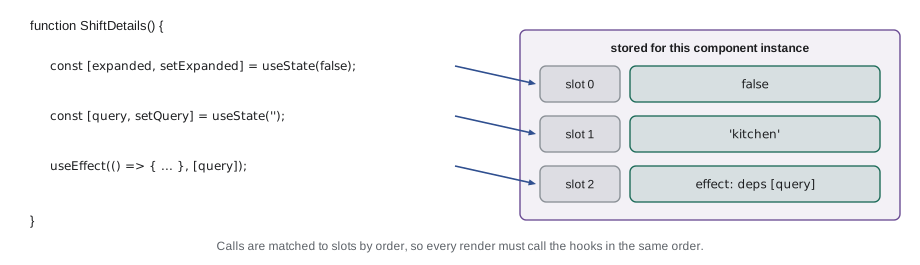
The example builds a working miniature of this. Each component instance has an array of slots and an index that is reset at the start of each render. useState reads the slot at the current index and moves the index on.
function createRuntime(component) {
  const slots = [];
  let index = 0;
  function useState(initial) {
    const i = index++;
    if (!(i in slots)) slots[i] = initial;
    const setState = (next) => { slots[i] = typeof next === 'function' ? next(slots[i]) : next; render(); };
    return [slots[i], setState];
  }
  let output;
  function render() { index = 0; output = component({ useState }); console.log(output.text); }
  render();
  return () => output;
}

function SearchPanel({ useState }) {
  const [query, setQuery] = useState('');
  const [expanded, setExpanded] = useState(false);
  return {
    text: `query="${query}" expanded=${expanded}`,
    type: (q) => setQuery(q),
    toggle: () => setExpanded((e) => !e),
  };
}

const current = createRuntime(SearchPanel);
current().type('kitchen');
current().toggle();
current().type('garden');query="" expanded=false query="kitchen" expanded=false query="kitchen" expanded=true query="garden" expanded=true
What this code does
createRuntime keeps an array of slots for one component instance and resets index to 0 before each render, so the first useState call always reads slot 0 and the second slot 1. Each setter writes to its own slot and renders again, which is why query and expanded keep their values independently. React's real implementation stores more and schedules renders, but the matching by order works the same way.
The rules of hooks
Matching by order gives two rules, which React's linter plugin, eslint-plugin-react-hooks, checks automatically. Call hooks only at the top level of a component or custom hook: not inside a condition, a loop, a nested function or after an early return. Call hooks only from React functions: components and custom hooks, not ordinary helper functions or class methods. If a hook were called only sometimes, the order would shift between renders and calls would receive each other's values.
The example uses the same runtime with a component that breaks the first rule. It calls useState for a note only when the shift is in the kitchen. When the condition changes, the slots no longer line up, and the next hook receives the wrong value.
function createRuntime(component, props) {
  const slots = [];
  let index = 0;
  const useState = (initial) => { const i = index++; if (!(i in slots)) slots[i] = initial; return [slots[i]]; };
  return (p) => { index = 0; return component({ ...props, ...p }, useState); };
}

function ShiftNote({ area }, useState) {
  if (area === 'kitchen') {
    const [note] = useState('Bring a hair net');   // breaks the rule: called only sometimes
    console.log('  note:', note);
  }
  const [volunteers] = useState(3);
  return `${area}: ${volunteers} volunteers`;
}

const render = createRuntime(ShiftNote, {});
console.log('render 1 ->', render({ area: 'kitchen' }));
console.log('render 2 ->', render({ area: 'warehouse' }));note: Bring a hair net render 1 -> kitchen: 3 volunteers render 2 -> warehouse: Bring a hair net volunteers
What this code does
On the first render the area is the kitchen, so the note takes slot 0 and volunteers takes slot 1. On the second render the condition is false, so volunteers is now the first call and reads slot 0, which holds the note's text. The output shows the volunteer count replaced by a sentence about hair nets, which is the kind of confusing bug the rules of hooks prevent.
The fix is always to call the hook unconditionally and put the condition inside it or after it: call useState for the note every time, and decide whether to show the note in the JSX.
Effects: synchronizing with the outside world
Rendering must be pure: it calculates elements from props and state and changes nothing. But some components must change things outside React. The tab title must be set with document.title. The connection status must be watched with the browser's online and offline events. A chat widget must connect to a server, and a timer must be started and stopped. These are side effects, and the hook for them is useEffect.
useEffect takes a function, the effect, and React runs it after the render has been committed to the page. The effect can optionally return a cleanup function, which React runs before the effect runs again and when the component is removed. The second argument is a dependency array: the values the effect uses from props and state. React runs the effect again only when one of them has changed since the last render, compared with Object.is.
import { useEffect } from 'react';

export function MyShiftsTitle({ bookedCount }) {
  useEffect(() => {
    const previous = document.title;
    document.title = bookedCount > 0 ? `(${bookedCount}) My shifts | Volunteer portal` : 'My shifts | Volunteer portal';
    return () => {
      document.title = previous;
    };
  }, [bookedCount]);

  return null;
}
What this code does
The effect sets the tab title from bookedCount after React has updated the page, and returns a cleanup function that puts the previous title back. The dependency array lists bookedCount, the only value from props or state the effect reads, so React runs the effect again only when the count changes. The component renders nothing; its only job is the effect.
The three forms of the dependency array behave differently, and choosing the wrong one is the most common effect bug.
| Second argument | When the effect runs | Typical use |
|---|---|---|
| [bookedCount] | After the first render, then after any render in which a listed value changed | Almost every effect: list every value from props and state the effect uses |
| [] (empty) | Once, after the first render; cleanup when the component is removed | Subscriptions and connections that do not depend on props or state |
| left out | After every render | Rarely right; usually a sign that dependencies are missing |
The linter rule react-hooks/exhaustive-deps checks that every value an effect uses is listed. Leaving one out to stop an effect running is a bug: the effect then keeps using the value from an old render, a problem known as a stale closure. The right fix is usually to change the effect's code, not its list.
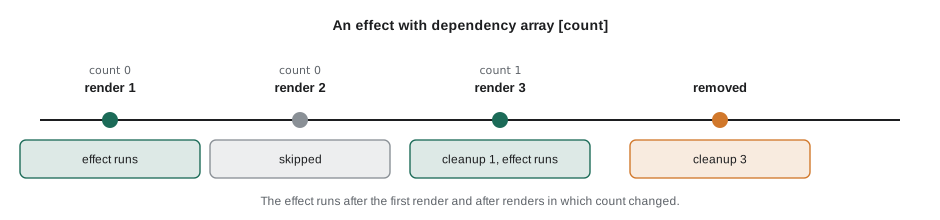
The example simulates React's handling of one effect across several renders: compare the dependencies, run the previous cleanup if they changed, then run the effect.
function depsChanged(prev, next) {
  if (prev === null) return true;
  return next.some((value, i) => !Object.is(value, prev[i]));
}

let prevDeps = null;
let cleanup = null;
function renderWithEffect(label, deps, effect) {
  if (depsChanged(prevDeps, deps)) {
    if (cleanup) cleanup();
    cleanup = effect() ?? null;
    prevDeps = deps;
  } else {
    console.log(`  (${label}: effect skipped)`);
  }
}
function unmount() { if (cleanup) cleanup(); console.log('  removed'); }

const titleEffect = (count) => () => {
  console.log(`  set title for ${count} booked`);
  return () => console.log(`  cleanup for ${count} booked`);
};
for (const count of [0, 0, 1, 1, 2]) {
  console.log(`render with count ${count}`);
  renderWithEffect(`count ${count}`, [count], titleEffect(count));
}
unmount();render with count 0 set title for 0 booked render with count 0 (count 0: effect skipped) render with count 1 cleanup for 0 booked set title for 1 booked render with count 1 (count 1: effect skipped) render with count 2 cleanup for 1 booked set title for 2 booked cleanup for 2 booked removed
What this code does
depsChanged compares each dependency with the one from the previous run using Object.is, and treats the first render as changed. renderWithEffect runs the previous cleanup and then the new effect only when the dependencies changed, so renders with the same count skip the effect. Removing the component runs the last cleanup, which is how subscriptions and timers are stopped.
Subscribing to the browser
The connection warning needs a subscription: start listening to the browser's online and offline events when the component appears and stop when it goes. The effect has no dependencies from props or state, so its array is empty, and its cleanup removes the listeners. Without the cleanup, every time the component appeared it would add another pair of listeners that were never removed, a memory leak.
import { useEffect, useState } from 'react';

export function ConnectionNotice() {
  const [online, setOnline] = useState(() => navigator.onLine);

  useEffect(() => {
    const goOnline = () => setOnline(true);
    const goOffline = () => setOnline(false);
    window.addEventListener('online', goOnline);
    window.addEventListener('offline', goOffline);
    return () => {
      window.removeEventListener('online', goOnline);
      window.removeEventListener('offline', goOffline);
    };
  }, []);

  if (online) return null;
  return <p role="status" className="notice">You are offline. Shifts will update when the connection comes back.</p>;
}
What this code does
The state starts from navigator.onLine, read with a function so that it is checked only once. The effect adds listeners for the online and offline events that set the state, and its cleanup removes exactly the same functions. role="status" makes a screen reader announce the notice when it appears, without moving the volunteer's focus.
In development, under StrictMode, React runs every effect, its cleanup and the effect again when a component first appears. This is deliberate. A correct effect with a correct cleanup behaves exactly the same after the extra round, while a missing cleanup shows up straight away as a duplicate listener or a doubled request. In the production build the effect runs once.
Fetching data in an effect
An effect can also fetch data, such as the details of one shift when its id changes. The danger is a race condition. If the volunteer clicks the warehouse shift and then quickly the kitchen shift, two requests are in flight. If the first response arrives last, the page shows the warehouse details under the kitchen heading. The standard fix is an ignore flag: the cleanup of each effect run marks that run's response as no longer wanted, so only the latest response is used.
// A stand-in for fetch: the warehouse answer is slow, the kitchen answer fast.
const delays = { warehouse: 30, kitchen: 10 };
const fakeFetch = (id) => new Promise((resolve) => setTimeout(() => resolve({ id, details: `${id} details` }), delays[id]));

function runEffects(useIgnoreFlag) {
  let shown = 'nothing';
  let cleanup = null;
  function selectShift(id) {
    if (cleanup) cleanup();          // React runs the previous cleanup first
    let ignore = false;
    fakeFetch(id).then((data) => { if (!useIgnoreFlag || !ignore) shown = data.details; });
    cleanup = () => { ignore = true; };
  }
  selectShift('warehouse');
  selectShift('kitchen');            // the volunteer changes their mind
  return new Promise((resolve) => setTimeout(() => resolve(shown), 50));
}

const without = await runEffects(false);
const withFlag = await runEffects(true);
console.log('kitchen selected; without the flag the page shows:', without);
console.log('kitchen selected; with the flag the page shows: ', withFlag);kitchen selected; without the flag the page shows: warehouse details kitchen selected; with the flag the page shows: kitchen details
What this code does
selectShift imitates an effect that fetches when the selected id changes: it runs the previous cleanup, starts a request and records a cleanup that sets that run's ignore flag. The warehouse request takes longer than the kitchen one, so without the flag its late answer overwrites the kitchen details. With the flag, the warehouse response arrives after its run was cleaned up and is ignored, so the page correctly shows the kitchen.
import { useEffect, useState } from 'react';

export function ShiftDetailsLoader({ shiftId }) {
  const [shift, setShift] = useState(null);
  const [error, setError] = useState(null);

  useEffect(() => {
    let ignore = false;
    setShift(null);
    setError(null);
    fetch(`/api/v1/shifts/${encodeURIComponent(shiftId)}`)
      .then((res) => (res.ok ? res.json() : Promise.reject(new Error(`HTTP ${res.status}`))))
      .then((data) => { if (!ignore) setShift(data); })
      .catch((err) => { if (!ignore) setError(err); });
    return () => { ignore = true; };
  }, [shiftId]);

  if (error) return <p role="alert">The shift could not be loaded.</p>;
  if (!shift) return <p>Loading…</p>;
  return <h2>{shift.area}</h2>;
}
What this code does
The effect depends on shiftId, so it fetches again whenever the volunteer chooses another shift. Each run creates its own ignore flag and its cleanup sets it, so a slow response for an earlier shift never overwrites a newer one. This pattern works, but it repeats loading and error handling in every component, which is why Lesson 9 moves fetching into a library that also caches results.
You might not need an effect
Effects are for synchronizing with things outside React. React's documentation has a whole page called "You Might Not Need an Effect", because they are often used for jobs that do not involve the outside world at all, which makes code slower and more fragile. Three cases come up again and again.
Values that can be calculated from props and state should be calculated during the render, not stored in state by an effect. A list of shifts filtered by the search text is just shifts.filter(...) in the component body. Storing it in state and updating it in an effect causes an extra render and can show stale results for a moment. Logic caused by a particular event, such as sending a sign-up when the volunteer clicks Sign up, belongs in the event handler, where it is clear what caused it. An effect that watches a submitted flag and then sends the request is harder to follow and can send twice. Resetting state when a prop changes, such as clearing a draft note when another shift is selected, is better done by giving the component a key, <NoteBox key={shiftId} />, so that React creates a fresh instance. Lesson 6 explains keys.
useRef: remembering without rendering
Sometimes a component needs to remember something that should not cause a render: a timer's id, the previous value of a prop, or a reference to a page element. useRef returns an object with one property, current, that keeps its value between renders. Changing ref.current does not trigger a render. The most common use is to get hold of an element, for example to move keyboard focus to the first error in a form.
import { useEffect, useRef } from 'react';

export function SignedUpMessage({ shiftArea }) {
  const headingRef = useRef(null);

  useEffect(() => {
    headingRef.current?.focus();
  }, []);

  return (
    <section>
      <h2 ref={headingRef} tabIndex={-1}>You are signed up</h2>
      <p>We will see you at the {shiftArea} shift. A confirmation email is on its way.</p>
    </section>
  );
}
What this code does
useRef(null) creates a ref object, and the ref attribute tells React to put the heading element in headingRef.current once it is on the page. The effect then moves keyboard focus to the heading, so that screen reader users hear the confirmation straight after signing up. tabIndex={-1} lets a heading receive focus from code without adding it to the Tab order.
Effect events
One problem with dependencies has a dedicated hook since React 19.2. Suppose the connection notice should log each change to Theo's analytics endpoint, including the volunteer's preferred language. The language must be read in the effect, but the effect should not resubscribe whenever the language changes. useEffectEvent wraps such logic in a function that the effect can call and that always sees the latest props and state, without being a dependency. It should be used only for this: code called from inside effects that reacts to the latest values but should not restart the effect.
Custom hooks
A custom hook is a function whose name starts with use and that calls other hooks. It lets several components share stateful logic without sharing state: each component that calls it gets its own copy. The connection status is a good candidate, because the sign-up button, the notice and the My shifts page all need to know it.
import { useEffect, useState } from 'react';

export function useOnlineStatus() {
  const [online, setOnline] = useState(() => navigator.onLine);
  useEffect(() => {
    const update = () => setOnline(navigator.onLine);
    window.addEventListener('online', update);
    window.addEventListener('offline', update);
    return () => {
      window.removeEventListener('online', update);
      window.removeEventListener('offline', update);
    };
  }, []);
  return online;
}
What this code does
useOnlineStatus contains the state and the subscription from ConnectionNotice and returns only the boolean. Any component can now write const online = useOnlineStatus() and render accordingly, and each call has its own state and listeners. Because its name starts with use, the linter checks the rules of hooks inside it and wherever it is called.
The miniature runtime from the start of the lesson shows why custom hooks need no special support from React. A custom hook is an ordinary function that calls useState in the same order on every render, so its slots line up with the component's own.
function createRuntime(component) {
  const slots = [];
  let index = 0;
  function useState(initial) {
    const i = index++;
    if (!(i in slots)) slots[i] = initial;
    return [slots[i], (v) => { slots[i] = typeof v === 'function' ? v(slots[i]) : v; render(); }];
  }
  let out;
  function render() { index = 0; out = component(useState); console.log(out.text); }
  render();
  return () => out;
}

// A custom hook: ordinary code that calls hooks.
function useToggle(useState, initial = false) {
  const [on, setOn] = useState(initial);
  return [on, () => setOn((v) => !v)];
}

function ShiftFilters(useState) {
  const [kitchenOnly, toggleKitchen] = useToggle(useState);
  const [weekendOnly, toggleWeekend] = useToggle(useState, true);
  return { text: `kitchen only: ${kitchenOnly}, weekend only: ${weekendOnly}`, toggleKitchen, toggleWeekend };
}

const ui = createRuntime(ShiftFilters);
ui().toggleKitchen();
ui().toggleWeekend();
ui().toggleKitchen();kitchen only: false, weekend only: true kitchen only: true, weekend only: true kitchen only: true, weekend only: false kitchen only: false, weekend only: false
What this code does
useToggle is a custom hook built on useState: it returns the value and a function that flips it. ShiftFilters calls it twice, and because both calls happen in the same order on every render, the first gets slot 0 and the second slot 1, so the two toggles stay independent. Nothing in the runtime knows that useToggle exists, which is why any function that follows the rules can be a hook.
Memoization and the React Compiler
Every render calls the component again, which recreates every object, array and function defined in it. Usually that is cheap. Older React advice was to wrap expensive calculations in useMemo, functions passed to children in useCallback, and whole components in memo, so that React could skip work when nothing relevant had changed. Doing this by hand was easy to get wrong, and the dependency lists had the same pitfalls as effects.
The React Compiler, stable since version 1.0 in October 2025, does this automatically. It analyses each component during the build and memoizes values, functions and JSX wherever it can prove it is safe, so that unchanged parts of the tree are not recalculated. It relies on the code following React's rules, pure components and correct hooks in particular, and it skips components it cannot prove safe. Brightwater turns on the compiler for the portal, along with the recommended preset of eslint-plugin-react-hooks, which reports code the compiler cannot optimize. In new code, useMemo and useCallback are needed only in rare cases, such as a value used as an effect dependency that must keep its identity.
Common mistakes
MistakeHooks can be called inside if statements as long as the code is careful.
InsteadHooks must be called in the same order on every render. Call them at the top level and put conditions inside or after them.
MistakeAn empty dependency array is a safe way to run an effect only once.
InsteadOnly if the effect really uses no props or state. Otherwise it keeps stale values; list every value it uses.
MistakeAn effect that runs twice in development is a React bug.
InsteadStrictMode does it on purpose to reveal missing cleanups. Write cleanups so that running the effect twice makes no difference.
MistakeFiltered lists should be stored in state and updated in an effect.
InsteadCalculate them during rendering. Effects are for synchronizing with things outside React.
MistakeEvery function passed to a child needs useCallback.
InsteadThe React Compiler memoizes automatically. Use useMemo and useCallback by hand only where a stable identity is really needed.
Summary and key terms
- React matches each hook call to a stored slot by the order of calls, so hooks must be called at the top level of components and custom hooks, never conditionally or in loops; eslint-plugin-react-hooks checks this. useEffect runs an effect after the render is committed, for synchronizing with systems outside React such as the document title, browser events, timers and servers.
- The dependency array lists every prop and state value the effect uses; the effect reruns when one changes, compared with Object.is.
- An empty array runs it once, and leaving the array out runs it after every render.
- The cleanup runs before the next run and when the component is removed.
- StrictMode runs effects twice in development to expose missing cleanups.
- When fetching in an effect, use an ignore flag to avoid race conditions.
- Calculate derived values during rendering, put event logic in handlers and reset state with a key instead of using effects. useRef keeps a value without causing renders and gives access to elements. useEffectEvent lets an effect read the latest values without depending on them.
- Custom hooks share stateful logic.
- The React Compiler memoizes automatically, so useMemo and useCallback are rarely needed.
- rules of hooks
- Call hooks only at the top level of components and custom hooks, never conditionally, in loops or in ordinary functions.
- side effect
- A change to something outside the render's result, such as the document title, a timer or a network request.
- useEffect
- The hook that runs code after a render to synchronize a component with something outside React.
- dependency array
- The list of values an effect uses; React reruns the effect when one of them changes.
- cleanup function
- The function an effect returns, run before the effect runs again and when the component is removed.
- race condition
- A bug in which the result depends on which of several overlapping operations finishes last.
- useRef
- The hook that keeps a mutable value between renders without causing a render, often a reference to an element.
- custom hook
- A function whose name starts with use and that calls other hooks to share stateful logic.
Practice problems
Work each problem on paper first, then reveal the answer to check.
Why must hooks be called in the same order on every render?
Show answer
React matches each call to its stored value by position; a changed order gives calls the wrong values.
When does an effect with the dependency array [shiftId] run?
Show answer
After the first render and after any render in which shiftId changed.
What should the cleanup of a subscription effect do?
Show answer
Remove exactly the listeners or connections the effect added.
A component stores the filtered shift list in state and updates it in an effect. What is better?
Show answer
Calculate the filtered list during rendering.
What is the difference between a ref and state?
Show answer
Changing ref.current does not cause a render; setting state does.
Try it yourself
Compare dependencies
Complete depsChanged(prev, next) the way React compares an effect's dependency arrays. It returns true when prev is null (the first render), when the arrays have different lengths, or when any item differs according to Object.is. Otherwise it returns false.
Note that Object.is treats NaN as equal to itself and 0 as different from -0, and that two separately created objects are always different.
function depsChanged(prev, next) {
  return false;
}

console.log(depsChanged(null, []));
console.log(depsChanged([1, 'kitchen'], [1, 'kitchen']));
console.log(depsChanged([1, 'kitchen'], [1, 'garden']));
console.log(depsChanged([NaN], [NaN]));
console.log(depsChanged([0], [-0]));
console.log(depsChanged([{ area: 'kitchen' }], [{ area: 'kitchen' }]));
const filters = { area: 'kitchen' };
console.log(depsChanged([filters], [filters]));
console.log(depsChanged([1], [1, 2]));
Try it yourself
Write useState for the runtime
The runtime below renders a component and lets it call useState, but useState always returns the initial value and a setter that does nothing. Complete it so that each call gets its own slot by order, keeps its value between renders, and has a setter that accepts a value or an updater function and then calls render().
Remember to reset the index at the start of each render; that line is already in render.
const slots = [];
let index = 0;
let ui;

function useState(initial) {
  return [initial, () => {}];
}

function render() {
  index = 0;
  ui = Counter();
  console.log(ui.text);
}

function Counter() {
  const [booked, setBooked] = useState(0);
  const [area, setArea] = useState('warehouse');
  return {
    text: `${area}: ${booked} booked`,
    book: () => setBooked((b) => b + 1),
    move: (a) => setArea(a),
  };
}

render();
ui.book();
ui.book();
ui.move('kitchen');
ui.book();
Lesson quiz · 5 questions
Score 60% or more to complete this lesson.
Create a free account to save your progress, take quizzes and earn a certificate.