
JS-220 · Lesson 1 of 12 · 33 min
Why front-end frameworks
▶ Video coming soon A video version of this lesson is on the way.
If the plan holds, Lucy Tran will start the spring of 2028 with a problem that is a sign of success. The volunteer pages Mira Castellanos built in her first year now do far more than anyone expected. Volunteers browse open shifts, filter them by area and day, sign up, check which shifts they have booked and cancel when plans change. Each of those features was added on its own, in plain JavaScript, a few weeks apart. By the end of the December 2027 hamper drive the sign-up page has grown to more than two thousand lines, and every new request from Lucy takes longer than the one before.
Gareth Lindqvist has planned an eighth block of Tuesday and Thursday sessions for the winter of Mira's second year. It runs from Tuesday, January 11 to Thursday, February 17, 2028, with a review on Friday, February 18. The goal is to rebuild the volunteer pages as a single-page application in React, so that a pilot group of volunteers can try the new portal from Monday, February 28 and everyone can use it from Monday, March 20, before the youth garden's busy season. The server-side block that follows, on Node.js, is planned for the spring.
"Nothing about the old pages is wrong," Gareth says at the first session. "You wrote them carefully, and they have tests now. But look at what happened in December." He opens the bug report. A volunteer signed up for the Saturday warehouse shift, and the details panel showed two spaces left. The shift list beside it still said three. Lucy saw the list, sent two more volunteers, and the shift ended up overbooked. "The code that updates the list and the code that updates the details panel are in different places. One of them was missed. A framework is mostly a way to make that kind of mistake hard to write."
This lesson explains why front-end frameworks exist, what problem they solve and how they solve it. It compares the imperative style of the old pages with the declarative style of React, introduces the idea that a user interface is a function of state, surveys the main frameworks and explains how a React project is created and run today. It also covers when a framework is not the right choice, because the lunch counter page will stay exactly as it is.
The problem: keeping the page in step with the data
Every interactive page has two things that must agree: the data, such as the list of shifts and how many spaces each has left, and the page, the elements the user sees. When the data changes, the page must change to match. In the old volunteer pages, as in most hand-written pages, that matching is done by hand. A click handler changes the data and then finds each element that shows that data and updates it.
This style is called imperative: the code describes, step by step, how to change the page from what it is now to what it should be. It works well when a piece of data is shown in one place. It becomes fragile when the same data is shown in several places, because every handler must remember every place. The open-spaces count for a shift appears in the shift list, in the details panel, in the sign-up button's label ("Sign up, 3 spaces left") and in the summary at the top of the page. A sign-up changes all four. Cancelling changes all four. A new feature that shows the count somewhere else must also be added to both handlers.
The runner below has no real page, so it uses plain objects to stand for the four elements. The sign-up handler updates three of them and forgets the summary, which is exactly the kind of mistake that reached Lucy in December.
// Four places on the page that show the same number.
const page = {
  listRow: { text: '3 spaces left' },
  details: { text: '3 spaces left' },
  button: { text: 'Sign up (3 left)' },
  summary: { text: 'Open spaces today: 3' },
};
const shift = { id: 'warehouse-sat', open: 3 };

function signUp() {
  shift.open -= 1;
  page.listRow.text = `${shift.open} spaces left`;
  page.details.text = `${shift.open} spaces left`;
  page.button.text = `Sign up (${shift.open} left)`;
  // The summary was added later, and nobody remembered to update it here.
}

signUp();
for (const [name, el] of Object.entries(page)) console.log(name.padEnd(8), el.text);listRow 2 spaces left details 2 spaces left button Sign up (2 left) summary Open spaces today: 3
What this code does
The object page stands for four elements that all show the number of open spaces, and signUp is a click handler written in the imperative style. It changes the data and then updates each element by hand, but it forgets the summary, so the output shows three places saying 2 and one still saying 3. Nothing crashes; the page is simply wrong, which is why this kind of bug is hard to notice.
The bug is not in any single line. Each line is correct. The bug is in the structure: the knowledge of where the count is shown is spread across every handler that changes it. The more features the page has, the more handlers and places there are, and the number of ways to get them out of step grows quickly.
The idea: the page is a function of the state
Front-end frameworks turn the problem around. Instead of writing code that changes the page, you write code that describes what the page should look like for any given data. That description is a function. You give it the current state, the data that can change while the page is open, and it returns the page. When the state changes, the framework calls the function again and makes the real page match the new description.
This style is called declarative: the code declares what the result should be, not the steps to reach it. The idea is often written as a short formula, UI = f(state). The page (the user interface) is a function f of the state. A handler no longer touches the page at all. It only changes the state, and the page follows.
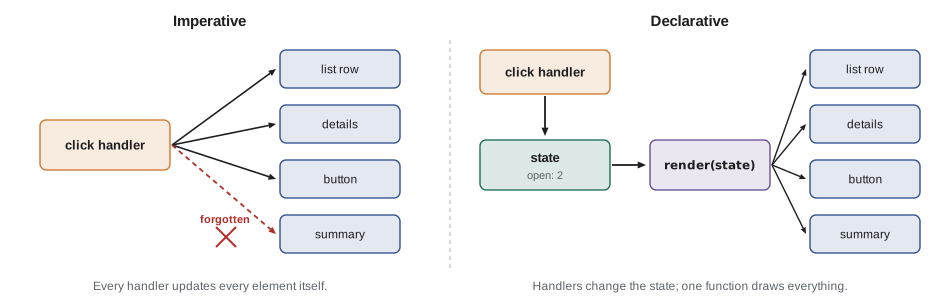
The next example rewrites the same page in the declarative style. One function, render, builds the whole page from the state. The handler changes the state and calls render. The summary cannot be forgotten, because there is only one place that knows how to show the count.
const state = { shifts: [{ id: 'warehouse-sat', name: 'Warehouse, Saturday', open: 3 }] };

// One function describes the whole page for any state.
function render(state) {
  const s = state.shifts[0];
  return {
    listRow: `${s.open} spaces left`,
    details: `${s.open} spaces left`,
    button: `Sign up (${s.open} left)`,
    summary: `Open spaces today: ${state.shifts.reduce((n, x) => n + x.open, 0)}`,
  };
}

function signUp(state, id) {
  return { shifts: state.shifts.map((s) => (s.id === id ? { ...s, open: s.open - 1 } : s)) };
}

const after = signUp(state, 'warehouse-sat');
for (const [name, text] of Object.entries(render(after))) console.log(name.padEnd(8), text);
console.log('before:', state.shifts[0].open, 'after:', after.shifts[0].open);listRow 2 spaces left details 2 spaces left button Sign up (2 left) summary Open spaces today: 2 before: 3 after: 2
What this code does
render takes the state and returns everything the page shows, so every element is worked out from the same number. signUp does not touch the page; it returns a new state with one fewer open space, leaving the old state unchanged. Rendering the new state gives four consistent results, and the last line shows that the original state still says 3.
Three features of this version matter for everything in this course. First, the page is worked out from the state, so it cannot disagree with it. Second, the handler returns a new state instead of changing the old one. That makes it easy to tell what changed, which a framework needs to know, and it means an older state can still be examined, for example to undo a change. Third, render is an ordinary function. It can be tested by giving it a state and checking what it returns, with no page at all.
So why not just rebuild the whole page?
If render produces the whole page, the obvious way to show the result is to throw away the old elements and create new ones every time. For a tiny page that works. For a real page it causes three problems. It is slow, because creating elements is much more expensive than comparing a few values. It loses everything the browser keeps inside the old elements: the text half-typed into an input, the position of the cursor, which element has keyboard focus, how far a list has been scrolled. And for people who use screen readers, a page that is replaced every time a count changes is disorienting, because the reader may start again from the top.
React's answer is to separate describing from doing. Calling a component, React's name for a render function, does not create elements. It returns a lightweight description of them, a tree of plain objects. React keeps the description from the last render, compares it with the new one, works out the smallest set of changes and applies only those to the real page. This comparison is called reconciliation. If only the count changed, React changes one text node and leaves the input, the focus and the scroll position alone.
The example below shows the idea with two descriptions of the page, written as nested arrays of plain objects. A short diff function walks both trees together and lists only the differences.
const before = { type: 'main', children: [
  { type: 'h1', text: 'Open shifts' },
  { type: 'p', text: 'Warehouse, Saturday: 3 spaces left' },
  { type: 'input', value: 'Mira' },
  { type: 'button', text: 'Sign up (3 left)' },
] };
const after = { type: 'main', children: [
  { type: 'h1', text: 'Open shifts' },
  { type: 'p', text: 'Warehouse, Saturday: 2 spaces left' },
  { type: 'input', value: 'Mira' },
  { type: 'button', text: 'Sign up (2 left)' },
] };

function diff(a, b, path = 'main') {
  const changes = [];
  if (a.type !== b.type) return [`replace ${path}`];
  for (const key of ['text', 'value']) {
    if (a[key] !== b[key]) changes.push(`set ${path}.${key} to "${b[key]}"`);
  }
  (a.children ?? []).forEach((child, i) => changes.push(...diff(child, b.children[i], `${path} > ${child.type}[${i}]`)));
  return changes;
}

const changes = diff(before, after);
console.log(changes.length, 'changes out of 5 elements');
for (const c of changes) console.log(' ', c);2 changes out of 5 elements set main > p[1].text to "Warehouse, Saturday: 2 spaces left" set main > button[3].text to "Sign up (2 left)"
What this code does
before and after are two descriptions of the page, made of plain objects rather than real elements. diff compares them node by node and records only the properties that differ, so the heading and the input are left alone. React's reconciliation is far more sophisticated, but the principle is the same: describe the whole page, then change only what is different.
Because the comparison happens on plain objects, it is fast, and because only changed parts of the real page are touched, the input keeps its text and focus. The developer gets the simplicity of "rebuild everything from the state" and the browser gets the efficiency of small updates. Older articles call React's tree of descriptions a virtual DOM. The React team no longer uses that phrase much, but the idea is the same.
One-way data flow
The declarative style also gives a page a predictable loop. Something happens, such as a click, a key press or a server response. A handler turns it into a change of state. The new state is rendered into a new description, and React updates the page. Then the page waits for the next event. Data flows in one direction around the loop: from state to page, and from events back to state. Nothing changes the page except a render.
The loop is easy to simulate. The example keeps the state in one variable, sends three events through a single update function and renders after each one. The order of events is all that is needed to explain any screen the user ever saw.
let state = { open: 3, booked: [] };

function update(state, event) {
  switch (event.type) {
    case 'signUp':
      if (state.open === 0) return state;
      return { open: state.open - 1, booked: [...state.booked, event.name] };
    case 'cancel':
      return { open: state.open + 1, booked: state.booked.filter((n) => n !== event.name) };
    default:
      return state;
  }
}
const view = (s) => `${s.open} spaces left; booked: ${s.booked.length ? s.booked.join(', ') : 'nobody'}`;

console.log('start   ', view(state));
for (const event of [{ type: 'signUp', name: 'Ana' }, { type: 'signUp', name: 'Raj' }, { type: 'cancel', name: 'Ana' }]) {
  state = update(state, event);
  console.log(event.type.padEnd(8), view(state));
}start 3 spaces left; booked: nobody signUp 2 spaces left; booked: Ana signUp 1 spaces left; booked: Ana, Raj cancel 2 spaces left; booked: Raj
What this code does
update is the only code that changes the state: it receives the current state and an event and returns the next state. view turns any state into the text the page would show. The loop sends three events through update and renders after each, so the output is a complete history of the screen, which is what makes this style easy to reason about and test.
Lesson 4 returns to this loop when it introduces React's state, and Lesson 10 builds the whole portal's shared state around an update function like this one, which React calls a reducer.
Components
The second big idea in React is the component: a piece of the interface with a name, written as a function that returns a description of what to show. The volunteer portal will be made of components such as ShiftList, ShiftCard, SignUpForm and MyShifts. Each takes some input, such as the shift to show, and returns its part of the page. Bigger components are built from smaller ones, so the whole page is a tree of components.
Components give the declarative idea a structure. Instead of one huge render function for the whole page, each component describes only its own part and knows only what it is given. A ShiftCard does not know whether it is in the main list, on the my-shifts page or in a search result. That makes it reusable and easy to test alone. Lesson 2 shows how components are written, and Lesson 3 shows how they pass data to each other.
The main front-end frameworks
React is not the only framework built on these ideas. The table summarizes the frameworks a developer is most likely to meet. All of them describe the interface from state and update the page for you. They differ in how they track changes, how much they include and how they are written.
| Framework | First released | How it updates the page | Notes |
|---|---|---|---|
| React | 2013, by Facebook (now Meta) | Re-renders components and reconciles their descriptions | The most widely used; a library for the view, with routing and data fetching from other packages or a framework built on it |
| Vue | 2014 | Tracks which data each part of the page reads and updates those parts | Templates close to HTML; a gentle learning curve; popular in Europe and Asia |
| Angular | 2016 (rewrite of AngularJS), by Google | Signals and change detection | A complete framework with routing, forms and HTTP built in; common in large companies |
| Svelte | 2016 | A compiler turns components into code that updates exactly what changed | Very small output; uses runes for reactive state since Svelte 5 |
| Solid | 2018 | Fine-grained signals; components run once | Looks like React but updates without re-rendering |
Brightwater chose React for three reasons that are typical of how teams choose. Gareth and Theo already know it. The libraries the portal needs, for routing, data fetching, forms and testing, are mature and well documented. And React skills are the most transferable for Mira: most front-end job listings in Kingston and elsewhere ask for it. None of the other frameworks would be a wrong choice. The ideas in this course, state, components, one-way data flow and reconciliation, carry over to all of them.
React today
React was created at Meta and, since February 2026, has been governed by the React Foundation, an independent foundation hosted by the Linux Foundation. React 19 was released in December 2024. It added Actions for forms and data changes, new hooks such as useActionState and useOptimistic, the use function for reading promises and context, and the ability to pass ref as an ordinary prop. React 19.2, in October 2025, added the Activity component and the useEffectEvent hook, and React 19.3, released on September 9, 2026, made View Transitions and Fragment refs stable. This course uses React 19.3, and every feature it teaches works the same way in any 19.x release.
Two other changes from 2025 shape how React projects are set up. In February 2025 the React team deprecated Create React App, the starter most older tutorials use, and now recommends either a framework built on React or a build tool such as Vite. In October 2025 the React Compiler reached version 1.0. It runs during the build and automatically adds the memoization that developers used to write by hand with useMemo, useCallback and memo. Lesson 5 explains what that means in practice.
Libraries, frameworks and where React fits
React on its own is a library for describing and updating the interface. A real application also needs routing (which page to show for which address), data fetching, forms and a build. There are two ways to get them. A framework such as Next.js, or React Router in its framework mode, provides all of them together, along with server rendering. Building on Vite instead gives a plain React application that runs entirely in the browser, and the team chooses the other pieces. React's documentation recommends a framework for most new applications and describes the Vite route as the right choice when an application has unusual constraints or when the team wants to understand every piece.
Brightwater takes the Vite route for the portal, and for a good reason. Theo's PHP server already provides the data through the /api/v1 interface, so the portal does not need a JavaScript server. It needs to be a set of static files that Theo's server can host, and it must talk to his API. A single-page application, or SPA, is exactly that: one HTML page and its JavaScript, which then shows different screens without loading new pages from the server. The table compares it with the alternatives.
| Approach | How pages are produced | Good for | Trade-offs |
|---|---|---|---|
| Multi-page site | The server sends a full HTML page for every address | Content sites, such as the Food Hub's public pages | Each click loads a new page; little shared state |
| Single-page application | The server sends one page; JavaScript shows each screen | Interactive tools behind a sign-in, such as the portal | First load needs JavaScript; routing and data fetching happen in the browser |
| Server-rendered React framework | The server runs React to produce HTML, then the browser takes over | Public pages that need speed and search visibility, plus interactivity | Needs a JavaScript server or a host that runs one |
React's Server Components, which run on a server and send their result to the browser, belong to the third approach. The portal will not use them, but they are worth knowing about, because frameworks such as Next.js are built around them.
Creating a React project
A React project with Vite is created with one command. The template sets up Vite, React, React DOM and a sample component. Mira uses the TypeScript template, because all Brightwater projects use TypeScript since the migration in her first spring. To keep the focus on React, most listings in this course are shown as .jsx files, which are JavaScript with JSX. The real files are .tsx, with the same code plus types, and Lesson 3 shows how the types are added.
npm create vite@latest volunteer-portal -- --template react-ts
cd volunteer-portal
npm install
npm run dev
What this code does
The first command runs Vite's project generator and asks it for the React and TypeScript template, creating a folder called volunteer-portal. npm install downloads React, React DOM, Vite and the other development packages listed in package.json. npm run dev starts Vite's development server, which serves the application and reloads the browser when a file is saved.
The heart of a new project is two files. index.html is the single page, with one empty element where the application will appear. src/main.jsx finds that element, creates a React root in it and renders the top component, App, into it. From then on React owns everything inside that element.
<!doctype html>
<html lang="en">
  <head>
    <meta charset="UTF-8">
    <meta name="viewport" content="width=device-width, initial-scale=1">
    <title>Volunteer portal | Riverside Community Food Hub</title>
  </head>
  <body>
    <div id="root"></div>
    <script type="module" src="/src/main.jsx"></script>
  </body>
</html>
What this code does
This is the only HTML page the portal has. The empty div with the id root is where React will put the whole application, and the module script loads main.jsx, which starts React. When the project is built, Vite replaces the script tag with links to the bundled files.
import { StrictMode } from 'react';
import { createRoot } from 'react-dom/client';
import App from './App.jsx';
import './index.css';

createRoot(document.getElementById('root')).render(
  <StrictMode>
    <App />
  </StrictMode>,
);
What this code does
createRoot from react-dom/client takes the empty root element and returns a React root that manages it. render tells React to show the App component inside it; the angle-bracket syntax is JSX, explained in Lesson 2. StrictMode adds extra checks during development, such as running some code twice to expose mistakes, and has no effect in the production build.
Two packages are involved. react contains the parts that are the same everywhere: components, hooks and the description of elements. react-dom contains the parts specific to web pages, such as createRoot. The same React components can be rendered by other renderers, such as React Native for phone apps, which is why the two are separate.
When not to use a framework
Gareth is clear that the lunch counter page will not be rewritten. It is a single screen, used on one tablet, with a small amount of state that already works, a complete set of tests and a trainee team that knows it well. A framework would add a build step, a larger download and new things to learn, and it would fix no problem the page has. The rule Brightwater follows is simple: use a framework when the same data is shown in many places, when the screens are many and change often, or when several developers work on the same interface. Do not use one for a page that is small, mostly static or already stable.
Many sites sit between the two. The Food Hub's public pages are plain HTML and CSS, with a little JavaScript for the menu. They will stay that way. The portal is different: many screens, shared data and a list of requests from Lucy that will keep growing. That is the kind of project frameworks were made for.
Common mistakes
MistakeReact makes pages faster.
InsteadReact makes interfaces easier to build correctly. A small hand-written page can be faster than the same page in React, because it has nothing to download and nothing to compare.
MistakeDeclarative code means you never think about the page.
InsteadYou still decide what the page looks like for every state, including loading, empty and error states. You just stop writing the steps that change it.
MistakeEvery website should be a single-page application.
InsteadContent pages work best as ordinary pages. Use an SPA for interactive tools where users stay on one page and work with shared data.
MistakeCreate React App is the way to start a React project.
InsteadIt was deprecated in February 2025. Use a framework, or Vite for a client-only application.
Summary and key terms
- Interactive pages must keep the page in step with the data.
- Imperative code updates each element by hand, so every handler must know every place a value appears, and missing one gives a wrong page.
- Declarative code describes the page for any state, written as UI = f(state); handlers only change the state.
- React components return descriptions of the page made of plain objects, and reconciliation compares the old and new descriptions and changes only what differs, keeping input text, focus and scroll position.
- Data flows one way: events change state, state is rendered, the page updates.
- React, Vue, Angular, Svelte and Solid share these ideas.
- React 19 added Actions and new hooks; React 19.3 is the current version, and the React Compiler 1.0 adds memoization automatically.
- Create React App is deprecated; start with a framework or Vite.
- A single-page application loads one page and shows each screen with JavaScript.
- Use a framework when data appears in many places and screens change often, not for small stable pages.
- imperative
- A style of code that describes the steps to change something, such as updating each element by hand.
- declarative
- A style of code that describes the result wanted and leaves the steps to a library or framework.
- state
- Data that can change while a page is open and that affects what the page shows.
- component
- A named, reusable piece of an interface, written in React as a function that returns a description of what to show.
- reconciliation
- React's process of comparing the previous and new descriptions of the interface and changing only what differs on the page.
- one-way data flow
- The pattern in which events change state and state determines the page, never the page changing the state directly.
- single-page application
- A web application that loads one HTML page and then shows its screens with JavaScript, without loading new pages.
- React Compiler
- A build-time tool that automatically adds memoization to React components and hooks.
Practice problems
Work each problem on paper first, then reveal the answer to check.
Why did the shift list and the details panel disagree in December?
Show answer
Each handler updated the places that showed the count by hand, and one place was missed.
What does UI = f(state) mean?
Show answer
The page is produced by a function of the current state, so the same state always gives the same page.
Why does React compare descriptions instead of replacing the whole page?
Show answer
Comparing objects is fast, and changing only what differs keeps typed text, focus and scroll position.
Name the two packages a React web project needs and what each contains.
Show answer
react, with components and hooks, and react-dom, with the parts specific to web pages such as createRoot.
Why will the lunch counter page stay in plain JavaScript?
Show answer
It is one small, stable, tested screen; a framework would add cost and fix no problem.
Try it yourself
Render the page from the state
signUp already returns a new state. Complete render(state) so that it returns an object with the same four keys as before, all worked out from the state: listRow, details, button and summary.
Use the first shift for the first three keys. The summary is the total of open across all shifts, so it must change when any shift changes.
const state = { shifts: [
  { id: 'warehouse-sat', open: 3 },
  { id: 'kitchen-sat', open: 4 },
] };

function render(state) {
  return { listRow: '', details: '', button: '', summary: '' };
}

const signUp = (state, id) => ({ shifts: state.shifts.map((s) => (s.id === id ? { ...s, open: s.open - 1 } : s)) });

for (const s of [state, signUp(state, 'warehouse-sat'), signUp(signUp(state, 'kitchen-sat'), 'kitchen-sat')]) {
  console.log(Object.values(render(s)).join(' | '));
}
Try it yourself
A safe update function
Complete update(state, event) for three events. signUp lowers open by one and adds event.name to booked, but only if there is a space and the name is not already booked. cancel does the reverse, but only if the name is booked.
Any other event returns the state unchanged. Never change the old state: always return a new object when something changes.
function update(state, event) {
  return state;
}

let state = { open: 2, booked: [] };
const start = state;
const events = [
  { type: 'signUp', name: 'Ana' }, { type: 'signUp', name: 'Ana' }, { type: 'signUp', name: 'Raj' },
  { type: 'signUp', name: 'Lee' }, { type: 'cancel', name: 'Sam' }, { type: 'cancel', name: 'Ana' }, { type: 'wave' },
];
for (const e of events) {
  state = update(state, e);
  console.log(`${e.type} ${e.name ?? ''}`.padEnd(11), state.open, state.booked.join(',') || '-');
}
console.log('start unchanged:', start.open === 2 && start.booked.length === 0);
Lesson quiz · 5 questions
Score 60% or more to complete this lesson.
Create a free account to save your progress, take quizzes and earn a certificate.