
JS-220 · Lesson 12 of 12 · 31 min
Capstone: a single-page application
▶ Video coming soon A video version of this lesson is on the way.
The capstone session is planned for Thursday, February 17, 2028, with a review on Friday, February 18 with Gareth, Theo, Sana and Lucy. By then the pieces from the previous eleven lessons should all exist: components, state, forms, routes, cached data, the plan and the tests. The capstone puts them together into the volunteer portal that a pilot group of twenty volunteers will use from Monday, February 28, and everyone from Monday, March 20. "An application is more than its parts," Gareth says. "Today we check that the parts fit, that the whole thing is fast and accessible, and that we can build it, deploy it and change it safely next month."
This lesson walks through the finished portal: the requirements and where each is met, the structure of the code, the routes and the flow of data through a complete sign-up. It builds the two pieces of logic still missing, the overlap check for the plan and confirming several shifts at once, then covers performance, Sana's accessibility review, the build and deployment to Theo's server, and the decisions from the review. It ends with the habits that keep a React application healthy as it grows.
The requirements
Lucy's requests arrived over several months, in emails, in meetings and in the December bug report. Mira collected them into one list at the start of the block, and the capstone checks each against the portal.
| Requirement | How the portal meets it | Lesson |
|---|---|---|
| Counts never disagree between screens | One query cache for server data; derived values; invalidation after every change | 1, 4, 9 |
| Browse open shifts by area and day, with search | Grouped list with filters in the search parameters | 6, 8 |
| Links to a shift or a filtered list can be shared | Routes for every screen; filters in the address | 8 |
| Sign up with the first-year rules | Form action with validate, server errors mapped to fields | 7 |
| See and cancel my shifts | My shifts route, a mutation for cancelling, invalidation | 8, 9 |
| Plan several shifts and confirm them together, never overlapping, kept on refresh | Plan reducer and context, overlap check, saved ids | 10, 12 |
| Works on a weak connection | Cached data, retries with backoff, offline notice | 5, 9 |
| Accessible to keyboard and screen reader users, WCAG 2.2 AA | Semantic markup, labels, live regions, focus management, Sana's review | All, 12 |
| Nothing personal stored in the browser | Only shift ids and preferences in localStorage | 10 |
WCAG 2.2 is the target because it is the current version of the guidelines. On the Canadian side, the legal minimum for the Food Hub's website is lower, WCAG 2.0 Level AA under Ontario's accessibility standards, but Brightwater builds to the current version so that the portal does not need reworking when the rules catch up.
The structure of the code
The portal has about forty files, arranged by what they do rather than by kind. Shared building blocks live in components, screens in pages, and each larger feature, such as the plan, gets its own folder with its reducer, context, storage and tests together. The api module is the only code that knows the server's addresses, and the hooks folder holds the custom hooks that wrap queries and mutations, so pages never call useQuery directly.
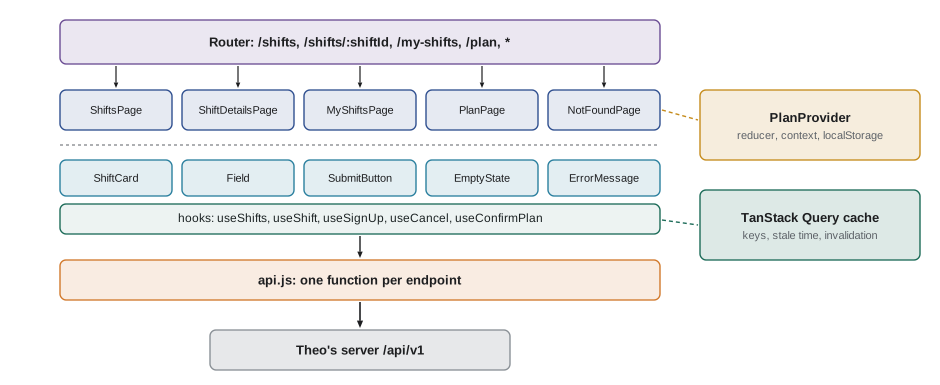
| Folder | Contents |
|---|---|
| src/api.js | The API client and one function per endpoint |
| src/App.jsx, src/AppLayout.jsx | The router, the routes and the shared layout |
| src/pages/ | One component per route, with its loader |
| src/components/ | Reusable components and their tests |
| src/hooks/ | Query and mutation hooks, useOnlineStatus |
| src/plan/ | planReducer, PlanContext, storage, overlap check and their tests |
| src/signup-rules.js | readSignUp, validate and toFieldErrors, shared by the form and the tests |
| src/test/ | The render helper, MSW handlers and test setup |
| e2e/ | Playwright tests for the critical journeys |
Following one sign-up
The best test of an architecture is to follow one action through it. A volunteer on the shift list presses Sign up on the Saturday warehouse shift. The ShiftCard's button is a Link to /volunteer/shifts/s-101, so the router pushes that address and matches the details route. Its loader asks the query cache for ['shifts', 'detail', 's-101']; the list was loaded twenty seconds ago, but the details have not been, so the loader starts the request and the details page renders with the data a moment later. The volunteer fills in the form and submits it. The form action validates, then calls the useSignUp mutation. When Theo's server answers 201, the mutation invalidates ['shifts'] and ['me', 'shifts']; the details page refetches and shows two spaces left, the shift list in the cache is marked stale, and the form shows its confirmation and moves focus to it. When the volunteer goes back, the list appears instantly from the cache, refetches in the background and updates its count. No component updated another component's data. Each one showed what the cache held.
The plan: checking for overlaps
The plan must never hold two shifts that overlap. A shift has a date and start and end times. Two shifts overlap when they are on the same date and each starts before the other ends. Shifts that touch, one ending at noon and the next starting at noon, do not overlap, because a volunteer can walk from the warehouse to the kitchen in the same building. Times are compared as minutes after midnight, which avoids any confusion with a.m. and p.m.
const toMinutes = (hhmm) => { const [h, m] = hhmm.split(':').map(Number); return h * 60 + m; };

function overlaps(a, b) {
  return a.date === b.date && toMinutes(a.start) < toMinutes(b.end) && toMinutes(b.start) < toMinutes(a.end);
}

function findOverlap(planned, candidate) {
  return planned.find((s) => s.id !== candidate.id && overlaps(s, candidate)) ?? null;
}

const shifts = {
  w: { id: 'w', label: 'Warehouse 9:00-12:00', date: '2028-12-16', start: '09:00', end: '12:00' },
  k: { id: 'k', label: 'Kitchen 10:00-14:00', date: '2028-12-16', start: '10:00', end: '14:00' },
  l: { id: 'l', label: 'Lunch counter 12:00-14:00', date: '2028-12-16', start: '12:00', end: '14:00' },
  g: { id: 'g', label: 'Garden 10:00-12:00 (Sunday)', date: '2028-12-17', start: '10:00', end: '12:00' },
};

const plan = [shifts.w];
for (const c of [shifts.k, shifts.l, shifts.g, shifts.w]) {
  const clash = findOverlap(plan, c);
  console.log(c.label.padEnd(28), clash ? `overlaps ${clash.label}` : 'fits');
}Kitchen 10:00-14:00 overlaps Warehouse 9:00-12:00 Lunch counter 12:00-14:00 fits Garden 10:00-12:00 (Sunday) fits Warehouse 9:00-12:00 fits
What this code does
toMinutes turns a 24-hour time from Theo's API into minutes after midnight, so times can be compared as numbers. overlaps is the standard test for two intervals: they clash only if each starts before the other ends, so shifts that merely touch at noon fit together. findOverlap ignores the candidate itself, which is why the warehouse shift does not clash with its own entry in the plan.
The AddToPlanButton calls findOverlap with the planned shifts from the query cache before dispatching added, and passes the clashing shift's label to the reducer for its notice, so the volunteer reads "That shift overlaps Warehouse, 9 a.m. to noon" rather than a bare refusal. The server checks the same rule again when the plan is confirmed.
The plan: confirming several shifts
Confirming the plan sends one sign-up request per shift. They are independent, so the portal sends them at the same time, but some may fail while others succeed: a shift may have filled up while the volunteer was deciding. Promise.allSettled waits for all of them and reports each result, whether it succeeded or failed, unlike Promise.all, which stops at the first failure. The portal then removes the confirmed shifts from the plan, keeps the failed ones with their reasons, and tells the volunteer exactly what happened.
// A stand-in for the API: the kitchen shift filled up a moment ago.
const outcomes = { w: 201, k: 409, g: 201 };
const signUp = (id) => new Promise((resolve, reject) => setTimeout(() => {
  if (outcomes[id] === 201) resolve({ id });
  else reject(Object.assign(new Error('This shift is now full.'), { status: outcomes[id], id }));
}, { w: 30, k: 10, g: 20 }[id]));

async function confirmPlan(ids) {
  const results = await Promise.allSettled(ids.map((id) => signUp(id)));
  const confirmed = [], failed = [];
  results.forEach((r, i) => (r.status === 'fulfilled' ? confirmed.push(ids[i]) : failed.push({ id: ids[i], reason: r.reason.message })));
  return { confirmed, failed };
}

const { confirmed, failed } = await confirmPlan(['w', 'k', 'g']);
console.log('confirmed:', confirmed.join(', '));
for (const f of failed) console.log('not confirmed:', f.id, '-', f.reason);
const remaining = failed.map((f) => f.id);
console.log('the plan now holds:', remaining.length ? remaining.join(', ') : 'nothing');
console.log(failed.length === 0 ? 'All shifts confirmed.' : `${confirmed.length} of ${confirmed.length + failed.length} shifts confirmed. The rest are still in your plan.`);confirmed: w, g not confirmed: k - This shift is now full. the plan now holds: k 2 of 3 shifts confirmed. The rest are still in your plan.
What this code does
signUp imitates three requests that finish at different times, one of which fails because the shift filled up. Promise.allSettled waits for all three and gives each result in the order of the requests, whichever finished first, so the results can be matched to the ids by position. The plan keeps only the shift that failed, and the message tells the volunteer how many were confirmed instead of reporting the whole plan as failed.
import { useMutation, useQueryClient } from '@tanstack/react-query';
import { signUp } from '../api.js';
import { usePlan } from '../plan/PlanContext.jsx';

export function useConfirmPlan(details) {
  const queryClient = useQueryClient();
  const { plan, dispatch } = usePlan();
  return useMutation({
    mutationFn: async () => {
      const results = await Promise.allSettled(plan.ids.map((id) => signUp(id, details)));
      return results.map((r, i) => ({ id: plan.ids[i], ok: r.status === 'fulfilled', reason: r.reason?.message }));
    },
    onMutate: () => dispatch({ type: 'confirm_started' }),
    onSuccess: (results) => dispatch({ type: 'confirm_finished', results }),
    onError: () => dispatch({ type: 'confirm_failed' }),
    onSettled: () => {
      queryClient.invalidateQueries({ queryKey: ['shifts'] });
      queryClient.invalidateQueries({ queryKey: ['me', 'shifts'] });
    },
  });
}
What this code does
useConfirmPlan wraps the parallel sign-ups in one mutation, so the plan page gets a single pending state and a single result. The reducer learns about each stage through actions: confirm_started before the requests, confirm_finished with the per-shift results, which removes the confirmed shifts and records reasons for the others. onSettled invalidates the shift and My shifts queries whatever happened, because even a partly failed plan has changed the counts.
The reducer from Lesson 10 gains one action for this, confirm_finished, which replaces confirm_succeeded: a plan can now partly succeed, so the action carries every shift's result, and the reducer removes the confirmed ids and keeps the others with their reasons. A test for each outcome, all confirmed, some confirmed and none confirmed, joins the reducer's tests.
Performance
The portal must work on the old phones many volunteers use, over the youth garden's weak connection. Three measures matter. The first is the size of the JavaScript the browser must download and run before anything appears. Gareth sets a performance budget for the first screen: no more than 120 kilobytes of compressed JavaScript. React and React DOM together take about half of it, so the rest of the application has to be modest. Vite's production build reports the size of every file, and a check in the CI pipeline fails the build if the budget is exceeded.
// Sizes in kB after gzip compression, as a build report lists them (sample figures).
const BUDGET = 120;
const chunks = [
  { name: 'react and react-dom', kB: 58.4, initial: true },
  { name: 'react-router', kB: 21.6, initial: true },
  { name: '@tanstack/react-query', kB: 13.1, initial: true },
  { name: 'portal code (shared)', kB: 17.9, initial: true },
  { name: 'PlanPage (lazy)', kB: 6.2, initial: false },
  { name: 'MyShiftsPage (lazy)', kB: 4.8, initial: false },
];

const initial = chunks.filter((c) => c.initial);
const total = initial.reduce((sum, c) => sum + c.kB, 0);
for (const c of initial) console.log(`${c.name.padEnd(24)} ${c.kB.toFixed(1).padStart(6)} kB  ${'#'.repeat(Math.round(c.kB / 2))}`);
console.log(`${'first screen'.padEnd(24)} ${total.toFixed(1).padStart(6)} kB of ${BUDGET} kB (${Math.round((total / BUDGET) * 100)} in 100)`);
console.log(total <= BUDGET ? 'within budget' : `over budget by ${(total - BUDGET).toFixed(1)} kB`);
const lazy = chunks.filter((c) => !c.initial).reduce((s, c) => s + c.kB, 0);
console.log(`loaded later, only when needed: ${lazy.toFixed(1)} kB`);react and react-dom 58.4 kB ############################# react-router 21.6 kB ########### @tanstack/react-query 13.1 kB ####### portal code (shared) 17.9 kB ######### first screen 111.0 kB of 120 kB (93 in 100) within budget loaded later, only when needed: 11.0 kB
What this code does
The chunks are the files a build produces, with sample compressed sizes, and initial marks those needed before the first screen can appear. The example adds up the initial chunks, draws a simple bar for each and compares the total with the budget, as a CI check would. The two pages marked lazy are not part of the first download at all, which is how code splitting keeps the first screen small.
The second measure is code splitting. Pages that not every volunteer visits, such as the plan page and the history on My shifts, are loaded only when their route is first opened. React Router's route objects accept a lazy function that imports the page's module, and React's lazy function with a Suspense boundary does the same for components. The third is the work done on each render, which the React Compiler keeps low by memoizing automatically. With TanStack Query's cache, most screen changes need no network request at all.
// src/App.jsx (excerpt): the plan page is loaded the first time its route is opened.
const router = createBrowserRouter([
  {
    path: '/',
    element: <AppLayout />,
    errorElement: <RouteError />,
    children: [
      { path: 'shifts', element: <ShiftsPage /> },
      { path: 'plan', lazy: async () => ({ Component: (await import('./pages/PlanPage.jsx')).PlanPage }) },
    ],
  },
], { basename: '/volunteer' });
What this code does
The plan route has no element; instead, lazy returns a promise for the route's component, created with a dynamic import. Vite turns every dynamic import into a separate file, so PlanPage's code is downloaded only when a volunteer first opens the plan. React Router waits for it during navigation, so the volunteer sees the previous screen until the page is ready.
Sana's accessibility review
On the morning of the review, Sana tests the portal the way the pilot volunteers will use it: on a phone with VoiceOver, on a laptop with NVDA and Firefox, with the keyboard alone and with the text enlarged to twice its size. She records three problems against the WCAG 2.2 success criteria, and Mira fixes them before the afternoon.
| Finding | Criterion | Fix |
|---|---|---|
| After opening My shifts, focus stays on the navigation link, so screen reader users do not hear that the page changed | 2.4.3 Focus Order | Move focus to each page's main heading after navigation and update the document title |
| The plan badge updates silently when a shift is added | 4.1.3 Status Messages | The Add to plan button announces "Added to your plan, 2 shifts planned" in a polite live region |
| The Full label on grey cards has a contrast of 3.9 to 1 | 1.4.3 Contrast (Minimum) | Darker text, 7.1 to 1; the word Full stays, so colour is not the only signal |
Sana also confirms what works: every control has a visible label and an accessible name, the error summary receives focus after a failed submit, the filters are real form controls, and nothing needs a mouse. Automated checks in the component tests had already caught two missing labels earlier in the block, which is why the manual review found so little.
Building and deploying
The production build is one command. Vite compiles the JSX, runs the React Compiler, bundles and minifies the code, splits the lazy routes into their own files and writes everything to the dist folder with content hashes in the file names, so that browsers can cache them for a long time. The base option in vite.config.js is set to /volunteer/, so every file is requested from the right place on Theo's server.
npm run buildvite v8.0.4 building client environment for production... ✓ 412 modules transformed. dist/index.html 0.71 kB │ gzip: 0.41 kB dist/assets/index-C3kq81mZ.css 9.84 kB │ gzip: 2.92 kB dist/assets/PlanPage-D7xQf2aL.js 17.02 kB │ gzip: 6.20 kB dist/assets/MyShiftsPage-B1rT9wKc.js 13.40 kB │ gzip: 4.81 kB dist/assets/index-Bf8zK2pQ.js 351.77 kB │ gzip: 111.03 kB ✓ built in 1.18s
What this code does
npm run build runs the build script from package.json, which here is vite build. The output lists every file written to dist with its size before and after compression, which is where the budget check gets its numbers. The sizes shown are a representative sample, not a measurement of the finished portal.
Theo copies the dist folder to his server under /volunteer/ and adds the fallback rule from Lesson 8, so that every address under /volunteer/ that is not a file is answered with index.html. index.html itself is sent with a header telling browsers not to cache it, so that a new release is picked up straight away, while the hashed files can be cached for a year. The CI workflow from Mira's tooling block runs on every pull request: lint, type check, unit and component tests, the build with its budget check, and the Playwright tests against a test copy of the API. Only a change that passes everything can be merged and deployed.
The review
The review on Friday, February 18 is short. Lucy signs up for a shift, plans three more, confirms them with one of them deliberately full, and cancels one from My shifts. The counts agree on every screen throughout. Theo confirms that the server logs show one request for each sign-up and no unnecessary refetches. Sana signs off the accessibility fixes. Four decisions are recorded, all plans at the time of writing.
| Decision | When |
|---|---|
| Release version 1.0.0 of the portal to the twenty pilot volunteers | Monday, February 28, 2028 |
| Collect feedback from the pilot in a short form and a phone call with three volunteers | Weeks of February 28 and March 6 |
| Open the portal to all volunteers and retire the old sign-up pages | Monday, March 20, 2028 |
| Start the server-side block, in which Mira writes a Node.js service for shift reminders | From March 2028 |
Rosa asks whether the lunch counter page will move to React too. Gareth gives the answer from the first lesson: not while it is one small, stable screen with its own tests. If the counter ever needs to share the portal's data or screens, the decision can be made again.
Keeping a React application healthy
The portal will be changed many times after March. A few habits, all practised in this block, keep it easy to change. Keep components small and pure, with one job each. Keep each kind of state in its home, and derive instead of storing. Put logic in plain functions with tests. Use keys from the data, and effects only to synchronize with the outside world. Let the query cache own server data, and invalidate rather than update by hand. Query tests by role and name. Run the linter's React rules and keep the React Compiler's warnings at zero. And update React, React Router and TanStack Query regularly, a minor version at a time, so that no upgrade is ever a big one.
Common mistakes
MistakePromise.all is the right way to send several independent requests.
InsteadIt rejects as soon as one fails and hides the others' results. Use Promise.allSettled when each result matters.
MistakeTwo shifts that touch at noon overlap.
InsteadIntervals overlap only if each starts before the other ends; touching end and start times do not.
MistakePerformance work can wait until users complain.
InsteadSet a budget early and check it in CI, so that the first screen stays fast on slow phones and connections.
MistakeAutomated accessibility checks are enough.
InsteadThey find only some problems. A manual review with a keyboard and screen readers is still needed.
MistakeEvery page should be in the first download.
InsteadSplit routes that not everyone visits into their own files with lazy routes.
Summary and key terms
- The capstone assembles the volunteer portal from the course's parts and checks each of Lucy's requirements against them.
- The code is arranged by purpose: an API client, the router and layout, pages, shared components, hooks for queries and mutations, a folder for the plan and test helpers.
- A sign-up flows through a link, a route loader and the query cache, a form action and a mutation that invalidates the affected queries, so no component updates another's data.
- The plan rejects overlapping shifts, tested as intervals that each start before the other ends, and confirms several shifts with Promise.allSettled, keeping failed ones with their reasons.
- A performance budget for the first screen is checked in CI, pages not everyone needs are split into lazy routes, and the React Compiler and query cache keep renders and requests low.
- Sana's review fixed focus after navigation, status announcements and contrast.
- The build writes hashed files under the /volunteer/ base for Theo's server, with a fallback to index.html.
- The pilot starts February 28 and full use March 20, 2028.
- performance budget
- A limit on a measure such as the size of the first screen's JavaScript, checked automatically.
- code splitting
- Dividing an application's code into files that are loaded only when needed.
- lazy route
- A route whose component is loaded with a dynamic import the first time the route is opened.
- Promise.allSettled
- A function that waits for several promises and reports whether each was fulfilled or rejected.
- interval overlap
- Two time ranges overlap when each starts before the other ends.
- production build
- The optimized, bundled and minified version of an application produced for deployment.
- base path
- The part of the address under which an application is served, such as /volunteer/.
- pilot
- A trial of a new system with a small group of real users before everyone uses it.
Practice problems
Work each problem on paper first, then reveal the answer to check.
Why does the portal confirm a plan with Promise.allSettled rather than Promise.all?
Show answer
So that each shift's result is known even if some fail, and the confirmed ones are not reported as failed.
Do a shift from 9:00 to 12:00 and one from 12:00 to 14:00 on the same date overlap?
Show answer
No; the second starts exactly when the first ends.
What does a lazy route save?
Show answer
The page's code is not part of the first download; it is loaded when the route is first opened.
Why is index.html sent with a no-cache header while the assets are cached for a year?
Show answer
index.html must pick up new releases at once; the assets have content hashes, so a change gets a new name.
Which three problems did Sana's review find?
Show answer
Focus not moved after navigation, the plan badge not announced and low contrast on the Full label.
Try it yourself
Find a clash in the plan
Complete overlaps(a, b) and firstClash(plan, candidate). Shifts have date, start and end, with times as HH:MM strings. Two different shifts overlap when they are on the same date and each starts before the other ends.
firstClash returns the id of the first shift in the plan that overlaps the candidate, ignoring the candidate itself, or null.
const toMinutes = (t) => { const [h, m] = t.split(':').map(Number); return h * 60 + m; };

function overlaps(a, b) {
  return false;
}

function firstClash(plan, candidate) {
  return null;
}

const plan = [
  { id: 'a', date: '2028-12-16', start: '09:00', end: '12:00' },
  { id: 'b', date: '2028-12-16', start: '13:30', end: '15:00' },
];
const tries = [
  { id: 'c', date: '2028-12-16', start: '11:30', end: '13:00' },
  { id: 'd', date: '2028-12-16', start: '12:00', end: '13:30' },
  { id: 'e', date: '2028-12-16', start: '14:00', end: '16:00' },
  { id: 'f', date: '2028-12-17', start: '09:00', end: '12:00' },
  { id: 'g', date: '2028-12-16', start: '08:00', end: '17:00' },
  plan[0],
];
for (const t of tries) console.log(t.id, firstClash(plan, t));
Try it yourself
Summarize the confirmation
results is what Promise.allSettled returns for the plan's sign-ups, in the same order as ids. Complete summarize(ids, results, labels) so that it returns { message, keep }.
keep is the ids that failed. message is All 3 shifts confirmed. when none failed (using the real number), None of your shifts could be confirmed. when all failed, and otherwise 2 of 3 shifts confirmed. Not confirmed: Kitchen (This shift is now full.), listing each failed shift's label and reason, separated by ; .
function summarize(ids, results, labels) {
  return { message: '', keep: [] };
}

const labels = { w: 'Warehouse', k: 'Kitchen', g: 'Garden' };
const ok = { status: 'fulfilled', value: {} };
const full = { status: 'rejected', reason: new Error('This shift is now full.') };
const offline = { status: 'rejected', reason: new Error('No connection.') };
for (const [ids, results] of [
  [['w', 'k', 'g'], [ok, ok, ok]],
  [['w', 'k', 'g'], [ok, full, ok]],
  [['w', 'k', 'g'], [offline, full, ok]],
  [['k', 'g'], [full, offline]],
]) {
  const { message, keep } = summarize(ids, results, labels);
  console.log(message, '| keep:', keep.join(',') || '-');
}
Lesson quiz · 5 questions
Score 60% or more to complete this lesson.
Create a free account to save your progress, take quizzes and earn a certificate.