
JS-220 · Lesson 4 of 12 · 28 min
State and events
▶ Video coming soon A video version of this lesson is on the way.
On Thursday, January 20, the shift list can show data but cannot change. Lucy's first request for the portal is the one that went wrong in December: when a volunteer signs up, every count on the screen must drop at once. "So far your components only receive," Gareth says. "Today they start remembering. A component that remembers something between renders has state, and changing that state is the only way to change what React shows."
This lesson explains what state is in React and why ordinary variables cannot do its job. It introduces the useState hook, shows how React handles events such as clicks, and walks through what happens when state is set: React renders again, compares and commits the changes. It explains why state behaves like a snapshot, how to update objects and arrays without changing them, and how to decide which component should own a piece of state. By the end, the shift list and the details panel share one source of truth, and the December bug cannot happen.
Why a variable is not enough
Suppose the details panel should show more information when the volunteer clicks a Show details button. A first attempt might keep a variable, expanded, and set it to true in the click handler. It does not work, for two reasons. First, changing a local variable does not tell React anything, so React does not render again and the page does not change. Second, even if React did render again for some other reason, it would call the component function from the start, and the variable would be created again with its first value. Local variables live only for one call of the function.
The example below imitates React with a tiny runtime: render calls the component, and a click calls the handler from the last render. The component that uses a local variable never changes. The one that uses a value stored by the runtime, and asks the runtime to render again, does.
// A tiny runtime: it keeps one stored value and renders on request.
let stored = { expanded: false };
let lastOutput;
function render(component) { lastOutput = component(); console.log('render:', lastOutput.text); }

function WithVariable() {
  let expanded = false;
  return { text: expanded ? 'details shown' : 'details hidden', click: () => { expanded = true; } };
}

function WithState() {
  const expanded = stored.expanded;
  const setExpanded = (value) => { stored = { expanded: value }; render(WithState); };
  return { text: expanded ? 'details shown' : 'details hidden', click: () => setExpanded(true) };
}

render(WithVariable);
lastOutput.click();   // changes a local variable; nothing happens
render(WithVariable); // even a new render starts from false again

render(WithState);
lastOutput.click(); // stores the value and asks for a new renderrender: details hidden render: details hidden render: details hidden render: details shown
What this code does
WithVariable keeps expanded in a local variable, so the click changes a variable that no render will ever read, and the next render creates it again as false. WithState reads its value from storage that outlives each call and changes it through a setter that also asks for a new render. That is exactly the job React's useState does: keep a value between renders and render again when it changes.
useState
useState is a hook, one of React's functions whose names start with use and that give a component abilities such as remembering values. A component calls useState with the initial value, and it returns an array of two things: the current value and a function that sets a new one. The usual style takes them apart with array destructuring and names the pair value and setValue.
import { useState } from 'react';

export function ShiftDetails({ shift }) {
  const [expanded, setExpanded] = useState(false);

  return (
    <article className="shift-details">
      <h2>{shift.area}</h2>
      <p>{shift.day}, {shift.start} to {shift.end}</p>
      <button type="button" aria-expanded={expanded} onClick={() => setExpanded(!expanded)}>
        {expanded ? 'Hide details' : 'Show details'}
      </button>
      {expanded && <p>{shift.description}</p>}
    </article>
  );
}
What this code does
useState(false) gives the component a remembered value, expanded, which starts as false, and a setter, setExpanded. The button's click handler calls the setter with the opposite value, which makes React render the component again with the new value. aria-expanded tells assistive technology whether the extra details are showing, and the description appears only when expanded is true.
Each instance of a component has its own state. If the page shows three ShiftDetails components, each has its own expanded value, and opening one does not open the others. React keeps the state with the component's position in the tree, not inside the function, which is why the same function can be used many times. Lesson 5 shows how React matches each useState call to its stored value.
The initial value is used only on the first render. On later renders, useState ignores its argument and returns the stored value. If the initial value is expensive to work out, for example reading and parsing a saved draft, pass a function instead, useState(() => loadDraft()), and React will call it only once.
Responding to events
React attaches event handlers through props whose names start with on: onClick, onChange, onSubmit, onKeyDown, onFocus and so on, the same events as the browser's, written in camelCase. The handler receives an event object. React wraps the browser's event in its own object with the same properties and methods, so e.target, e.key, e.preventDefault() and e.stopPropagation() work as they do in plain JavaScript.
export function SearchBox({ query, onQueryChange }) {
  function handleKeyDown(e) {
    if (e.key === 'Escape') onQueryChange('');
  }
  return (
    <form role="search" onSubmit={(e) => e.preventDefault()}>
      <label htmlFor="shift-search">Search shifts</label>
      <input
        id="shift-search"
        type="search"
        value={query}
        onChange={(e) => onQueryChange(e.target.value)}
        onKeyDown={handleKeyDown}
      />
    </form>
  );
}
What this code does
The form's onSubmit handler calls preventDefault so that pressing Enter does not reload the page. onChange runs on every keystroke and passes the input's new value up through onQueryChange, and onKeyDown clears the search when Escape is pressed. The query itself is state owned by the parent; Lesson 7 explains this pattern, called a controlled input.
Handlers can be defined inside the component, like handleKeyDown, or written inline as arrow functions. Either way they can read the component's props and state, because they are created during the render. There is one important difference from plain JavaScript: in React, onChange on a text input fires on every change of the value, like the browser's input event, not only when the field loses focus.
What happens when state is set
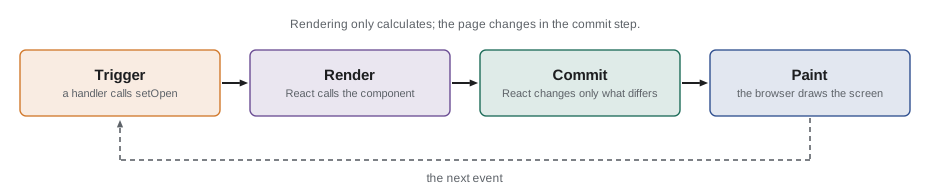
Setting state does not change the page directly. It asks React to render again, and React then works in three steps. Trigger: a setter is called, so React notes that the component needs to render. Render: React calls the component function, which returns new elements using the new state, and React compares them with the previous ones. Commit: React applies the differences to the real page. Then the browser paints the screen. The render step only calculates; nothing on the page changes until the commit.
State is a snapshot
Within one render, a state value never changes. When the component is called, useState returns the value stored at that moment, and every handler created during that render sees that value, even after the setter has been called. Setting state replaces the value for the next render, not the current one. React's documentation describes state as a snapshot.
This explains a classic puzzle. A handler calls setCount(count + 1) three times in a row. After the click, the count has gone up by one, not three, because count was the same snapshot value each time: three calls of setCount(0 + 1). When the next value depends on the previous one, pass an updater function instead: setCount((c) => c + 1). React puts updaters in a queue and runs them one after another during the next render, each receiving the result of the one before.
The example imitates React's queue. Setting state with a value adds "replace with this value" to the queue; setting it with a function adds "apply this function". The next render works through the queue.
function nextValue(base, queue) {
  let value = base;
  for (const update of queue) value = typeof update === 'function' ? update(value) : update;
  return value;
}

const count = 0;   // the snapshot value during this render

// Three replacements, all worked out from the same snapshot.
const queueA = [count + 1, count + 1, count + 1];
// Three updater functions, each applied to the result of the last.
const queueB = [(c) => c + 1, (c) => c + 1, (c) => c + 1];
// A mix: replace with 5, then add one.
const queueC = [5, (c) => c + 1];

console.log('setCount(count + 1) x3 ->', nextValue(count, queueA));
console.log('setCount(c => c + 1) x3 ->', nextValue(count, queueB));
console.log('setCount(5), then c => c + 1 ->', nextValue(count, queueC));setCount(count + 1) x3 -> 1 setCount(c => c + 1) x3 -> 3 setCount(5), then c => c + 1 -> 6
What this code does
nextValue works through a queue the way React does at the next render: a plain value replaces the current one, and a function is called with it. Because count is 0 throughout the render, the first queue holds three ones and the result is 1. The updater functions in the second queue build on each other and give 3, and the third shows that a replacement followed by an updater gives 6.
React also batches updates. All the setters called during one event, and since React 18 also those called in timeouts, promises and other callbacks, are collected and applied in a single render. This is why calling three setters in one handler causes one render, not three, and why the snapshot rule holds throughout a handler.
Updating objects and arrays
State can hold any value, including objects and arrays. The rule for them is the same as for props: never change them in place. React decides whether something changed by comparing the old and new values with Object.is, which for objects asks "is this the same object?" If a handler changes a property of the existing object and passes the same object to the setter, React sees the same object and may skip the render entirely. Even when it does render, other code that kept the old object sees it change too.
Instead, create a new object or array that includes the change. Spread syntax copies an object or array; map replaces an item; filter removes one; a spread with a new item at the end adds one. Methods that sort or reverse in place, sort and reverse, have non-changing versions, toSorted and toReversed, and with replaces one item by index. Only the parts on the path to the change are copied; everything else is shared between the old and new values.
const before = {
  filters: { area: 'all', day: 'Saturday' },
  shifts: [
    { id: 'w-sat', area: 'Warehouse', open: 2, booked: ['Ana'] },
    { id: 'k-sat', area: 'Community kitchen', open: 1, booked: [] },
  ],
};

// Sign Raj up for the kitchen shift without changing anything in place.
const after = {
  ...before,
  shifts: before.shifts.map((s) =>
    s.id === 'k-sat' ? { ...s, open: s.open - 1, booked: [...s.booked, 'Raj'] } : s),
};

console.log('same top object?    ', Object.is(before, after));
console.log('same filters?       ', Object.is(before.filters, after.filters));
console.log('same shifts array?  ', Object.is(before.shifts, after.shifts));
console.log('same warehouse shift?', Object.is(before.shifts[0], after.shifts[0]));
console.log('same kitchen shift? ', Object.is(before.shifts[1], after.shifts[1]));
console.log('kitchen before/after:', before.shifts[1].open, after.shifts[1].open, after.shifts[1].booked);same top object? false same filters? true same shifts array? false same warehouse shift? true same kitchen shift? false kitchen before/after: 1 0 [ "Raj" ]
What this code does
The update copies only what is on the path to the change: a new top object, a new shifts array and a new kitchen shift with a new booked array. The filters and the warehouse shift are not copied, so Object.is reports them as the same objects. The old state is untouched, which is what lets React, and any code that compares values, see exactly which parts changed.
For deeply nested state this copying becomes long-winded. Two remedies are common. The first is to keep state flatter, for example storing shifts in an object keyed by id instead of inside other objects; Lesson 10 returns to this. The second is a small library called Immer, which lets you write code that looks as if it changes a draft and produces a properly copied new value. Brightwater uses plain spreads in the portal, because its state is shallow.
Because React compares with Object.is, setting state to the same value it already has does nothing: React skips the render. The example shows the rule with a small setter that renders only when the value really changed, and counts the renders a sequence of clicks causes.
let state = { area: 'all' };
let renders = 0;
const log = [];

function setState(next) {
  if (Object.is(next, state)) { log.push('skipped'); return; }
  state = next;
  renders++;
  log.push(`render ${renders}: area=${state.area}`);
}

setState({ ...state, area: 'kitchen' });   // a new object: render
setState(state);                           // the same object: skipped
const same = state;
same.area = 'garden';                      // changed in place...
setState(same);                            // ...so React cannot tell: skipped
setState({ ...state, area: 'warehouse' }); // a new object: render

console.log(log.join('\n'));
console.log('renders:', renders);render 1: area=kitchen skipped skipped render 2: area=warehouse renders: 2
What this code does
setState compares the new value with the current one using Object.is and renders only when they differ, as React does. Passing the same object is skipped, which is correct in the second call but a bug in the third: the area was changed in place, so the object is still the same one and the change never reaches the page. The last call creates a new object and renders, which is the right way to make any change.
Lifting state up
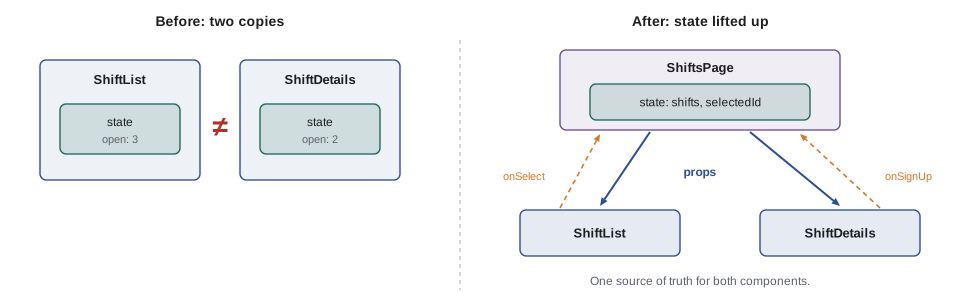
Now the December bug. On the old page, the shift list and the details panel each kept their own copy of the counts. In React, the same mistake would be to give ShiftList and ShiftDetails their own useState for the shifts. The fix is to lift state up: move the state to the closest component that contains both, here a ShiftsPage component, and pass the data down to both as props, along with functions to change it. There is then only one copy of each count, a single source of truth, and both components show it.
import { useState } from 'react';

const initialShifts = [
  { id: 'w-sat', area: 'Warehouse', day: 'Saturday', open: 3 },
  { id: 'k-sat', area: 'Community kitchen', day: 'Saturday', open: 1 },
];

function ShiftList({ shifts, selectedId, onSelect }) {
  return (
    <ul className="shift-list">
      {shifts.map((s) => (
        <li key={s.id}>
          <button type="button" aria-pressed={s.id === selectedId} onClick={() => onSelect(s.id)}>
            {s.area}, {s.day}: {s.open} left
          </button>
        </li>
      ))}
    </ul>
  );
}

function ShiftDetails({ shift, onSignUp }) {
  if (!shift) return <p>Choose a shift to see the details.</p>;
  return (
    <section aria-live="polite">
      <h2>{shift.area}</h2>
      <p>{shift.open} spaces left</p>
      <button type="button" disabled={shift.open === 0} onClick={() => onSignUp(shift.id)}>Sign up</button>
    </section>
  );
}

export function ShiftsPage() {
  const [shifts, setShifts] = useState(initialShifts);
  const [selectedId, setSelectedId] = useState('w-sat');
  const selected = shifts.find((s) => s.id === selectedId);

  function handleSignUp(id) {
    setShifts((current) => current.map((s) => (s.id === id && s.open > 0 ? { ...s, open: s.open - 1 } : s)));
  }

  return (
    <div className="shifts-page">
      <ShiftList shifts={shifts} selectedId={selectedId} onSelect={setSelectedId} />
      <ShiftDetails shift={selected} onSignUp={handleSignUp} />
    </div>
  );
}
What this code does
ShiftsPage owns two pieces of state: the shifts and the id of the selected shift. It passes the shifts to ShiftList and the selected shift to ShiftDetails, and gives them functions to report clicks. handleSignUp uses an updater function and map, so it works from the latest list and never changes it in place; both children then render the new count, because they read the same state.
<div class="shifts-page">
  <ul class="shift-list">
    <li>
      <button type="button" aria-pressed="true">Warehouse, Saturday: 3 left</button>
    </li>
    <li>
      <button type="button" aria-pressed="false">Community kitchen, Saturday: 1 left</button>
    </li>
  </ul>
  <section aria-live="polite">
    <h2>Warehouse</h2>
    <p>3 spaces left</p>
    <button type="button">Sign up</button>
  </section>
</div>
What this code does
This is the first render, with the warehouse shift selected. The list button and the details panel show the same number because both come from the one shifts array in ShiftsPage, and aria-pressed marks which list item is selected.
The selected shift is not stored as a copy. ShiftsPage stores only its id and finds the shift in the list during each render. If it stored a copy of the whole shift, a sign-up would update the list but not the copy, and the bug would be back. Storing the id and working out the rest is a small example of a principle Lesson 10 develops: keep state minimal and derive everything else.
Where should state live?
For each piece of state, React's documentation suggests asking which components show it and which change it, then putting it in the closest component that contains all of them. Some state is local: whether one card's details are expanded matters only to that card. Some is shared: the list of shifts matters to the list, the details panel and the summary. Some belongs higher still: the signed-in volunteer matters to almost every screen. Local state should stay local, because state kept higher than needed causes more of the tree to render and makes components harder to reuse.
Two habits prevent common bugs. Do not copy a prop into state, as in useState(props.open), unless the prop is only a starting value; the state will not follow later changes to the prop. If it really is only a starting value, name the prop to say so, such as initialOpen. And do not store values that can be calculated from other state or props, such as the number of open shifts; calculate them during the render.
Common mistakes
MistakeChanging a variable inside a component updates the page.
InsteadOnly setting state, with the function from useState, makes React render again. Local variables are created fresh on every render.
MistakeAfter setCount(count + 1), count has the new value in the same handler.
InsteadState is a snapshot. The new value appears on the next render; use an updater function when the next value depends on the previous one.
Mistakeshift.open -= 1; setShifts(shifts) is a fine way to update.
InsteadChanging state in place hides the change from React's Object.is comparison. Create a new array and a new shift object.
MistakeEach component that shows the counts should keep its own copy in state.
InsteadCopies drift apart. Lift the state to the closest common parent and pass it down.
MistakeStore the selected shift object in state.
InsteadStore its id and find the shift during rendering, so that the details always match the list.
Summary and key terms
- State is data a component remembers between renders.
- Local variables cannot hold it, because they are recreated on every render and changing them does not cause one. useState(initial) returns the current value and a setter; each component instance has its own state, and the initial value is used only on the first render.
- Event props such as onClick and onChange receive handlers that get an event object with the browser's properties and methods.
- Setting state triggers a render; React calls the component, compares the elements and commits the differences.
- State is a snapshot within a render; use updater functions when the next value depends on the previous one, and React batches all updates in an event into one render.
- Never change objects or arrays in state; create new ones with spread, map, filter, toSorted or with, copying only the changed path.
- React compares with Object.is, so changes made in place can be missed and setting the same value skips the render.
- Lift shared state to the closest common parent, keep it minimal and derive the rest.
- state
- Data a component remembers between renders and that causes a new render when it is set.
- hook
- A React function whose name starts with use and that gives a component an ability, such as state.
- useState
- The hook that gives a component a remembered value and a function to set it.
- event object
- The object passed to an event handler, describing the event, with methods such as preventDefault.
- snapshot
- The fixed value of state during one render; setting state changes the value for the next render.
- updater function
- A function passed to a state setter that receives the previous value and returns the next.
- batching
- React's handling of several state updates in one event as a single render.
- lifting state up
- Moving state to the closest common parent of the components that need it and passing it down as props.
Practice problems
Work each problem on paper first, then reveal the answer to check.
Why does a variable declared inside a component forget its value?
Show answer
The component function runs again on every render, so the variable is created again.
What does useState return?
Show answer
An array of the current value and a function that sets the next value.
A handler calls setOpen(open - 1) twice. open was 3. What is it after the render?
Show answer
2, because both calls use the snapshot value 3.
Name the three steps React goes through after state is set.
Show answer
Trigger, render and commit.
Why should ShiftsPage store selectedId rather than the selected shift?
Show answer
So that the details are always worked out from the current list and cannot become a stale copy.
Try it yourself
Process the state queue
Complete processQueue(base, queue) so that it returns the state value after React applies the queued updates in order. An item that is a function is an updater: call it with the current value. Any other item replaces the value.
The test runs several queues, including ones from the examples in this lesson.
function processQueue(base, queue) {
  return base;
}

const add = (n) => (c) => c + n;
console.log(processQueue(0, [1, 1, 1]));
console.log(processQueue(0, [add(1), add(1), add(1)]));
console.log(processQueue(0, [5, add(1)]));
console.log(processQueue(0, [add(1), 42, add(-2)]));
console.log(processQueue(3, []));
console.log(processQueue('kitchen', [(a) => a.toUpperCase(), (a) => a + '!']));
Try it yourself
Sign up without changing state
Complete signUp(state, shiftId, name). It should return a new state in which the shift with that id has one fewer open space and name added to the end of its booked list.
Return the same state object unchanged if the shift is full, if the name is already booked on it or if there is no such shift. Copy only what changes: the other shift and filters must stay the same objects.
function signUp(state, shiftId, name) {
  return state;
}

const s0 = {
  filters: { area: 'all' },
  shifts: [{ id: 'w-sat', open: 1, booked: [] }, { id: 'k-sat', open: 2, booked: ['Ana'] }],
};
const s1 = signUp(s0, 'k-sat', 'Raj');
console.log(JSON.stringify(s1.shifts));
console.log('old state unchanged:', s0.shifts[1].open === 2 && s0.shifts[1].booked.length === 1);
console.log('shared parts kept:', s1.filters === s0.filters, s1.shifts[0] === s0.shifts[0]);
console.log('duplicate name ignored:', signUp(s1, 'k-sat', 'Raj') === s1);
const s2 = signUp(s1, 'w-sat', 'Lee');
console.log('full shift ignored:', signUp(s2, 'w-sat', 'Kim') === s2);
console.log('missing shift ignored:', signUp(s2, 'x', 'Kim') === s2);
Lesson quiz · 5 questions
Score 60% or more to complete this lesson.
Create a free account to save your progress, take quizzes and earn a certificate.