
JS-120 · Lesson 8 of 12 · 30 min
Handling errors and timeouts
▶ Video coming soon A video version of this lesson is on the way.
Rosa asked Mira a blunt question when they met to plan the counter's connection to the server: "What happens at ten past twelve, with eight people in the queue, when the Wi-Fi drops?" The honest answer, at that point, was that the Place order button would show Sending... forever. The session planned for Tuesday, March 23, 2027, is about making sure that never happens.
"On a developer's laptop, every request succeeds in 40 milliseconds," Gareth says. "On a tablet in a busy kitchen, requests fail, stall and arrive late, and the code has to decide what to do in each case. The aim is simple to say: the trainee always knows what is happening, nothing is lost, and nothing is sent twice."
The ways a request can fail
A request can go wrong at several points, and each shows up differently in code. Telling them apart matters, because the right response differs: a timeout may be worth retrying, a validation error never is, and a cancellation is not really an error at all.
| Failure | How it appears | Worth retrying? | What to tell the user |
|---|---|---|---|
| No network, server unreachable, request blocked | fetch rejects with a TypeError | Yes, after a pause | No connection; your order is saved |
| Request cancelled by your code | fetch rejects with a DOMException named AbortError | No | Usually nothing |
| Request took too long | A DOMException named TimeoutError, with AbortSignal.timeout | Yes, carefully | The server is slow; trying again |
| Server error: 500, 502, 503, 504 | Response with ok false | Yes, after a pause | Something went wrong on our side |
| Too many requests: 429 | Response with ok false and maybe Retry-After | Yes, after the time it asks for | Please wait a moment |
| Client error: 400, 401, 403, 404, 409, 422 | Response with ok false | No | The specific problem |
| Body is not the expected JSON | json() rejects with a SyntaxError, or a shape check fails | No | Something went wrong; try reloading |
Two lessons come out of this table. First, a single catch that shows "Something went wrong" for every failure throws away information the user needs: "This shift is full" and "You are offline" call for different actions. Second, code needs a reliable way to tell the cases apart, which is what error classes are for.
Errors that say what happened
Mira's api.js module from Lesson 7 already turns a failed response into an ApiError with a status. Gareth suggests one more step: wrap every low-level failure into one of a few error types that the rest of the page understands, and keep the original error attached for debugging. The Error constructor accepts an options object with a cause property for exactly this, so the chain of what went wrong is never lost.
class NetworkError extends Error { name = 'NetworkError'; }
class HttpError extends Error {
  name = 'HttpError';
  constructor(status, message, options) { super(message, options); this.status = status; }
  get retryable() { return this.status === 429 || this.status >= 500; }
}

function describe(err) {
  if (err.name === 'AbortError') return 'aborted by the page, ignore';
  if (err.name === 'TimeoutError') return 'too slow, may retry';
  if (err instanceof NetworkError) return 'offline, may retry (cause: ' + err.cause.message + ')';
  if (err instanceof HttpError) return 'HTTP ' + err.status + (err.retryable ? ', may retry' : ', do not retry');
  return 'bug: ' + err.name + ': ' + err.message;
}

const samples = [
  new NetworkError('No connection', { cause: new TypeError('Failed to fetch') }),
  new HttpError(503, 'Service Unavailable'),
  new HttpError(409, 'Shift is full'),
  new DOMException('The operation was aborted.', 'AbortError'),
  new DOMException('The operation timed out.', 'TimeoutError'),
  new SyntaxError('Unexpected token < in JSON'),
];
for (const err of samples) console.log(err.name.padEnd(13), describe(err));NetworkError offline, may retry (cause: Failed to fetch) HttpError HTTP 503, may retry HttpError HTTP 409, do not retry AbortError aborted by the page, ignore TimeoutError too slow, may retry SyntaxError bug: SyntaxError: Unexpected token < in JSON
What this code does
NetworkError and HttpError are small classes, and HttpError knows which statuses are worth retrying. The cause option keeps the browser's original TypeError inside the NetworkError, so a developer can still see it. describe sorts every kind of failure into a decision, which is exactly what the page needs before choosing a message.
The browser's own failures are told apart by name rather than class. A cancelled fetch rejects with a DOMException whose name is AbortError, and one stopped by a timeout signal rejects with a DOMException named TimeoutError. The network failure is a plain TypeError whose message differs between browsers, such as "Failed to fetch" in Chrome and "NetworkError when attempting to fetch resource" in Firefox, so never test the message text.
Cancelling with AbortController
Sometimes your own code needs to stop a request: the trainee closed the receipt panel before it loaded, or Lucy typed another letter in a search box and the previous search is no longer wanted. An AbortController does this, the same object you used in The DOM and Browser Events to remove event listeners. Pass its signal to fetch in the options; calling the controller's abort() method makes that fetch reject with an AbortError at once, and the browser stops the request.
const routes = {
  'GET /api/v1/orders/41/receipt': () => [200, { number: 41, lines: 2 }, 400],
};

// ---- stand-in for the network (Lesson 6): answers from routes after a delay ----
function fakeFetch(url, { method = 'GET', body, signal } = {}) {
  return new Promise((resolve, reject) => {
    if (signal?.aborted) return reject(signal.reason);
    const u = new URL(url, 'https://riverside-food-hub.example');
    const route = routes[method + ' ' + u.pathname];
    const [status, data, ms = 80] = route ? route(body && JSON.parse(body), u.searchParams) : [404, { error: 'Not found' }];
    const timer = setTimeout(() => resolve(fakeResponse(status, data)), ms);
    signal?.addEventListener('abort', () => { clearTimeout(timer); reject(signal.reason); });
  });
}
function fakeResponse(status, data) {
  const text = JSON.stringify(data);
  return { status, ok: status >= 200 && status < 300, headers: new Headers({ 'Content-Type': 'application/json' }),
           json: async () => JSON.parse(text), text: async () => text };
}
// ---- end of stand-in ----

const controller = new AbortController();
setTimeout(() => {
  console.log('Trainee closed the receipt panel');
  controller.abort();
}, 150);

try {
  const response = await fakeFetch('/api/v1/orders/41/receipt', { signal: controller.signal });
  console.log('Receipt loaded', await response.json());
} catch (err) {
  if (err.name === 'AbortError') console.log('Request aborted; nothing to show');
  else throw err;
}Trainee closed the receipt panel Request aborted; nothing to show
What this code does
The pretend receipt takes 400 milliseconds, but after 150 milliseconds a timer plays the trainee closing the panel and aborts the controller. The fetch then rejects with an AbortError, which the catch recognizes and quietly ignores. Any other error is thrown on, because only a cancellation is expected here.
A controller can be aborted only once; create a new one for each request, or for each group of requests that should be cancelled together. One signal can be passed to several fetch calls, and abort() then cancels all of them, which is useful when a page section is closed and every request it started should stop.
Latest wins
A classic bug in search boxes and filters is the race condition between responses. Lucy types k, ki, kit in the shift search. Three requests go out. If the response for k happens to arrive last, the list shows the results for k while the box says kit. Debouncing from The DOM and Browser Events reduces the number of requests but does not remove the race. The fix is to abort the previous request whenever a new one starts, so only the latest can ever update the page.
const routes = {
  'GET /api/v1/shifts': (_, q) => {
    const term = q.get('q');
    const ms = { k: 300, ki: 200, kit: 50 }[term];
    return [200, { term, items: ['Kitchen 09:00', 'Kitchen 13:00'].filter((s) => s.toLowerCase().startsWith(term)) }, ms];
  },
};

// ---- stand-in for the network (Lesson 6): answers from routes after a delay ----
function fakeFetch(url, { method = 'GET', body, signal } = {}) {
  return new Promise((resolve, reject) => {
    if (signal?.aborted) return reject(signal.reason);
    const u = new URL(url, 'https://riverside-food-hub.example');
    const route = routes[method + ' ' + u.pathname];
    const [status, data, ms = 80] = route ? route(body && JSON.parse(body), u.searchParams) : [404, { error: 'Not found' }];
    const timer = setTimeout(() => resolve(fakeResponse(status, data)), ms);
    signal?.addEventListener('abort', () => { clearTimeout(timer); reject(signal.reason); });
  });
}
function fakeResponse(status, data) {
  const text = JSON.stringify(data);
  return { status, ok: status >= 200 && status < 300, headers: new Headers({ 'Content-Type': 'application/json' }),
           json: async () => JSON.parse(text), text: async () => text };
}
// ---- end of stand-in ----

let current = null;
async function search(term) {
  current?.abort();
  current = new AbortController();
  try {
    const response = await fakeFetch('/api/v1/shifts?q=' + term, { signal: current.signal });
    const data = await response.json();
    console.log('Showing', data.items.length, 'results for', data.term);
  } catch (err) {
    if (err.name !== 'AbortError') throw err;
    console.log('Dropped the search for', term);
  }
}

search('k');
setTimeout(() => search('ki'), 30);
setTimeout(() => search('kit'), 60);Dropped the search for k Dropped the search for ki Showing 2 results for kit
What this code does
Each new search aborts the controller of the one before it, then makes its own. The slow searches for k and ki are cancelled when the next letter arrives, so only kit can update the list, even though the pretend server would have answered k last. Without the abort, the page could end up showing stale results.
Timeouts
fetch has no timeout of its own. A request to a server that has stopped responding can hang for minutes before the browser gives up, which in Rosa's lunch rush means minutes of Sending.... The standard answer is AbortSignal.timeout(ms), which returns a signal that aborts itself after the given time with a TimeoutError. It has been Baseline since 2024 and works in browsers, workers and Node.js.
const routes = {
  'GET /api/v1/menu': () => [200, [{ code: 'SOUP' }], 50],
  'GET /api/v1/counter/today': () => [200, { orders: 37 }, 400],
};

// ---- stand-in for the network (Lesson 6): answers from routes after a delay ----
function fakeFetch(url, { method = 'GET', body, signal } = {}) {
  return new Promise((resolve, reject) => {
    if (signal?.aborted) return reject(signal.reason);
    const u = new URL(url, 'https://riverside-food-hub.example');
    const route = routes[method + ' ' + u.pathname];
    const [status, data, ms = 80] = route ? route(body && JSON.parse(body), u.searchParams) : [404, { error: 'Not found' }];
    const timer = setTimeout(() => resolve(fakeResponse(status, data)), ms);
    signal?.addEventListener('abort', () => { clearTimeout(timer); reject(signal.reason); });
  });
}
function fakeResponse(status, data) {
  const text = JSON.stringify(data);
  return { status, ok: status >= 200 && status < 300, headers: new Headers({ 'Content-Type': 'application/json' }),
           json: async () => JSON.parse(text), text: async () => text };
}
// ---- end of stand-in ----

async function getWithTimeout(path, ms) {
  try {
    const response = await fakeFetch(path, { signal: AbortSignal.timeout(ms) });
    return await response.json();
  } catch (err) {
    if (err.name === 'TimeoutError') throw new Error(path + ' took longer than ' + ms + ' ms', { cause: err });
    throw err;
  }
}

for (const path of ['/api/v1/menu', '/api/v1/counter/today']) {
  try {
    const data = await getWithTimeout(path, 200);
    console.log(path, '->', data);
  } catch (err) {
    console.log('Gave up:', err.message, '(' + err.cause.name + ')');
  }
}/api/v1/menu -> [ { code: "SOUP" } ]
Gave up: /api/v1/counter/today took longer than 200 ms (TimeoutError)What this code does
Each request gets a signal that aborts itself after 200 milliseconds. The menu answers in 50 and arrives normally; the counter summary would take 400, so its signal fires first and the fetch rejects with a TimeoutError. The helper turns that into an error with a clear message and keeps the original as its cause.
Choosing the time is a judgement. Too short and slow but working connections fail needlessly; too long and the user waits for nothing. Mira and Rosa settle on 8 seconds for placing an order, because the counter shows a saved copy and can retry, and 5 seconds for the dashboard's refreshes, because a missed refresh is harmless. Measure real response times during the pilot and adjust.
Combining signals
A request often needs both: cancellation by the user and a timeout. AbortSignal.any(signals) combines several signals into one that aborts as soon as any of them does, with that signal's reason. It has been in all major browsers since March 2024 and is Baseline Widely available since September 2026.
function placeOrder(order, userSignal) {
  const signal = AbortSignal.any([userSignal, AbortSignal.timeout(8000)]);
  return fetch('/api/v1/orders', {
    method: 'POST',
    headers: { 'Content-Type': 'application/json' },
    body: JSON.stringify(order),
    signal,
  });
}
What this code does
The combined signal aborts either when the trainee presses Cancel, which aborts userSignal, or after 8 seconds, whichever comes first. The error's name says which one happened: AbortError for the user, TimeoutError for the clock. The page can respond to each differently.
Retrying with backoff
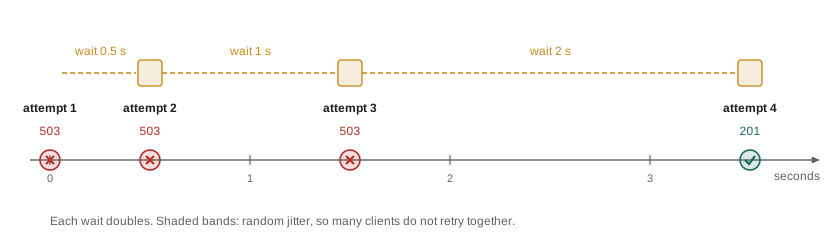
Many failures are temporary: a dropped Wi-Fi packet, a server restarting, a moment of overload. Trying again after a pause often succeeds. But retrying badly makes things worse. If every tablet and every dashboard retries immediately and repeatedly, a struggling server gets a flood of requests just when it can least handle them. The standard pattern is exponential backoff: wait a little before the first retry and twice as long before each further one, up to a limit, and give up after a few attempts.
let calls = 0;
const routes = {
  'GET /api/v1/shifts': () => (++calls < 3 ? [503, { error: 'Restarting' }, 20] : [200, { items: [17, 18] }, 20]),
};

// ---- stand-in for the network (Lesson 6): answers from routes after a delay ----
function fakeFetch(url, { method = 'GET', body, signal } = {}) {
  return new Promise((resolve, reject) => {
    if (signal?.aborted) return reject(signal.reason);
    const u = new URL(url, 'https://riverside-food-hub.example');
    const route = routes[method + ' ' + u.pathname];
    const [status, data, ms = 80] = route ? route(body && JSON.parse(body), u.searchParams) : [404, { error: 'Not found' }];
    const timer = setTimeout(() => resolve(fakeResponse(status, data)), ms);
    signal?.addEventListener('abort', () => { clearTimeout(timer); reject(signal.reason); });
  });
}
function fakeResponse(status, data) {
  const text = JSON.stringify(data);
  return { status, ok: status >= 200 && status < 300, headers: new Headers({ 'Content-Type': 'application/json' }),
           json: async () => JSON.parse(text), text: async () => text };
}
// ---- end of stand-in ----

const sleep = (ms) => new Promise((resolve) => setTimeout(resolve, ms));

async function getWithRetry(path, { attempts = 4, base = 100 } = {}) {
  for (let attempt = 1; ; attempt++) {
    const response = await fakeFetch(path);
    if (response.ok) return response.json();
    const retryable = response.status === 429 || response.status >= 500;
    if (!retryable || attempt === attempts) throw new Error('Failed with ' + response.status + ' after ' + attempt + ' attempts');
    const wait = base * 2 ** (attempt - 1);
    console.log('Attempt', attempt, 'got', response.status + '; waiting', wait, 'ms');
    await sleep(wait);
  }
}

const data = await getWithRetry('/api/v1/shifts');
console.log('Got shifts', data.items.join(', '), 'after', calls, 'calls');Attempt 1 got 503; waiting 100 ms Attempt 2 got 503; waiting 200 ms Got shifts 17, 18 after 3 calls
What this code does
The pretend server answers 503 twice and then succeeds. getWithRetry tries again only for statuses worth retrying, waits 100 then 200 milliseconds, doubling each time, and gives up with a clear error after four attempts. A real version would also add random jitter to each wait and stop retrying if the user leaves the page.
Two refinements make backoff work at scale. Jitter adds a random amount to each wait, so that a hundred clients that failed at the same moment do not retry at the same moment too; a common form waits a random time between zero and the backoff value. And when a server answers 429 or 503 with a Retry-After header, it is telling you how many seconds to wait, so use that instead of your own guess.
Retrying without duplicating
Retrying a GET is harmless. Retrying a POST is not, because of the problem from Lesson 7: if the server received and saved the order but the response was lost on the way back, a retry creates a second order and the tally counts one customer twice. Rosa was clear that this must not happen. Theo's contract solves it with an idempotency key: the page generates a unique identifier for each order, such as one from crypto.randomUUID(), and sends it in an Idempotency-Key header. If the server sees the same key twice, it returns the first result instead of creating a second order. The header is being standardized by the IETF and is already used by payment services such as Stripe.
async function sendOrderSafely(order) {
  const key = order.key ??= crypto.randomUUID();   // the same key on every retry
  return withRetry(() => fetch('/api/v1/orders', {
    method: 'POST',
    headers: { 'Content-Type': 'application/json', 'Idempotency-Key': key },
    body: JSON.stringify(order),
    signal: AbortSignal.timeout(8000),
  }));
}
What this code does
The key is created once, the first time the order is sent, and stored on the order so that every retry sends the same one. The server keeps the result for each key it has seen, so a retried request returns the original order number instead of creating a duplicate. withRetry stands for a backoff helper like the one above.
Offline and back again
Browsers report whether they believe they are connected: navigator.onLine is false when there is definitely no network, and the window fires offline and online events when that changes. The signal is useful but unreliable in one direction: onLine can be true when the Wi-Fi is connected but the internet or the server is not reachable. Treat it as a hint for the interface, such as showing an Offline badge, and rely on actual request failures for decisions.
For the counter, Mira and Rosa agree on a plan they write into the page's README. Orders are saved on the tablet first and then sent; an order that fails to send stays in an outbox with a clear "waiting to send" mark; the outbox is retried with backoff and again whenever an online event fires; and each order carries its idempotency key, so a retry can never double-count. The trainee can keep serving throughout.
const outbox = loadOutbox();          // orders saved on the tablet, not yet confirmed

async function flushOutbox() {
  for (const order of [...outbox]) {
    try {
      const receipt = await sendOrderSafely(order);
      markConfirmed(order, receipt.number);
      outbox.splice(outbox.indexOf(order), 1);
      saveOutbox(outbox);
    } catch (err) {
      showOutboxWarning(outbox.length);   // try again later
      return;
    }
  }
}

window.addEventListener('online', flushOutbox);
setInterval(flushOutbox, 60_000);
What this code does
Each waiting order is sent in turn; a confirmed one is removed from the outbox and the outbox is saved again. The first failure stops the loop and shows how many orders are waiting, so the trainee knows nothing is lost. The outbox is tried again when the browser reports it is back online, and once a minute in any case.
Messages for people
The last part of handling an error is telling someone. The user needs to know what happened in plain words and what they can do; the developer needs the technical detail. Keep the two apart: show a short, specific message on the page, and send the error object, with its cause, to the console or to a logging service.
| Situation | Poor message | Better message |
|---|---|---|
| Order could not be sent | Error: Failed to fetch | No connection. Order 42 is saved and will be sent automatically. |
| Shift full | HTTP 409 | This shift filled up a moment ago. Choose another time. |
| Server error | Something went wrong | The server is having trouble. Your changes are saved; try again in a minute. |
| Timeout on the dashboard | TimeoutError: signal timed out | Last updated 12:04. Retrying. |
Try it yourself
Give up after a time limit
Complete load(path, ms) so that it passes AbortSignal.timeout(ms) as the signal to fakeFetch, returns the parsed JSON on success, and returns the string too slow if the request fails with a TimeoutError.
The code should print { orders: 37 } and then too slow.
const routes = {
  'GET /api/v1/counter/today': () => [200, { orders: 37 }, 50],
  'GET /api/v1/shifts': () => [200, { items: [] }, 300],
};

// ---- stand-in for the network (Lesson 6): answers from routes after a delay ----
function fakeFetch(url, { method = 'GET', body, signal } = {}) {
  return new Promise((resolve, reject) => {
    if (signal?.aborted) return reject(signal.reason);
    const u = new URL(url, 'https://riverside-food-hub.example');
    const route = routes[method + ' ' + u.pathname];
    const [status, data, ms = 80] = route ? route(body && JSON.parse(body), u.searchParams) : [404, { error: 'Not found' }];
    const timer = setTimeout(() => resolve(fakeResponse(status, data)), ms);
    signal?.addEventListener('abort', () => { clearTimeout(timer); reject(signal.reason); });
  });
}
function fakeResponse(status, data) {
  const text = JSON.stringify(data);
  return { status, ok: status >= 200 && status < 300, headers: new Headers({ 'Content-Type': 'application/json' }),
           json: async () => JSON.parse(text), text: async () => text };
}
// ---- end of stand-in ----

async function load(path, ms) {
  const response = await fakeFetch(path);
  return response.json();
}

const today = await load('/api/v1/counter/today', 150);
console.log(today);
console.log(await load('/api/v1/shifts', 150));
Try it yourself
Retry with growing waits
Complete retry(fn, attempts) so that it calls the async function fn, returns its result if it succeeds, and otherwise waits and tries again: 50 ms after the first failure, 100 ms after the second, doubling each time. After attempts failures it throws the last error.
Print attempt <n> failed, waiting <ms> before each wait. The output should end with Booked on attempt 3.
const sleep = (ms) => new Promise((resolve) => setTimeout(resolve, ms));
let tries = 0;
async function book() {
  tries += 1;
  await sleep(10);
  if (tries < 3) throw new Error('Server busy');
  return 'Booked on attempt ' + tries;
}

async function retry(fn, attempts) {
  return fn();
}

try {
  const result = await retry(book, 4);
  console.log(result);
} catch (err) {
  console.log('Gave up:', err.message);
}
Common mistakes
MistakeOne generic error message is enough for every failure.
InsteadDifferent failures need different actions; tell the user what happened and what to do.
Mistakefetch times out on its own after a few seconds.
InsteadIt has no timeout; add one with AbortSignal.timeout.
MistakeAn AbortError should be shown to the user as a failure.
InsteadA cancellation was usually your own code's decision and needs no message.
MistakeRetrying immediately and forever is the most reliable approach.
InsteadIt floods a struggling server. Use exponential backoff with jitter and a limit.
MistakeA POST can be retried like a GET.
InsteadIt may create a duplicate. Send an idempotency key so the server can recognize a repeat.
Mistakenavigator.onLine true means the server can be reached.
InsteadIt only means some network is connected. Rely on actual request results.
Summary and key terms
- Requests fail in distinct ways: network errors reject fetch with a TypeError, cancellations with an AbortError, timeouts with a TimeoutError, while HTTP errors arrive as responses with ok false and bad bodies make json() reject.
- Error classes such as NetworkError and HttpError, with the cause option, let code tell failures apart and keep the original error.
- AbortController cancels requests through the signal option; aborting the previous request makes the latest search win.
- AbortSignal.timeout adds a timeout, and AbortSignal.any combines user cancellation with a timeout.
- Temporary failures such as 429 and 5xx can be retried with exponential backoff, jitter and a limit, honouring Retry-After.
- POST requests need an idempotency key to be retried safely. navigator.onLine and the online event are hints; an outbox keeps unsent work safe.
- Users get short, specific messages; developers get the details.
- AbortController
- An object whose abort method cancels every request given its signal.
- AbortSignal
- An object passed to fetch that tells it when to stop.
- AbortError
- The name of the DOMException a fetch rejects with when it is cancelled.
- AbortSignal.timeout
- A method returning a signal that aborts itself with a TimeoutError after a set time.
- AbortSignal.any
- A method returning a signal that aborts when any of the given signals does.
- error cause
- The original error attached to a new one through the cause option.
- race condition
- A bug where the result depends on which of several operations finishes first.
- exponential backoff
- Waiting longer before each retry, typically doubling the wait.
- jitter
- A random amount added to retry waits so that many clients do not retry together.
- Retry-After
- A response header telling the client how long to wait before trying again.
- idempotency key
- A unique value sent with a request so the server can recognize and ignore repeats.
- outbox
- A saved list of changes waiting to be sent to the server.
Practice problems
Work each problem on paper first, then reveal the answer to check.
How does a cancelled fetch reject?
Show answer
With a DOMException whose name is AbortError.
Does fetch have a built-in timeout?
Show answer
No; use a signal from AbortSignal.timeout.
Which status codes are usually worth retrying?
Show answer
429 and the 5xx server errors such as 503.
Why add jitter to backoff?
Show answer
So that many clients that failed together do not all retry at the same moment.
How can a POST be retried without creating a duplicate?
Show answer
Send the same idempotency key with every attempt so the server can recognize the repeat.
Lesson quiz · 5 questions
Score 60% or more to complete this lesson.
Create a free account to save your progress, take quizzes and earn a certificate.