
JS-120 · Lesson 4 of 12 · 23 min
Promises
▶ Video coming soon A video version of this lesson is on the way.
Mira's callback version of placing an order worked, but by the end of Lesson 3 she had a list of worries about it: callbacks that might run twice, errors that a try block could not catch, error checks repeated at every level. The session planned for Tuesday, March 9, 2027, introduces the tool that modern JavaScript uses for all of them. "A callback is an instruction: call me when you are done," Gareth says. "A promise is a receipt: here is something that will hold the answer. You keep the receipt, and you decide what to do with it."
Promises were added to the language in ECMAScript 2015, after years of use in libraries. Almost every asynchronous API added to browsers since then returns one, including fetch, and the async and await keywords of Lesson 5 are built on them. Understanding promises well is the foundation for the rest of the course.
What a promise is
A promise is an object that stands for the eventual result of an asynchronous operation. When you start the operation, you get the promise back at once, before the result exists. The promise is in one of three states. It starts pending. Later it becomes either fulfilled, with a value, or rejected, with a reason, usually an Error. Once it is fulfilled or rejected it is settled, and a settled promise never changes again.
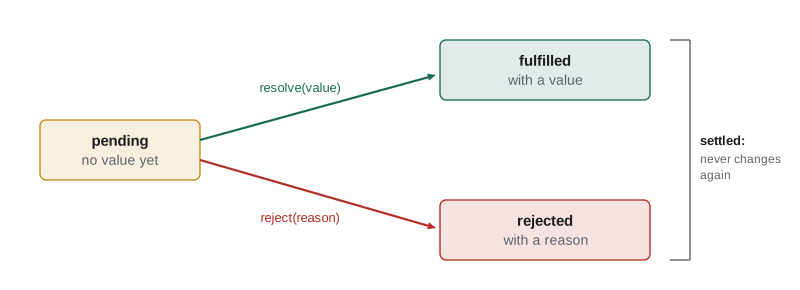
Those rules answer most of the trust problems from Lesson 3. A promise settles at most once, so code waiting for it cannot be called twice. The callbacks you attach to a promise always run asynchronously, as microtasks, even if the promise is already settled, so there is no "sometimes synchronous" behaviour. And a rejection travels along a chain of promises until something handles it, so errors are not lost.
Creating a promise
Most of the time you receive promises from APIs such as fetch, but you can create one with the Promise constructor. It takes a function called the executor, which the constructor calls at once with two functions, usually named resolve and reject. The executor starts the work; when the work finishes, it calls resolve with the value or reject with the reason.
function delay(ms) {
  return new Promise((resolve) => {
    setTimeout(() => resolve(ms), ms);
  });
}

console.log('start');
const p = delay(200);
console.log('got a promise straight away:', p instanceof Promise);
p.then((value) => console.log('fulfilled after', value, 'ms'));
console.log('end of script');start got a promise straight away: true end of script fulfilled after 200 ms
What this code does
delay returns a promise at once and starts a timer; when the timer fires, the executor's resolve function fulfils the promise with the number of milliseconds. The script carries on and prints its last line while the promise is still pending. The function passed to then runs when the promise is fulfilled, 200 milliseconds later.
Wrapping a callback-based operation like this is called promisifying it. Here is the stock check from Lesson 3, which used an error-first callback, turned into a function that returns a promise. The wrapper calls reject for an error and resolve for a result, and the caller no longer passes a callback at all.
const stock = { SOUP: 12, EGG: 0 };
function checkStockCb(code, callback) {
  setTimeout(() => {
    if (stock[code] === 0) callback(new Error(code + ' is sold out'));
    else callback(null, stock[code]);
  }, 100);
}

function checkStock(code) {
  return new Promise((resolve, reject) => {
    checkStockCb(code, (err, left) => (err ? reject(err) : resolve(left)));
  });
}

checkStock('SOUP').then((left) => console.log('SOUP:', left, 'left'));
checkStock('EGG').catch((err) => console.log('Problem:', err.message));SOUP: 12 left Problem: EGG is sold out
What this code does
checkStock calls the old callback function and settles its promise from inside the callback: rejected if there was an error, fulfilled with the number left otherwise. The caller attaches then for the success case and catch for the failure case. This is how Node.js's util.promisify works inside.
If the executor itself throws, the promise is rejected with the thrown error, so a mistake inside the executor does not escape. Calling resolve or reject a second time, or calling one after the other, does nothing: the first call wins.
const p = new Promise((resolve, reject) => {
  resolve('first answer');
  resolve('second answer');        // ignored
  reject(new Error('too late'));   // ignored
});
p.then((v) => console.log('Fulfilled with:', v));

const q = new Promise(() => {
  throw new Error('bug in the executor');
});
q.catch((err) => console.log('Rejected with:', err.message));Fulfilled with: first answer Rejected with: bug in the executor
What this code does
The first promise is resolved once, and the later calls to resolve and reject are ignored because a settled promise never changes. The second executor throws, and the constructor turns the exception into a rejection instead of letting it escape. Both results are handled by the functions attached with then and catch.
then, catch and finally
You read a promise's result by attaching reactions. then(onFulfilled, onRejected) registers functions for either outcome, though the second argument is rarely used. catch(onRejected) is shorthand for then(undefined, onRejected). finally(fn) registers a function that runs on either outcome without receiving the value, which suits cleanup such as hiding a spinner. You can attach reactions before or after the promise settles; if it has already settled, they are queued as microtasks straight away.
| Method | Runs when | Receives | Typical use |
|---|---|---|---|
| then(fn) | The promise is fulfilled | The value | Use the result, start the next step |
| catch(fn) | The promise is rejected | The reason, usually an Error | Show a message, recover |
| finally(fn) | Either way | Nothing | Hide the spinner, re-enable a button |
Chaining
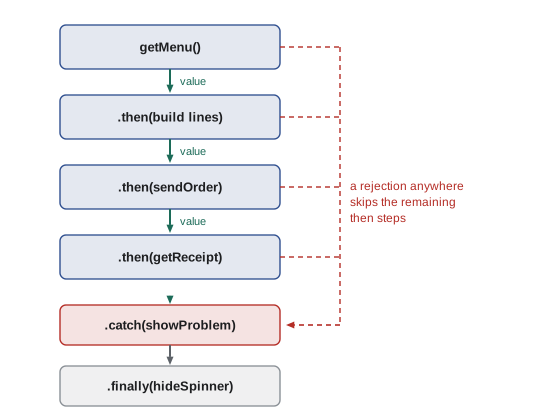
The key feature of then, catch and finally is that each one returns a new promise. That new promise is settled by what the reaction function does. If the function returns a value, the new promise is fulfilled with that value. If it throws, the new promise is rejected with the error. If it returns another promise, the new promise follows that promise and settles the same way. This is what lets steps be written one after another instead of nested.
const wait = (ms, value) => new Promise((resolve) => setTimeout(() => resolve(value), ms));

const getMenu = () => wait(50, { SOUP: 550, DRINK: 200 });
const sendOrder = (lines) => wait(50, { number: 41, lines });
const getReceipt = (number) => wait(50, 'Receipt for order ' + number);

getMenu()
  .then((menu) => [{ code: 'SOUP', qty: 2, price: menu.SOUP }])
  .then((lines) => sendOrder(lines))
  .then((order) => {
    console.log('Order', order.number, 'placed');
    return getReceipt(order.number);
  })
.then((receipt) => console.log(receipt));Order 41 placed Receipt for order 41
What this code does
Each then receives what the previous step produced. The first reaction returns a plain array, which is passed straight on; the others return promises from the pretend server, and the chain waits for each one before continuing. The four dependent steps of Lesson 3 now read from top to bottom with no nesting.
A common mistake is to forget the return inside a then. Without it, the reaction returns undefined, the next step runs immediately instead of waiting, and it receives undefined instead of the result. If a chain seems to run out of order, a missing return is the first thing to look for.
Errors travel down the chain
When a promise in a chain is rejected, or a reaction throws, the chain skips every following then until it reaches a catch. The catch receives the error. If the catch returns normally, the promise it returns is fulfilled, so the chain recovers and carries on from there. One catch at the end of a chain therefore handles a failure at any step, which is exactly what the callback version could not do.
const wait = (ms, value) => new Promise((resolve) => setTimeout(() => resolve(value), ms));
const checkStock = (code) =>
  code === 'EGG' ? Promise.reject(new Error('EGG is sold out')) : wait(50, 12);

function order(code) {
  return checkStock(code)
    .then((left) => {
      console.log(code, 'in stock:', left);
      return wait(50, 41);
    })
    .then((number) => console.log(code, 'order', number, 'placed'))
    .catch((err) => console.log(code, 'not ordered:', err.message))
    .finally(() => console.log(code, 'spinner hidden'));
}

order('EGG').then(() => order('SOUP'));EGG not ordered: EGG is sold out EGG spinner hidden SOUP in stock: 12 SOUP order 41 placed SOUP spinner hidden
What this code does
For EGG the stock check is rejected, so both then steps are skipped and the catch prints the reason. finally runs in both cases, which makes it the right place for cleanup. Because catch returned normally, the promise returned by order is fulfilled, and the next order starts afterwards.
Inside a then you can also signal failure yourself by throwing. Throwing in a reaction is the promise equivalent of calling reject, and it is how you turn an unwanted but technically successful result, such as a server reply saying the shift is full, into an error that the catch at the end will handle.
Unhandled rejections
A rejected promise with no catch anywhere along its chain is an unhandled rejection. Browsers report it in the console with a message such as "Uncaught (in promise)" and fire an unhandledrejection event on the window; Node.js, since version 15, stops the whole process by default. Always end a chain with a catch, or return the promise to a caller who will. In this course's runner, an unhandled rejection stops the run and is reported as an error, so examples always handle their rejections.
// Reported as an unhandled rejection: nobody catches it
checkStock('EGG').then((left) => showStock(left));

// Handled: the chain ends with a catch
checkStock('EGG')
  .then((left) => showStock(left))
  .catch((err) => showProblem(err.message));

// A page-wide safety net for anything missed
window.addEventListener('unhandledrejection', (event) => {
  reportToTheo(event.reason);
});
What this code does
The first chain has no catch, so a sold-out item produces an unhandled rejection and the user sees nothing. The second ends with a catch that shows the problem. The listener at the end is a last resort that logs anything that slipped through, not a replacement for handling errors where they happen.
Ready-made promises and resolvers
Two static methods create promises that are already settled. Promise.resolve(value) returns a fulfilled promise, or returns value itself if it is already a promise; it is handy for starting a chain or for treating a cached value and a fresh request the same way. Promise.reject(reason) returns a rejected promise. Both still deliver their results asynchronously to any reactions.
Sometimes the code that settles a promise is not inside the executor, for example when a dialog's OK and Cancel buttons should settle a promise that was created earlier. Promise.withResolvers() returns an object with the promise and its resolve and reject functions, so they can be stored and called from anywhere. It has been available in all major browsers since March 2024 and in Node.js 22, and is Baseline Widely available since September 2026.
function confirmClear() {
  const { promise, resolve } = Promise.withResolvers();
  console.log('Dialog shown: clear the order?');
  // In a page these would be button listeners; here timers play the user.
  setTimeout(() => resolve(false), 150);   // the trainee taps Cancel
  return promise;
}

confirmClear().then((yes) => {
  console.log(yes ? 'Order cleared' : 'Order kept');
});Dialog shown: clear the order? Order kept
What this code does
withResolvers gives back a promise together with the functions that settle it, so they can be passed to event listeners that run later. Here a timer stands in for the trainee tapping Cancel and resolves the promise with false. The code that opened the dialog simply waits for the promise.
A newer method, Promise.try(fn), calls a function and always gives back a promise: fulfilled with its return value, rejected if it throws, or following the promise it returns. It is part of ECMAScript 2025 and has been Baseline since January 2025 (Chrome 128, Firefox 134, Safari 18.2). It is useful when a function might be synchronous or asynchronous and you want one way to handle both. The checker used for this course's examples runs on Node.js 22, which does not have it, so it is shown here as a listing.
// getPrice may return a number from a cache or a promise from the server,
// and may throw if the code is unknown. Promise.try handles all three.
Promise.try(() => getPrice('SOUP'))
  .then((price) => console.log('Price', price))
  .catch((err) => console.log('No price:', err.message));
What this code does
Promise.try calls getPrice straight away and wraps whatever happens in a promise. A synchronous return value, a returned promise and a thrown error all end up on the same chain. Before Promise.try, the usual workaround was Promise.resolve().then(fn), which delays the call by a microtask.
| Tool | Returns | Available |
|---|---|---|
| new Promise(executor) | A promise settled by the executor | Since ECMAScript 2015 |
| Promise.resolve(v), Promise.reject(r) | An already settled promise | Since ECMAScript 2015 |
| then, catch | A new promise for the next step | Since ECMAScript 2015 |
| finally | A new promise that passes the result through | ECMAScript 2018 |
| Promise.withResolvers() | An object with promise, resolve and reject | ECMAScript 2024; Baseline Widely available since Sept 2026 |
| Promise.try(fn) | A promise for the result of calling fn | ECMAScript 2025; Baseline since Jan 2025 |
Thenables
The promise machinery accepts any object that has a then method, called a thenable, and treats it like a promise. That is how promise libraries written before 2015 interoperate with native promises, and it is why returning such an object from a then makes the chain wait for it. You will rarely write a thenable yourself, but it explains why Promise.resolve on a library's promise-like object gives you a genuine promise.
Try it yourself
A promise that waits
Write wait(ms, value), which returns a promise fulfilled with value after ms milliseconds.
The starter uses it in a chain that should print Soup is ready, then Order 41 called.
function wait(ms, value) {
  // replace this line with a promise that waits
  return Promise.reject(new Error('wait is not written yet'));
}

wait(100, 'Soup is ready')
  .then((msg) => {
    console.log(msg);
    return wait(50, 41);
  })
  .then((n) => console.log('Order', n, 'called'))
  .catch((err) => console.log('Not a promise yet:', err.message));
Try it yourself
Promisify the booking
bookShiftCb takes an error-first callback. Complete bookShift(id) so that it returns a promise rejected with the error or fulfilled with the places left.
The code at the bottom should print K1: 1 left and then K2 failed: Shift K2 is full.
const places = { K1: 2, K2: 0 };
function bookShiftCb(id, callback) {
  setTimeout(() => {
    if (places[id] === 0) callback(new Error('Shift ' + id + ' is full'));
    else { places[id] -= 1; callback(null, places[id]); }
  }, 50);
}

function bookShift(id) {
  return Promise.resolve(0);   // replace this
}

bookShift('K1')
  .then((left) => console.log('K1:', left, 'left'))
  .then(() => bookShift('K2'))
  .then((left) => console.log('K2:', left, 'left'))
  .catch((err) => console.log('K2 failed:', err.message));
Common mistakes
MistakeA promise can be resolved again with a newer value.
InsteadA promise settles once. Later calls to resolve or reject are ignored.
MistakeReactions on an already settled promise run immediately, in the middle of your code.
InsteadThey are always queued as microtasks and run after the current code.
MistakeYou can leave out return in a then and the chain still waits.
InsteadWithout return the next step gets undefined and does not wait for the inner promise.
MistakeA catch in the middle of a chain stops the chain.
InsteadIf the catch returns normally, the chain recovers and continues with the next then.
MistakeAn unhandled rejection is harmless.
InsteadBrowsers report it, Node.js stops the process, and the user is never told what went wrong.
Summary and key terms
- A promise stands for the eventual result of an asynchronous operation and is pending, fulfilled with a value or rejected with a reason.
- It settles only once, and its reactions always run asynchronously as microtasks. new Promise(executor) creates one; the executor calls resolve or reject, and a throw inside it rejects the promise.
- Wrapping a callback function this way is promisifying it. then, catch and finally attach reactions and each returns a new promise, so dependent steps form a flat chain.
- A reaction's return value fulfils the next promise, a thrown error rejects it and a returned promise is followed.
- A rejection skips the remaining then steps until a catch, which can recover.
- Unhandled rejections are reported by browsers and stop Node.js.
- Promise.resolve and Promise.reject make settled promises, Promise.withResolvers returns a promise with its settling functions, and Promise.try wraps a call that may or may not be asynchronous.
- promise
- An object that stands for the eventual result of an asynchronous operation.
- pending
- The state of a promise that has not yet settled.
- fulfilled
- The state of a promise that succeeded, with a value.
- rejected
- The state of a promise that failed, with a reason.
- settled
- Fulfilled or rejected; a settled promise never changes.
- executor
- The function passed to new Promise, which starts the work and calls resolve or reject.
- reaction
- A function attached with then, catch or finally.
- promise chain
- A sequence of then and catch calls, each returning a new promise.
- promisify
- To wrap a callback-based function so that it returns a promise.
- unhandled rejection
- A rejected promise that nothing catches.
- thenable
- Any object with a then method, treated by promises as promise-like.
- Promise.withResolvers
- A method that returns a new promise together with its resolve and reject functions.
Practice problems
Work each problem on paper first, then reveal the answer to check.
What are the three states of a promise?
Show answer
Pending, fulfilled and rejected; fulfilled and rejected together are called settled.
What happens if a then reaction returns a promise?
Show answer
The promise returned by then follows it, so the chain waits for it.
What does finally receive?
Show answer
Nothing; it runs on either outcome and passes the original result through.
How do you turn an error-first function into a promise-returning one?
Show answer
Call it inside new Promise and call reject for an error and resolve for the result.
What does Node.js do by default with an unhandled rejection?
Show answer
Since version 15 it stops the process with an error.
Lesson quiz · 5 questions
Score 60% or more to complete this lesson.
Create a free account to save your progress, take quizzes and earn a certificate.