
JS-120 · Lesson 11 of 12 · 26 min
Web workers
▶ Video coming soon A video version of this lesson is on the way.
Paul Desrosiers, the Food Hub's executive director, has asked for figures for the board's meeting in June: how the lunch counter did across its first season of tablet orders, which dishes sold best on which days, and how tips for the youth garden added up. Mira tried the calculation on a year's worth of made-up test orders, about 9,000 of them with all their lines. On her laptop it took a third of a second. On the counter tablet, which is several years old, it froze the page for well over a second.
"That is not an asynchronous problem," Gareth says at the session planned for Thursday, April 1, 2027. "Nothing is waiting for the network. The work itself is heavy, and on the main thread heavy work blocks the page however you arrange it. You need a second thread. In the browser, that is a Web Worker."
Threads in the browser
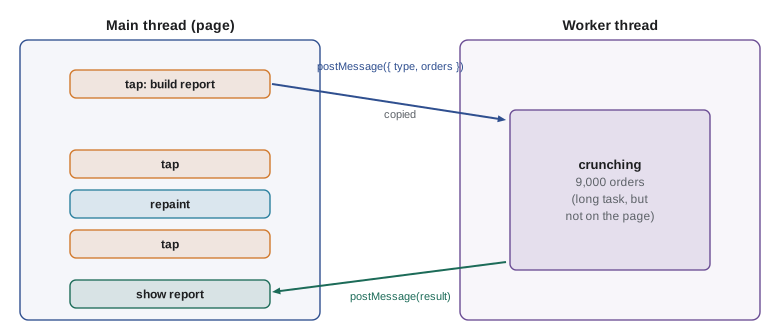
Everything in this course so far has run on the page's main thread, and Lessons 1 and 2 explained why long work there is harmful: while it runs, the page cannot respond or repaint. Splitting work into chunks helps, but the work still competes with the page for the same thread. A Web Worker is a separate JavaScript environment that runs on its own thread, in parallel with the page. It has its own global object, its own event loop and its own memory. Work done in a worker cannot block the page, however long it takes.
Workers are deliberately isolated. A worker cannot touch the page's DOM, its variables or its functions, and the page cannot touch the worker's. They communicate only by sending messages to each other, and every message is copied on the way. That isolation is the price of safety: because no two threads ever share an ordinary JavaScript object, the bugs that plague multi-threaded code in other languages, where two threads change the same data at the same instant, cannot happen.
What a worker can and cannot do
A worker's global object is called self, and it offers a large part of what pages have, but nothing that is tied to the visible page.
| Available in a worker | Not available in a worker |
|---|---|
| fetch, Request, Response, Headers | document and every DOM element |
| setTimeout, setInterval, queueMicrotask | window and alert |
| Promises, async and await, modules | localStorage and sessionStorage |
| IndexedDB and the Cache API | The page's variables, functions and objects |
| URL, URLSearchParams, TextEncoder, crypto | requestAnimationFrame (in most cases) |
| EventTarget, AbortController, structuredClone | Direct access to the page's event listeners |
In fact, the runner on this site is a worker. Every example you have run in this course and the ones before it ran in a Web Worker, which is why none of them could use document and why a runaway loop never froze this page. You can see it for yourself.
console.log('document:', typeof document);
console.log('window:', typeof window);
console.log('fetch:', typeof fetch);
console.log('setTimeout:', typeof setTimeout);
console.log('structuredClone:', typeof structuredClone);document: undefined window: undefined fetch: function setTimeout: function structuredClone: function
What this code does
The two page objects, document and window, are undefined here, while fetch, timers and structuredClone are all available. That combination is exactly what code inside a worker sees. The runner sends your code to a worker as a message and collects what it prints as messages coming back.
Creating a worker
A worker is created from a separate script file. new Worker(url, { type: 'module' }) starts it; with type module the worker file can use import and export like any module. The page sends data with worker.postMessage(data) and receives replies through the worker's message event. Inside the worker, the same names work the other way round: a message listener on self receives the page's messages, and self.postMessage sends replies.
// main.js, on the page
const worker = new Worker(new URL('./season-worker.js', import.meta.url), { type: 'module' });

worker.addEventListener('message', (event) => {
  showSeasonReport(event.data);           // the result, copied back from the worker
});
worker.addEventListener('error', (event) => {
  showProblem('The report could not be calculated: ' + event.message);
});

reportButton.addEventListener('click', async () => {
  const orders = await loadSeasonOrders();  // about 9,000 orders from the server
  worker.postMessage({ type: 'season', orders });
});
What this code does
The page starts the worker once, with a URL resolved relative to the module, and listens for its replies and for errors. When Paul's report is requested, the page loads the orders and posts them to the worker; the page then carries on and stays responsive. When the worker posts its result back, the message listener shows the report.
// season-worker.js, running in the worker
import { seasonStats } from './stats.js';

self.addEventListener('message', (event) => {
  const { type, orders } = event.data;
  if (type === 'season') {
    const result = seasonStats(orders);   // heavy work, but on the worker's own thread
    self.postMessage(result);
  }
});
What this code does
The worker imports an ordinary module of pure functions and waits for messages. When a season request arrives, it does the heavy calculation and posts the result back. Nothing here touches the page, and nothing the page does can interrupt the calculation.
Look again at seasonStats: it is an ordinary function in an ordinary module, the kind you wrote in JavaScript Programming II. It does not know it runs in a worker, and it can be tested on its own. Keeping the heavy logic in pure modules, with a thin layer of message handling around it, makes workers much easier to work with.
function makeOrders(n) {
  let seed = 2027;
  const rand = () => (seed = (seed * 16807) % 2147483647) / 2147483647;
  const dishes = [['SOUP', 550], ['EGG', 625], ['WRAP', 700], ['DRINK', 200], ['COOKIE', 150]];
  return Array.from({ length: n }, (_, i) => ({
    day: ['Mon', 'Tue', 'Wed', 'Thu', 'Fri'][i % 5],
    lines: Array.from({ length: 1 + Math.floor(rand() * 3) }, () => {
      const [code, price] = dishes[Math.floor(rand() * dishes.length)];
      return { code, qty: 1 + Math.floor(rand() * 2), price };
    }),
    tipCents: Math.floor(rand() * 4) * 50,
  }));
}

function seasonStats(orders) {
  const byDish = new Map();
  let sales = 0, tips = 0;
  for (const o of orders) {
    tips += o.tipCents;
    for (const l of o.lines) {
      sales += l.qty * l.price;
      byDish.set(l.code, (byDish.get(l.code) ?? 0) + l.qty);
    }
  }
  const best = [...byDish].sort((a, b) => b[1] - a[1])[0];
  return { orders: orders.length, sales, tips, best };
}

const s = seasonStats(makeOrders(9000));
console.log('Orders:', s.orders);
console.log('Sales:', (s.sales / 100).toFixed(2), ' Tips for the garden:', (s.tips / 100).toFixed(2));
console.log('Best seller:', s.best[0], 'with', s.best[1], 'sold');Orders: 9000 Sales: 120076.00 Tips for the garden: 6653.00 Best seller: SOUP with 5545 sold
What this code does
makeOrders builds 9,000 test orders from a simple seeded random number generator, so the figures are the same on every run. seasonStats is the pure function the worker would call: one pass over every order and line, adding up sales, tips and quantities per dish. Here it runs inside the runner's own worker, so even this page stays responsive while it works.
Messages are copied
Every message between the page and a worker is copied with the structured clone algorithm. It copies much more than JSON can: objects and arrays, Dates, Maps and Sets, typed arrays, Blobs and Files, and even objects that refer to themselves. It cannot copy functions, DOM nodes or class instances' methods; a class instance arrives as a plain object without its prototype. The same algorithm is available directly as structuredClone(value), which is also the modern way to make a deep copy of data on the page.
const report = {
  title: 'Season 2027',
  made: new Date('2027-06-01T15:00:00Z'),
  byDish: new Map([['SOUP', 4210], ['EGG', 2980]]),
  days: new Set(['Mon', 'Tue', 'Wed', 'Thu', 'Fri']),
};
report.self = report;   // a reference to itself

const copy = structuredClone(report);
console.log(copy !== report, copy.made instanceof Date, copy.byDish.get('SOUP'), copy.days.size);
console.log('Self reference kept:', copy.self === copy);

try {
  structuredClone({ format: (n) => n.toFixed(2) });
} catch (err) {
  console.log(err.name + ': functions cannot be cloned');
}true true 4210 5 Self reference kept: true DataCloneError: functions cannot be cloned
What this code does
structuredClone copies the Date, the Map and the Set as real objects of their own types, and even keeps the reference from the object to itself. JSON could do none of that. A function cannot be cloned at all, and the attempt throws a DOMException named DataCloneError, which is also what postMessage throws when you try to send one.
Copying takes time and memory in proportion to the data. For 9,000 orders it is quick, a few milliseconds, but for very large binary data such as images or audio, copying would be wasteful. Such data can instead be transferred: passing an ArrayBuffer in the transfer list moves its memory to the other side, which is almost instant, and the sender's copy becomes empty and unusable.
const buffer = new ArrayBuffer(1_000_000);   // 1 MB of binary data
new Uint8Array(buffer)[0] = 42;

const moved = structuredClone(buffer, { transfer: [buffer] });
console.log('Receiver has', moved.byteLength, 'bytes; first byte', new Uint8Array(moved)[0]);
console.log('Sender now has', buffer.byteLength, 'bytes');Receiver has 1000000 bytes; first byte 42 Sender now has 0 bytes
What this code does
Passing the buffer in the transfer list moves its memory instead of copying it, so the result has the full megabyte and the original is left with zero bytes. postMessage takes the same transfer list as its second argument, as in worker.postMessage(buffer, [buffer]). After a transfer, the sending side must not use the buffer again.
Request and reply
Plain postMessage is fire and forget: the page sends a message and, at some point, a message comes back. When the page can send several requests, it needs to know which reply belongs to which request. The usual pattern gives each request an id, has the worker include the id in its reply, and keeps a map from id to the resolve and reject functions of a promise, so that calling the worker looks like calling an async function.
// ---- stand-in for new Worker(): messages are copied and delivered as later tasks ----
function makeFakeWorker(onWorkerMessage) {
  const page = { onmessage: null };
  const workerSide = {
    postMessage: (data) => setTimeout(() => page.onmessage?.({ data: structuredClone(data) }), 5),
  };
  page.postMessage = (data) => {
    const copy = structuredClone(data);
    setTimeout(() => onWorkerMessage({ data: copy }, workerSide), 5);
  };
  return page;
}
// ---- end of stand-in ----

// The worker's side: answers 'season' and 'tips' requests
const worker = makeFakeWorker(({ data }, self) => {
  const { id, type, orders } = data;
  if (type === 'season') self.postMessage({ id, result: orders.length + ' orders' });
  else if (type === 'tips') self.postMessage({ id, result: orders.reduce((t, o) => t + o.tip, 0) });
  else self.postMessage({ id, error: 'Unknown request ' + type });
});

// The page's side: each call returns a promise settled by the matching reply
let nextId = 1;
const waiting = new Map();
worker.onmessage = ({ data }) => {
  const { resolve, reject } = waiting.get(data.id);
  waiting.delete(data.id);
  if (data.error) reject(new Error(data.error));
  else resolve(data.result);
};
function call(type, orders) {
  const { promise, resolve, reject } = Promise.withResolvers();
  const id = nextId++;
  waiting.set(id, { resolve, reject });
  worker.postMessage({ id, type, orders });
  return promise;
}

const orders = [{ tip: 150 }, { tip: 0 }, { tip: 100 }];
const [season, tips] = await Promise.all([call('season', orders), call('tips', orders)]);
console.log('season ->', season, '| tips ->', tips);
try {
  await call('forecast', orders);
} catch (err) {
  console.log('Refused:', err.message);
}season -> 3 orders | tips -> 250 Refused: Unknown request forecast
What this code does
makeFakeWorker stands in for new Worker: it copies every message with structuredClone and delivers it as a later task, as the browser does, though everything here runs on one thread. call gives each request an id, stores its promise's settling functions in a map and resolves or rejects them when the reply with that id arrives. Two requests can then be awaited together like any other promises.
Libraries such as Comlink, from the Chrome team, build exactly this layer for you and let page code call a worker's functions as if they were local async functions. Writing it once by hand, as here, shows that there is no magic: ids, a map and Promise.withResolvers.
Errors and stopping a worker
An uncaught exception inside a worker does not crash the page. It fires an error event on the Worker object in the page, with a message and the file and line, and the worker carries on handling later messages. In the request and reply pattern, the worker should catch errors itself and send them back as replies, as the example above does, so that the right promise is rejected. A message that cannot be copied fires a messageerror event instead.
A worker uses memory and a thread for as long as it lives. worker.terminate() stops it at once from the page, abandoning any work in progress, and the worker can stop itself with self.close(). Terminating is also the way to cancel a calculation that is no longer wanted, since a busy worker does not read new messages until its current task ends. For Paul's report, Mira keeps one worker for as long as the reports page is open and terminates it when the page is left.
| In the page | In the worker | Purpose |
|---|---|---|
| new Worker(url, { type: 'module' }) | The module runs | Start a worker |
| worker.postMessage(data, transfer) | message event on self | Send data to the worker |
| message event on worker | self.postMessage(data, transfer) | Send data back to the page |
| error event on worker | An uncaught exception | Report a failure |
| worker.terminate() | self.close() | Stop the worker |
Other kinds of worker
The workers in this lesson are dedicated workers, belonging to the one page that created them. Two other kinds exist. A shared worker can be used by several tabs of the same site at once, for example to keep one connection to a server for all open tabs, though it is used much less often than the other kinds. A service worker is quite different in purpose: it sits between the site's pages and the network, can answer requests from a cache when the device is offline, and is the basis of installable web apps. Service workers are the subject of Web Performance and Progressive Web Apps.
| Kind | Belongs to | Typical use |
|---|---|---|
| Dedicated worker | One page | Heavy calculation, parsing large files, image processing |
| Shared worker | All tabs of one origin | One shared connection or cache for several tabs |
| Service worker | The whole site, even with no page open | Offline support, caching, push notifications |
When to use a worker
A worker adds files, messages and copying, so it is worth it only for work that is genuinely heavy. Waiting for the network is not heavy: a fetch takes no main-thread time while it waits, and moving it to a worker gains nothing. The signal is CPU time: if a piece of work takes more than about 50 milliseconds on the slowest device you support, the size of a long task, consider moving it. Measure on that device; Mira's calculation took a third of a second on her laptop and over a second on the tablet.
| Work | Worker? | Why |
|---|---|---|
| Fetching the menu | No | Waiting for the network does not block the page |
| Adding up today's 60 orders | No | Takes well under a millisecond |
| Season statistics over 9,000 orders | Yes | Over a second on the tablet |
| Parsing a 20 MB spreadsheet export | Yes | Seconds of CPU work |
| Resizing photos before upload | Yes | Heavy pixel work, with transferable buffers |
| Updating the DOM | Not possible | Only the main thread can touch the DOM |
Try it yourself
The worker's message handler
Complete handle(message), the logic a worker would run for each message. For { type: 'sum', values } return { result: <sum> }; for { type: 'max', values } return { result: <largest> }; for anything else return { error: 'Unknown request <type>' }.
The loop should print { result: 22 }, { result: 9 } and { error: "Unknown request mean" }.
function handle(message) {
  return { result: 0 };
}

const messages = [
  { type: 'sum', values: [5, 8, 9] },
  { type: 'max', values: [5, 8, 9] },
  { type: 'mean', values: [5, 8, 9] },
];
for (const m of messages) console.log(handle(m));
Try it yourself
Match replies to requests
The stand-in worker replies with { id, result }, sometimes out of order. Complete ask(question) so that it sends { id, question } with a new id and returns a promise that is resolved with result when the reply with the same id arrives.
Store each promise's resolve in the waiting map by id, and use it in worker.onmessage.
// ---- stand-in for new Worker(): messages are copied and delivered as later tasks ----
function makeFakeWorker(onWorkerMessage) {
  const page = { onmessage: null };
  const workerSide = {
    postMessage: (data) => setTimeout(() => page.onmessage?.({ data: structuredClone(data) }), 5),
  };
  page.postMessage = (data) => {
    const copy = structuredClone(data);
    setTimeout(() => onWorkerMessage({ data: copy }, workerSide), 5);
  };
  return page;
}
// ---- end of stand-in ----

const worker = makeFakeWorker(({ data }, self) => {
  const ms = data.question === 'slow' ? 40 : 0;
  setTimeout(() => self.postMessage({ id: data.id, result: 'answer to ' + data.question }), ms);
});

let nextId = 1;
const waiting = new Map();
worker.onmessage = ({ data }) => {
  // find the resolve function for data.id, remove it and call it
};
function ask(question) {
  worker.postMessage({ id: nextId++, question });
  return Promise.resolve('not matched yet');
}

const answers = await Promise.all([ask('slow'), ask('fast')]);
console.log(answers.join(' | '));
Common mistakes
MistakeMoving a fetch into a worker makes the page faster.
InsteadWaiting for the network does not block the main thread; workers help only with heavy CPU work.
MistakeA worker can update the page's DOM when it finishes.
InsteadWorkers have no DOM access; they post a message and the page updates the DOM.
MistakeObjects sent with postMessage are shared between the page and the worker.
InsteadThey are copied with structured cloning; changes on one side do not affect the other.
MistakeFunctions and class methods can be sent to a worker.
InsteadFunctions cannot be cloned; class instances arrive as plain objects without their methods.
MistakeAn error in a worker crashes the whole page.
InsteadIt fires an error event on the Worker object; the page carries on.
Summary and key terms
- A Web Worker runs JavaScript on its own thread, in parallel with the page, so heavy work there cannot block the page.
- Workers have fetch, timers, promises, IndexedDB and more, but no DOM, window or localStorage.
- The page creates one with new Worker(url, { type: 'module' }) and the two sides exchange data with postMessage and message events.
- Messages are copied with the structured clone algorithm, which handles Dates, Maps, Sets and cycles but not functions or DOM nodes, and structuredClone makes the same deep copies on the page.
- ArrayBuffers can be transferred instead of copied.
- Request ids, a map and Promise.withResolvers turn messages into promise-returning calls.
- Uncaught worker errors fire an error event; terminate stops a worker.
- Shared workers serve several tabs and service workers sit between pages and the network.
- Use a worker only for CPU work that takes more than about 50 ms on the slowest device.
- Web Worker
- A JavaScript environment running on its own thread, in parallel with the page.
- dedicated worker
- A worker that belongs to the single page that created it.
- postMessage
- The method that sends a copied message between a page and a worker.
- message event
- The event that delivers a message, with the data in event.data.
- structured clone
- The algorithm that copies data for messages, including Dates, Maps, Sets and cycles.
- structuredClone
- A function that makes a deep copy of a value using the structured clone algorithm.
- DataCloneError
- The DOMException thrown when a value, such as a function, cannot be cloned.
- transferable
- An object, such as an ArrayBuffer, whose memory can be moved rather than copied.
- terminate
- The method that stops a worker immediately from the page.
- shared worker
- A worker used by several pages of the same origin at once.
- service worker
- A worker that sits between a site's pages and the network, used for offline support.
Practice problems
Work each problem on paper first, then reveal the answer to check.
Why does heavy work in a worker not freeze the page?
Show answer
It runs on a separate thread, so the main thread stays free for taps and painting.
Can a worker read localStorage?
Show answer
No; it can use IndexedDB instead.
What happens to an ArrayBuffer after it is transferred?
Show answer
The receiver gets its memory and the sender's buffer becomes empty.
How does a page tell which reply belongs to which request?
Show answer
Each request carries an id, and the worker includes the same id in its reply.
When is a worker worth adding?
Show answer
When CPU work takes more than about 50 milliseconds on the slowest device you support.
Lesson quiz · 5 questions
Score 60% or more to complete this lesson.
Create a free account to save your progress, take quizzes and earn a certificate.