
JS-120 · Lesson 6 of 12 · 27 min
Fetching data with fetch
▶ Video coming soon A video version of this lesson is on the way.
With promises and await in hand, the session planned for Tuesday, March 16, 2027, finally reaches the network. Theo's server will not be live until the April pilot, but his API contract says exactly what it will accept and return, so Mira can write the code now. The first job is the counter page's menu: instead of being written into menu.js, it should come from the server, so that Rosa can change a price or mark the soup as sold out without asking a developer.
"The browser has one function for this," Gareth says, "and you will use it in every web project you ever work on. It is called fetch. It sends an HTTP request and gives you a promise for the response."
HTTP in one page
Every exchange between a browser and a server follows the Hypertext Transfer Protocol, HTTP. The browser sends a request and the server sends back a response. A request has a method, such as GET to read something or POST to send something new; a URL saying what it is about; headers, which are name and value pairs carrying extra information; and sometimes a body. A response has a status code, a three-digit number saying how it went, its own headers, and usually a body. You met these ideas in Web Development I when pages were loaded; fetch lets your code make the same requests itself.
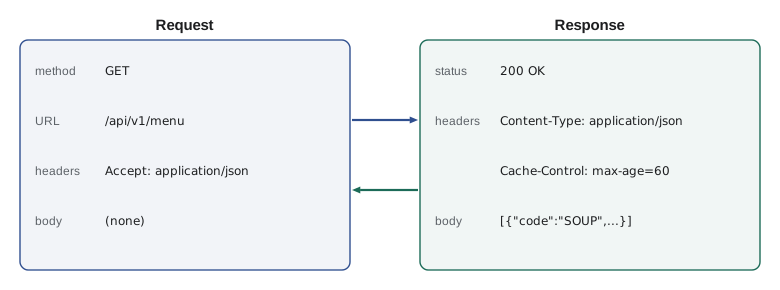
| Part | In a request | In a response |
|---|---|---|
| First line | Method and URL, such as GET /api/v1/menu | Status code and text, such as 200 OK |
| Headers | Accept, Content-Type, Authorization | Content-Type, Cache-Control, Date |
| Body | Data being sent, for POST, PUT and PATCH | The data asked for, or an error description |
Calling fetch
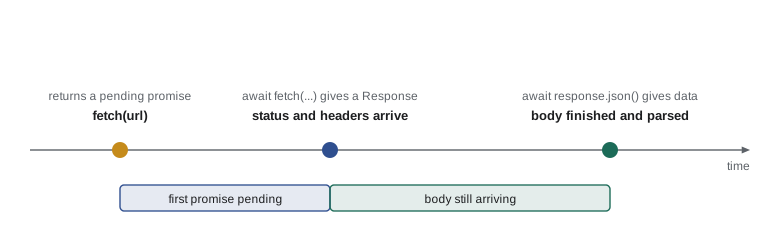
fetch(url, options) starts a request and returns a promise at once. The promise is fulfilled with a Response object as soon as the server's status and headers have arrived, which may be before the whole body has. Reading the body is a second asynchronous step: the response's json() method returns another promise, fulfilled with the body parsed as JSON. So a fetch usually involves two awaits.
async function loadMenu() {
  const response = await fetch('/api/v1/menu');
  console.log(response.status, response.ok);   // 200 true
  const menu = await response.json();
  return menu;                                  // an array of menu items
}
What this code does
The first await waits for the response to start arriving and gives a Response object with its status. The second await reads the rest of the body and parses it as JSON. A relative URL such as /api/v1/menu is resolved against the page's own address, so the request goes to the same server that sent the page.
A stand-in for the network
The runner on this site has no network, and Theo's server does not exist yet, so the runnable examples use a small stand-in called fakeFetch. It takes the same arguments as fetch, looks the request up in a table called routes, and after a short delay resolves with an object that has the parts of a real Response used in this course: status, ok, headers, json() and text(). It is a mock: a stand-in that behaves like the real thing for testing. Writing against a mock is also exactly how Mira will work until April, so this is not only a trick for the runner.
const routes = {
  'GET /api/v1/menu': () => [200, [
    { code: 'SOUP', name: 'Soup of the day', price: 550 },
    { code: 'EGG', name: 'Egg sandwich', price: 625 },
    { code: 'DRINK', name: 'Tea or coffee', price: 200 },
  ]],
};

// ---- stand-in for the network (Lesson 6): answers from routes after a delay ----
function fakeFetch(url, { method = 'GET', body, signal } = {}) {
  return new Promise((resolve, reject) => {
    if (signal?.aborted) return reject(signal.reason);
    const u = new URL(url, 'https://riverside-food-hub.example');
    const route = routes[method + ' ' + u.pathname];
    const [status, data, ms = 80] = route ? route(body && JSON.parse(body), u.searchParams) : [404, { error: 'Not found' }];
    const timer = setTimeout(() => resolve(fakeResponse(status, data)), ms);
    signal?.addEventListener('abort', () => { clearTimeout(timer); reject(signal.reason); });
  });
}
function fakeResponse(status, data) {
  const text = JSON.stringify(data);
  return { status, ok: status >= 200 && status < 300, headers: new Headers({ 'Content-Type': 'application/json' }),
           json: async () => JSON.parse(text), text: async () => text };
}
// ---- end of stand-in ----

const response = await fakeFetch('/api/v1/menu');
console.log('Status', response.status, 'ok', response.ok);
console.log('Content type:', response.headers.get('content-type'));
const menu = await response.json();
for (const item of menu) {
  console.log(item.code.padEnd(6), item.name.padEnd(16), (item.price / 100).toFixed(2));
}Status 200 ok true Content type: application/json SOUP Soup of the day 5.50 EGG Egg sandwich 6.25 DRINK Tea or coffee 2.00
What this code does
The routes table says what the pretend server answers for GET /api/v1/menu, and fakeFetch, between the two comment lines, plays the network. The code after it is exactly what you would write with the real fetch: await the response, check its status and headers, await the parsed body and use it. Header names are not case-sensitive, so content-type finds Content-Type.
In a real page you would delete the stand-in and write fetch where the example writes fakeFetch. Everything else stays the same, which is why the rest of the course keeps the stand-in short and puts it between two comment lines.
Status codes and response.ok
The most important fact about fetch, and the one that catches nearly everyone once, is when its promise is rejected. It is rejected only when no response arrives at all: the network is down, the server cannot be reached, the request was blocked, or it was cancelled. If the server answers, even with 404 Not Found or 500 Internal Server Error, fetch is fulfilled with a Response. It is your code's job to look at the status.
| Range | Meaning | Common codes |
|---|---|---|
| 200 to 299 | Success | 200 OK, 201 Created, 204 No Content |
| 300 to 399 | Redirection; fetch follows these by itself | 301 Moved Permanently, 304 Not Modified |
| 400 to 499 | The request was wrong or not allowed | 400 Bad Request, 401 Unauthorized, 403 Forbidden, 404 Not Found, 409 Conflict, 422 Unprocessable Content, 429 Too Many Requests |
| 500 to 599 | The server failed | 500 Internal Server Error, 502 Bad Gateway, 503 Service Unavailable, 504 Gateway Timeout |
response.ok is true when the status is from 200 to 299 and false otherwise, so checking it is the usual first step after every fetch. response.status gives the number itself, for code that treats different failures differently, such as showing "Shift is full" for 409 and "Please sign in" for 401.
const routes = {
  'GET /api/v1/menu': () => [503, { error: 'The kitchen system is restarting' }],
};

// ---- stand-in for the network (Lesson 6): answers from routes after a delay ----
function fakeFetch(url, { method = 'GET', body, signal } = {}) {
  return new Promise((resolve, reject) => {
    if (signal?.aborted) return reject(signal.reason);
    const u = new URL(url, 'https://riverside-food-hub.example');
    const route = routes[method + ' ' + u.pathname];
    const [status, data, ms = 80] = route ? route(body && JSON.parse(body), u.searchParams) : [404, { error: 'Not found' }];
    const timer = setTimeout(() => resolve(fakeResponse(status, data)), ms);
    signal?.addEventListener('abort', () => { clearTimeout(timer); reject(signal.reason); });
  });
}
function fakeResponse(status, data) {
  const text = JSON.stringify(data);
  return { status, ok: status >= 200 && status < 300, headers: new Headers({ 'Content-Type': 'application/json' }),
           json: async () => JSON.parse(text), text: async () => text };
}
// ---- end of stand-in ----

async function loadMenu() {
  const response = await fakeFetch('/api/v1/menu');
  if (!response.ok) {
    const body = await response.json();
    throw new Error('Menu not loaded (' + response.status + '): ' + body.error);
  }
  return response.json();
}

try {
  const menu = await loadMenu();
  console.log('Loaded', menu.length, 'items');
} catch (err) {
  console.log(err.message);
}Menu not loaded (503): The kitchen system is restarting
What this code does
This time the pretend server answers 503 Service Unavailable. The fakeFetch promise is still fulfilled, because a response arrived, so loadMenu checks response.ok itself and throws an error that includes the status and the server's explanation. The caller's catch then handles it like any other failure.
Reading the body
A Response offers several methods for reading its body, each returning a promise. Choose the one that matches what the server sent, which the Content-Type header tells you. A body is a stream that can be read only once: after calling json(), calling text() on the same response is rejected with a TypeError because the body has been used. If you need the body twice, read it once as text and parse the text yourself, or call response.clone() first.
| Method | Gives you | Use for |
|---|---|---|
| json() | The body parsed as JSON | API responses with Content-Type application/json |
| text() | The body as a string | Plain text, HTML, or JSON you want to inspect first |
| blob() | A Blob of raw bytes with a type | Images and files to display or download |
| arrayBuffer() | Raw bytes | Binary formats processed in code |
| formData() | A FormData object | Bodies in form format |
| body | A ReadableStream, an async iterable in modern browsers | Reading a large body piece by piece |
json() is rejected with a SyntaxError if the body is not valid JSON, which happens surprisingly often with errors: a misconfigured server or a proxy in between may answer a failed request with an HTML error page. Robust code checks response.ok before parsing, and treats a parse failure as one more kind of error. Lesson 8 collects these cases into one helper.
Sending data
To send data, pass an options object as the second argument. method sets the HTTP method. body holds the data, and for JSON it must be a string, so it is built with JSON.stringify. headers must then include Content-Type: application/json so that the server knows how to read the body. Theo's contract says that POST /api/v1/orders accepts an order and answers 201 Created with the order's number.
let nextNumber = 41;
const routes = {
  'POST /api/v1/orders': (order) => {
    if (!order.lines?.length) return [422, { error: 'An order needs at least one line' }];
    const total = order.lines.reduce((sum, l) => sum + l.qty * l.price, 0);
    return [201, { number: nextNumber++, total }];
  },
};

// ---- stand-in for the network (Lesson 6): answers from routes after a delay ----
function fakeFetch(url, { method = 'GET', body, signal } = {}) {
  return new Promise((resolve, reject) => {
    if (signal?.aborted) return reject(signal.reason);
    const u = new URL(url, 'https://riverside-food-hub.example');
    const route = routes[method + ' ' + u.pathname];
    const [status, data, ms = 80] = route ? route(body && JSON.parse(body), u.searchParams) : [404, { error: 'Not found' }];
    const timer = setTimeout(() => resolve(fakeResponse(status, data)), ms);
    signal?.addEventListener('abort', () => { clearTimeout(timer); reject(signal.reason); });
  });
}
function fakeResponse(status, data) {
  const text = JSON.stringify(data);
  return { status, ok: status >= 200 && status < 300, headers: new Headers({ 'Content-Type': 'application/json' }),
           json: async () => JSON.parse(text), text: async () => text };
}
// ---- end of stand-in ----

async function placeOrder(lines) {
  const response = await fakeFetch('/api/v1/orders', {
    method: 'POST',
    headers: { 'Content-Type': 'application/json' },
    body: JSON.stringify({ lines, tip: 15 }),
  });
  const data = await response.json();
  if (!response.ok) throw new Error(data.error + ' (' + response.status + ')');
  return data;
}

const receipt = await placeOrder([{ code: 'SOUP', qty: 2, price: 550 }]);
console.log('Order', receipt.number, 'total', (receipt.total / 100).toFixed(2));
try {
  await placeOrder([]);
} catch (err) {
  console.log('Refused:', err.message);
}Order 41 total 11.00 Refused: An order needs at least one line (422)
What this code does
placeOrder sends a POST with a JSON body built by JSON.stringify and a Content-Type header that says so. The pretend server answers 201 with a number and total for a real order, and 422 with an explanation for an empty one. Reading the JSON before checking ok means the error message from the server can be shown to the trainee.
| Option | What it does | Example |
|---|---|---|
| method | The HTTP method; GET if left out | 'POST' |
| headers | Request headers, as an object or a Headers object | { 'Content-Type': 'application/json' } |
| body | The data to send: a string, FormData, Blob or URLSearchParams | JSON.stringify(order) |
| signal | An AbortSignal for cancelling the request (Lesson 8) | AbortSignal.timeout(8000) |
| credentials | Whether to send cookies: omit, same-origin (default) or include | 'include' |
| cache | How to use the browser's HTTP cache | 'no-store' |
| keepalive | Let the request finish even if the page is closing | true |
A form can be sent as it is by passing a FormData object as the body, as in The DOM and Browser Events; fetch then sets the right Content-Type itself. Do not set Content-Type by hand in that case, because the browser must add a boundary marker to it.
Building URLs safely
Requests for data usually carry parameters in the URL's query string, the part after the question mark, such as ?date=2027-04-19&area=kitchen. Building that string by gluing text together is error-prone: a space, an ampersand or an accented letter in a value breaks it. The URL and URLSearchParams classes build and read URLs correctly, encoding each value as needed. Both are available in browsers, workers and Node.js, so they run here for real.
const base = 'https://riverside-food-hub.example';

const url = new URL('/api/v1/shifts', base);
url.searchParams.set('date', '2027-04-19');
url.searchParams.set('area', 'Lunch counter');
url.searchParams.append('status', 'open');
url.searchParams.append('status', 'full');
console.log(url.href);

const back = new URL(url.href);
console.log('area is', back.searchParams.get('area'));
console.log('statuses are', back.searchParams.getAll('status'));https://riverside-food-hub.example/api/v1/shifts?date=2027-04-19&area=Lunch+counter&status=open&status=full area is Lunch counter statuses are [ "open", "full" ]
What this code does
new URL resolves a path against a base address, and searchParams adds query parameters, encoding the space in Lunch counter as a plus sign. append adds a second value for the same name, which many APIs use for lists. Parsing the finished URL gives the original values back, decoded.
Loading states on the page
A fetch takes time, so a page that uses one has at least three states to show: loading, loaded and failed. Users should never be left wondering whether anything is happening. The usual pattern is to show a short message or spinner before the request, replace it with the data when it arrives, and replace it with an explanation and a way to try again if it fails. A status region with aria-live, from The DOM and Browser Events, announces the change to screen reader users.
const list = document.querySelector('#menu');
const status = document.querySelector('#menu-status');   // has aria-live="polite"

async function showMenu() {
  status.textContent = 'Loading the menu...';
  try {
    const response = await fetch('/api/v1/menu');
    if (!response.ok) throw new Error('status ' + response.status);
    const menu = await response.json();
    list.replaceChildren(...menu.map(menuItemElement));
    status.textContent = '';
  } catch (err) {
    status.textContent = 'The menu could not be loaded. Showing the last saved menu.';
    list.replaceChildren(...savedMenu().map(menuItemElement));
  }
}
showMenu();
What this code does
The status line says the menu is loading before the request starts, so the trainee knows something is happening. On success the list is rebuilt from the server's data; on any failure the page falls back to the copy of the menu saved on the tablet, so the counter can keep serving. menuItemElement and savedMenu are helper functions from the counter page's modules.
That fallback is a decision Rosa made, not a technical one. "If the server is down at noon, we still sell soup," she told Mira. The counter keeps the last menu it loaded in localStorage and uses it when the server cannot be reached, which is also why the page keeps working during the pilot if Theo's server has a bad day.
Where requests may go
A page can always fetch from its own origin, the combination of scheme, host and port it was loaded from, such as https://riverside-food-hub.example. Requests to other origins are allowed by the browser only if that other server says so, a rule called CORS that Lesson 10 explains. Theo has planned for this by serving the API from the same origin as the site, under /api/v1, so the Food Hub's own pages never run into it.
Try it yourself
A shift search URL
Complete shiftUrl(date, areas) so that it returns the full URL for /api/v1/shifts on https://riverside-food-hub.example, with a date parameter and one area parameter for each area in the array, using URL and searchParams.
The call at the bottom should print https://riverside-food-hub.example/api/v1/shifts?date=2027-04-19&area=Kitchen&area=Youth+garden.
function shiftUrl(date, areas) {
  return '/api/v1/shifts?date=' + date + '&area=' + areas.join(',');
}

console.log(shiftUrl('2027-04-19', ['Kitchen', 'Youth garden']));
Common mistakes
Mistakefetch rejects when the server answers 404 or 500.
Insteadfetch rejects only when no response arrives. Check response.ok or response.status yourself.
Mistakeawait fetch(url) gives you the data.
InsteadIt gives a Response. Reading the body is a second await, such as await response.json().
MistakeYou can pass an object straight as the body.
InsteadA JSON body must be a string: JSON.stringify(data), with a Content-Type: application/json header.
MistakeA response body can be read as many times as you like.
InsteadIt can be read once. Read it as text and parse it, or clone the response first.
MistakeQuery strings can be glued together with plus signs.
InsteadValues must be encoded; build URLs with URL and URLSearchParams.
Summary and key terms
- HTTP requests have a method, URL, headers and sometimes a body; responses have a status code, headers and usually a body. fetch(url, options) starts a request and returns a promise for a Response, fulfilled when the headers arrive.
- Reading the body is a second step: json(), text(), blob() and others return promises and the body can be read only once. fetch rejects only when no response arrives; for 404, 500 and other errors it is fulfilled, so check response.ok, which is true for statuses 200 to 299.
- To send JSON, set method, a Content-Type: application/json header and a body made with JSON.stringify.
- URL and URLSearchParams build query strings with correct encoding.
- Pages should show loading, loaded and failed states, and may fall back to saved data.
- Requests to the page's own origin are always allowed; other origins need CORS.
- A mock such as fakeFetch lets code be written and tested before the server exists.
- HTTP
- The protocol browsers and servers use to exchange requests and responses.
- request
- A message from a client to a server: method, URL, headers and an optional body.
- response
- A server's answer: status code, headers and usually a body.
- method
- The kind of request, such as GET to read or POST to create.
- header
- A name and value pair carrying extra information in a request or response.
- status code
- A three-digit number in a response saying how the request went.
- fetch
- The browser function that sends an HTTP request and returns a promise for the response.
- Response
- The object fetch gives you, with status, ok, headers and body methods.
- response.ok
- True when the status code is from 200 to 299.
- query string
- The part of a URL after the question mark, carrying name and value parameters.
- URLSearchParams
- A class for building and reading query strings with correct encoding.
- mock
- A stand-in that behaves like a real component, used for development and testing.
- origin
- The scheme, host and port a page was loaded from.
Practice problems
Work each problem on paper first, then reveal the answer to check.
When is the promise returned by fetch rejected?
Show answer
Only when no response arrives: a network failure, a blocked request or a cancellation.
What does response.ok mean?
Show answer
The status code is from 200 to 299.
Why does a fetch usually need two awaits?
Show answer
One for the Response when the headers arrive, one for reading and parsing the body.
Which header should accompany a JSON body?
Show answer
Content-Type: application/json.
How do you add two values for the same query parameter?
Show answer
Call searchParams.append twice with the same name.
Lesson quiz · 5 questions
Score 60% or more to complete this lesson.
Create a free account to save your progress, take quizzes and earn a certificate.