
JS-120 · Lesson 2 of 12 · 25 min
The event loop
▶ Video coming soon A video version of this lesson is on the way.
At the end of the first session, Mira asked a question Gareth had been hoping for. "If there is only one thread, who decides what runs next? The timer was due during the busy loop, but it waited. Something must be keeping a list." There is such a list, in fact more than one, and the machinery that works through them is called the event loop. The session planned for Tuesday, March 2, 2027, is about how it works.
"You can write asynchronous code for years without drawing the event loop," Gareth says. "But the first time two things happen in an order you did not expect, the diagram is the only thing that explains it. And on the counter page, things will happen in surprising orders: a tap, a reply from Theo's server and a timer can all be ready at once."
The call stack
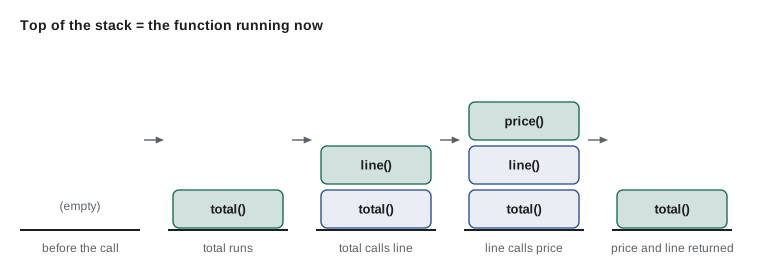
Start with the part you already know. When the engine runs a function, it keeps a record of where it is: which function is running, its local variables and the place to return to. These records are kept on the call stack. Calling a function pushes a new record, or frame, on top of the stack; returning from it pops the frame off and carries on in the frame below. The function at the top of the stack is the one running now.
let depth = 0;
function enter(name) { console.log('  '.repeat(depth) + 'enter ' + name); depth++; }
function leave(name) { depth--; console.log('  '.repeat(depth) + 'leave ' + name); }

function price(code) { enter('price'); const p = code === 'SOUP' ? 550 : 200; leave('price'); return p; }
function line(code, qty) { enter('line'); const t = price(code) * qty; leave('line'); return t; }
function total(items) {
  enter('total');
  let sum = 0;
  for (const [code, qty] of items) sum += line(code, qty);
  leave('total');
  return sum;
}

console.log('Total:', total([['SOUP', 2], ['DRINK', 1]]));enter total
enter line
enter price
leave price
leave line
enter line
enter price
leave price
leave line
leave total
Total: 1300What this code does
Each function logs when it starts and finishes, indented by how many frames are on the stack below it. total calls line, which calls price, so three frames are stacked at the deepest point, and each one is removed when its function returns. The output is a picture of the call stack growing and shrinking.
The stack explains why synchronous code cannot be interrupted. While any frame is on the stack, the engine is busy with it. Only when the stack is empty, when the outermost function has returned and the script has finished, is the engine free to start something else. Every asynchronous callback waits for that moment.
A stack has a limit. A function that calls itself without stopping keeps pushing frames until the engine refuses with a RangeError, "Maximum call stack size exceeded". You met recursion in JavaScript Programming II; that error is the stack running out of room.
Queues of waiting work
When an asynchronous operation finishes, its callback is not run straight away, because the engine may be in the middle of something. Instead the browser places a task in a task queue: an item that says "call this function with this data". Timers that come due, network responses that arrive, taps and key presses, and messages from workers all become tasks. The browser has several task queues for different sources and may choose between them, but each queue is handled first in, first out.
There is a second, separate queue with a higher priority: the microtask queue. Microtasks come mainly from promises, which Lesson 4 introduces: when a promise settles, the functions waiting for it are queued as microtasks. You can also queue one directly with queueMicrotask(fn). The rule that matters is that the microtask queue is emptied completely every time the call stack becomes empty, before the next task starts and before the browser paints.
One turn of the loop
The event loop repeats the same steps for as long as the page is open. Simplified, one turn of the loop does this:
- Take the oldest task from a task queue and run it until the call stack is empty. The first task is the script itself.
- Run every microtask in the microtask queue, including any microtasks queued while doing so, until the queue is empty.
- If it is time for a new frame, typically every 16.7 milliseconds, update the rendering: run requestAnimationFrame callbacks, work out styles and layout, and paint.
- Go back to the first step. If there are no tasks, wait until one arrives.
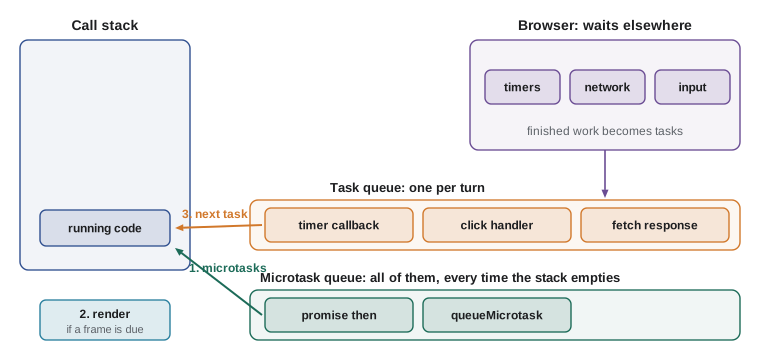
Three consequences follow, and between them they explain almost every surprising ordering. Synchronous code always finishes first. Microtasks always run before the next task, so promise callbacks run before timer callbacks that were already due. And rendering only happens between tasks, so the screen cannot update in the middle of your code, however long it runs.
console.log('1 script starts');

setTimeout(() => console.log('5 timer task'), 0);

queueMicrotask(() => console.log('3 microtask'));
Promise.resolve().then(() => console.log('4 promise callback'));

console.log('2 script ends');1 script starts 2 script ends 3 microtask 4 promise callback 5 timer task
What this code does
The two log lines in the script run first, because the script itself is the current task. When it ends and the stack is empty, both microtasks run, in the order they were queued, including the promise callback. Only after that does the loop take the next task, the timer, even though its delay was zero.
| Source | Queue | Runs |
|---|---|---|
| Your script, top to bottom | It is the current task | First |
| queueMicrotask, promise then, catch, finally, await | Microtask queue | As soon as the stack is empty, all of them |
| setTimeout, setInterval | Task queue (timers) | One per turn of the loop, when due |
| Network responses, user input, worker messages | Task queues (each source) | One per turn of the loop |
| requestAnimationFrame | Rendering step | Just before the browser paints |
Worked problem
Predicting a mixed order
A script logs A, sets setTimeout to log B after 0 ms, queues a promise callback that logs C and also sets a new 0 ms timer that logs D, and finally logs E. What is printed?
Show solution
- The script is the current task: A and E print first.
- The stack is now empty, so the microtask runs: C prints, and it schedules the D timer.
- The next task is the B timer, which was queued first.
- The D timer was queued later, by the microtask, so it runs on the following turn.
Answer: A, E, C, B, D.
Microtasks that queue microtasks
Because the microtask queue is drained completely, a microtask that queues another microtask extends the queue, and the new one also runs before any task. This is usually what you want: a chain of promise steps finishes as a unit. It also means that an endless chain of microtasks would starve the page completely, since the loop never gets back to tasks or rendering. A timer callback that schedules another timer does not have that problem, because each timer is a separate task and the browser can paint between them.
setTimeout(() => console.log('timer task'), 0);

let n = 0;
function again() {
  n += 1;
  console.log('microtask', n);
  if (n < 3) queueMicrotask(again);
}
queueMicrotask(again);
console.log('script done');script done microtask 1 microtask 2 microtask 3 timer task
What this code does
The timer is set first, yet all three microtasks run before it. Each microtask queues the next one, and the loop keeps draining the microtask queue until it is empty. Only then is the timer task taken from its queue.
Timers are minimum delays
The delay you pass to setTimeout is the earliest the callback can run, never a promise that it will run at that moment. When the time comes, the timer only adds a task to the queue; the task then waits for the current code and any earlier tasks to finish. You saw this in Lesson 1, where a busy loop held a 10 millisecond timer for 300 milliseconds. Browsers also clamp very short delays: once timers have been nested five levels deep, the minimum becomes 4 milliseconds, and timers in background tabs may be slowed to once a second or less to save power.
setInterval repeats a callback, but it has the same limits. If the callback itself takes longer than the interval, runs pile up or are skipped; and the interval drifts because each run starts whenever the loop gets round to it. For a refresh that should happen every 60 seconds, many developers prefer a chain of setTimeout calls, each scheduled when the previous run has finished, so that runs can never overlap. Lucy's dashboard in Lesson 12 uses that pattern.
// setInterval: runs every 60 s even if the last refresh has not finished
setInterval(refreshDashboard, 60_000);

// A setTimeout chain: the next refresh is planned only when this one is done
async function refreshLoop() {
  await refreshDashboard();
  setTimeout(refreshLoop, 60_000);
}
refreshLoop();
What this code does
The first version starts a refresh every minute regardless of whether the previous one is still waiting for the server. The second waits for each refresh to finish and only then plans the next one a minute later. The await keyword is explained in Lesson 5; here it simply means wait for the refresh to finish.
Rendering happens between tasks
A frequent surprise on real pages: code sets a status message such as "Sending...", does some slow work, then sets the message to "Sent", and the user never sees "Sending..." at all. The reason is the loop. The DOM changed twice, but the browser only paints between tasks, after the code has finished, and by then the text already says "Sent". To let the screen update, the slow part must be moved into a later task, or better, made asynchronous so that the main thread is free in the meantime.
status.textContent = 'Sending...';
heavyWork();                       // 2 seconds of blocking work
status.textContent = 'Sent';       // the user only ever sees this

// Giving the browser a chance to paint first
status.textContent = 'Sending...';
setTimeout(() => {
  heavyWork();
  status.textContent = 'Sent';
}, 0);
What this code does
In the first version both changes happen inside one task, so the screen is painted only once, showing the final text. In the second, the first change is painted when the current task ends, and the heavy work runs in a later task. The page is still frozen during the heavy work, which is why heavy work belongs in a worker (Lesson 11) or is split into pieces.
Breaking up long work
Sometimes the main thread really does have to do a lot of work, such as adding up a long list of orders. The standard technique is to split the work into chunks, do one chunk, then yield to the event loop by scheduling the next chunk as a new task. Between chunks, the browser can handle taps and paint. The whole job takes slightly longer, but no single task is long.
const orders = Array.from({ length: 10 }, (_, i) => ({ number: i + 1, cents: 500 + i * 25 }));
let total = 0;

function processChunk(start) {
  const end = Math.min(start + 4, orders.length);
  for (let i = start; i < end; i++) total += orders[i].cents;
  console.log('orders', start + 1, 'to', end, 'done; running total', total);
  if (end < orders.length) setTimeout(() => processChunk(end), 0);
  else console.log('All done:', (total / 100).toFixed(2));
}

setTimeout(() => console.log('a tap handled between chunks'), 0);
processChunk(0);orders 1 to 4 done; running total 2150 a tap handled between chunks orders 5 to 8 done; running total 4700 orders 9 to 10 done; running total 6125 All done: 61.25
What this code does
processChunk handles four orders, then schedules itself as a new task for the next four instead of looping straight on. The pretend tap was queued before the second chunk was scheduled, so it runs between the first and second chunks. That gap between tasks is where a real page would respond to the user and repaint.
Newer browsers offer a purpose-made way to yield: scheduler.yield(), part of the Scheduler API. It has been in Chrome and Edge since version 129 and in Firefox since version 142, but Safari does not support it as of November 2026, so code that uses it checks for it first and falls back to a zero-delay timer. It returns a promise, so it is used with await, which Lesson 5 covers.
function yieldToMain() {
  if (globalThis.scheduler?.yield) return scheduler.yield();
  return new Promise((resolve) => setTimeout(resolve, 0));
}

async function addUpOrders(orders) {
  let total = 0;
  for (let i = 0; i < orders.length; i++) {
    total += orders[i].cents;
    if (i % 500 === 499) await yieldToMain();   // let the page breathe
  }
  return total;
}
What this code does
yieldToMain uses scheduler.yield when the browser has it and a zero-delay timer when it does not. The loop pauses every 500 orders to let the event loop handle input and painting. A continuation after scheduler.yield is given priority over other waiting tasks, so the job is not pushed to the back of the queue.
The same loop in Node.js
Node.js, which you will use for servers in later courses, has an event loop too, built on a library called libuv. Its tasks come from timers, files, network sockets and the setImmediate function rather than from clicks, and it divides a turn of the loop into named phases. The rules you have learned still hold: synchronous code first, then microtasks, then the next callback from the outside world. Node adds process.nextTick, which runs even before promise microtasks. The details matter for servers and are covered in Back-End Development with Node.js and Express.
| Question | Browser | Node.js |
|---|---|---|
| Where do tasks come from? | Timers, network, user input, workers | Timers, files, network, setImmediate |
| Microtasks | Promises and queueMicrotask | The same, plus process.nextTick, which runs first |
| Rendering step | Yes, between tasks | No screen, no rendering |
| What a blocked loop affects | Taps, typing and painting | Every other request the server is handling |
Try it yourself
Make the order come out right
Using exactly one queueMicrotask and one setTimeout, make the program print script, then microtask, then task.
The starter prints the right words in the wrong order.
setTimeout(() => console.log('microtask'), 0);
queueMicrotask(() => console.log('task'));
console.log('script');
Try it yourself
Count shifts in chunks
Complete countChunk(start) so that it counts the booked places in shifts three shifts at a time, printing a line after each chunk, and schedules the next chunk with setTimeout(..., 0).
After the last chunk it should print Booked places: 17.
const shifts = [3, 2, 4, 1, 2, 0, 3, 2];
let booked = 0;

function countChunk(start) {
  const end = Math.min(start + 3, shifts.length);
  // add up shifts[start] to shifts[end - 1] into booked
  console.log('counted to shift', end);
  // schedule the next chunk, or print the result
}

countChunk(0);
Common mistakes
MistakesetTimeout(fn, 0) runs before a promise callback queued later in the same script.
InsteadPromise callbacks are microtasks and run as soon as the script ends, before any timer task.
MistakeA timer delay is the exact time the callback will run.
InsteadIt is a minimum. The callback waits for the stack to empty and for earlier tasks.
MistakeThe browser repaints whenever the DOM changes.
InsteadIt paints between tasks, so several changes in one task are painted once, at the end.
MistakeAn endless chain of microtasks lets the page keep responding.
InsteadThe microtask queue is drained completely, so the loop never reaches tasks or rendering.
MistakesetInterval is the safest way to refresh data every minute.
InsteadRuns can overlap if a refresh is slow; a setTimeout chain plans the next run only when the last has finished.
Summary and key terms
- The call stack records the functions currently running; nothing else can run until it is empty.
- Finished asynchronous operations become tasks in task queues, which the event loop takes one at a time.
- Promise callbacks and queueMicrotask create microtasks, and the microtask queue is drained completely whenever the stack empties, before the next task and before painting.
- Rendering happens between tasks, so changes made inside one task are painted together.
- Timer delays are minimums, nested timers are clamped to 4 ms and background tabs may be throttled.
- A setTimeout chain avoids overlapping runs that setInterval can cause.
- Long work can be split into chunks that yield to the loop with setTimeout or scheduler.yield, which Safari does not yet support.
- Node.js has its own event loop with the same basic rules and no rendering step.
- event loop
- The mechanism that repeatedly runs the next task, drains the microtask queue and lets the browser render.
- call stack
- The stack of frames for the functions that are currently running.
- frame
- The record of one function call on the call stack: its variables and where to return.
- task
- A unit of work in a task queue, such as a timer callback or an event handler.
- task queue
- A first-in, first-out list of tasks waiting to run.
- microtask
- A small piece of work, usually a promise callback, that runs as soon as the stack empties.
- microtask queue
- The queue of microtasks, drained completely before the next task.
- queueMicrotask
- A function that adds a callback to the microtask queue.
- starvation
- When some work never gets to run because other work keeps taking priority.
- yield
- To pause long work and let the event loop handle other tasks before continuing.
- scheduler.yield
- A browser function that returns a promise resolved after yielding to the event loop.
Practice problems
Work each problem on paper first, then reveal the answer to check.
What is on top of the call stack at any moment?
Show answer
The frame of the function that is running now.
When does the microtask queue run?
Show answer
Every time the call stack becomes empty, completely, before the next task and before painting.
Why might a user never see a Sending... message?
Show answer
Both text changes happen in one task, and the browser only paints after the task ends.
Why does a 10 ms timer sometimes run after 300 ms?
Show answer
It only queues a task when due; the task waits for the current code and earlier tasks.
How can long work avoid blocking the page?
Show answer
Split it into chunks and yield to the event loop between chunks, or move it to a Web Worker.
Lesson quiz · 5 questions
Score 60% or more to complete this lesson.
Create a free account to save your progress, take quizzes and earn a certificate.