
JS-120 · Lesson 7 of 12 · 28 min
REST APIs and JSON
▶ Video coming soon A video version of this lesson is on the way.
Theo joins the session planned for Thursday, March 18, 2027, for its first hour, because it is about his side of the work. His API contract now runs to six pages. "Every request Mira's pages make will follow the same few rules," he says. "If she knows the rules, she can guess most of the contract without reading it, and so can anyone who works on the site after her. The rules are called REST."
Today Mira will turn Theo's contract into a small module, api.js, that the counter page and Lucy's dashboard will both use, so that no other code in the project needs to know how the requests are built.
Resources and URLs
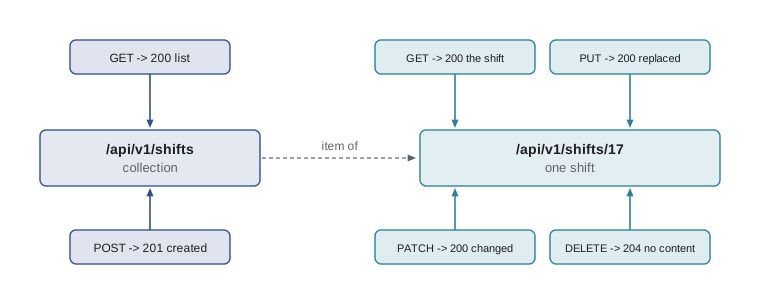
REST, short for Representational State Transfer, is a style for designing web APIs described by Roy Fielding in 2000. Its central idea is the resource: a thing the API knows about, such as a shift, an order or the menu. Each resource has its own URL, and a collection of resources has a URL too. A client works with resources by sending standard HTTP methods to those URLs and receiving representations of them, today almost always in JSON.
| URL | Resource |
|---|---|
| /api/v1/shifts | The collection of all shifts |
| /api/v1/shifts/17 | Shift number 17 |
| /api/v1/shifts/17/signups | The sign-ups for shift 17 |
| /api/v1/menu | Today's lunch counter menu |
| /api/v1/orders | The collection of lunch counter orders |
| /api/v1/orders/41 | Order number 41 |
What the URLs do not contain is verbs. There is no /getShift or /deleteOrder. The URL names the thing, and the HTTP method says what to do with it. Collections use plural nouns, and an item's identifier follows the collection's name. The v1 in the path is a version number, so that a future, incompatible version can live alongside the old one; how to version and document an API well is a subject of APIs, Authentication and Real-Time Apps.
Methods and what they promise
HTTP defines a small set of methods, and each makes promises about its effect. A method is safe if it only reads and never changes anything on the server, so a browser or crawler may send it freely. A method is idempotent if sending the same request twice has the same effect as sending it once. Idempotence matters for retries: if a request to delete order 41 times out, it is safe to send it again, but repeating a POST may create a second order.
| Method | Purpose | Safe | Idempotent | Typical success |
|---|---|---|---|---|
| GET | Read a resource or collection | Yes | Yes | 200 OK |
| POST | Create a new resource in a collection, or run an action | No | No | 201 Created |
| PUT | Replace a resource completely | No | Yes | 200 OK or 204 No Content |
| PATCH | Change part of a resource | No | Not guaranteed | 200 OK |
| DELETE | Remove a resource | No | Yes | 204 No Content |
Status codes complete the picture. Theo's contract uses a small, consistent set, and Mira's code will treat them the same way everywhere.
| Status | Meaning in Theo's API | What the page does |
|---|---|---|
| 200 OK | Here is what you asked for | Show it |
| 201 Created | The new resource was made; its URL is in the Location header | Use the returned object, such as the order number |
| 204 No Content | Done, and there is nothing to send back | Do not try to read a body |
| 400 Bad Request | The request could not be understood | A bug in the page: log it |
| 401 Unauthorized | You are not signed in | Ask the user to sign in |
| 403 Forbidden | You are signed in but may not do this | Explain, do not retry |
| 404 Not Found | No such resource | Say it no longer exists |
| 409 Conflict | It clashes with the current state, such as a full shift | Explain and refresh the data |
| 422 Unprocessable Content | Understood but invalid, such as a missing name | Show the field errors |
| 429 Too Many Requests | Slow down; the Retry-After header says how long | Wait and try again |
| 500, 502, 503, 504 | The server or something in front of it failed | Try again later, show saved data |
JSON, precisely
JSON, JavaScript Object Notation, is the text format in which nearly every REST API sends its data. It looks like JavaScript object literals, but it is stricter and smaller. It has six kinds of value: objects, arrays, strings, numbers, true and false, and null. Keys must be strings in double quotes, strings use double quotes, and there are no comments, no trailing commas and no undefined. You worked with JSON.stringify and JSON.parse in JavaScript Programming II; here is what happens at the edges, where JavaScript values do not fit the format.
const order = {
  number: 41,
  placedAt: new Date('2027-04-19T16:05:00Z'),
  tip: undefined,
  note: null,
  lines: [{ code: 'SOUP', qty: 2 }],
  extras: new Map([['spoon', 2]]),
  discount: NaN,
  print() { return 'Order 41'; },
};

const text = JSON.stringify(order);
console.log(text);

const back = JSON.parse(text);
console.log(typeof back.placedAt, back.placedAt);
console.log('tip' in back, back.discount, back.extras);{"number":41,"placedAt":"2027-04-19T16:05:00.000Z","note":null,"lines":[{"code":"SOUP","qty":2}],"extras":{},"discount":null}
string 2027-04-19T16:05:00.000Z
false null {}What this code does
JSON.stringify turns the Date into an ISO string through its toJSON method, leaves out the undefined property and the function, writes NaN as null and turns the Map into an empty object. After JSON.parse, placedAt is a plain string, not a Date. Data sent to a server must be made of values JSON can represent.
| JavaScript value | In JSON.stringify output | After JSON.parse |
|---|---|---|
| Date | An ISO 8601 string | A string; convert it back yourself |
| undefined, functions, symbols in objects | Left out | Missing |
| undefined in an array | null | null |
| NaN, Infinity | null | null |
| Map, Set | {} (empty object) | An empty object |
| BigInt | TypeError | Not possible without a custom format |
Dates are the case you will meet most. APIs send them as ISO 8601 strings such as 2027-04-19T16:05:00Z, where the Z means UTC. JSON.parse accepts an optional second argument, a reviver function, which sees every key and value as the text is parsed and may replace the value. A reviver can turn date strings back into Date objects in one pass.
const text = '{"number":41,"placedAt":"2027-04-19T16:05:00Z","lines":[{"code":"SOUP","qty":2}]}';

function reviveDates(key, value) {
  if (typeof value === 'string' && key.endsWith('At')) return new Date(value);
  return value;
}

const order = JSON.parse(text, reviveDates);
console.log(order.placedAt instanceof Date, order.placedAt.toISOString());
console.log('Minutes past the hour:', order.placedAt.getUTCMinutes());true 2027-04-19T16:05:00.000Z Minutes past the hour: 5
What this code does
The reviver is called for every key and value in the parsed text, innermost first. Whenever a key ends in At and its value is a string, it returns a Date instead, so placedAt arrives as a real date while everything else is unchanged. Theo's contract names every timestamp field this way, which makes the rule safe.
Large numbers are the other edge. JSON numbers become JavaScript numbers, which are exact only up to 9,007,199,254,740,991. Identifiers bigger than that, which some databases generate, lose their last digits silently. Theo's API sends such identifiers as strings to avoid the problem, which is a common convention. Money is sent as whole cents, as in every course in this program, so that 0.1 plus 0.2 problems never arise.
A small API client
Rather than writing fetch, headers, status checks and JSON parsing in every function, Mira writes them once in a module. Every other part of the project calls functions such as api.get('/shifts') or api.post('/orders', order) and receives data or an error. If Theo changes a rule, such as adding a header, there is one place to change.
const shifts = new Map([
  [17, { id: 17, area: 'Kitchen', date: '2027-04-19', start: '09:00', needed: 4, booked: 3 }],
  [18, { id: 18, area: 'Lunch counter', date: '2027-04-19', start: '11:00', needed: 3, booked: 3 }],
]);
let nextId = 19;
const routes = {
  'GET /api/v1/shifts': () => [200, { items: [...shifts.values()] }],
  'POST /api/v1/shifts': (s) => { const shift = { id: nextId++, booked: 0, ...s }; shifts.set(shift.id, shift); return [201, shift]; },
  'PATCH /api/v1/shifts/17': (changes) => [200, Object.assign(shifts.get(17), changes)],
  'DELETE /api/v1/shifts/18': () => { shifts.delete(18); return [204, undefined]; },
};

// ---- stand-in for the network (Lesson 6): answers from routes after a delay ----
function fakeFetch(url, { method = 'GET', body, signal } = {}) {
  return new Promise((resolve, reject) => {
    if (signal?.aborted) return reject(signal.reason);
    const u = new URL(url, 'https://riverside-food-hub.example');
    const route = routes[method + ' ' + u.pathname];
    const [status, data, ms = 80] = route ? route(body && JSON.parse(body), u.searchParams) : [404, { error: 'Not found' }];
    const timer = setTimeout(() => resolve(fakeResponse(status, data)), ms);
    signal?.addEventListener('abort', () => { clearTimeout(timer); reject(signal.reason); });
  });
}
function fakeResponse(status, data) {
  const text = JSON.stringify(data);
  return { status, ok: status >= 200 && status < 300, headers: new Headers({ 'Content-Type': 'application/json' }),
           json: async () => JSON.parse(text), text: async () => text };
}
// ---- end of stand-in ----

class ApiError extends Error {
  constructor(status, body) {
    super(body?.detail ?? body?.error ?? 'Request failed');
    this.name = 'ApiError';
    this.status = status;
  }
}

async function request(method, path, data) {
  const options = { method, headers: { Accept: 'application/json' } };
  if (data !== undefined) {
    options.headers['Content-Type'] = 'application/json';
    options.body = JSON.stringify(data);
  }
  const response = await fakeFetch('/api/v1' + path, options);
  if (response.status === 204) return null;
  const body = await response.json();
  if (!response.ok) throw new ApiError(response.status, body);
  return body;
}

const api = {
  get: (path) => request('GET', path),
  post: (path, data) => request('POST', path, data),
  patch: (path, data) => request('PATCH', path, data),
  delete: (path) => request('DELETE', path),
};

const list = await api.get('/shifts');
console.log('Shifts:', list.items.map((s) => s.id + ' ' + s.area).join(', '));
const made = await api.post('/shifts', { area: 'Youth garden', date: '2027-04-19', start: '14:00', needed: 5 });
console.log('Created shift', made.id, 'with', made.booked, 'booked');
const changed = await api.patch('/shifts/17', { needed: 5 });
console.log('Shift 17 now needs', changed.needed);
console.log('Delete answered:', await api.delete('/shifts/18'));
console.log('Shifts now:', (await api.get('/shifts')).items.length);Shifts: 17 Kitchen, 18 Lunch counter Created shift 19 with 0 booked Shift 17 now needs 5 Delete answered: null Shifts now: 2
What this code does
request builds the options once: an Accept header always, and a JSON body with its Content-Type only when there is data. It returns null for 204 No Content without trying to read a body, throws an ApiError carrying the status for any failure, and otherwise returns the parsed JSON. The api object gives each method a short name, and the calls at the bottom exercise all four against the pretend server.
In the real module, fakeFetch becomes fetch and the module exports api and ApiError. Callers can check err.status when they need to treat one failure differently, such as 409 for a full shift, and otherwise just show err.message.
Lists, pages and filters
A collection can be large. Theo's shifts collection will hold every shift for years, so a request for all of it would be slow and wasteful. APIs therefore let clients filter with query parameters, such as ?date=2027-04-19&area=Kitchen, and paginate: return a limited number of items at a time with a way to ask for the next batch. Theo's contract uses cursor pagination: each response includes a next value, an opaque string the client sends back to get the following page, and next is null on the last page.
{
  "items": [ { "id": 17, "area": "Kitchen", "start": "09:00", "needed": 4, "booked": 3 } ],
  "next": "eyJhZnRlciI6MTd9"
}
What this code does
A page of shifts as Theo's API returns it. The items array holds up to the requested limit of shifts, 50 by default. The next field is a cursor for the following page; the client does not interpret it, it only sends it back as ?cursor=..., and null means there are no more pages.
The async generator from Lesson 5 is the natural way to read such a collection: it fetches a page, yields its items, and follows the cursor until it is null. The rest of the code loops over shifts without ever seeing a page.
async function* allShifts(filters) {
  let cursor = null;
  do {
    const params = new URLSearchParams(filters);
    if (cursor) params.set('cursor', cursor);
    const page = await api.get('/shifts?' + params);
    yield* page.items;
    cursor = page.next;
  } while (cursor);
}

for await (const shift of allShifts({ date: '2027-04-19' })) {
  addShiftRow(shift);
}
What this code does
Each turn of the loop fetches one page with the filters and the current cursor, yields every shift on it and takes the next cursor from the response. The loop ends when the server sends next as null. The page-by-page work is hidden inside the generator.
Errors as data
When a request fails, a good API explains why in the body, in a consistent shape. Theo's contract follows RFC 9457, Problem Details for HTTP APIs, published in July 2023 to replace the older RFC 7807. Error responses have the Content-Type application/problem+json and a JSON body with a title, the status, a human-readable detail, and for validation errors an extra errors list naming the fields.
const routes = {
  'POST /api/v1/shifts/18/signups': () => [409, {
    type: 'https://riverside-food-hub.example/problems/shift-full',
    title: 'Shift is full',
    status: 409,
    detail: 'The lunch counter shift at 11:00 on April 19 already has 3 of 3 volunteers.',
  }],
  'POST /api/v1/volunteers': () => [422, {
    title: 'Invalid volunteer',
    status: 422,
    detail: 'Two fields need attention.',
    errors: [{ field: 'email', message: 'Enter an email address' }, { field: 'age16', message: 'Confirm you are 16 or older' }],
  }],
};

// ---- stand-in for the network (Lesson 6): answers from routes after a delay ----
function fakeFetch(url, { method = 'GET', body, signal } = {}) {
  return new Promise((resolve, reject) => {
    if (signal?.aborted) return reject(signal.reason);
    const u = new URL(url, 'https://riverside-food-hub.example');
    const route = routes[method + ' ' + u.pathname];
    const [status, data, ms = 80] = route ? route(body && JSON.parse(body), u.searchParams) : [404, { error: 'Not found' }];
    const timer = setTimeout(() => resolve(fakeResponse(status, data)), ms);
    signal?.addEventListener('abort', () => { clearTimeout(timer); reject(signal.reason); });
  });
}
function fakeResponse(status, data) {
  const text = JSON.stringify(data);
  return { status, ok: status >= 200 && status < 300, headers: new Headers({ 'Content-Type': 'application/json' }),
           json: async () => JSON.parse(text), text: async () => text };
}
// ---- end of stand-in ----

async function send(path, data) {
  const response = await fakeFetch(path, { method: 'POST', body: JSON.stringify(data) });
  const body = await response.json();
  if (response.ok) return body;
  console.log(response.status, body.title + ':', body.detail);
  for (const e of body.errors ?? []) console.log('  ' + e.field + ': ' + e.message);
}

await send('/api/v1/shifts/18/signups', { volunteer: 3 });
await send('/api/v1/volunteers', { name: 'Ana' });409 Shift is full: The lunch counter shift at 11:00 on April 19 already has 3 of 3 volunteers. 422 Invalid volunteer: Two fields need attention. email: Enter an email address age16: Confirm you are 16 or older
What this code does
Both pretend failures come back as problem details: a title, the status, a detail sentence and, for the validation failure, a list of field errors. Because the shape is the same for every error, one function can report any of them. On a real page the field errors would be shown next to the fields, as in The DOM and Browser Events.
Never trust the response
Data from a server is input, and input can be wrong. A new version of the API may rename a field, a bug may send null where a number was expected, and a proxy may answer with something else entirely. Code that uses a response without checking it fails in confusing ways far from the cause. A light check of the shape, right after parsing, turns those failures into clear errors at the boundary. Larger projects use schema libraries for this, and TypeScript, the next course, helps describe the expected shapes.
function checkMenuItem(item, i) {
  const problems = [];
  if (typeof item?.code !== 'string') problems.push('code');
  if (typeof item?.name !== 'string') problems.push('name');
  if (!Number.isInteger(item?.price) || item.price < 0) problems.push('price');
  if (problems.length) throw new TypeError('Menu item ' + i + ' has a bad ' + problems.join(' and '));
  return item;
}

const fromServer = JSON.parse('[{"code":"SOUP","name":"Soup of the day","price":550},{"code":"EGG","name":"Egg sandwich","price":"6.25"}]');
try {
  const menu = fromServer.map(checkMenuItem);
  console.log('Menu OK with', menu.length, 'items');
} catch (err) {
  console.log(err.name + ':', err.message);
}TypeError: Menu item 1 has a bad price
What this code does
checkMenuItem looks at each field the page relies on and collects the names of any that are missing or of the wrong type. The second item's price arrived as the string 6.25 instead of a whole number of cents, so the check throws a TypeError naming the item and field. The page can then fall back to its saved menu instead of showing NaN as a price.
Try it yourself
Change a shift with PATCH
Complete setNeeded(id, needed) so that it sends a PATCH to /api/v1/shifts/<id> with a JSON body containing only needed, and returns the updated shift. Throw an Error with the server's detail if the response is not ok.
The code at the bottom should print Shift 17 needs 5, has 3 and then Not changed: needed must be at least 1.
const routes = {
  'PATCH /api/v1/shifts/17': (c) => c.needed >= 1
    ? [200, { id: 17, area: 'Kitchen', needed: c.needed, booked: 3 }]
    : [422, { title: 'Invalid shift', status: 422, detail: 'needed must be at least 1' }],
};

// ---- stand-in for the network (Lesson 6): answers from routes after a delay ----
function fakeFetch(url, { method = 'GET', body, signal } = {}) {
  return new Promise((resolve, reject) => {
    if (signal?.aborted) return reject(signal.reason);
    const u = new URL(url, 'https://riverside-food-hub.example');
    const route = routes[method + ' ' + u.pathname];
    const [status, data, ms = 80] = route ? route(body && JSON.parse(body), u.searchParams) : [404, { error: 'Not found' }];
    const timer = setTimeout(() => resolve(fakeResponse(status, data)), ms);
    signal?.addEventListener('abort', () => { clearTimeout(timer); reject(signal.reason); });
  });
}
function fakeResponse(status, data) {
  const text = JSON.stringify(data);
  return { status, ok: status >= 200 && status < 300, headers: new Headers({ 'Content-Type': 'application/json' }),
           json: async () => JSON.parse(text), text: async () => text };
}
// ---- end of stand-in ----

async function setNeeded(id, needed) {
  // send the PATCH and return the updated shift
  return { id, needed: 0, booked: 0 };
}

for (const n of [5, 0]) {
  try {
    const s = await setNeeded(17, n);
    console.log('Shift', s.id, 'needs', s.needed + ', has', s.booked);
  } catch (err) {
    console.log('Not changed:', err.message);
  }
}
Try it yourself
Bring the dates back
Write a reviver revive(key, value) for JSON.parse that turns any string value whose key ends in At into a Date and leaves everything else alone.
The code prints whether startsAt is a Date and the hour in UTC; it should print true 15 and then string.
const text = '{"id":17,"startsAt":"2027-04-19T15:00:00Z","area":"Kitchen"}';

function revive(key, value) {
  return value;
}

const shift = JSON.parse(text, revive);
console.log(shift.startsAt instanceof Date, shift.startsAt instanceof Date ? shift.startsAt.getUTCHours() : '-');
console.log(typeof shift.area);
Common mistakes
MistakeREST URLs should name actions, such as /api/v1/deleteShift.
InsteadURLs name resources; the HTTP method, such as DELETE, says what to do.
MistakeRepeating any request is safe if the first one timed out.
InsteadOnly idempotent methods such as GET, PUT and DELETE can be repeated safely; a repeated POST may create a duplicate.
MistakeJSON.parse gives Date objects back for dates.
InsteadDates arrive as strings; convert them, for example with a reviver.
MistakeA 204 response has a JSON body to parse.
Instead204 No Content has no body; calling json() on it fails.
MistakeData from your own server does not need checking.
InsteadFields can be renamed, null or wrong; check the shape at the boundary.
Summary and key terms
- REST APIs give each resource and collection its own URL, named with nouns, and use HTTP methods for actions: GET to read, POST to create, PUT to replace, PATCH to change part, DELETE to remove.
- Safe methods only read; idempotent methods can be repeated with the same effect, which matters for retries.
- Status codes such as 201, 204, 404, 409, 422 and 429 tell the client what happened.
- JSON has six kinds of value; dates become strings, undefined and functions disappear, NaN becomes null and Maps become empty objects.
- A reviver passed to JSON.parse can restore dates.
- A small client module builds requests, handles 204, throws a typed error for failures and returns parsed data.
- Large collections are filtered with query parameters and paginated, for example with cursors.
- Problem details, RFC 9457, give errors a consistent JSON shape.
- Responses are input and should be checked before use.
- REST
- A style of web API design built around resources, URLs and standard HTTP methods.
- resource
- A thing an API knows about, identified by its own URL.
- representation
- The data sent to describe a resource, usually JSON.
- safe method
- A method that only reads and changes nothing on the server.
- idempotent
- Having the same effect whether a request is sent once or several times.
- JSON
- A text format for data with objects, arrays, strings, numbers, booleans and null.
- reviver
- A function passed to JSON.parse that can replace values as they are parsed.
- pagination
- Returning a large collection in limited pages.
- cursor
- An opaque value returned with a page and sent back to request the next one.
- problem details
- A standard JSON format for API errors, defined in RFC 9457.
- API client
- A module that wraps the details of making requests to an API.
Practice problems
Work each problem on paper first, then reveal the answer to check.
Which method changes part of a resource?
Show answer
PATCH.
Why is it risky to retry a POST that timed out?
Show answer
POST is not idempotent, so the first request may have succeeded and a retry could create a duplicate.
What does JSON.stringify do with a property whose value is undefined?
Show answer
It leaves the property out.
Why does Theo's API send very large identifiers as strings?
Show answer
JavaScript numbers are exact only up to about 9 quadrillion; larger integers would lose digits.
What does next: null mean in a cursor-paginated response?
Show answer
This is the last page.
Lesson quiz · 5 questions
Score 60% or more to complete this lesson.
Create a free account to save your progress, take quizzes and earn a certificate.